LED Module Used To Display Load, Traffic, And Status Data For Your PC

cpu-monitoring-block

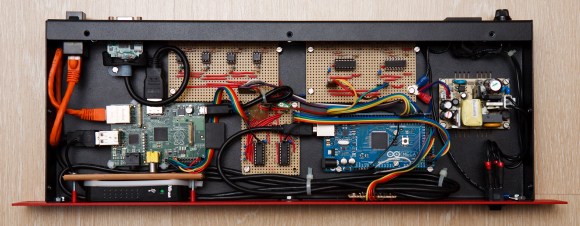
You’re going to like [Ivan’s] write-up for this LED computer status monitor. Of course he didn’t just show-and-tell the final product — if he had you’d be reading this in a Links post. But he also didn’t just detail how he put the thing together. Nope, he shared pictures and details of every iteration that got him here.

It started off with a tachometer. Yeah, that analog display you put on the dashboard of your car which reads out RPM. He wanted to make it into a USB device which would read out his CPU load. But that’s an awful lot of work when it can only display one thing at a time. So he decided to add an 8×8 LED module which would display the load for each individual core of his CPU. It looks great next to the illuminated tachometer. From there he added resolution by transitioning to an RGB module, which ended up sucking him into a coding project to extend the data pushed to his embedded hardware. In the end his ReCoMonB (Real Computer Monitoring Block) displays CPU load, RAM usage, several aspects of HDD activity, as well as the network up and down traffic.

We think he’s probably squeezed all that he can from this little display. Time to upgrade to a TFT LCD.

Continue reading “LED Module Used To Display Load, Traffic, And Status Data For Your PC”

Veronica 6502 Gets Keyboard Input Via USB

PS2

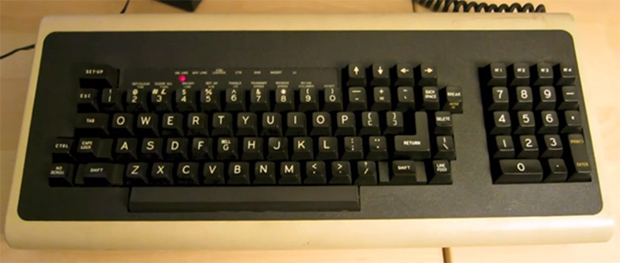
When building a homebrew computer, there are a few milestones that make all the work seem worth it. Of course, seeing the CPU step through address lines on the blinkenlights is near the top, but even more important is being able to type a character on a keyboard and have it show up on a display. [Quinn] didn’t want her Veronica computer to deal with serial terminals or PS/2 keyboards when she typed her first characters in; instead she wanted to read a USB keyboard using 80s-era hardware.

Back in the early days of USB, design specs and keyboard manufacturers included a legacy mode in nearly every USB keyboard ever manufactured. This allows a USB keyboard to work with the ancient PS/2 protocol. [Quinn] tapped into that functionality nearly every PS/2 keyboard has using a 6522 Versatile Interface Adapter. This VIA is in the same family of chips as the venerable 6502 CPU that provides GPIO pins and timers.

[Quinn] connected the keyboard connector tapped for PS/2 input to an ATtiny13. This microcontroller reads the scan codes from the keyboards and sends them to the VIA and the rest of Veronica. It’s quite a bit of work to get to this point, but [Quinn] finally has a computer she can type on, the first step to developing software for her homebrew computer.

USB Sniffing With The BeagleBoard-xM

[Matlo] wrote in to share his USB sniffing project using the BeagleBoard-xM. It builds on the Google Summer of Code project from 2010 that used the non-xM version of the hardware to build a pass through USB sniffer. [Matlo] couldn’t get it to work back then, but recently revisited the project. He’s cleaned up some scripts and generally made it a bit easier for others to pull off as well.

The ARM-based BeagleBoard seen above acts as man-in-the-middle. You connect your target USB device to the board and the board to a computer. The board emulates the target device, passing packets in either direction while also logging them. The captured data is in the correct format for display using WireShark, the de facto standard for making sense of captured communication packets.

This is great for figuring out how to use USB devices on non-standard systems, or vice versa.

Hacking A Medion WiFi Streaming Radio Found At Aldi

hacking-medion-streaming-wifi

On a shopping trip at Aldi [Aaron Christophel] came across this Medion streaming device which connects to your home network via WiFi and works as an Internet radio. He couldn’t resist buying one, and managed to do quite a bit of hacking on the device (translated) once he got it home.

His first order of business was a hardware teardown. An inspection of the board showed what was obviously an unpopulated footprint for a USB mini jack. He added the component, thinking it would allow him to connect it to a computer, but that didn’t work. To investigate the issue further he connected to the device’s serial port using the hard-to-guess credentials root and password. It’s running a Linux kernel and the lsusb command revealed that the USB is enabled as host mode. This mean you can attach mass storage… sweet!

He also did some firmware hacking. Above is the confirmation screen for flashing his altered image file. This resulted in a custom splash screen when it boots up.

Adding WiFi To A Kid’s Tablet

tab

[Mick] has been playing around with the VTech Innotab – a $70 tablet computer aimed at kids – for a while now. He’s successfully turned this tablet soon to be found at yard sales the world over into a Linux tablet and can play everything from those magical LucasArts SCUMM adventure games to Angry Birds. What his tablet is missing, though, is any sort of Internet connection. He recently fixed this by soldering a USB WiFi adapter directly to the CPU of his InnoTab.

In all fairness, there’s not a terrible amount of software hackery going on here. VTech’s InnoTab 2s uses the same chipset as the cheaper InnoTab 2 but has an additional board soldered directly to the mainboard. This additional board provides a WiFi connection with an RT5370 chipset; soldering a WiFi dongle onto the InnoTab 2’s CPU D+ and D- USB lines effectively turns it into the WiFi enabled InnoTab 2s.

It’s an impressive piece of work for a low-power tablet that one can safely assume is both bullet and childproof. [Mick] was also able to mount a USB thumb drive on his upgraded kid’s tablet, so if you’re looking for a cheap tablet that doesn’t need much horsepower, you might want to check out your local Toys ‘R Us.

Benchmarking USB Transfer Speeds

boards

[Paul Stoffregen], creator of the Teensy series of microcontroller dev boards, noticed a lot of project driving huge LED arrays recently and decided to look into how fast microcontroller dev boards can receive data from a computer. More bits per second means more glowey LEDs, of course, so his benchmarking efforts are sure to be a hit with anyone planning some large-scale microcontroller projects.

The microcontrollers [Paul] tested included the Teensy 2.0, Teensy 3.0, the Leonardo and Due Arduinos, and the Fubarino Mini and Leaflabs Maple. These were tested in Linux ( Ubuntu 12.04 live CD ), OSX Lion, and Windows 7, all running on a 2012 MacBook Pro. When not considering the Teensy 2.0 and 3.0, the results of the tests were what you would expect: faster devices were able to receive more bytes per second.  When the Teensys were thrown into the mix, though, the results changed drastically. The Teensy 2.0, with the same microcontroller as the Arduino Leonardo, was able to outperform every board except for the Teensy 3.0.

[Paul] also took the effort to benchmark the different operating systems he used. Bottom line, if you’re transferring a lot of bytes at once, it really doesn’t matter which OS you’re using. For transferring small amounts of data, you may want to go with OS X. Windows is terrible for transferring single bytes; at one byte per transfer, Windows only manages 4kBps. With the same task, Linux and OS X manage about 53 and 860 (!) kBps, respectively.

So there you go. If you’re building a huge LED array, use a Teensy 3.0 with a MacBook. Of course [Paul] made all the code for his benchmarks open source, so feel free to replicate this experiment.

Add External Power To Any USB Hub

[Andrew] was getting some poor performance from a couple of USB devices he had connected through an unpowered hub. This is a problem because the hub prevents devices from negotiating with the host controller for more current. He fixed it by adding an external power supply to his USB hub.

In this case the PCB already had a footprint for a power connector. The manufacturer uses one board for several different models and just leaves the supply components unpopulated. [Andrew] managed to find a barrel jack in his parts bin that matched the footprint.

One important thing to do before hooking up the source is to disconnect the 5v wire from the incoming cable from the computer. The other tip we can give you is to use a good regulated 5v source to ensure you don’t damage the stuff you’re trying to power. That means avoiding deals that are too good to be true.