External Text Display For Nexus One

Nexus One External Display

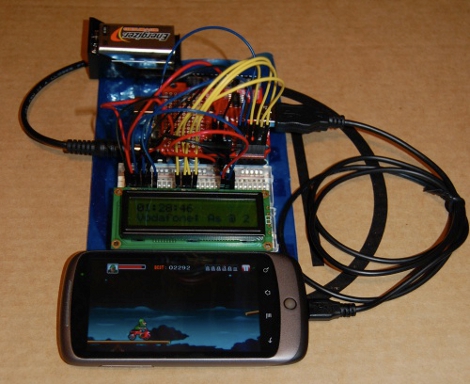
[follower] prototyped a 2-line external display for his Nexus One using an Arduino with a USB Host Shield, and the Android Open Accessory Protocol. There are two basic software pieces at work: an Arduino sketch that handles displaying data sent from the phone, and a lightweight android app to detect the presence of the external screen and send data to it. As shown here, it diplays the time and the beginning of the most recently received SMS message.

This project coalesced from several other things [follower] had been working on with regards to USB accessories, background services, interfacing with the Arduino and handling SMS messages, so it’s modular and open-source.  If you’re interested in mashing up microcontroller projects and your android phone, there’s plenty of stuff in this project to help you get off the ground.

As hacks go, this is very much a “because you can” sort of deal that’s designed to tie a bunch of cool things together. You’re unlikely to catch us carrying an LCD and breadboard around in our pockets any time soon, but it paves the way for some potentially fun phone accessories.

Teensy AVRs Used In Penetration Testing

netragard_penetration_testing_mouse

While some people know that you should be wary of USB drives with unknown origins, the same care is rarely, if ever exercised with USB peripherals. The security firm Netragard recently used this to their advantage when performing a penetration test at a client’s facility. When the client ruled out the use of many common attack vectors including social networks, telephones, social engineering, and unauthorized physical access from the test, the team at Netragard knew they would have to get creative.

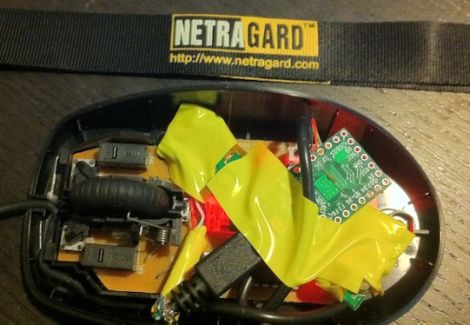
They purchased a Logitech USB mouse and disassembled it in order to add their clever payload. A Teensy uC was programmed to emulate keyboard input, entering commands via the mouse’s USB connection once it had been connected to a computer. Using an undocumented exploit in McAfee’s antivirus suite, they were able to evade detection while their system entered commands to install malware from the flash drive they hid along side the Teensy.

Once the mouse was reassembled, they repackaged it along with some marketing materials to make it look like part of a promotional event. They purchased a detailed list of employees and singled out an easy target, sending their malicious mouse on its way. Within three days, their malware was loaded onto the victim’s computer and their test was deemed a success.

[Thanks, Aaron]

XBMC Controller Is An All-in-one Usb Solution For HTPCs

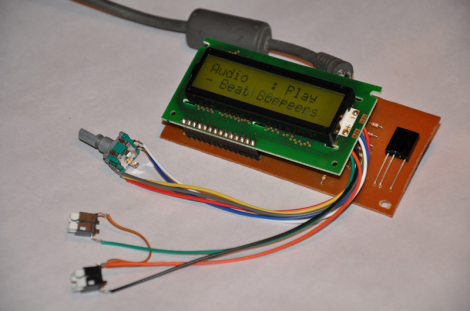
On the original Xbox, XBMC was a software-only solution (assuming you had a chipped or soft-modded console). That’s because the Xbox was already meant to connect to a television and work with an IR remote control. Now that the XBMC software has transitioned to focus on a wider range of hardware, it may be more complicated to get the same functionality on an HTPC. Realizing this, [Dilshan] developed a USB connected XBMC controller that features an IR receiver, character LCD, and a rotary encoder with two buttons.

As long as your HTPC has a way to connect to the audio and video inputs on your TV, this should take care of the rest of the presentation. LCD screens were popular with XBMC from very early on because modchips included an interface. Because of this, XBMC is already setup to provide navigation and media information this way. So you can use XBMC for audio playback without needed to have your TV turned on. Add to that the ability to control your box with either  a remote control or the navigation tools on the front bezel and you’ve got a winning solution.

You can download an archive that includes all the info about this device over at the project repository. For your convenience we’ve embedded the schematic and PDF description of the project, which we found in that package, after the break.

Continue reading “XBMC Controller Is An All-in-one Usb Solution For HTPCs”

Vintage Peripheral Hacks Roundup

A few days ago, we featured an Apple ][ USB keyboard mod, and several readers chimed in sharing their own retro conversions in the comments section. We had no idea that many of you had made similar modifications of your own, so here’s a quick roundup of what your fellow Hackaday readers have put together.


Optical Atari STM1 Mouse

atari_stm1_usb

[JJ] had a 25-year old Atari STM1 mouse sitting around and was wondering how to get it to work with his new computer. Instead of interfacing the old mouse with his computer via a custom circuit board, he gutted the STM1 and replaced the innards with those of a much newer optical mouse. He did a bit of trimming to get the new PCB to fit, aiming the optical sensor through the now-empty “ball hole”. According to [JJ] it works just as good as it looks.


ZX Spectrum USB keyboard conversion
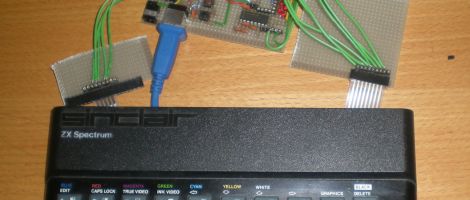
sinclair_zx_spectrum_usb

[Lee] is a sucker for vintage hardware, and with the help of his friend [LanceR], resurrected an old Sinclair ZX Spectrum computer into a working USB keyboard. After replacing the deteriorated membrane, the pair mapped out the keyboard to figure out how the matrix was wired. With that done, they built a prototype USB interface board, which they later replaced with a proper PCB.


BBC Master Compact USB keyboard conversion
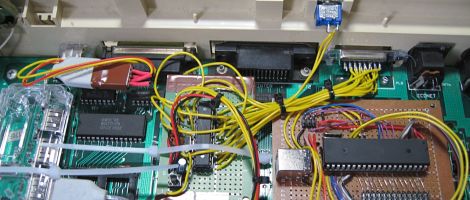
bbc_master_compact_usb

A friend of [MoJo’s] had a BBC Master Compact computer from back in the day and wanted to have the keyboard converted to USB in order to use it with certain emulators. [MoJo] gladly took on the project, stripping some of the old motherboard components out to make room for his new circuitry. He built a USB interface board around an ATMega162, and even got the old built-in speaker working properly. From the outside, the keyboard looks like it has never been touched – nice job!

Apple ][ Converted Into USB Keyboard

Sometimes it’s apparent that there is no practical use for something featured on Hack a Day, but we don’t know if [Andrew Filer]’s Apple ][ USB keyboard qualifies for this.

After reading through the very thorough documentation available in electronic and dead tree formats, [Andrew] decided that Apple ][ would make a great USB keyboard. Unlike modern keyboards, vintage computers like the TRS-80, Commodore 64, and the Apple ][ return the 7-bit ASCII value of the key instead of a scan code. The ASCII codes generated by the keyboard were sent through a Teensyduino running [Andrew]’s keyduino sketch.

Modern PS/2 keyboards use MAKE and BREAK scan codes sent from a microcontroller that reads the keyboard matrix. For example the MAKE code for the letter ‘A’ is 1C, while the BREAK code is F0 1C. There is a reason for this design, but for the DIYer, interfacing a keyboard becomes a challenge without a separate microcontroller. We’re thinking [Andrew]’s keyduino could be a great way to put a keyboard in a project, but we’re not about to tear up our Apples and C64s to get a keyboard.

Archaeopteryx: A Large, Colorful MIDI Controller

This is [Robert Jarvis’] new MIDI controller which he has christened the Archaeopteryx. It makes its home (quite nicely might we add) in a discarded wooden cutlery case. This provides a strong and stable base for the controls while keeping the electrical connections close at hand for any rewiring or repair work.

The interface is made up of several different input devices. The guts from two Korg Nanokontrols donated the sliders and pots. These are both USB devices and they join with a USB keyboard which has been rewired to work with the colorful push buttons. All three devices connect to a hub inside which makes the device work using just one cable connection to the computer.

There’s a lot of wiring shoved into that shallow case. But if he keeps the keyboard mapping straight we think it won’t be too hard to configure the device. We like it that [Robert] included a snapshot of the back-of-the-envelope prototyping plans he made. This kind of ‘how I got there’ information is what we’re looking for when choosing projects to feature.

Reverse Engineering A Cheap LED Message Marquee

[Hugo] went all out when sharing his findings while reverse engineering this small LED marquee. He purchased the 29×7 LED matrix for under $12 but was surprised to find that the USB connector wasn’t a standard type and didn’t come with a cable. He first soldered a standard connector in place and then set out to make the device do his bidding (translated).

What he accomplished can be seen in the video after the break. He can now connect to the device via a USB cable, sending it new messages and adjusting the speed at which it scrolls. He can also adjust the spacing between letters, reverse the scrolling direction, read the on-board buttons, and write the settings to the device’s EEPROM. This is all thanks to some alternative firmware that [Hugo] wrote for the ATmega88. You can download a copy of that code from the wiki page he put together (translated). We really appreciate the time he spent putting that page together. The wealth of information he gathered during the hacking process serves as an example of the best way to share your projects with the world.

Continue reading “Reverse Engineering A Cheap LED Message Marquee”