Adding USB Connectivity To Old Benchtop Tools

frequency_counter_hacked_for_usb_connectivity

[Scott] was recently given a frequency counter, and once he brought it home, he started contemplating how he could possibly make it better. While the counter worked well as-is, he wanted to find a way to record data readings over a reasonably long period of time. He figured that interfacing it with his computer would be the best way to do this, but he had to find a way to connect the devices first.

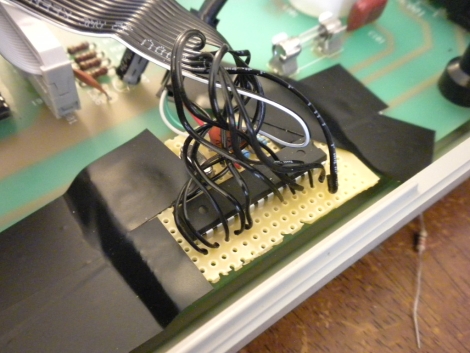
He started poking around inside the frequency counter and stumbled upon a possible data source when taking a closer look at the display board. He found that he could read the frequency data as it was being written to the display, and send that data to his computer. He used an ATMega48 to intercept the data and code from the V-USB project to bit-bang the data to his PC over USB.

Now, anything he sees on the frequency counter can be easily collected and graphed on his computer with little fuss.

Stick around to see a quick video demonstration of his hack in action.

Continue reading “Adding USB Connectivity To Old Benchtop Tools”

Character LCD Screen Add-on For Android Devices

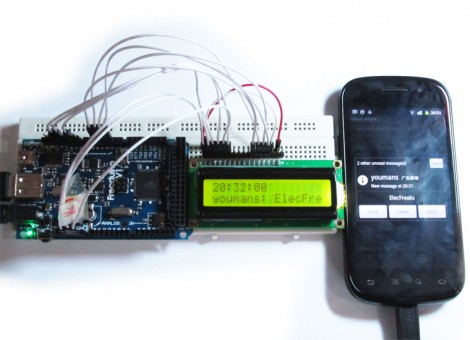
Here’s an Android accessory project that adds a secondary LCD display. It utilizes the Android Open Accessory Development Kit standard to connect the 16×2 character LCD as a USB device. It pairs an app on the phone which runs transparently with firmware for the ATmega2560-based Arduino compatible board you see to the left. The app launches as soon as the auxiliary hardware is connected and is responsible for determining which lines of text are pushed out to the LCD. The example code displays the current time on the top line, and scrolls incoming text messages as they are received.

This is a good way to get your feet wet with the ADK hardware. We’ve already seen it used for larger displays like this LED marquee, but this smaller test project doesn’t require much hardware setup. Chances are you either already have an Arduino and character LCD on hand, or can easily borrow which makes this an easy weekend project.

One note on that Arduino compatible board; it’s called a Freakduino ADK but we couldn’t figure out if it’s a Freak Labs product or not. If you have some insight about that, please leave a comment.

Sound Card Microcontroller/PC Communication

The usual way send data from a microcontroller is either over RS-232 with MAX232 serial ICs, crystals, and a relatively ancient computer, or by bit-banging the USB protocol and worrying about driver issues. Not content with these solutions, [Scott] came up with sound card μC/PC communication that doesn’t require any extra components.

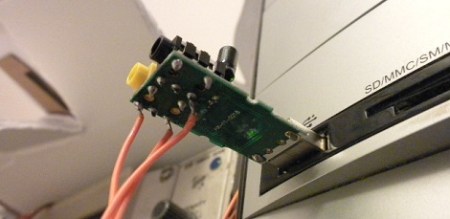
[Scott] bought a cheap USB sound card dongle on eBay (although a built-in sound card will do) and wired up the tip and ring of the plug to the microcontroller. The data is sent from the microcontroller a lot like Morse code – a short gap between pulses is a zero, a long gap is a one. This is parsed by a Python script using PyAudio. Synchronization, timing, and calibration is automatic because of a 10-bit ‘packet header’ explained in this video.

Continue reading “Sound Card Microcontroller/PC Communication”

ChibiMo – An AVR-based USB Display

chibimo_usb_arduino_external_monitor

[Ko] wanted to add an extra monitor to his computer, but he wasn’t looking for something huge that would sit atop his desk – he desired something smaller, much smaller.

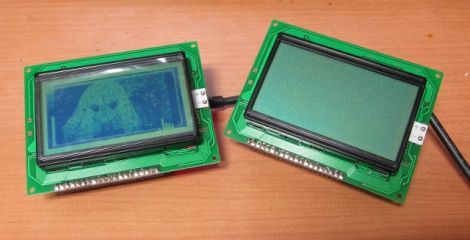
His ChibiMo mini USB monitor is a neat little creation that lets you extend or mirror your Windows desktop onto a tiny 128×64 pixel LCD panel. At first glance you might think that it is too small to be useful, but it is recognized in Windows in the same fashion as any standard monitor. This means that it would be quite easy to load system monitoring software solely on the LCD panel, keeping the clutter off of your main display.

The display is wired to an Arduino like any other standard shield, and is connected to his computer via a USB cable. Once the ChibiMo sketch is uploaded to the Arduino, the display driver needs to be loaded on the PC. This allows you to tweak the ChibiMo’s display settings in Windows’ display manager.

It’s a great concept, one we would love to see explored further. As of right now, the ChibiMo is only supported on x86 versions of Windows XP, and we weren’t able to find source links anywhere on his site. Perhaps there are some talented members of our community who would be interested in taking a whack at it…

External Text Display For Nexus One

Nexus One External Display

[follower] prototyped a 2-line external display for his Nexus One using an Arduino with a USB Host Shield, and the Android Open Accessory Protocol. There are two basic software pieces at work: an Arduino sketch that handles displaying data sent from the phone, and a lightweight android app to detect the presence of the external screen and send data to it. As shown here, it diplays the time and the beginning of the most recently received SMS message.

This project coalesced from several other things [follower] had been working on with regards to USB accessories, background services, interfacing with the Arduino and handling SMS messages, so it’s modular and open-source.  If you’re interested in mashing up microcontroller projects and your android phone, there’s plenty of stuff in this project to help you get off the ground.

As hacks go, this is very much a “because you can” sort of deal that’s designed to tie a bunch of cool things together. You’re unlikely to catch us carrying an LCD and breadboard around in our pockets any time soon, but it paves the way for some potentially fun phone accessories.

Teensy AVRs Used In Penetration Testing

netragard_penetration_testing_mouse

While some people know that you should be wary of USB drives with unknown origins, the same care is rarely, if ever exercised with USB peripherals. The security firm Netragard recently used this to their advantage when performing a penetration test at a client’s facility. When the client ruled out the use of many common attack vectors including social networks, telephones, social engineering, and unauthorized physical access from the test, the team at Netragard knew they would have to get creative.

They purchased a Logitech USB mouse and disassembled it in order to add their clever payload. A Teensy uC was programmed to emulate keyboard input, entering commands via the mouse’s USB connection once it had been connected to a computer. Using an undocumented exploit in McAfee’s antivirus suite, they were able to evade detection while their system entered commands to install malware from the flash drive they hid along side the Teensy.

Once the mouse was reassembled, they repackaged it along with some marketing materials to make it look like part of a promotional event. They purchased a detailed list of employees and singled out an easy target, sending their malicious mouse on its way. Within three days, their malware was loaded onto the victim’s computer and their test was deemed a success.

[Thanks, Aaron]

XBMC Controller Is An All-in-one Usb Solution For HTPCs

On the original Xbox, XBMC was a software-only solution (assuming you had a chipped or soft-modded console). That’s because the Xbox was already meant to connect to a television and work with an IR remote control. Now that the XBMC software has transitioned to focus on a wider range of hardware, it may be more complicated to get the same functionality on an HTPC. Realizing this, [Dilshan] developed a USB connected XBMC controller that features an IR receiver, character LCD, and a rotary encoder with two buttons.

As long as your HTPC has a way to connect to the audio and video inputs on your TV, this should take care of the rest of the presentation. LCD screens were popular with XBMC from very early on because modchips included an interface. Because of this, XBMC is already setup to provide navigation and media information this way. So you can use XBMC for audio playback without needed to have your TV turned on. Add to that the ability to control your box with either  a remote control or the navigation tools on the front bezel and you’ve got a winning solution.

You can download an archive that includes all the info about this device over at the project repository. For your convenience we’ve embedded the schematic and PDF description of the project, which we found in that package, after the break.

Continue reading “XBMC Controller Is An All-in-one Usb Solution For HTPCs”