Robots Talking To Robots

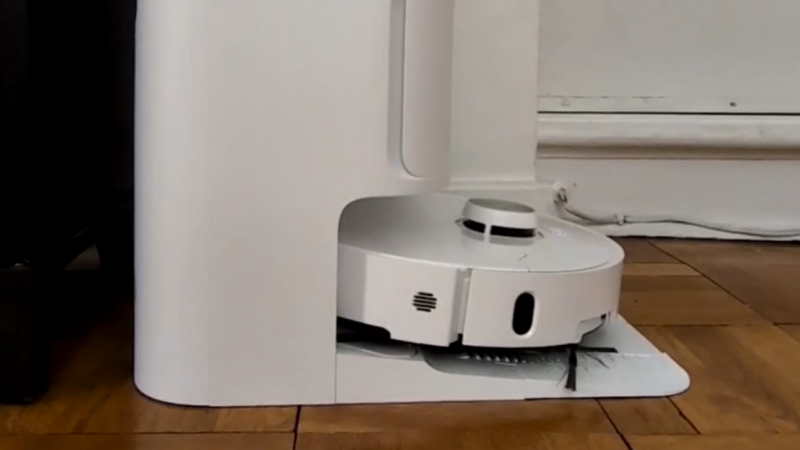
Although there are a few robots on the market that can make life a bit easier, plenty of them have closed-source software or smartphone apps required for control that may phone home and send any amount of data from the user’s LAN back to some unknown server. Many people will block off Internet access for these types of devices, if they buy them at all, but that can restrict the abilities of the robots in some situations. [Max]’s robot vacuum has this problem, but he was able to keep it offline while retaining its functionality by using an interesting approach.

Home Assistant, a popular open source home automation system, has a few options for voice commands, and can also be set up to transmit voice commands as well. This robotic vacuum can accept voice commands in lieu of commands from its proprietary smartphone app, so to bypass this [Max] set up a system of automations in Home Assistant that would command the robot over voice. His software is called jacadi and is built in Go, which uses text-to-speech to command the vacuum using a USB speaker, keeping it usable while still offline.

Integrating a voice-controlled appliance like this robotic vacuum cleaner allows things like scheduled cleanings and other commands to be sent to the vacuum even when [Max] isn’t home. There are still a few limitations though, largely that communication is only one way to the vacuum and the Home Assistant server can’t know when it’s finished or exactly when to send new commands to the device. But it’s still an excellent way to keep something like this offline without having to  rewrite its control software entirely.

Be Careful What You Ask For: Voice Control

We get it. We also watched Star Trek and thought how cool it would be to talk to our computer. From Kirk setting a self-destruct sequence, to Scotty talking into a mouse, or Picard ordering Earl Grey, we intuitively know that talking to a computer is better than typing, right? Well, computers talking back and forth to us is no longer science fiction, and maybe we aren’t as happy about it as we thought we’d be.

We weren’t able to pinpoint the first talking computer in fiction. Asimov and van Vogt had talking computers in the 1940s. “I, Robot” by Eando Binder, and not the more famous Asimov story, had a fully speaking robot in 1939. You could argue that “The Machine” in E. M. Forster’s “The Machine Stops” was probably speaking — the text is a little vague — and that was in 1909. The robot from Metropolis (1927) spoke after transforming, but you could argue that doesn’t count.

Meanwhile, In Real Life

In real life, computers weren’t as quick to speak. Before the middle of the twentieth century, machine-generated speech was an oddity. In 1779, a mechanical contrivance by Wolfgang von Kempelen, famous for the mechanical Turk chess-playing automaton, could form simple words. By 1939, Bell Labs could do even better speech synthesis electronically but with a human operator. It didn’t sound very good, as you can see in the video below, but it was certainly expressive.

Continue reading “Be Careful What You Ask For: Voice Control”

My Glasses Hear Everything I’m Not Saying!

There was a time when you saw someone walking down the street talking to no one, they were probably crazy. Now you have to look for a Bluetooth headset. But soon they may just be quietly talking to their glasses. Cornell University researchers have EchoSpeech which use sonar-like sensors in a pair of glasses to watch your lips and mouth move. From that data, they can figure out what you are saying, even if you don’t really say it out loud. You can see a video of the glasses below.

There are a few advantages to a method like this. For one thing, you can speak commands even in places where you can’t talk out loud to a microphone. There have been HAL 9000-like attempts to read lips with cameras, but this is power-hungry and video tends to be data intensive.

Continue reading “My Glasses Hear Everything I’m Not Saying!”

Voice Command Made Mostly Easy

Speech commands are all the rage on everything from digital assistants to cars. Adding it to your own projects is a lot of work, right? Maybe not. [Electronoobs] shows a speech board that lets you easily integrate 255 voice commands via serial communications with a host computer. You can see the review in the video below.

He had actually used a similar board before, but that version was a few years ago, and the new module has, of course, many new features. As of version 3.1, the board can handle 255 commands in a more flexible way than the older versions.

Continue reading “Voice Command Made Mostly Easy”

Using Voice Commands To Start A Jeep

If you’ve got a car built in the last 5 years or so, it’s quite likely it’s started by the push of a button when in the presence of a keyfob. Older vehicles make do with the twist of a key. Of course, starting a car by voice command would be cool, and that’s what [John Forsyth] set out to do.

The build uses a Macbook to handle voice recognition, using its Dictation feature. With a hefty download, it’s capable of doing the task offline, making things easier. The dictated words are passed to a Python script, which searches for words like “start” and “go” as a trigger. When an appropriate command is received, the Python script sends a signal over a USB-serial connection to an attached Arduino. The Arduino then toggles a relay connected to the Jeep’s external starter solenoid, starting the vehicle.

As a fan of recent popular films, [John] programmed the system to respond to the command “Jarvis, let’s get things going!”, causing the vehicle to spring into life. There’s room for future improvement, too – the system could benefit from being a little more compact, and there’s a long delay between finishing the sentence and the vehicle starting. A Raspberry Pi and faster dictation software could likely help in this regard.

We’ve seen voice commands used for everything from chess to finding electronic components. Video after the break.

Continue reading “Using Voice Commands To Start A Jeep”

Voice Chess Uses Phone, Arduino, And An Electromagnet

[Diyguypt] may be an altruist to provide the means for people who can’t manipulate chess pieces to play the game. Or he may just have his hands too busy with food and drink to play. Either way, his voice command chessboard appears to work, although it has a lot of moving parts both figuratively and literally. You can check out the video below to see how it works.

The speech part is handled by an Android phone and uses Google’s voice services, so if you don’t want Google listening to your latest opening gambit, you’ll want to pass this one up. The phone uses an app that talks to the Arduino via Bluetooth, which means the Arduino needs a Bluetooth module.

Continue reading “Voice Chess Uses Phone, Arduino, And An Electromagnet”

Picovoice Puts Smarts Offline In 512K Of Memory

We live in the future. You can ask your personal assistant to turn on the lights, plan your commute, or set your thermostat. If they ever give Alexa sudo, she might be able to make a sandwich. However, you almost always see these devices sending data to some remote server in the sky to do the analysis and processing. There are some advantages to that, but it isn’t great for privacy as several recent news stories have pointed out. It also doesn’t work well when the network or those remote servers crash — another recent news story. But what’s the alternative? If Picovoice has its way, you’ll just do all the speech recognition offline.

Have a look at the video below. There’s an ARM board not too different from several we have lying around in the Hackaday bunker. It is listening for a wake-up phrase and processing audio commands. All in about 512K of memory. The libraries are apparently quite portable and the Linux and Raspberry Pi versions are already open source. The company says they will make other platforms available in upcoming releases and claim to support ARM Cortex-M, Cortex-A, Android, Mac, Windows, and WebAssembly.

Continue reading “Picovoice Puts Smarts Offline In 512K Of Memory”