IPad Teardown

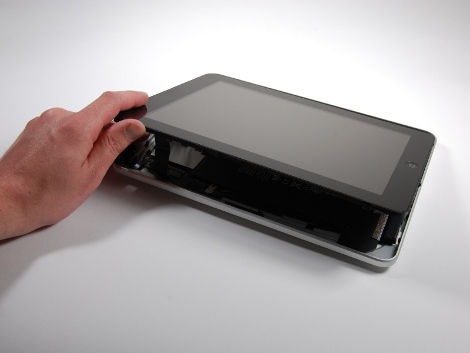
Its been quite a while since we’ve featured something from iFixit. But when we saw they had torn apart the next greatest Apple product, the iPadreleased today, and how everyone on our team loves it, we thought why not also let our user base enjoy the destruction informative teardown as well.

In both the original and the FCC teardown, we see some awesome features and tricks Apple implemented. Most notably the two separate 3.75V lithium polymer cells, not soldered to the motherboard, allowing users to easily replace the battery if need be. However, in the opposite respect, more components than ever are being epoxied to the board, making the iPad much more rugged.

We’re left wondering, with everyone able to see the beautiful insides, does it change anyone’s mind on getting an iPad? Or would you rather make your own?
Touch Screen For Graphing Calculator

[youtube=http://www.youtube.com/watch?v=pyWIJFLbJZ0]

[Owen] got down and dirty by adding a touchscreen to his TI-84 graphing calculator. The dirty part is the z80 assembly code he wrote to use the linkport as a UART (assembly always makes us feel queasy). Once that was working he implemented some commands using an Arduino and then hooked up an Nintendo DS touch screen. Now he’s got this proof of concept video where he draws on the screen, that input is interpreted by the Arduino, commands are sent through the UART, and the calculator program draws on the screen. Adding a touch screen to something is a lot more impressive when you have to go to these lengths to get it working. Nice job!

HDD Power Tools: The Sander

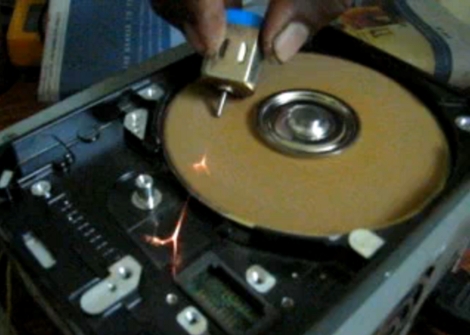
At first we thought this looked hastily thrown together and quite possible useless. Then we watched the video, embedded after the break, and realized it is quite a handy bench sander. [Mhkabir] opened up an older hard drive, removed the read head, and added a piece of carefully cut sand paper. When you hook it up to your bench supply you’ve got a small sander ready to use.  We can’t wait to try it on some small PCB edges. Now that we’ve seen a sander and a chop saw, we wonder what’s next?

Continue reading “HDD Power Tools: The Sander”

Clock Sans-microcontroller

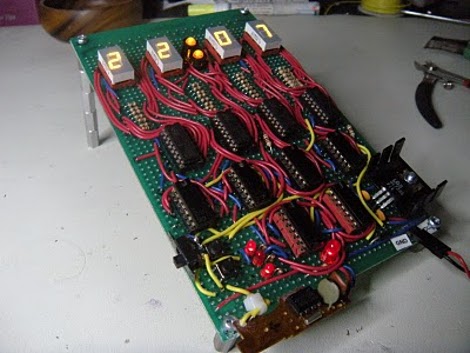
This clock requires no microcontroller. It’s actually a digital logic counter that functions as a timepiece. [BlackCow] used six decade counters to track seconds, minutes, and hours. The output is displayed on four 7-segment digits using BCD-7-segment decoders that you can learn about in our binary encoded decimal post. The actual timekeeping is done by a quartz clock circuit he pulled from a Mickey Mouse clock. This would be a perfect circuit to build in a digital logic simulator, just follow the schematic and learn as you go.

AVR Synth/sequencer

[youtube=http://www.youtube.com/watch?v=yHmhdiQ8Xko]

[kernelcode] has built this pretty slick looking sequencer/groovebox and shared the process with the world. At its heart you’ll find an AVR atmega168 along with a hand full of buttons and blue LEDs. He says the total cost was somewhere around £15-20, so that’s somewhere under $40 for the American readers. There are tons of great pics of the build and it looks like he’ll be uploading source code soon as well.

[via hackerfoundry.com]

3D Laser Printer

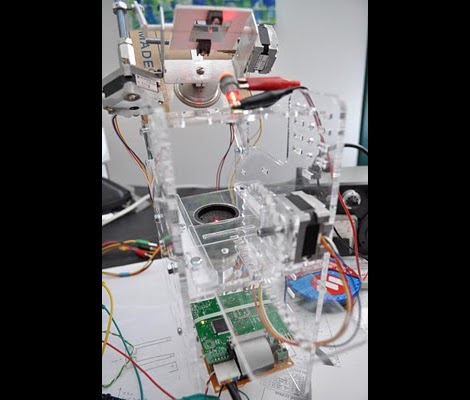
Working with easy replication in mind, [Peter] is building a 3D laser printer. The majority of the machine is made from laser-cut acrylic held together by parts that are inexpensive and available at your local hardware store. In the end this will lay down a layer of powder, use a laser to fuse the powder together in the outline of your choice, then repeat. This is known as selective laser sintering which is sometimes used in commercial rapid prototyping and, like a lot of other cool technologies, came into existence as a result of a DARPA project.

Sorry folks, this is not a fully functioning prototype yet. [Peter] is searching for the right laser for the job and a source for the powder. If you’ve got a solution please lend a hand and let’s see this project through to completion.

Illuminated Moveable Type

[vimeo=http://vimeo.com/10437744]

[Rob Stewart] put in a lot of time and built this lighted display at great expense. It displays four letter words using a word association algorithm to pick the next term to show. What interests us is the motorized display. It is made up of fluorescent tubes but they’re not fixed in place. Each can be rotated, as well as moved along a linear path to form any letter in the alphabet. Check out [Rob’s] build logs for the details on how he pulled it all together.

[Thanks Hugo via Engadget and Switched]