I Got 99 Volts And My Anodizing’s Done!

anodizing-titanium-with-coke

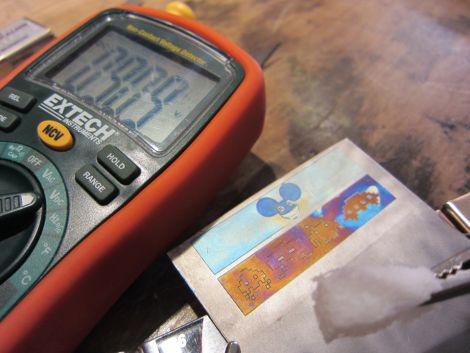
[POTUS31] had a need for anodized titanium, but the tried and true “submersion” method was not going to work out well for what he was trying to do. In order to create the look he wanted he had to get creative with some tape, a laser cutter, Coke, and a whole lot of 9v batteries.

His Ring-A-Day project has him creating customized rings based on reader feedback, and lately the requests have had him searching for a good way to color metal. Anodizing titanium was a sure bet, though creating detailed coloring on a small medium is not an easy task.

[POTUS31] figured that he could gradually anodize different areas of the ring by using laser-cut tape masks, allowing him to selectively oxidize different portions of his creations as he went along. Using the phosphoric acid prevalent in Coke as his oxidizing agent along with a constantly growing daisy-chain of 9-volt batteries, he had a firm grasp on the technique in no time. As you can see in the picture above, the anodizing works quite well, producing vivid colors on the titanium bands without the need for any sort of dye.

[POTUS31’s] favorite color thus far? A rich green that comes from oxidizing the metal at you guessed it – 99 volts.

[via Make]
Sorting Resistors With Speech Recognition

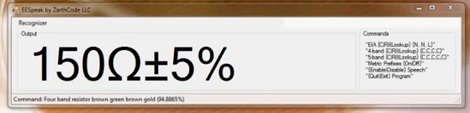
If you’ve ever had to organize a bunch of resistors, you’ll know why [Anthony] created EESpeak. It’s a voice-controlled component look up tool that calculates a component value by listening to you read out color code bands.

In his demo video of EESpeak, [Anthony] reads off the color bands of several resistors whilst the program dutifully calculates and displays the value. [Anthony] also included support for calculating the value of capacitors and inductors by speaking the color bands, as well as EIA-96 codes for SMD parts.

In addition to taking speech input and flashing a component value on the screen, EESpeak also has a text-to-speech function that will tell you what a component without ever having to look at your monitor.

Even though the text-to-speech function seems a little cumbersome – it takes much longer for a computer to speak a value than to display it on the screen – using voice recognition to calculate component values is an awesome idea. With an extremely limited vocabulary the computer has to understand, the error rate of EESpeak is probably very low.

You can check out [Anthony]’s demo video after the break, and of course download the app on his blog.

Continue reading “Sorting Resistors With Speech Recognition”

GPS Dog Collar Keeps Track Of Your Walks

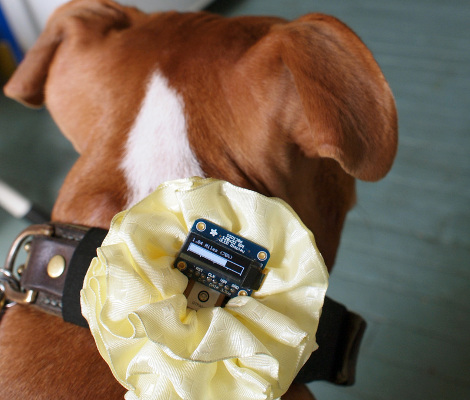
[Becky Stern] came up with a way to make sure you and your dog are getting enough exercise. It’s a dog collar mounted GPS that measures how far you have walked. Just set your target distance and the progress bar in the middle of this flower will let you know when you reached it.

The most obvious piece of hardware is the OLED board which is sticking out like a sore thumb. But if you’d like to be a little more discreet you could forego the full-featured display for some carefully places LEDs to make up a circular progress bar. The GPS module itself fits well in the center of the flower, which [Becky] shows us how to make out of wire-edged ribbon. Hidden on the other side is an ATmega23u4 breakout board running the Arduino bootloader.

If you’re interested in sewables and textiles [Becky] uses a lot of basic techniques that are good to learn. Check it out in the clip after the break. She’s always shown a remarkable ability to develop projects which won’t scare away the villagers in the way our wire-sprouting breadboard hacks sometimes do.

Continue reading “GPS Dog Collar Keeps Track Of Your Walks”

Hacking A Brother Thermal Printer To Use Non-OEM Continuous Rolls

You can get your hands on a Brother thermal label printer for $65-75. But if you don’t want to buy the Brother branded continuous feed paper for it you’re out of luck. Unless you pull off this hack which lets you use any thermal paper you want with a Brother QL-500 printer.

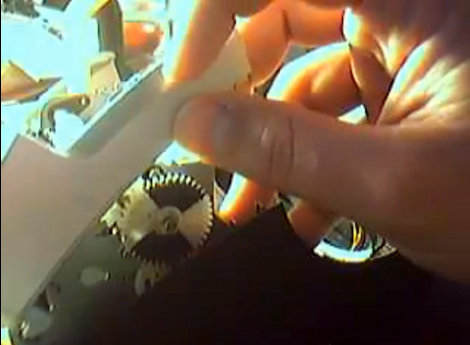
The printer is tied to the OEM paper because of a pattern printed on the back of the roll. It’s basically an encoder strip made up of black rectangles spaced at regular intervals. Surely there are other brands that come with this pattern on them, but if you want to use paper without it the secret is in moving the sensor that reads that strip.

The brilliant solution is to use one of the white feed-gears as an encoder wheel. [CheapSkateVideo] used a magic marker to paint two opposite quarters of the gear black. He then removed the optical sensor and placed it on the side of the case facing the wheel. It needs to be adjusted along the radius of that gear until the timing is just right, but once it is you’re ready to go. The sensor is a safety feature to ensure there is media in the printer. If there’s not you can burn up the print head so keep that in mind. See the explanation in the video after the break.

Continue reading “Hacking A Brother Thermal Printer To Use Non-OEM Continuous Rolls”

Fabricating Headlights For An F250

The amount of time that is going into these custom headlights is just staggering. [Mcole254] is working on his brother’s truck, replacing the stock headlights with High-Intensity Discharge (HID) lamps and rolling some nice LED features into the mix while he’s at it.

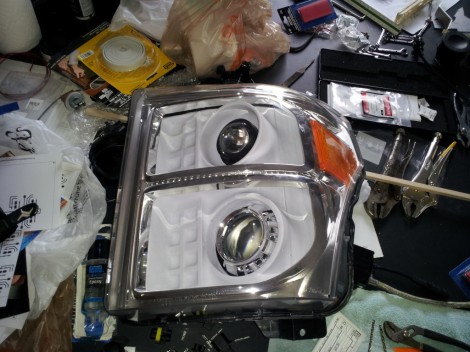
The build starts by removing and disassembling the stock headlight assembly. In order to get the enclosure apart he heated it in the oven until the glue was softened and the parts could be pried apart. The goal is to replace the reflectors with an assembly that suits the new lamps and LEDs. Above you can see the white pieces which were vacuum formed from a mold that [Mcole254] made from wood and PVC. He tried several iterations using his home-made vacuum former but couldn’t get the definition he really wanted. The most recent posts from him show some massive 3D printed parts that will be used instead.

While inside he added a line of amber LEDs for the turn signal. You can seem them mounted along the silver strip between the upper and lower reflectors. A demo of those super bright additions is embedded after the break.

Continue reading “Fabricating Headlights For An F250”

3D Printing With A Delta Robot That Seems To Simplify The Concept

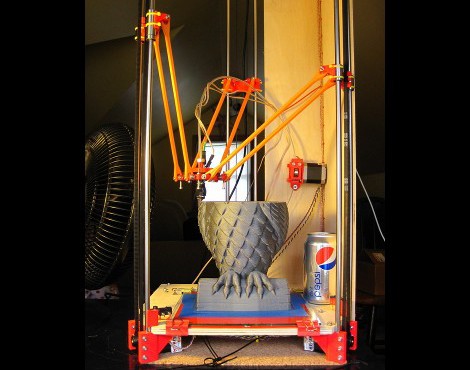
This 3d printing delta robot really seems to solve a lot of the hurdles faced by previous offerings. With other delta printers we’ve looked at the motor control of the three arms is usually a it complicated. On this build the motors can just be seen in this image at each corner under the build platform. Each motor has a belt that loops from the bottom to the top for the machine, driving an arm along two precision rods.

It’s also interesting to note that the printer head doesn’t have a motor mounted on it for feeding the filament. Instead, the motor is mounted remotely. You can see it above the soda can in this image. It feeds the filament through a hollow tube spanning the gap between the extruder and the motor. This acts as a Bowden cable. With less mass to move this may make it easier to control the location of the print head.

After the break you can catch a clip of the team showing off the speed and dexterity of the delta bot, followed by a printing demo.

Continue reading “3D Printing With A Delta Robot That Seems To Simplify The Concept”

Meizu MX Rooted Using The Bus Pirate

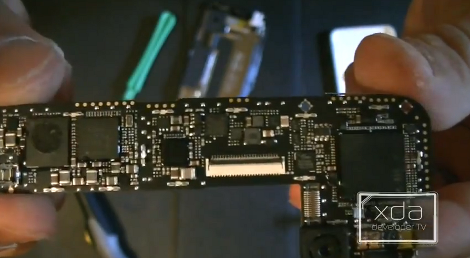
It is just amazing how small the boards are for some really powerful smart phones. For instance, the diminutive size of this Meizu MX Android phone’s board is only outshone by the intricate packaging the phone arrived in. [Adam Outler] did an unboxing of the device. But for him that mean tearing down all of the components and using a Bus Pirate to root the device.

In the video after the break he gives us a candid look at what it takes to exploit this piece of hardware. You might be a little spooked by the commands, which he reads aloud character by character, but watch closely and you’ll see they’re really quite common functions.

His rooting quest began by reading the datasheet for the main processor to find the USART parameters. With that information he hooked his Bus Pirate to ground, then probed around various test points on the board while it was rebooting until serial data started scrolling on the screen. He had found the USART lines and soldered a breakout connector onto them so that he had access after reassembling the phone.

From there he used the Bus Pirate to merge with the board’s terminal, then rebooted the phone using the Android Debug Bridge. Once it fires up, the Bus Pirate terminal window is sitting at a root prompt (many companies disable this but [Adam] was lucky). He remounts the internal file system to be rewritable, then uses the ADB to push the Linux substitute user (su) command onto the device as it will be needed by the Superuser.apk program. That is the next thing to be installed and once it is he officially has root.

Continue reading “Meizu MX Rooted Using The Bus Pirate”