Video Review: STM32F0-Discovery Board

The STM32 Discovery boards are nothing new, we’ve looked at them several times. But the newest sibling in the line might be just the thing to make the leap from your steadfast 8-bit projects. We got our hands on it and recorded a video review.

The STM32F0-Discovery gives you a programmer and ARM Cortex-M0 chip all on one convenient board. The top portion is the ST-Link V2 programmer, and includes jumpers and a programming header which let it easily program off-board chips.

The included microcontroller is an STM32F051R8T6 which includes 64kb of program memory and 8kb of RAM. Coming in at $1.80-3.77 in single units and in a hand-solderable LQFP package this raises an eyebrow for our future projects. It has an 8 MHz internal oscillator with 6x PLL which means you can run at 48 MHz without an external crystal (check out [Kenneth Finnegan’s] PLL primer if you don’t know what this is).

The only thing holding us back is the development environment. ST provides everything you need if you’re on Windows, but we want a Linux friendly solution. We know other Discovery boards have worked under Linux thanks to this project. This uses the same ST-LINK V2 so it should work as well. If you want one of your own head over the ST page to see if they’re still giving away samples. There should be a button labeled “Register for your FREE KIT”.
Morse Code Beacon Wins The LayerOne Badge Hacking Contest

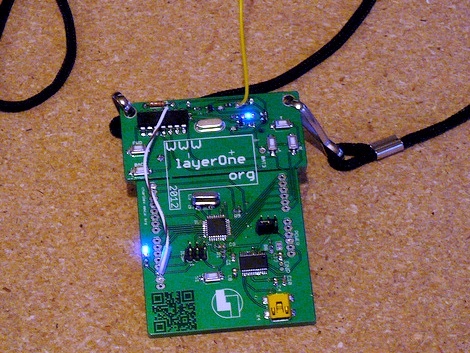
Ham skills prevail in this year’s LayerOne badge hacking contest. [Jason] was the winner with this Morse Code beacon hack.He got a head start on the competition after seeing our preview feature on the badge hardware development. It got him thinking and let him gather his tools ahead of arrival.

The hardware is segregated into two parts of the board. The lower portion is a take on the Arduino, and the upper portion is a wireless transmitter meant to control some cheap RC cars. [Jason] figured this was perfect for conversion as a CW beacon (continuous wave is what Morse Code is called if you’re a ham). The first issue he encountered was getting the badge to play nicely with the Arduino IDE. It was setup to run Slowduino firmware which uses the internal oscillator. [Jason] soldered on his own crystal and reflashed the firmware. He found that the transmitter couldn’t be directly keyed because of the shifting used in the RC car protocol. He cut the power to the transmitter, and found that it could be more accurately keyed by injecting power to one of the other pins. Check out the video after the break for a better explanation of his technique.

Continue reading “Morse Code Beacon Wins The LayerOne Badge Hacking Contest”

One Enormous Breadboard

[Franklyn] wrote in to tell us about the The Hack Factory Big Board project. The Twin Cities Maker group, a Minneapolis/St Paul based hackspace, set out to provide an education tool to help students make the leap from schematic diagrams to bread board connections.   Naturally their conclusion was to create a humungous 10x scale bread board.  The board features scaled up yet fully functional capacitors, resistors, a dip switch, and the jumbo-est LEDs we’ve seen in a long while.

Like its 0.1″ pitch counterpart, passive components can be thrown in 1″ pitch breadboard to create a myriad of analog circuits. The Twin Cities folks even tossed together an optical theremin using a scaled up photoresistor.  Beyond analog circuits the board can also demonstrate various ICs using either a custom breakout board featuring an 8-pin DIP socket or a vacuum formed Atmega 328 which boasts an internal Arduino Uno. The cool thing about the giant 28-pin DIP is that it does not necessarily function as a microcontroller.  Instead the UNO will be loaded with chip emulation programs geared towards the lesson at hand,  jumpers  select programs to teach debouncing, logic, flip-flops, and a whole slew of other basic concepts.

We are a bit concerned that the next logical step is a gigantic soldering iron,  but at least we finally have something to interface to the huge liquid crystal display.  If you still want more giant circuit stuff check out this 555 footstool.

Check out a quick intro video after the jump!

Continue reading “One Enormous Breadboard”

CalTech’s Manipulator-arm Equipped Robot

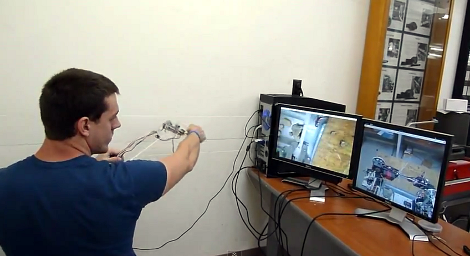
[Justin] wrote in to tell us about the rover which his CalTech team has entered in NASA’s Exploration Robo-Ops Competition. Their time to shine is later this week, but you can see some of the test footage after the break.

The operator pictured above is using a controller which is a scale model of the manipulator arm, with two cameras giving feedback. One of those monitors shows a feed from the arm itself, providing a view of the gripper. The other feed is a wide shot of the working area from the body of the robot. The arm has six degrees of freedom actuated by servo motors. The controller is a replica of the arm laser cut from acrylic. At each joint there’s a potentiometer whose value is used to establish the position of the frame.

At first we thought that this would be more fatiguing and less convenient than using a gaming controller. But as we look at the dexterity of the arm it becomes obvious that joysticks and buttons would just make things more difficult.

Continue reading “CalTech’s Manipulator-arm Equipped Robot”

Hackerspace Introduction: 7hills Makerspace In Rome Georgia

This place served as a very strong reminder that not all hackerspaces are the same. Housed in a masonic temple, 7hills makerspace is quite different. They are fairly new, having just built out the location in January. I didn’t have a visit planned, and just happened to get lucky enough to catch [John Grout] there doing some screen printing. He agreed to give us a tour on the spot, and I think he did a fantastic job.

Continue reading “Hackerspace Introduction: 7hills Makerspace In Rome Georgia”

OpenCV Knows Where You’re Looking With Eye Tracking

[John] has been working on a video-based eye tracking solution using OpenCV, and we’re loving the progress. [John]’s pupil tracking software can tell anyone exactly where you’re looking and allows for free head movement.

The basic idea behind this build is simple; when looking straight ahead a pupil is perfectly circular. When an eye looks off to one side, a pupil looks more and more like an ellipse to a screen-mounted video camera. By measuring the dimensions of this ellipse, [John]’s software can make a very good guess where the eye is looking. If you want the extremely technical breakdown, here’s an ACM paper going over the technique.

Like the EyeWriter project this build was based on, [John]’s build uses IR LEDs around the edge of a monitor to increase the contrast between the pupil and the iris.

After the break are two videos showing the eyetracker in action. Watching [John]’s project at work is a little creepy, but the good news is a proper eye tracking setup doesn’t require the user to stare at their eye.

Continue reading “OpenCV Knows Where You’re Looking With Eye Tracking”

GPU Programming For Easy & Fast Image Processing

If you ever need to manipulate images really fast, or just want to make some pretty fractals, [Reuben] has just what you need. He developed a neat command line tool to send code to a graphics card and generate images using pixel shaders. Opposed to making these images with a CPU, a GPU processes every pixel in parallel, making image processing much faster.

All the GPU coding is done by writing a bit of code in GLSL. [Reuben]’s command line utility takes that code, sends it to the graphics card, and returns the image calculated by the GPU. It’s very simple for to make pretty Mandebrolt set images and sine wave interference this way, but [Reuben]’s project can do much more than that. By sending an image to the GPU and performing a few operations, [Reuben] can do very fast edge detection and other algorithmic processing on pre-existing images.

So far, [Reuben] has tested his software with a few NVIDIA graphics cards under Windows and Linux, although it should work with any graphics card with pixel shaders.

Although [Reuben] is sending code to his GPU, it’s not quite on the level of the NVIDIA CUDA parallel computing platform; [Reuben] is only working with images. Cleverly written software could get around that, though. Still, even if [Reuben]’s project is only used for image processing, it’s still much faster than any CPU-bound method.

You can grab a copy of [Reuben]’s work over on GitHub.