Hidden Bookshelf Switch

So you don’t have any secret passageways in your house, but if you’ve got a bookshelf this secret switch can add some fun to your routine. [Brandon] saw a commercially available version which was out of stock when he went to order so he set out to build his own.

He’s using the switch to operate a lamp. The donor part for the hack is a lamp dimmer which you’ll find at the big box store. This is really just a pass-through wall plug with an extension cord. By cutting the dimmer module off of the extension a push button can be used to connect and disconnect one of the conductors in the line. Make sure you use a push button rated or mains voltage!

To make the push switch work with a book [Brandon] bend a bracket which will slide into the spine of a hardcover. We love his homemade press brake (angle iron, a sturdy hinge, and a chunk of 2×4) used when shaping the bracket. Once everything’s in place nobody will ever know there’s anything special about those books.
Who Couldn’t Use A Little More Screen Space?

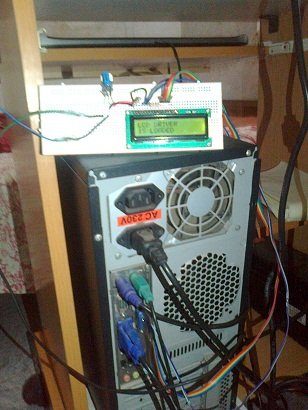
Text LCD’s are handy for any occasion, a printer port on your PC is also darn handy as well. Mix together and add in a splash of linux and you get a very handy Linux device driver for a 16×2 LCD connected to the parallel port.

Electrically the LCD is wired up in a typical 4 bit mode, this allows the parallel port to use its 8 bit data register to write data, but also control the Register Select and Enable pins. Next is to make a module for linux to use, it seems like pretty standard fair for this type of screen.

Make the driver, insert the module so it can be loaded, and add a node so you know where to find it later, and your only an “echo Hello > /dev/my_lcd” away from finding all sorts of creative uses for your new external display.

Tired Of The Normal Use For Your Toothbrush? Why Not An Engraving Tool?

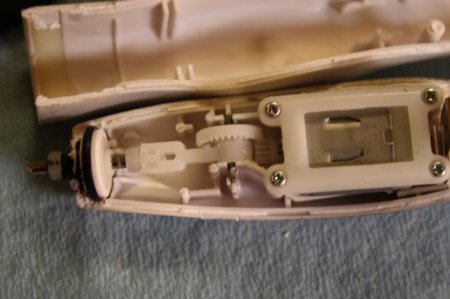
Hardware hackers and makers like us may not be well known for our excellent hygiene habits, but after [Dan]’s creation, no one can claim he doesn’t know how to use one! Either out of a total disdain for tooth care, or hopefully, after using one properly for many months, [Dan] decided to turn his electric toothbrush into an engraving tool!

At around $4 and meant for cleaning plaque off teeth, this tool isn’t the most powerful engraver on the block, but is capable of good work on softer material such as acrylic. Be sure to check out the heart that was made with this improvised tool that introduced us to [Dan]’s work.

This is really a clever use of your resources, and the article gives a nice account of how the toothbrush was modified with pictorial directions. Besides it’s use as an engraving tool, this might give someone other ideas for alternate toothbrush uses. For another neat alternate home-item use, why not check out how to repurpose an air freshener as a camera trigger?

Flash An Arduino From An SD Card

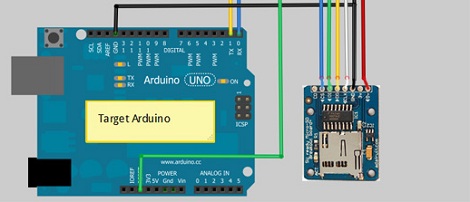
[Kevin] has been working on reverse engineering the protocol used by the Arduino IDE and porting it to the Arduino platform. Now that his BootDrive project is nearing completion, he’s ready to give every Arduino the ability to program another Arduino over an SD card.

BootDrive isn’t terribly different from using an Arduino as an ISP, only now AVRdude runs on the Arduino itself and no computer is required to put new firmware into the target Arduino.  [Kevin] attached a MicroSD breakout board to an Arduino-compatible clone. When the clone starts up, it searches the SD card for a file called ‘program.hex.’ This file is sent over to the target Arduino and the new firmware is installed.

While it may not be extremely practical if you’ve only got a few Arduinos that never leave your workbench, we’re thinking this would be an invaluable tool if you need to update the software on a board already ‘in the field,’ serving as a weather station or homemade game camera. [Kevin] put up a demo of his BootDrive project; you can check that out after the break.

Continue reading “Flash An Arduino From An SD Card”

Laser Spirograph Exhibit Repair And Upgrade

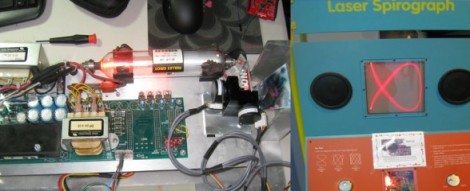
[Bill Porter] continues finding ways to help out at the local museum. This time he’s plying his skills to fix a twenty-year-old exhibit that has been broken for some time. It’s a laser spirograph which had some parts way past their life expectancy.

He started by removing all of the electronics from the cabinet for further study in his lair. He examined the signal generator which when scoped seemed to be putting out some very nice sine waves as it should. From there he moved on to the galvos which tested way off of spec and turned out to be the offending elements.

A bit of searching around the interwebs and [Bill] figured out an upgrade plan for the older parts. But since he was at it, why not add some features at the same time? He rolled in a port so that just a bit of additional circuitry added later will allow shapes and logos to be drawn on the screen. One of his inspirations for this functionality came from another DIY laser projector project.

Take a look at the results of the repair process in the clip after the break.

Continue reading “Laser Spirograph Exhibit Repair And Upgrade”

Get Neck-deep Into ZigBee

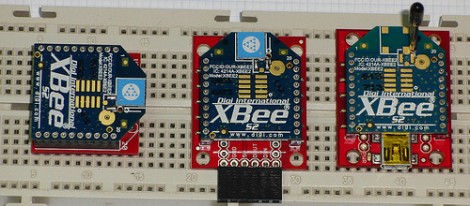
Here’s a bulky tutorial that will round-out your understanding of ZigBee wireless communications (translated). The protocol is great for hobby electronics projects because it uses low-power short range wireless devices to build a mesh network. The guide covers both hardware and software, but also takes the time to explain what that hardware is doing in the background.

As you can see, several different renditions of an XBee module are used as examples. They pretty much all rely on a series of SparkFun breakout boards that each serve different purposes. Once you’ve acquired these modules, there’s a fair number of choices needed to configure them to play nicely with each other. We read most of the tutorial (we’ll save the rest for later enjoyment) and had no problem following along even without owning the hardware or being able to use the interface as we learned.

Whenever we cover XBee modules we always like to mention that it’s quite easy to use these for remote sensors with no additional microcontroller needed.

Repair A Misbehaving Motor Controller Board

It can be a real drag to fix a circuit board which has stopped working as intended, especially if you don’t have any reference material for the product. That’s the position that [Todd Harrison] found himself in when the controller for his mini-lathe gave up the ghost. He undertook and hefty repair process and eventually mapped out and repaired the driver board.

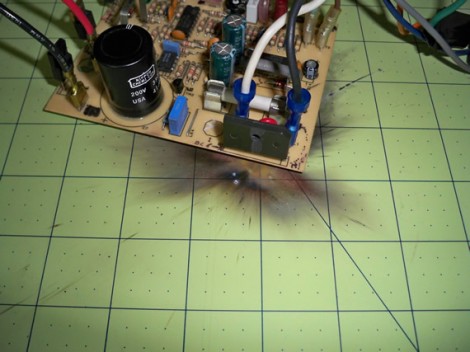
First off, we’re happy to report his success at the end of a year-long troubleshooting process; the entirety of which occupies six different posts. The link at the top is the conclusion, and you’ll find his final test video after the break. But as you can see from the image above, he was met with a lot of problems along the way. The first two segments show him reverse engineering the PCB, with a giant schematic coming out of the process. In part 3 he then started probing the board while it was live, with the smell of hot electronics causing him to disconnect the power every thirty seconds. One time he took too long and blew a resistor with the pictured results.

In the end it was a shorted PWM chip to blame. He tested a couple of different replacement options, dropped in the new part, and is now back in business. Continue reading “Repair A Misbehaving Motor Controller Board”