Keep Your SD Cards Data Safe With The SD Locker

sdlocker_1

[Karl Lunt] has come up with a simple circuit for protecting data you have stored on SD cards. As is relatively well-known, the little lock switch on the side of most SD cards really doesn’t do anything more than the switch on floppies or the tabs on VHS or cassette decks. It’s up to the reader/writer to check the status of the tab and decide if it should write to the card or not. Not a very safe system. However, it’s not the only write protection system built into SD and SDHC cards. As part of the standard, cards have three protection methods: A TMP_WRITE_PROTECT bit, a PERM_WRITE_PROTECT bit, and a PWD register.

The PERM_WRITE_PROTECT bit permanently write protects the card. The bit can not be reset, so you should be really sure you want to keep the data on the card forever. The PWD register is a password register. The card will not allow any access (read or write) unless a password is provided. The TMP_WRITE_PROTECT bit is a temporary write protect. This is the bit that [Karl] is working with. When TMP_WRITE_PROTECT is set, the card can be read but not written. Note that there is no true protection here, as anyone can modify the bit. However, this should stop grandma from accidentally deleting your wedding pictures.

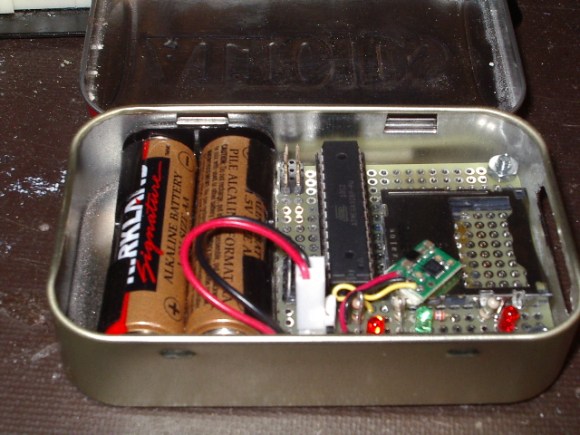
[Karl’s] device is very simple. A card is inserted into an Altoids tin enclosure. One button locks the card, another unlocks it. Three LEDs return status – power, card locked, and card unlocked. Under the hood, he’s using an Atmel ATmega328 to set and clear the TMP_WRITE_PROTECT bits. Power is provided by two AA batteries, and regulated with a Pololu 3.3v boost regulator. [Karl] has also included a serial port for control and debug information. We think this is a great hack, however one thing we’re not sure of is how or if these features are implemented in all cards. We’re relatively sure the name brand cards stick to the SD/SDHC spec sheet, but what about all the knockoff and no name brands from overseas?

Reverse Engineering The Z80’s 16-bit Increment/Decrement Circuit

z80

Increment and decrement. They sound like simple functions. But even the simplest functions can get quite complex in a microprocessor design. Ken Shirriff has written up a great blog post about his reverse engineering of the Z80’s 16-bit increment/decrement circuit. The Zilog Z80 was one of the most popular microprocessors of the 70’s and 80’s. It was used in many classic computers such as the Osborne 1. These machines would often use the Z80 to run the popular CP/M operating system.

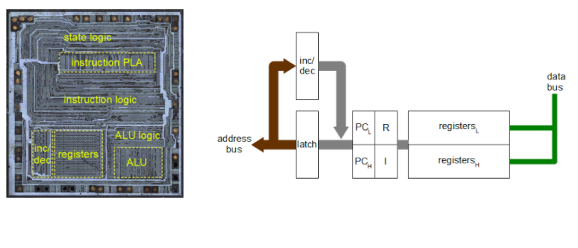
The increment/decrement circuit is responsible for updating the program counter register during normal (non branch) operations. The increment/decrement circuit also handles the stack pointer register during stack operations, as well as several other functions. One might wonder why a separate adder would be used when the microprocessor has a big ALU available to it. The answer is twofold. First the ALU is already in use handling user math operations. Secondly the increment/decrement circuit has to be fast. A generic ALU just won’t be fast enough.

One classic adding circuit is a Ripple Carry Adder. Ripple Carry Adders get the job done, but they are slow. Note slow is measured in nanoseconds here – there are no clocks involved in the circuit. The whole thing becomes a classic combinational logic optimization problem. Each layer of logic adds a gate delay to the circuit. As the carry has to ripple through all 16 bits, there are 16 gate delays before the final result is available at the outputs. Delays like these are what limits the maximum clock speed for a given circuit.

The Z80 uses some tricks in its increment/decrement circuit. The first is Carry-lookahead. A carry-lookahead circuit will calculate the carry values directly from the inputs. This reduces the gate delays significantly, but it requires more real estate on the die. A second trick is the carry-skip circuit. Carry-skip calculates the result for groups of bits rather than each bit individually. Again, it will reduce gate delays, at the cost of real estate. The actual Z80 implementation uses a mix of both circuits. Several other “helper” circuits are also used. Surprisingly the Z80 has specific logic just to check for 1 (0x0001) on the internal address bus. This circuit is used during memory move loops to inform other parts of the chip that a loop is about to complete. 

The Rabbit’s Hole: Creative Reuse And Stop Motion Animation

rabbitshole

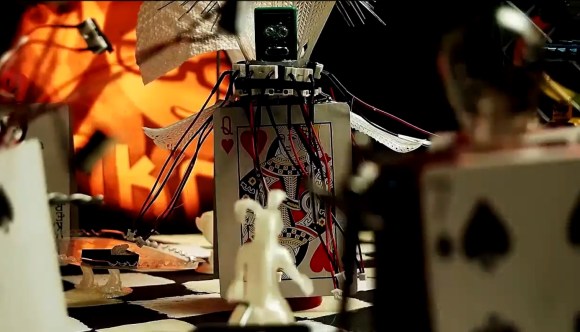
The folks down at The Rabbit Hole Hackerspace have been busy lately. They’ve created an amazing stop motion animation short titled “The Rabbit’s Hole”. The three-minute film documents the journey of a white rabbit through several strange lands, including the court of a “hormonally imbalanced queen”, the sewers, a PCB wasteland, and a banana jazz concert. The rest of the video is a behind the scenes view, showing the incredible amount of teamwork that went into the film’s creation.

From set building to final photography, the entire film was shot in one day.  The set was split into 8 pieces. Each piece represented a scene the rabbit would journey through in the final movie. Members of The Rabbit Hole were able to work in parallel, each designing their own section of the set. Once the photography was done, [Whisker] took over for the process of editing and sound design. Just like in Hollywood, post production took much longer than the actual shoot.

The amazing part of the video is that most of the characters and set pieces are created from The Rabbit Hole’s junkbox. Even the star of the show, a 3D printed Rabbit wasn’t immune. Many rabbits were printed for the stop motion animation process. As can be expected, there were a few failed prints. Those prints became Rabbit footed Lamps, Tables, and a rather macabre rabbit’s hand in a tray. Even the camera dolly was welded up from some scrap metal and old roller blade wheels.

We like the way the entire hackerspace was able to come together to create something greater than any one of them could have done alone. This sort of project should be a template for other hackerspaces to follow.

Continue reading “The Rabbit’s Hole: Creative Reuse And Stop Motion Animation”

Detect Disguises With A Raspberry Pi

maskdetect

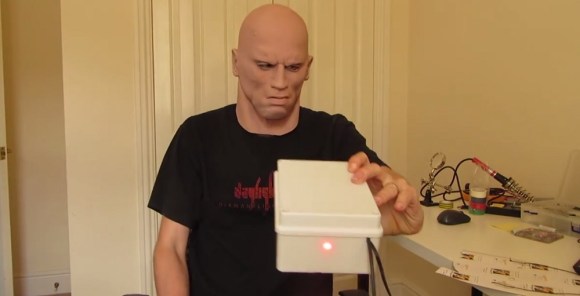
Computer vision based face detection systems are getting better every day. Authorities have been using face detection and criminal databases for several years now. But what if a person being detected is wearing a mask? High quality masks have been making their way out of Hollywood and into the mainstream. It isn’t too far-fetched to expect someone to try to avoid detection using such a mask. To combat this, [Neil] has created a system which detects face masks.

The idea is actually rather simple. The human face has a well-defined heat signature. A mask will not have the same signature. Even when worn for hours, a mask still won’t mimic the infrared signature of the human face. The best tool for this sort of job would be a high resolution thermal imaging camera. These cameras are still relatively expensive, so [Neil] used a Melexis MLX90620 64×8 16×4 array sensor. The Melexis sensor is interfaced to an Arduino nano which then connects to a Raspberry Pi via serial.

The Raspberry Pi uses a Pi camera to acquire an image. OpenCV’s face detection is then used to search for faces. If a face is detected, the data from the Melexis sensor is then brought into play. In [Neil’s] proof of concept system, a temperature variance over ambient is all that is needed to detect a real face vs a fake one. As can be seen in the video after the break, the system works rather well. Considering the current climate of government surveillance, we’re both excited and a bit apprehensive to see where this technology will see real world use.

Continue reading “Detect Disguises With A Raspberry Pi”

Augmented Reality Breadboarding

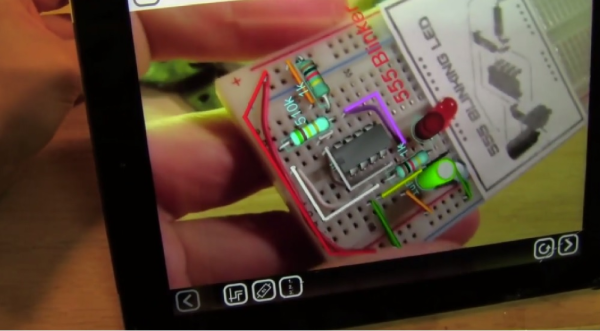
[Scott] sent in this tantalizing view of the what could be the future of bread boarding. His day job is at EquipCodes, where he’s working on augmented reality systems for the industrial sector. Most of EquipCodes augmented reality demos involve large electric motors and power transmission systems. When someone suggested a breadboard demo, [Scott] was able to create a simple 555 led blinker circuit as a proof of concept. The results are stunning. An AR glyph tells the software what circuit it is currently viewing. The software then shows a layout of the circuit. Each component can be selected to bring up further information.

The system also acts as a tutor for first time circuit builders – showing  them where each component and wire should go. We couldn’t help but think of our old Radio Shack 150 in 1 circuit kit while watching [Scott] assemble the 555 blinker. A breadboard would be a lot more fun than all those old springs! The “virtual” layout can even be overlayed on real one. Any misplaced components would show up before power is turned on (and the magic smoke escapes).

Now we realize this is just a technology demonstrator. Any circuit to be built would have to exist in the software’s database. Simple editing software like Fritzing could be helpful in this case. We’re also not sure how easy it would be working with a tablet between you and your circuit. A pair of CastAR glasses would definitely come in handy here. Even so, we’re excited by this video and hope that some of this augmented reality technology makes its way into our hands.

Continue reading “Augmented Reality Breadboarding”

Classic 80’s Stereo Receiver Enjoys A Second Life As RadioduinoWRT

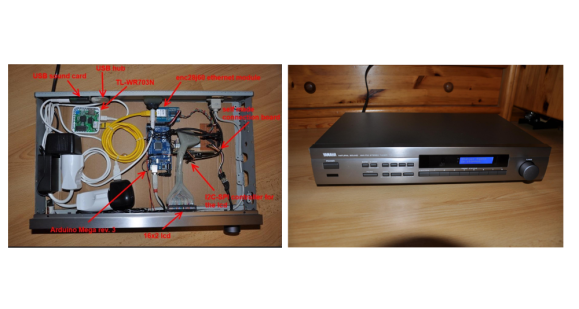
radio2[Raffael] had an old Broken Yamaha natural sound receiver lying around. Rather than throw it out, he built himself a slick web radio. He calls it RadioduinoWRT. [Raffael] started by removing all the internals – though he kept the front panel controls.  He then added an Arduino Mega to handle the front panel controls, including a 16×2 character LCD module. The Arduino also takes commands via IR remote. An enc28j60 Ethernet module allows the Arduino to communicate with a the brains of the operation, a TL-WR703N mini router.

A micro USB hub expands the single USB port on the WR703, allowing both a USB sound card and a 4 gig USB stick to be mounted. We’d like to add that the TL-WR703 is a must in this application – the amazon link [Rafael] provides brings up the TL-WR702 as a top link. Only the TL-WR703 has a USB host connection.

The real magic is in [Raffael’s] software setup. The WR703 is running OpenWRT.  He added modules for the USB sound card, as well as expanding the file system onto the USB stick. Once that was complete [Raffael] added Music Player Daemon (MPD) and MPC, a console app to drive MPD. Lighttpd, a light web server provides an interface for the Arduino as well as a web front end to the entire radio.All this allows [Raffael] to control his radio in several ways. He can log in via any web browser on his network. He can use the front panel controls. He can use an IR remote. Since he is running MPD, any client (there are literally hundreds out there) will also drive the radio.

While a low-end USB sound card in a home stereo application does make our inner audiophile cringe a bit, the quality does seem to be pretty good. [Rafael’s] design would make it simple to swap out a higher quality USB sound card if the need arises.

Continue reading “Classic 80’s Stereo Receiver Enjoys A Second Life As RadioduinoWRT”

Furbies Sing Queen At Fresher’s Faire

kent-furby

The University of Kent has their own hacker space, called  [Maker Society]. Every year the school holds an orientation for new students called the Fresher’s Faire. The [Maker Society] display at this year’s Fresher’s Faire included a group of partially clothed Furbies singing the classic Bohemian Rhapsody by Queen. This isn’t our first run in with Bohemian Rhapsody and hacked hardware.

The [Maker Society] started by doing some internet research and reverse engineering a first generation Furby.  The Furby itself is a marvel of cost reduction. All the doll’s functions run from a single motor and a cam system. A limit switch tells the on-board microcontroller when the cam is at the zero position. An optical encoder keeps track of the cam as it moves. The [Society] replaced Furby’s internal microcontroller with an Atmel ATMega328. This allowed them to use the Arduino programming environment.

Many classic Animatronic systems use an audio recording for motion. Typically a stereo recorder would perform double duty. The first track would contain the audio for the animation. A second track would contain audio tones corresponding to movement of each of the degrees of freedom of the doll being animated. Because the two tracks were on the same strip of magnetic tape, the audio and movement would always be in sync. Multitrack tape record and playback systems added even more flexibility to this type of system.

Continue reading “Furbies Sing Queen At Fresher’s Faire”