Breaking Out The ATtiny10

Atmel’s ATtiny10 is the one microcontroller in their portfolio that earns its name. It doesn’t have a lot of Flash – only 1 kilobyte. It doesn’t have a lot of RAM – only thirty two bytes. It is, however, very, very small. Atmel stuffed this tiny microcontroller into an SOT-23 package, more commonly used for surface mount transistors. It’s small, and unless your ideal application is losing this chip in your carpet, you’re going to need a breakout board. [Dan] has just the solution. He could have made this breakout board smaller, but OSHpark has a minimum size limit. Yes, this chip is very, very small.

Because this chip is so small, it doesn’t use the normal in-system programming port of its larger brethren. The ATtiny10 uses the Tiny Programming Interface, or TPI, which only requires power, ground, data, clock, and a reset pin. Connecting these pins to the proper programming header is easy enough, and with a careful layout, [Dan] fit everything into a breakout board that’s a hair smaller than a normal 8-pin DIP.

The board works perfectly, but simply soldering the ATtiny10 to a breakout board and using it as is probably isn’t the best idea. The reason you use such a small microcontroller is to put a microcontroller into something really, really small like ridiculous LED cufflinks. A breakout board is much too large for a project like this, but SOT23 test adapters exist, and they’re only $25 or so.

Either way, [Dan] now has a very, very small microcontroller board that can fit just about anywhere. There’s a lot you can do with one kilobyte of Flash, and with an easy way to program these chips, we can’t wait to see what [Dan] comes up with.

Announcing Hackaday Belgrade’s Talks And Speakers

Hackaday is hosting a hardware conference in Belgrade on April 9th. This is arguably our first-ever European conference, and for the last few months we’ve been putting together a hackable conference badge, a list of speakers, and a set of hands-on workshops. Now, we’re finally ready to announce the workshops and talks for Hackaday | Belgrade. You can check out the scheduled talks and workshops below.

Tickets for Hackaday | Belgrade are still available, and tickets for the workshops will open up today. Tickets are also cheap – $35 for a regular ticket, and about $10 and $30 for the robot and DIY musical toy workshops, respectively. The workshop tickets are only to cover material cost, and you’ll get to take your project home with you.

The conference will be a blast. There will be bands and DJs, badge hacking competitions, and ten hours of talks and workshops. If you’re going, or are still on the fence, hang out on the event page to get the inside info on a few Hackaday events that will happen the night before and the day after.


The Workshops

Radomir Dopieralski – Tote, A Walking Quadruped Robot. Build your own spider-like robot and make it walk.

Anastasios StamouHardware Hacking Musical Toys & DIY Electronic Musical Interfaces. Introductory circuit bending workshop teaching all the necessary techniques for designing and making experimental electronic musical interfaces out of recycled material.

The Talks

Voja AntonicHacking the Hackaday Belgrade Badge. The Belgrade conference features its own badge designed by Voja Antonic. Voja will introduce the Belgrade badge and the theory of operation behind the LED matrix, keyboard, power management, infrared transceiver, and accelerometer.

Navid GornallHow To Eat Your Own Face. The story of hacking a 3D printer to print burger selfies with mayo. Printing with a non-Newtonian condiment presents a unique set of challenges which will be explored in this presentation.

Tsvetan Usunov Hacker Friendly OSHW DIY Modular Laptop. Tsvetan is the mind behind Olimex, manufacturer of various embedded development platforms and tools. He will talk about the creation of a modular, hacker friendly laptop based on a 64-bit ARM processor.

Chris Gammell Top Down Electronics

Dejan RistanovicSerbia: Long Road To The Internet. During the 1980s and 1990s, we had to hack the system in many ways just to stay connected, and to reinvent the wheel three times before breakfast. We also had some results, including Sezam, the biggest BBS in this part of Europe

Kristina KapanovaDesigning A High Performance Parallel Personal Cluster. This talk introduces an open source, homebrew mini cluster consisting of a Radxa Pro single board computer based on the quad-core ARM Cortex-A9 CPU. In particular, this talk demonstrates it is possible to achieve very advanced simulations in the field of quantum computing.

Sophi KravitzCreation, fabrication, and application by experimentation of the synchronization of a grid configuration of a light radiation orientation polarization illumination.

Seb Lee-DelisleMaking The Laser Light Synths. The Laser Light Synths are LED emblazoned musical instruments that anyone can play. Along with high power lasers, they form part of a large outdoor installation that switch the traditional roles of audience and performer.

Mike HarrisonRetrotechular : 1950s Video Projection Technology. A talk on the history and technology of the Eidophor, a little known, absurdly complicated, and very expensive product that dominated the large-screen projection market from the 1950s to the 1990s.

Peter Isza Open Source Clinical Grade Electrocardiography. This talk covers the development of a true clinical grade, open source Holter ECG which will be sold for close to its manufacturing cost.

Paulina StefanovicInteractive Digital Storytelling Systems: Generative Interfaces, Authors and the Role of the Audience. This talk will cover the development and design of interactive content and interactive performance that shifts the focus from the creator of the system to the creative involvement of the audience.


BelgradeSpeakers-02-01

Introducing The Raspberry Pi 3

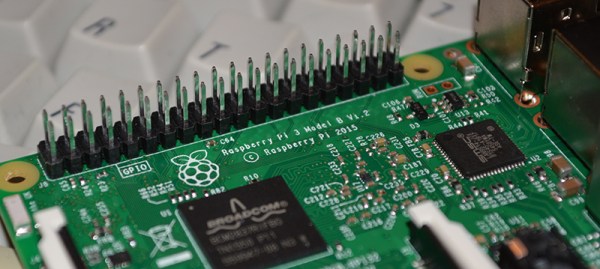
TL;DR: The Raspberry Pi 3 Model B is out now. This latest model includes 802.11n WiFi, Bluetooth 4.0, and a quad-core 64-bit ARM Cortex A53 running at 1.2 GHz. It’s a usable desktop computer. Available now at the usual Pi retailers for $35.

News of the latest Raspberry Pi swept around the Internet like wildfire this last weekend, thanks to a published FCC docs showing a Pi with on-board WiFi and Bluetooth. While we thank the dozens of Hackaday readers that wrote in to tell us about the leaked FCC documents, our lips have been sealed until now. We’ve been doing a few hands-on tests with the Pi 3 for about two weeks now, and the reality of the Pi 3 is much cooler than a few leaked FCC docs will tell you.

The Raspberry Pi 3 Model B features a quad-core 64-bit ARM Cortex A53 clocked at 1.2 GHz. This puts the Pi 3 roughly 50% faster than the Pi 2. Compared to the Pi 2, the RAM remains the same – 1GB of LPDDR2-900 SDRAM, and the graphics capabilities, provided by the VideoCore IV GPU, are the same as they ever were. As the leaked FCC docs will tell you, the Pi 3 now includes on-board 802.11n WiFi and Bluetooth 4.0. WiFi, wireless keyboards, and wireless mice now work out of the box.

Continue reading “Introducing The Raspberry Pi 3”

Hackaday Links: Leap Eve, 2016

The current Mac Pro is a masterpiece of design that looks like a trash can. We’ve been waiting for someone to take one of these computers and stuff a MiniITX board in there, but seeing as how the Mac Pro costs $3000, that probably won’t happen anytime soon. Here’s the solution. It’s a trash can computer case that is also too expensive for what it is. Now all we need is someone to put a big fan inside one and turn this computer into a wacky waving inflatable arm flailing tube man.

[Mike Harrison] recently got his hands on a $20,000 SPARC CPU module. This is an enormously thick board that must be dozens of layers thick. How many layers was an open question until he put the board in a CNC milling machine. The setup is pretty much what you would expect with a few lines of g-code repeated over and over. The real trick comes from using one of the outputs for lubricant to trigger the shutter release on a camera. How many layers were in the CPU module? About 30, or something like that.

Almost a year ago, we saw the latest advances in perfboard. It was a perfboard with each hole connected to rows and columns on a selectively solderable orthogonal busses. Something like that. Actually, we still can’t wrap our head around it. Now, it’s a crowdfunding campaign with a few new and useful features. There’s also a layout tool that will show you where to place your components and where to make solder bridges.

[Ray Wilson] started Music From Outer Spacethe place to learn about DIY analog synthesizers. Ray now has cancer, and as you can imagine, being a self-employed engineer specializing in analog synthesizers doesn’t provide great health coverage. [Ray]’s family set up a GoFundMe page to pay for the medical expenses.

We haven’t seen much in the land of 3D scanners, and we’re betting most of that is because they’re so expensive. The guys from CowTech have a kickstarter up for a 3D scanner that’s just $99. It’s based on the Ciclop scanner but designed around a custom Arduino shield and remains fully open source.

Remember the screen printed electroluminescent displays that were printed directly onto t-shirts from a few months ago? Now that company is working on a much cooler design: the Hackaday Jolly Wrencher. It works, but there are still a few problems: they’re setting the shirt on fire a little. Don’t worry, if these are ever reasonably safe and somewhat affordable, an EL Jolly Wrencher shirt will be in the Hackaday Store.

Need a rechargeable multimeter? It’s actually pretty easy. With an 18650 Lithium Ion cell and a 9V boost converter, this circuit will fit in most devices that need a 9V battery. To do this right, you’ll also need a USB charging port, to be used once every couple of years when the battery needs charging.

FCC Locks Down Router Firmware

For years, we have been graced with consumer electronics that run some form of Linux, have a serial port on the circuit board somewhere, and are able to be upgraded through official and unofficial means. That digital picture frame you got for Christmas in 2007 and forgot to regift in 2008? That’s a computer, and it would make a wonderful Twitter feed display. Your old Linksys WRT54G router? You can make a robotic lawnmower out of that thing. The ability to modify the firmware of consumer electronics is the cornerstone of Hackaday’s editorial prerogative. Now that right we have all enjoyed is in jeopardy, thanks to regulations from the FCC and laziness from router manufacturers.
Continue reading “FCC Locks Down Router Firmware”

Giving The Pi Zero USB, Ethernet, And Serial Over USB

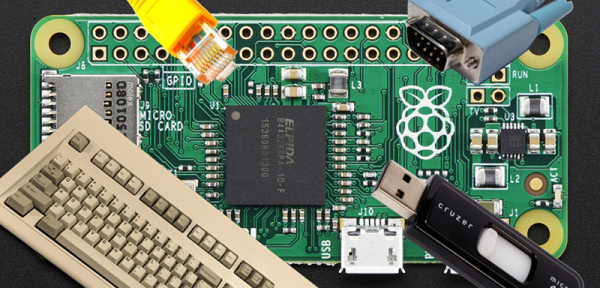
Just as the USB port on your phone can serve as a serial connection, mass storage device, and a network connection, the Pi Zero can do the same. We’ve seen a few people turn the Zero into a single USB gadget, but what about turning the Zero into a USB HID device, network connection, and serial port all at the same time? That’s what [Tobias] did, and his method is even easier than the old one.

The old method of turning the Pi Zero into a USB device required the user to modify and recompile the kernel. Obviously, this isn’t an ideal solution. [Tobias]’ implementation fixes this by putting everything into userland. Everything is configurable through a script and a few tweaks to how the Pi starts up.

The result is a Raspberry Pi Zero that will appear as any USB peripheral. [Tobias] goes through the usual examples: setting the Pi up as a serial device for hacking and code cracking in a terminal, as an Ethernet device to give the Pi Zero networking capabilities, as a keyboard to send keypresses to another computer, and as a mass storage device so that other computers can read a small portion of the Pi’s SD card.

There are plenty more USB gadgets the Pi can emulate, from printers to audio devices to MIDI adapters to webcams. If you can wrap your head around what a Pi Zero could do when configured as one of these devices, drop a note in the comments.

Upgrading And Desoldering A Fake CPU

[quarterturn] had an old Apple Powerbook 520c sitting around in his junk bin. For the time, it was a great computer but in a more modern light, it could use an upgrade. It can’t run BSD, either: you need an FPU for that, and the 520 used the low-cost, FPU-less version of the 68040 as its main processor. You can buy versions of the 68040 with FPUs direct from China, which means turning this old Powerbook into a BSD powerhouse is just a matter of desoldering and upgrading the CPU. That’s exactly what [quarterturn] did, with an unexpected but not surprising setback.

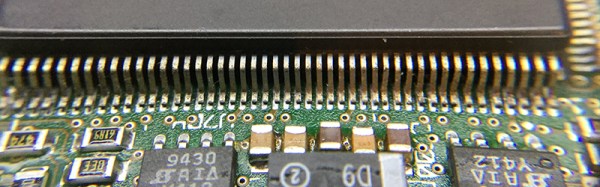
The motherboard for the Powerbook 500 series was cleverly designed, with daughter cards for the CPU itself and RAM upgrades. After pulling the CPU daughter card from his laptop, [quarterturn] faced his nemesis: a 180-pin QFP 68LC040. Removing the CPU was handled relatively easily by liberal application of ChipQuik. A few quick hits with solder braid and some flux cleaned everything up, and the daughter card was ready for a new CPU.

The new FPU-equipped CPU arrived from China, and after some very careful inspection, soldering, and testing, [quarterturn] had a new CPU for his Powerbook. Once the Powerbook was back up and running, there was a slight problem. The chip was fake. Even though the new CPU was labeled as a 68040, it didn’t have an FPU. People will counterfeit anything, including processors from the early 90s. This means no FPU, no BSD, and [quarterturn] is effectively back to square one.

That doesn’t mean this exercise was a complete loss. [quarterturn] did learn a few things from this experience. You can, in fact, desolder a dense QFP with ChipQuik, and you can solder the same chip with a regular soldering iron. Networking across 20 years of the Macintosh operating system is a mess, and caveat emptor doesn’t translate into Mandarin.