Using Photogrammetry To Design 3D Printed Parts

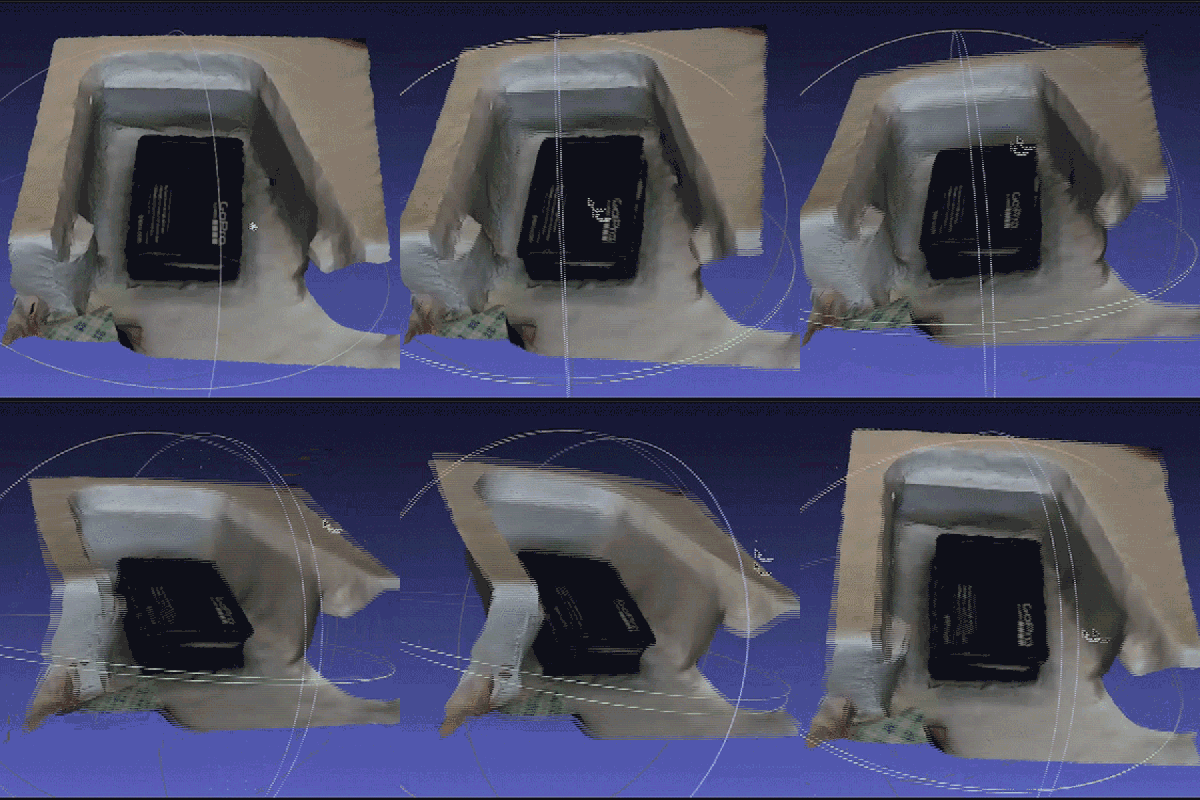
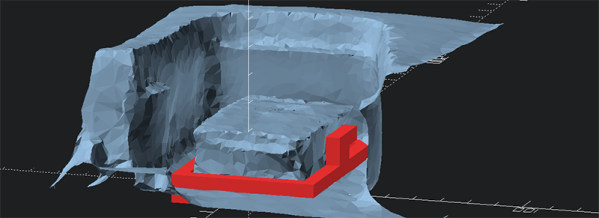
[Stefan] is building a fixed wing drone, and with that comes the need for special mounts and adapters for a GoPro. The usual way of creating an adapter is pulling out a ruler, caliper, measuring everything, making a 3D model, and sending it off to a 3D printer. Instead of doing things the usual way, [Stefan] is using photogrammetric 3D reconstruction to build a camera adapter that fits perfectly in his plane and holds a camera securely.

ScanPhotogrammetry requires taking a few dozen pictures with a camera, using software to turn these 2D images into a 3D model, and building the new part from that model. The software [Stefan] is using is Pix4D, a piece of software that is coincidentally used to create large-scale 3D models from drone footage.

With the 2D images turned into a 3D model, [Stefan] imported the .obj file into MeshLab where the model could be cropped, smoothed, and the file size reduced. From there, creating the adapter was as simple as a little bit of OpenSCAD and sending the adapter model off to a 3D printer.

Just last week we saw photogrammetry used in another 3D object scanner. The results from both of these projects show real promise for modeling, especially with objects that are difficult to measure by hand.

KiCad Traducido Al Español

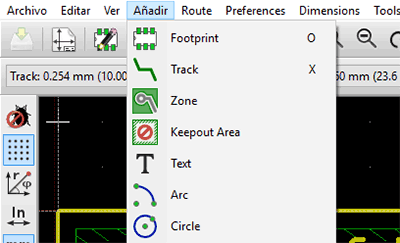
KiCad ya es una gran herramienta para la captura esquemática y el diseño de PCB, pero el software sólo funciona si es posible utilizarlo. Para los mil millones de personas que no hablan inglés, esto significa que el idioma es la barrera más grande al momento de utilizar el mejor software para desarrollo de hardware. En los últimos meses, [ElektroQuark] ha estado liderando esfuerzos de localización al español de KiCad y estos se encuentran finalmente completados. También ha iniciado un foro de KiCad en idioma español para llevar el desarrollo de software hacia uno de los idiomas más hablado del planeta.

SpanishMientras que ha habido otros intentos por localizar KiCad a otros idiomas, la mayoría de estos proyectos se encuentran incompletos. En una actualización de KiCad hace algunos meses, la localización al español ya contaba con algunas cadenas ya traducidas, pero no demasiadas. Los esfuerzos de [ElektroQuark] han acercado KiCad a millones de hablantes nativos de español, no solo algunos de sus menús.

El español es la segunda lengua más hablada del planeta, mientras que el inglés es la tercera. Teniendo en cuenta solamente este hecho, parece absurdo que casi todas las herramientas de software para capturas esquemáticas y diseño de PCB sean localizados sólo al chino o al inglés. Los esfuerzos de [ElektroQuark] por localizar KiCad al español son un gran avance para un ya impresionante software.

Unlocking Thinkpad Batteries

A few months ago, [Matt] realized he needed another battery for his Thinkpad X230T. The original battery would barely last 10 minutes, and he wanted a battery that would last an entire plane flight. When his new battery arrived, he installed it only to find a disturbing message displayed during startup: “The system does not support batteries that are not genuine Lenovo-made or authorized.” The battery was chipped, and now [Matt] had to figure out a way around this.

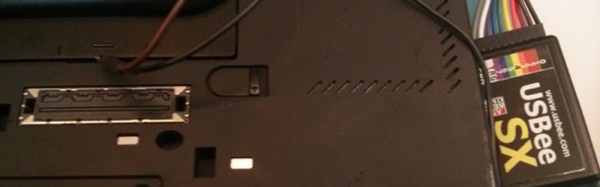
Most recent laptop batteries have an integrated controller that implements the Smart Battery Specification (SBS) over the SMBus, an I2C-like protocol with data and clock pins right on the battery connector. After connecting a USBee logic analyser to the relevant pins, [Matt] found the battery didn’t report itself correctly to the Thinkpad’s battery controller.

With the problem clearly defined, [Matt] had a few options open to him. The first was opening both batteries, and replacing the cells in the old (genuine) battery with the cells in the newer (not genuine) battery. If you’ve ever taken apart a laptop battery, you’ll know this is the worst choice. There are fiddly bits of plastic and glue, and if you’re lucky enough to get the battery apart in a reasonably clean matter, you’re not going to get it back together again. The second option was modifying the firmware on the non-genuine battery. [Charlie Miller] has done a bit of research on this, but none of the standard SBS commands would work on the non-genuine battery, meaning [Matt] would need to take the battery apart to see what’s inside. The third option is an embedded controller that taps into the SMBus on the charger connector, but according to [Matt], adding extra electronics to a laptop isn’t ideal. The last option is modifying the Thinkpad’s embedded controller firmware. This last option is the one he went with.

There’s an exceptionally large community dedicated to Thinkpad firmware hacks, reverse engineering, and generally turning Thinkpads into the best machines they can be. With the schematics for his laptop in hand, [Matt] found the embedded controller responsible for battery charging, and after taking a few educated guesses had some success. He ran into problems, though, when he discovered some strangely encrypted code in the software image. A few Russian developers had run into the same problem, and by wiring up a JTAG to the embedded controller chip, this dev had a fully decrypted Flash image of whatever was on this chip.

[Matt]’s next steps are taking the encrypted image and building new firmware for the embedded controller that will allow him to charge is off-brand, and probably every other battery on the planet. As far as interesting mods go, this is right at the top, soon to be overshadowed by a few dozen comments complaining about DRM in batteries.

China’s Fusion Reactor Hits Milestone

An experimental fusion reactor built by the Chinese Academy of Science has hit a major milestone. The Experimental Advanced Superconducting Tokamak (EAST) has maintained a plasma pulse for a record 102 seconds at a temperature of 50 million degrees – three times hotter than the core of the sun.

The EAST is a tokamak, or a torus that uses superconducting magnets to compress plasma into a thin ribbon where atoms will fuse and energy will be created. For the last fifty years, most research has been dedicated to the study of tokamaks in producing fusion power, but recently several projects have challenged this idea. The Wendelstein 7-X  stellarator at the Max Planck Institute for Plasma Physics recently saw first plasma and if results go as expected, the stellarator will be the design used in fusion power plants. Tokamaks have shortcomings; they can only be ‘pulsed’, not used continuously, and we haven’t been building tokamaks large enough to produce a net gain in power, anyway.

Other tokamaks currently in development include ITER in France. Theoretically, ITER is large enough to attain a net gain in power at 12.4 meters in diameter. EAST is much smaller, with a diameter of just 3.7 meters. It is impossible for EAST to ever produce a net gain in power, but innovations in the design that include superconducting toroidal and poloidal magnets will surely provide insight into unsolved questions in fusion reactor design.

Particle Electron – The Solution To Cellular Things

Just over a year ago, Particle (formerly Spark), makers of the very popular Core and Particle Photon WiFi development kits, released the first juicy tidbits for a very interesting piece of hardware. It was the Electron, a cheap, all-in-one cellular development kit with an even more interesting data plan. Particle would offer their own cellular service, allowing their tiny board to send or receive 1 Megabyte for $3.00 a month, without any contracts.

Thousands of people found this an interesting proposition and the Electron crowdfunding campaign took off like a rocket. Now, after a year of development and manufacturing, these tiny cellular boards are finally shipping out to backers and today the Electron officially launches.

Particle was kind enough to provide Hackaday with an Electron kit for a review. The short version of this review is the Electron is a great development platform, but Particle pulled off a small revolution in cellular communications and the Internet of Things

Continue reading “Particle Electron – The Solution To Cellular Things”

FAA Rescinds Drone Ban Around DC

Late last year, the FAA expanded a Special Flight Rule Area (SFRA) that applied to Unmanned Aerial Systems, drones, and RC airplanes around Washington DC. This SFRA was created around the year 2000 – for obvious reasons – and applies to more than just quadcopters and airplanes made out of foam. Last December, the FAA expanded the SFRA from 15 nautical around a point located at Reagan National to 30 nautical miles. No remote-controlled aircraft could fly in this SFRA, effectively banning quadcopters and drones for six million people.

Today, the FAA has rescinded that ban bringing the area covered under the Washington DC SFRA to 15 nautical miles around a point inside Reagan National. This area includes The District of Columbia, Bethesda, College Park, Alexandria, and basically everything inside the beltway, plus a mile or two beyond. Things are now back to the way they were are few weeks ago.

The 30-mile SFRA included a number of model flying clubs that were shuttered because of the ban. DCRC is now back up. The Capital Area Soaring Association worked with the FAA and AMA to allow club members to fly.

Of course, limitations on remote-controlled aircraft still exist. For the most part, these are rather standard restrictions: aircraft must weigh less than 55 pounds, fly below 400 feet line of sight, and must avoid other aircraft.

Giving WiFi To An Apple Newton

The Apple Newton gets a bad rap, partly because of the bad handwriting recognition of the first version of the firmware, and mostly because Steve Jobs hated it. Those who know of the Newton love the Newton; it has an exceptionally well-designed interface, the handwriting recognition is great with updated firmware.

[Jake] has the king of the Newtons – a MessagePad 2100. There’s a hidden port in this machine for a modem card, but Apple never made one. While other Newton aficionados trudge along with old PCMCIA WiFi cards that only support 802.11a without WPA2, [Jake] thought it would be possible to build a modern WiFi card for the Newton. He succeeded, opening the door to modern networking apps on the finest tablet Apple will ever make.

Oddly, this isn’t [Jake]’s first attempt at expanding the capabilities of his Newton. There’s an internal serial port inside the MessagePad 2×00, and a few years ago [Jake] tried to build an internal Bluetooth card. The RF design didn’t work, but with a few more years of experience, [Jake] figured he had the skills for the job.

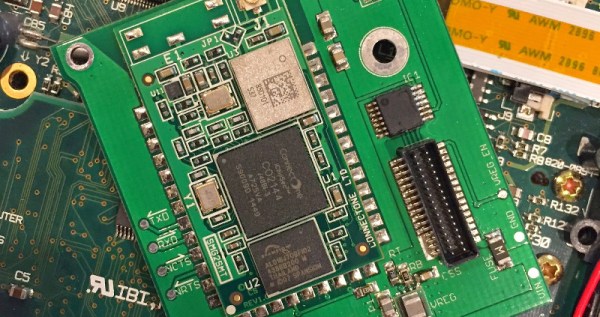
The critical piece of hardware for this build isn’t an ESP8266 or other common WiFi module. Instead, a WiReach module from ConnectOne was used for the built-in PPP server. This allows legacy hardware to use standard AT modem commands to access a WiFi network. It’s a very interesting module; there is a lot of hardware out there that speaks PPP natively, and a module like this could be a drop-in replacement for a modem.

That said, thanks to unintelligible and ‘Apple Classified’ documentation, getting this card working wasn’t easy. The APIs to access the internal serial slot were never documented, and it took a bit of time with a disassembler to figure out how to address the port correctly.

[Jake] has pushed all the files for his project up to Github. This includes the design files for the PCB, the Newton software that enables WiFi, and a nifty 3D printed port cover that shows off the new wireless capabilities of Apple’s greatest tablet.