7th Period Of The Periodic Table Complete

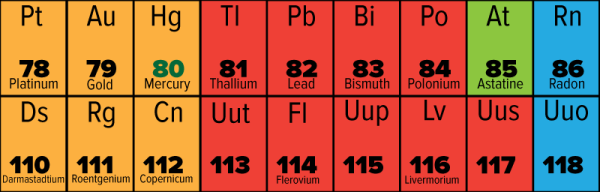
For the last fifty or so years, the periodic table has been incomplete. Elements after uranium on the periodic table have been synthesized for the past few decades, but there were always a few missing blocks in the periodic table. These elements, with atomic numbers of 113, 115, 117, and 118 comprise the missing parts of period 7 – the lowest row – of the periodic table. Now, IUPAC, the International Union of Pure and Applied Chemistry, has announced the verification of the discoveries of the last four elements of the seventh period of the periodic table.

With the announcement of the verification of discovery for these elements, they will get a name. Currently elements 113, 115, 117, and 118 are known as Ununtrium, Ununpentium, Ununseptium, and Ununoctium, respectively. What these elements will be named depends on the proposals by the discoverers of these elements.

Element 113 was discovered by researchers at the RIKEN laboratory in Japan, and these researchers will be able to propose a name and atomic symbol for their discovery. Elements 115, 117, and 118 were discovered through a partnership between the Joint Institute for Nuclear Research in Dubna, Russia, Lawrence Livermore National Laboratory in California, and Oak Ridge National Laboratory in Oak Ridge, Tennessee. Researchers at these three laboratories will propose names and atomic symbols for these three elements.

It should be noted that Lawrence Livermore National Laboratories and the Joint Institute for Nuclear Research in Dubna each have their own element named after them: Lawrencium and Dubnium, with atomic numbers 103 and 105, respectively. Having element 113, 115, and 118 named after Oak Ridge National Laboratory wouldn’t be a bad proposal, and would be rather fitting given the laboratory’s influence on the last half-century of physics.

Of particular interest is the naming of element 118. Because element 118 falls within group 18 of the periodic table, it is a noble gas, with a particular naming pattern. each of the elements in group 18 end with the suffix ~on, instead of the suffix for the rest of the periodic table, ~ium (helium is the exception to this rule due to historical precedent). Whether element 118 will use the ~on or ~ium suffix is up to debate; current IUPAC rules say all new elements should end with ~ium, but recommendations have been published to name all group 18 elements with the ~on suffix.

This is not the end of the periodic table by any means. It is possible that elements with higher atomic numbers can be synthesized. However, experiments to synthesize element 119 have so far come up short, and the predicted properties of element 119 put it at the limits of what current technology is able to detect.
Better 3D Graphics On The Arduino

There are cheap LCDs available from China, and when plugged into an Arduino, these displays serve as useful interfaces or even shinier baubles for your latest project. [Michael] picked up a few of these displays in the hope of putting a few animated .GIFs on them. This is an impossible task with an ATMega microcontroller – the Arduino does not have the RAM or the processing power to play full-screen animations. It is possible to display 3D vector graphics, with an updated graphics library [Michael] wrote.

The display in question uses the ILI9341 LCD driver, found in the Adafruit library, and an optimized 3D graphics driver. Both of these drivers have noticeable flicker when the animation updates, caused by the delay between erasing a previous frame and when a new frame is drawn.

With 16-bit color and a resolution of 320×240 pixels, there simply isn’t enough memory or the processing power on an ATMega microcontroller to render anything in the time it takes to display a single frame. There isn’t enough memory to render off-screen, either. To solve this problem, [Michael] built his render library to only render pixels that are different from the previous frame.

Rendering in 3D presents its own problems, with convex surfaces that can overlap themselves. To fix this, [Michael]’s library renders objects from front to back – if the pixel doesn’t change, it doesn’t need to be rendered. This automatically handles occlusions.

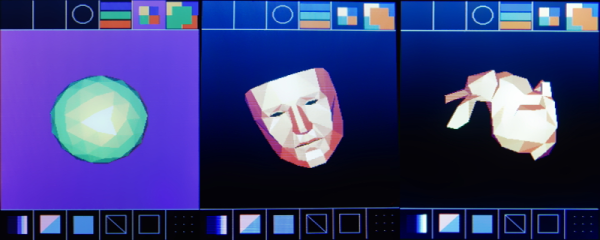
In a demo application, [Michael]’s LCD and Arduino can display the Stanford bunny, a low-poly 3D face, and geometric object. It’s not a video game yet, but [Michael] thinks he can port the classic game Spectre to this platform and have it run at a decent frame rate.

Video of the demo below.

Continue reading “Better 3D Graphics On The Arduino”

Portable, DIY Radiography

[Matt] has a background in radiation, electronics, and physics, which means building a device to generate X-rays was only a matter of time. It’s something not everyone should attempt, and [Matt] discourages anyone from attempting anything like this, but if you’re looking for a project with a ‘because it’s there’ flair to it, building your own X-ray machine can be a fun and rewarding project.

Despite being scary and mysterious, X-rays are a rather old technology that date back to some of the first purposeful experiments in electronics. Most X-ray devices today are built around the same parts they were 100 years ago, namely, a Coolidge tube. Apply a high enough voltage to the Coolidge tube and electrons whizz from cathode to anode, and slam into a heavy metal target. This produces Bremsstrahlung radiation – breakingbraking X-rays – that can be directed to film or an X-ray intensifier screen that fluoresces in visible light when being struck by X-rays.

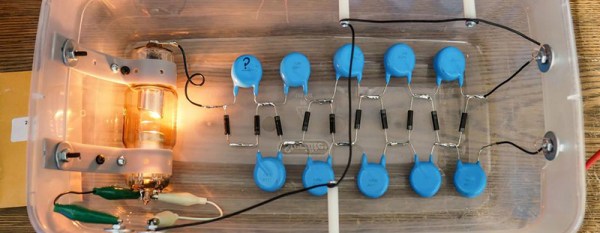
Aside from a cheap Coolidge tube, [Matt] constructed the rest of his X-ray generator with a voltage multiplier made out of sufficiently derated Chinese caps, a flyback transformer, and a transformer driver originally made for induction heating applications. The electronics were installed in a Tupperware container and insulated with mineral oil.

Being able to generate X-rays is one thing, viewing them is another matter entirely. For this, [Matt] is using an old X-ray intensifier screen from the 60s or 70s. This screen fluoresces blue, not the easiest color to photograph in low-light settings, but enough to capture images of the inside of tools sitting around his workbench. Following in the footsteps of [Roentgen], [Matt] also took an X-ray image of his hand. This is something he doesn’t recommend, and something he won’t do again, but it is a very cool example of what you can do with sufficient knowledge and respect for what can kill you.

32C3: Running Linux On The PS4

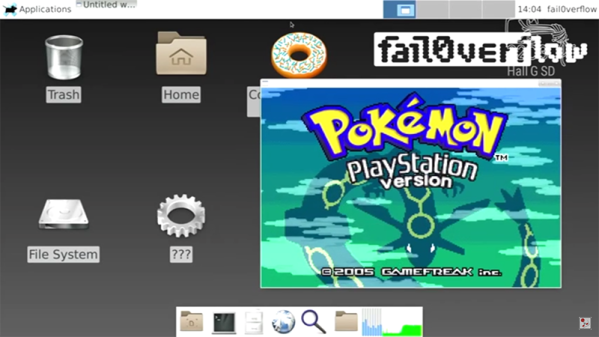
At the 2010 Chaos Communication Congress, fail0verflow (that’s a zero, not the letter O) demonstrated their jailbreak of the PS3. At the 2013 CCC, fail0verflow demonstrated console hacking on the Wii U. In the last two years, this has led to an active homebrew scene on the Wii U, and the world is a better place. A few weeks ago, fail0verflow teased something concerning the Playstation 4. While this year’s announcement is just a demonstration of running Linux on the PS4, fail0verflow can again claim their title as the best console hackers on the planet.

Despite being able to run Linux, there are still a few things the PS4 can’t do yet. The current hack does not have 3D acceleration enabled; you won’t be playing video games under Linux with a PS4 any time soon. USB doesn’t work yet, and that means the HDD on the PS4 doesn’t work either. That said, everything to turn the PS4 into a basic computer running Linux – serial port, framebuffer, HDMI encoder, Ethernet, WiFi, Bluetooth, and the PS4 blinkenlights – is working.

Although the five-minute lightning talk didn’t go into much detail, there is enough information on their slides to show what a monumental task this was. fail0verflow changed 7443 lines in the kernel, and discovered the engineers responsible for the southbridge in the PS4 were ‘smoking some real good stuff’.

This is only fail0verflow’s announcement that Linux on the PS4 works, and the patches and bootstrap code are ‘coming soon’. Once this information is released, you’ll need to ‘Bring Your Own Exploit™’ to actually install Linux.

Video of the demo below.

Continue reading “32C3: Running Linux On The PS4”

2015: As The Hardware World Turns

A few hours from now, the ball will drop in Times Square. 2015 is over, and the good news is you can easily turn a handwritten ‘5’ into a ‘6’. Keep that in mind for the next few weeks. It’s time for a retrospective of everything that happened in 2015. That’s rather boring, though, and it’s usually better to put the most outrageous items in the lede. Therefore, it’s time for predictions of what will happen over the next 366 days. They are, in order:

  • 2016 will be the year of the Linux desktop
  • Self-driving cars will be demonstrated
  • Graphene! Something to do with graphene!
  • Your company will receive a resume with ‘Bitcoin’ listed as a skill
  • Fusion power is only nine years away

With that said, a lot happened this year. Tiny Linux single board computers became incredibly cheap, Radio Shack died, and Arduino went crazy.

Continue reading “2015: As The Hardware World Turns”

Yet Another Pi Zero USB Hub

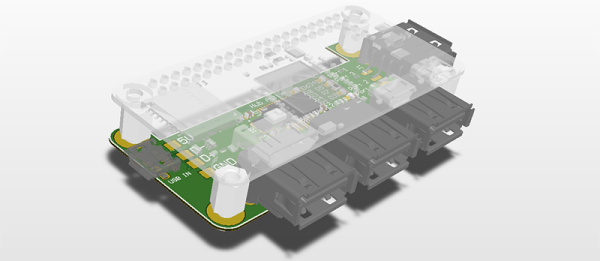
The Raspberry Pi Zero was back in stock at Adafruit this week – for about eight minutes. That means a few more people get Pi Zeros, many more will put them up on eBay, and everyone is working on their own version of a Pi Zero USB hub. The latest version of a Pi Zero hub comes from [Nate], and he’s doing this one right. His Pi USB adapter adds four USB ports and features not found in other DIY USB hubs like fuses and ESD protection.

As with other Pi Zero USB hub add-ons, this build relies on a USB hub controller, a few passives, and not much else. The chip used in this hub is the FE1.1s chip, a highly integrated 4-port hub controller that can be found through the usual Chinese resellers. This hub controller doesn’t require much, just a 12MHz crystal, a few passives, and four USB jacks.

Of particular interest is how [Nate] is connecting this hub to the Pi Zero. He’s left the option open for using either a USB cable, or soldering the USB’s differential pairs directly between the Pi and the hub. In either case, the hub should work, and with the addition of the zeners, fuses, and other parts that keep the hub from frying itself, [Nate] might have a very nice project on his hands.

32C3: Inside Glorious Leader’s Operating System

North Korea is a surveillance state propped up by a totalitarian government infamous for human rights abuses and a huge military that serves the elite while the poor are left to fight over scraps. Coincidently, that’s exactly what North Korea says about the United States.

There is one significant difference between the two countries: North Korea has developed its own operating system for its citizens, called Red Star OS. It’s an operating system based on Linux, but that has a few interesting features that allow Glorious Leader to take care of his citizens. A deep teardown of what has gone into the development of Red Star OS hasn’t been available until now, with [Florian Grunow] and [Niklaus Schiess]’s talk at the Chaos Communication Congress this week.

Kim Jong-Un with an iMac

The first question anyone must ask when confronted with an operating system built by a country that doesn’t have much electricity is, “why?” This question can only be answered philosophically; the late Kim Jong-Il stressed the importance of North Korea developing “their own style” of programming, and not relying on western operating systems. Nearly everything in Red Star has been modified, with a custom browser called Naenara, a crypto tool, a clone of Open Office, a software manager, and a custom music composition tool. Red Star also had to have the look and feel of OS X; that is, after all, what Glorious Leader uses.

Red Star goes much deeper than custom browsers and a desktop theme. There are other, subtler components inside the OS. There is a program that verifies the integrity of the system by checking signatures of the custom files against a database. If a file has been tampered with, the system reboots. Since this tamper check runs on bootup, Red Star makes it nearly impossible to modify files for study. This is one of the big features designed into Red Star – system integrity is paramount.

There are other custom bits of software that hide files from the user even if they have root, and a ‘virus scanner’ that is anything but. This virus scanner checks documents for patterns that, when put through Google Translate, are strange, weird, and somewhat understandable. Phrases like, “punishment”, “hungry”, and “strike with fists” are detected in all documents, and depending on what the developers decide, these documents can be deleted on a whim.

While scanning a system for documents that contain non-approved speech is abhorrent enough, there’s another feature that would make any privacy advocate weep. Media files including DOCX, JPG, PNG, and AVI files are watermarked by every computer that opened the files. This allows anyone to track the origin of a file, with the obvious consequences to free speech that entails.

While most people in the US consider North Korea to be a technological backwater and oppressive regime, the features that make Red Star OS useful to the DPRK are impressive. The developers touched nearly everything in Red Star, and the features inside it are rather clever and make their style of surveillance very useful. They’re also doing this without any apparent backdoors or other spycraft; they’re putting all their surveillance out in the open for all to see, which is, perhaps, the best way to go about it.