32C3: Vector Video Games

There are a few classic video games that rely on vector graphics and special monitors. Asteroids is incomplete if you’re not playing it in its original arcade format. The same goes with Tempest, Lunar Lander, and the 1983 Star Wars arcade game. Emulation of these games is possible, even with MAME, but the display – like every display you can buy today – is still rasterized. The solution to this problem is to create a vector display output for MAME that works in conjunction with adapter boards and DACs connected to a monitor.

For this year’s Chaos Computer Congress, that’s exactly what [Trammell Hudson] and [Adelle Lin] did. They’ve created an open source vector gaming system that connects MAME to XY monitors and oscilloscopes.

The build uses a custom board equipped with a Teensy 3.1 microcontroller and a 12-bit DAC to convert XY coordinates sent by MAME to vectors that can be displayed on any XY monitor. This, of course, requires a patch to MAME, which the maintainers rejected as being an, “unacceptably hacky way to achieve the intended result.” It does achieve the intended result, though: allowing dozens of vector games playable on whatever monitor supports vector graphics.

So far, [Trammell] and [Adelle] have gotten their system working on Vectrex consoles, analog oscilloscopes set to XY mode, and vectorscopes that litter every broadcast station and surplus shop. Check out [Trammell] and [Adelle]’s talk, and if you want to build the V.st vector display driver, the board is available from OSHPark.

FAA Bans Drones For More Than Six Million People

In recent weeks, the FAA has solicited input from hobbyists and companies in the ‘drone’ industry, produced rules and regulations, and set up a registration system for all the quadcopters and flying toys being gifted over the holiday season. Whether or not the FAA is allowed to do this is a question being left to the courts, but for now, the FAA has assuredly killed a hobby for more than six million people. The FAA has introduced an updated Temporary Flight Restriction (TFR) for a 30-mile radius around Washington, DC.

staticmap
The 30-mile TFR area

Previously, there had been a blanket ban on drones, UAS, and model aircraft within a 15-mile radius of a point inside Reagan National Airport. This point covered the District of Columbia proper, and the suburbs of Bethesda, College Park, and Alexandria – basically, everything inside the beltway, and a mile or two beyond. The new flight restriction for drones covers a vastly larger area – all of the DC metro area, Annapolis, half of Baltimore, and all of northern Virginia. This area encompasses a population of more than six million people.

The DC metro area has, since 9/11, become some of the most complex airspace in the entire country. There are several military bases, Aberdeen proving grounds, the US Naval academy, and of course the White House, Capitol building, and the Pentagon. Even commercial airliners are subject to some very interesting regulations. For the same reason general aviation shuts down in southern California every time the president visits LA, you simply can’t fly model aircraft within the beltway; it’s a security measure, and until now, flying clubs in the DC area have dealt with these restrictions.

The new TFR has effectively shuttered more than a dozen flying clubs associated with the Academy of Model Aeronautics. DCRC, a club with a field in the middle of some farmland in Maryland, has closed down until further notice. The Capital Area Soaring Association has also closed because of the TFR.

Although called a Temporary Flight Restriction, this is a rule that will be around for a while. The FAA says this restriction is here for good.

Flying Planes With Squirrel Cages

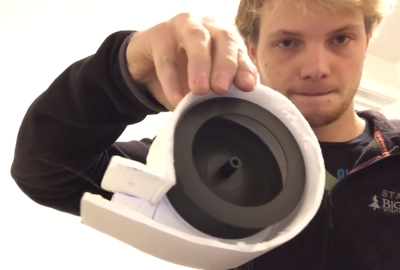
Fixed wing remote control planes are ridiculously overpowered. Whereas normal, manned fixed wing aircraft need to take into account things like density altitude, angle of attack, and weight limits, most RC aircraft can hover. This insane amount of power means there’s a lot of room for experimentation, especially in new and novel power plants. [Samm Sheperd] had an old squirrel cage fan taken from an electric wall heater and figured one man’s trash was an integral part of another man’s hobby and built a plane around this very unusual fan.

squirrel-cage-fan-wideThe only part of the squirrel cage fan [Samm] reused was the impeller. Every other part of this power plant was either constructed out of foam board, plywood, or in the case of the brushless motor turning the fan, stolen from the ubiquitous box of junk on every modeller’s workbench.

The design of the plane puts the blower fan directly under the wings, blasting the air backwards underneath the empennage. During testing, [Samm] found this blower pulled around 350W from the battery – exactly what it should draw if a properly sized propeller were attached to the motor. The thrust produced isn’t that great — only about 400g of thrust from an airframe that weights 863g. That’s very underpowered for an RC aircraft, but absurdly powerful for any manned flying machine.

Does the plane work? Of course it does. [Samm] took his plane for a few laps around the neighborhood and found the plane flies excellently. It is horrifically loud, but it is a great example of how much anyone can do with cheap RC planes constructed out of foam.

Continue reading “Flying Planes With Squirrel Cages”

The Effects Of Color On Material Properties Of 3D Printed Components

The strength of object printed on filament-based 3D printers varies by the plastic used, the G-code used by the printer, the percent infill, and even the temperature the plastic was extruded at. Everything, it seems, has an effect on the strength of 3D printed parts, but does the color of filament have an effect on the stress and strain a plastic part it can withstand? [Joshua M. Pearce] set out to answer that question in one of his most recent papers.

The methods section of the paper is about what you would expect for someone investigating the strength of parts printed on a RepRap. A Lulzbot TAZ 4 was used, along with natural, white, black, silver, and blue 3mm PLA filament. All parts were printed at 190°C with a 60°C heated bed.

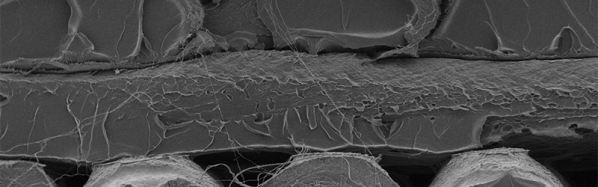
The printed parts demonstrated yet again that a RepRap can produce parts that are at least equal in material strength to those produced by a proprietary 3D printer. But what about a difference in the strength among different colors? While there wasn’t a significant variation in the Young’s modulus of parts printed in different colors, there was a significant variation of the crystallization of differently colored printed parts, with white PLA producing the largest percent crystallinity, followed by blue, grey, black, and finally natural PLA. This crystallinity of a printed part can affect the tensile properties of a printed part, but [Pearce] found the extrusion temperature also has a large effect on the percentage of crystallinity.

32C3: Towards Trustworthy X86 Laptops

Security assumes there is something we can trust; a computer encrypting something is assumed to be trustworthy, and the computer doing the decrypting is assumed to be trustworthy. This is the only logical mindset for anyone concerned about security – you don’t have to worry about all the routers handling your data on the Internet, eavesdroppers, or really anything else. Security breaks down when you can’t trust the computer doing the encryption. Such is the case today. We can’t trust our computers.

In a talk at this year’s Chaos Computer Congress, [Joanna Rutkowska] covered the last few decades of security on computers – Tor, OpenVPN, SSH, and the like. These are, by definition, meaningless if you cannot trust the operating system. Over the last few years, [Joanna] has been working on a solution to this in the Qubes OS project, but everything is built on silicon, and if you can’t trust the hardware, you can’t trust anything.

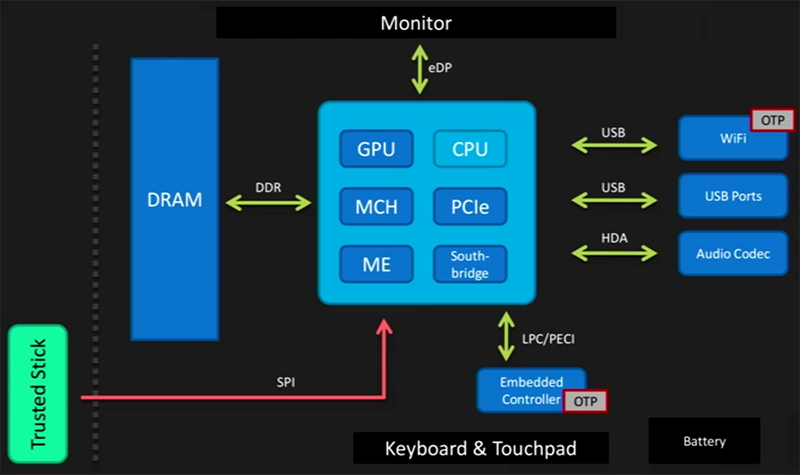
And so we come to an oft-forgotten aspect of computer security: the BIOS, UEFI, Intel’s Management Engine, VT-d, Boot Guard, and the mess of overly complex firmware found in a modern x86 system. This is what starts the chain of trust for the entire computer, and if a computer’s firmware is compromised it is safe to assume the entire computer is compromised. Firmware is also devilishly hard to secure: attacks against write protecting a tiny Flash chip have been demonstrated. A Trusted Platform Module could compare the contents of a firmware, and unlock it if it is found to be secure. This has also been shown to be vulnerable to attack. Another method of securing a computer’s firmware is the Core Root of Trust for Measurement, which compares firmware to an immutable ROM-like memory. The specification for the CRTM doesn’t say where this memory is, though, and until recently it has been implemented in a tiny Flash chip soldered to the motherboard. We’re right back to where we started, then, with an attacker simply changing out the CRTM chip along with the chip containing the firmware.

But Intel has an answer to everything, and to the house of cards for firmware security, Intel introduced their Management Engine. This is a small microcontroller running on every Intel CPU all the time that has access to RAM, WiFi, and everything else in a computer. It is security through obscurity, though. Although the ME can elevate privileges of components in the computer, nobody knows how it works. No one has the source code for the operating system running on the Intel ME, and the ME is an ideal target for a rootkit.
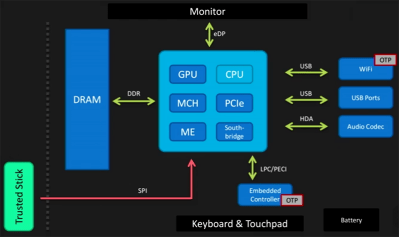
trustedstickIs there hope for a truly secure laptop? According to [Joanna], there is hope in simply not trusting the BIOS and other firmware. Trust therefore comes from a ‘trusted stick’ – a small memory stick that contains a Flash chip that verifies the firmware of a computer independently of the hardware in a computer.

This, with open source firmwares like coreboot are the beginnings of a computer that can be trusted. While the technology for a device like this could exist, it will be a while until something like this will be found in the wild. There’s still a lot of work to do, but at least one thing is certain: secure hardware doesn’t exist, but it can be built. Whether secure hardware comes to pass is another thing entirely.

You can watch [Joanna]’s talk on the 32C3 streaming site.

Hackaday Links: December 27th, 2015

PCBs can be art – we’ve known this for a while, but we’re still constantly impressed with what people can do with layers of copper, fiberglass, soldermask, and silkscreen. [Sandy Noble] is taking this idea one step further. He took C64, Spectrum, and Sinclair PCBs and turned them into art. The results are incredible. These PCBs were reverse engineered, traced, and eventually turned into massive screen prints. They look awesome, and they’re available on Etsy.

$100k to bring down drones. That’s the tagline of the MITRE Challenge, although it’s really being sold as, “safe interdiction of small UAS that pose a safety or security threat in urban areas”. You can buy a slingshot for $20…

[styropyro] mas made a name for himself on Youtube for playing with very dangerous lasers and not burning his parent’s house down. Star Wars is out, and that means it’s time to build a handheld 7W laser. It’s powered by two 18650 cells, and is responsible for more than a few scorch marks on the walls of [styropyro]’s garage.

Everybody is trying to figure out how to put Ethernet and a USB hub on the Pi Zero. This means a lot of people will be launching crowdfunding campaigns for Pi Zero add-on boards that add Ethernet and USB. The first one we’ve seen is the Cube Infinity. Here’s the thing, though: they’re using through-hole parts for their board, which means this won’t connect directly to the D+ and D- USB signals on the Pi Zero. They do have a power/battery board that may be a little more useful, but I can’t figure out how they’re doing the USB.

[Keith O] found a fascinating video on YouTube and sent it into the tips line. It’s a machine that uses a water jet on pastries. These cakes start out frozen, and come out with puzzle piece and hexagon-shaped slices. Even the solution for moving cakes around is ingenious; it uses a circular platform that rotates and translates by two toothed belts. Who would have thought the latest advancements in cutting cakes and pies would be so fascinating?

It’s time to start a tradition. In the last links post of last year, we took a look at the number of views from North Korea in 2014. Fifty-four views, and we deeply appreciate all our readers in Best Korea. This year? For 2015, we’ve logged a total of thirty-six views from the Democratic People’s Republic of Korea. That’s a precipitous drop that deserves an investigation. Pyongyang meetup anyone?

Turning The Pi Zero Into A USB Gadget

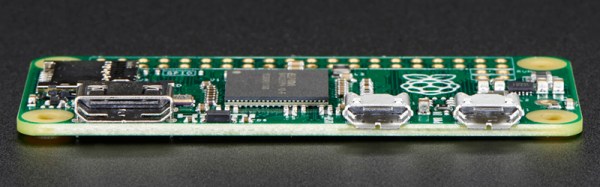
The Raspberry Pi Zero is limited, or so everyone says, and everyone is trying to cram a USB hub and WiFi adapter on this tiny, tiny board. One thing a lot of people haven’t realized is that the Raspberry Pi Zero comes with a USB OTG port, meaning it can function as a USB device rather than a USB host. This means the Raspi can become a serial device with just a USB cable, an Ethernet device, MIDI device, camera, or just about anything else you can plug into a USB port. Adafruit has your back with a tutorial for using the USB OTG port as a serial and Ethernet interface, and the possible applications are extremely interesting.

The only requirement for using the USB OTG port for device applications is an update to the kernel. This is easily installed by dumping a few files on an SD card and a employing bit of command line wizardry. The simplest example is setting up the Pi Zero as a USB serial device, allowing anyone to log into a serial console on the Pi with just a USB cable.

A slightly more interesting application is setting up the Pi as an Ethernet gadget. This effectively tunnels all the networking on the Pi Zero through a USB cable and a separate computer. The instructions are extremely OS-specific, but the end result is the same: you can apt-get on a Pi Zero to your heart’s desire with a new kernel loaded onto the SD card and a USB cable.

This experimentation is just scratching the surface of what is possible with the OTG port on the Pi Zero. MIDI devices are easy, and with a ton of GPIOs, the Pi Zero itself could become a very interesting musical instrument. Want the Pi Zero to be a storage device? That’s easy too. The USB Gadget will end up being one of the most exciting uses for the Pi Zero, and we can’t wait to see what everyone will come up with next.