Programming In 3D With 3DPL

cubes

Here’s an interesting tool for making simple 3D games. It’s called 3DPL, the 3D programming language, and it’s a real-time interpreted language that allows you to create cubes and other primitives that respond to user input and internal logic. Not only that, but you can build 3D versions of breakout and asteroids very simply with only a few lines of code.

3DPL is based on Unity with a lot of JavaScript influences. Building a cube in 3DPL is as simple as declaring it with a name and position in 3D space. There are a few functions that can be applied to these cubes – they can be made to rotate at the press of a key, or translated in space to collide with each other.

It’s still a very early build, but looks to be pretty interesting for an ‘introduction to 3D graphics programming’ perspective. You can grab a copy of 3DPL to try out over on [amigojapan]’s github. Hopefully we’ll see a gravity method soon for a proper 3DPL Tetris implementation.
Turning An IPhone Into A Karaoke Machine

setup

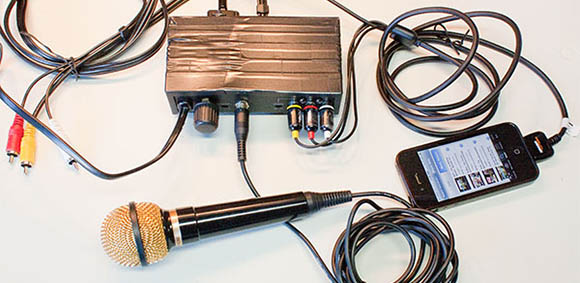
Instead of booking an MC for your next karaoke party, take a look at [Paulo]’s build that turns any iPhone into a karaoke machine.

There are thousands of YouTube videos out there of songs with lyrics – a much more advanced version of the mainstay of any karaoke get together, suitcase full of CDs and a video monitor. The only problem in turning these YouTube videos into a karaoke party is putting a drunken slob into the mix. [Paulo] recently solved this problem with a karaoke mixer that adds a microphone input to any analog audio feed.

But this is only halfway to a karaoke machine. To finish the build, [Paulo] created an amplifier (with a fabulous Manhattan-style PCB) for an iPhone’s audio output. The video output can be sent directly to a monitor, allowing for the full karaoke experience.

Since [Paulo]’s karaoke mixer uses an XLR jack for the mic, it’s still possible to make karaoke worse by adding vocal and other miscellaneous effects.

Reflow Oven Courtesy Of Hurricane Sandy

2013-01-23-00.51.57

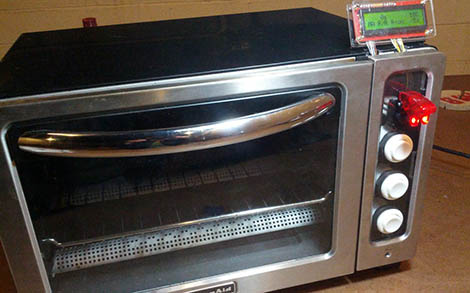
The Makerbar, Hoboken’s Hackerspace, was in desperate need of a reflow oven. Hurricane Sandy did a number on a whole bunch of household appliances, so when [Kush] saw a neighbor throw out a broken toaster oven, the Makerbar crew sprung into action.

The storm waters shorted the electronics board, fried the existing controls, and basically turned the oven into a metal shell with heating elements. It was the perfect platform for a toaster oven – every part that was going to be thrown out was already destroyed.

[Zach] over at the Makerbar ordered the Sparkfun reflow toaster conversion kit along with a few arcade buttons and set to work. After plugging the heating elements into the mains power to make sure they still worked, [Zach] attached these elements to the relay on board the controller. Three arcade buttons were wired up to the controller, and a whole bunch of code was written.

With the included thermocouple, [Zach], [Kush], and the rest of the Makerbar gang now have a very accurate and reliable reflow oven. There’s also settings for Sculpey clay and shrinky dinks, just in case anyone at Makerbar is feeling a bit creative.

Better PWM On The Raspberry Pi

pi

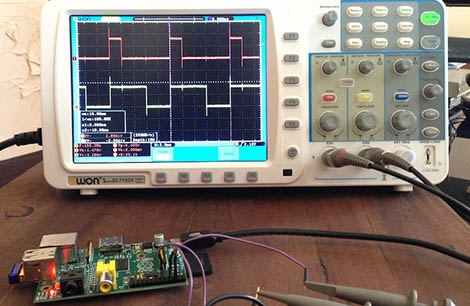
[Thomas] wanted to play around with a few high-power LEDs and a RaspberryPi. LED controllers usually require some form of PWM to change the brightness of a LED, and unfortunately the Pi only has one PWM pin. [Thomas] could have gotten around this with a custom chip or even an Arduino hanging off the Pi’s USB port. He opted to go with software-based PWM, and did so in a way that is far superior to bit banging a pin.

Conventional wisdom says PWM without a real-time operating system is dumb – right up there with starting a land war in Asia. Turning a pin on and off in a while loop will eat up all the processor power in the Pi, so [Thomas] looked for a better way to do things. He came across the ServoBlaster project by [Richard Hirst] that creates pulses of different lengths by playing with direct memory access; [Richard] created a circular buffer that is read every 10μs. With 2000 values in the buffer, he can control eight different pins with very little impact on CPU usage.

For [Thomas], though, [Richard]’s project wasn’t enough. It was originally written for servos and is only able to drive PWM pins up to about 12%. A quick rewrite of [Richard]’s code allowed [Thomas] to control eight pins with PWM varying from 0% to 100% – and be able to do other things with his Pi in the process.

[Thomas] now has a 40 Watt RGB LED powered by a Raspberry Pi burned into his retina, and the satisfaction of a really clever way of giving the Pi more PWM pins.

Building A Better NES

NES

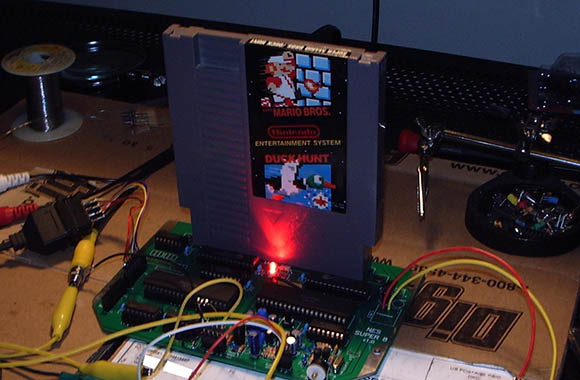
The first model of the NES wasn’t all that great; just ask any one of the millions of six-year-olds who independently discovered blowing on a cartridge made it work. The second NES hardware revision, the top loader, was better but only had RF video output. These are the only two pieces of hardware that can play every single NES game, and even with years of hacking NES-on-a-chip devices, there’s still much to be desired.

[low_budget] over on the AtariAge forum decided he’d had enough of these hardware compromises and decided to build the first new NES hardware revision in 20 years. It’s got all the best features from both of its predecessors and a few new features not seen on any existing NES. There’s support for composite and RGB video generators, new and better amplifiers for the audio, no lockout chip, and a top loading cartridge slot to prevent bent pins on the 72 pin connector.

While [low_budget]’s prototype works, it only does so by salvaging the CPU and PPU from a working NES. There’s still much work to be done on the prototype, but even if we’ll have to destroy our beloved NES, we’d love to get our hands on one of these improved consoles.

Programming A 555 Chip

555

[Phillip] needed a way to trigger an input every 8 hours or so. This is a snap with a microcontroller with a proper timer, but he recently heard about a very cool programmable timer chip that’s also a 555. Of course CSS555 timer chip has an obscure programming interface, but that isn’t a problem when you can program it yourself with a parallel port.

The CSS555 timer chip (PDF…) is a strange little beast. It’s pin compatible with everyone’s favorite timer IC, but also has a programming mode that allows the output to trigger on every 1 cycle, every 10 cycles, and so on up to one output every million cycles. Basically, it’s a 555 with a huge programmable capacitor that only costs two bucks.

After building a programming circuit from a 74125 hex buffer chip, [Philip] connected his programmer to the parallel port of an ancient PC. For a little retrocomputing cred, he wrote a small app in Forth that pushes commands from the parallel port to the CSS555 chip, greatly increasing the time delay of the chip’s stock configuration.

It’s a neat build, and an awesome introduction to a really cool timer chip. Of course this could be easily replicated with a $2 microcontroller, but that wouldn’t give [Philip] the satisfaction of using a 555.

USB Apple ][ Disk Emulator

One of the most commonly frustrating things about having an old Apple ][ lying around in your basement or attic is the lack of software. While at one time in the late 80s you may have had your own copy of Oregon Trail, that disk is either lost or non-functional, and it’s pretty hard to get new disk images onto 5 1/4″ disks.

To solve this problem for himself, [Eric] came up with an Apple disk emulator. A project like this has been done many, many times over the last few decades, but [Eric] put his own twist on it: he doesn’t use a microcontroller. Instead, he used a simple USB FTDI device to talk to the Apple disk drive.

The FTDI device in question is a UM232H chip that takes a USB connection and turns it into an SPI bus. Of course the Apple ][ disk doesn’t speak SPI, so [Eric] needed to do a little logic conversion with a 74LS251 multiplexer and a 74LS161 counter.

In the video after the break, you can see [Eric] loading Apple disk images on a IIc from his new Intel Mac. It’s a neat build, but it’s not done yet: [Eric] plans on adding a microcontroller with an SD card, allowing just about every Apple ][ game every made to fit in your pocket. Yes, [Eric]’s project is quite similar to the A][ pocket serial host we saw just a bit ago, but this will hopefully have a lower component count.

Continue reading “USB Apple ][ Disk Emulator”