Color palettes are key to any sort of visual or graphic design. A designer has to identify a handful of key colours to make a design work, making calls on what’s eye catching or what sets the mood appropriately. One of the problems is that it relies heavily on subjective judgement, rather than any known mathematical formula. There are rules one can apply, but rules can also be artistically broken, so it’s never a simple task. To this end, [Jack Qiao] created colormind.io, a tool that uses neural nets to generate color palettes.
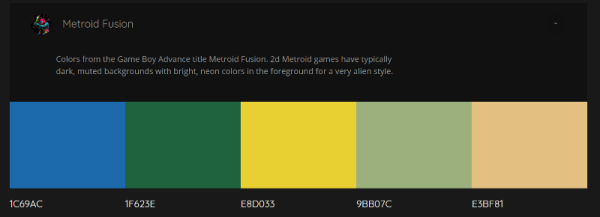
It’s a fun tool – there’s a selection of palettes generated from popular media and sunset photos, as well as the option to generate custom palettes yourself. Colours can be locked so you can iterate around those you like, finding others that match well. The results are impressive – the tool is able to generate palettes that seem to blend rather well. We were unable to force it to generate anything truly garish despite a few attempts!
The blog explains the software behind the curtain. After first experimenting with a type of neural net known as an LSTM, [Jack] found the results too bland. The network was afraid to be wrong, so would choose values very much “in the middle”, leading to muted palettes of browns and greys. After switching to a less accuracy-focused network known as a GAN, the results were better – [Jack] says the network now generates what it believes to be “plausible” palettes. The code has been uploaded to GitHub if you’d like to play around with it yourself.
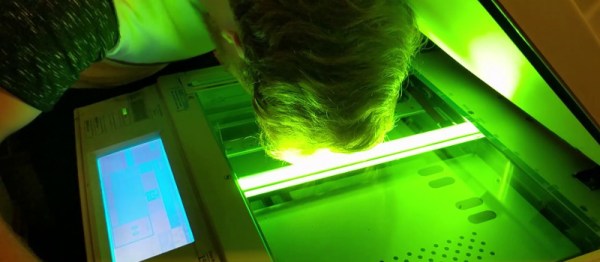
You’ll all remember my grand adventure in acquiring a photocopier. Well, it’s been a rollercoaster, I tell ya. While I still haven’t found a modification worthy enough to attempt, I have become increasingly frustrated. From time to time, I like to invite my friends and family over for dinner, and conversation naturally turns to things like the art on the walls, the fish in the aquarium, or perhaps the photocopier in the living room. Now, I dearly love to share my passions with others, so it’s pretty darned disappointing when I go to fire off a few copies only to have the machine fail to boot! It was time to tackle this problem once and for all.
When powered up, the photocopier would sit at a “Please Wait…” screen for a very long time, before eventually coughing up an error code — SC990 — and an instruction to call for service. A bunch of other messages would flash up as well; Address Book Data Error, Hard Drive Data Error, and so on. In the end I realized they all centered around data storage.
Pictured: the author, in his happy place, at peace with the copier.
Now, I’d already tried diving into the service menu once before, and selected the option to format the hard drive. That had led to the problem disappearing for a short period, but now it was back. No amount of mashing away at the keypad would work this time. The format commands simply returned “Failed” every time. What to do next? You guessed it, it was time for a teardown!
Thankfully, photocopiers are designed for easy servicing — someone’s paying for all those service calls. A few screws and large panels were simply popping off with ease; completely the opposite of working on cars. Spotting the hard drive was easy, it looked like some sort of laptop IDE unit. With only SATA laptops around the house to salvage parts from, I wasn’t able to come up with something to swap in.
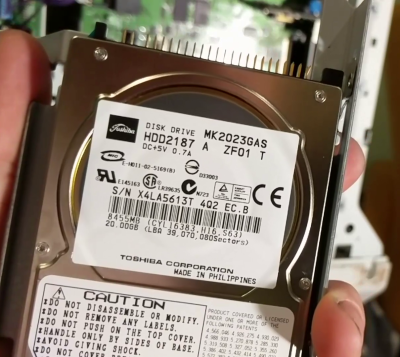
A bit of research (and reading the label) taught me that the drive was a Toshiba MK2023GAS/HDD2187. Replacements were available on eBay, but if I waited two weeks I’d probably be wrist deep in some other abandoned equipment. It had to be sorted on the night. In the words of [AvE], if you can’t fix it… well, you know how it goes. I yanked the drive and, lo and behold – the copier booted straight up! Just to be sure I wasn’t hallucinating, I churned out a few copies, and other than the continued jamming on all-black pages, everything was fine. Literally all it took to get the copier to boot was to remove the ailing drive. Suffice to say, I was kind of dumbfounded.
The hard drive a.k.a. the villain of the piece.
I’m happy to chalk up the win, but I have to draw issue with Ricoh’s design here. The copier is clearly capable of operating perfectly well without a hard drive. It will give up its document server and address book abilities, but it will still make copies and print without a problem.
Yet, when the copier’s drive fails, the unit fails completely and refuses to work. This necessitates a service call for the average user to get anything at all happening again — causing much lost work and productivity. A better design in my eyes would have the copier notify users of the lost functionality due to the failed drive and the need to call service, but let them copy! Any IT administrator will know the value of a bodged work around that keeps the company limping along for the day versus having a room of forty agitated workers with nothing to do. It’s a shame Ricoh chose to have the photocopier shut down completely rather than valiantly fight on.
Feel free to chime in with your own stories of minor failures that caused total shutdowns in the comments. Video below the break.
For those that suffer them, seizures are a dangerous thing. Outside the neurological effects, there is always the possibility of injury from the surrounding environment as well – consider the dangers of having a seizure near a busy road, or even simply a glass table. Some detection methods exist for seizure sufferers, but they are primarily based on detecting the jerking motion of the patient. [akhil2001us] thinks it’s possible to do better – by measuring brainwaves to detect the onset of seizures.
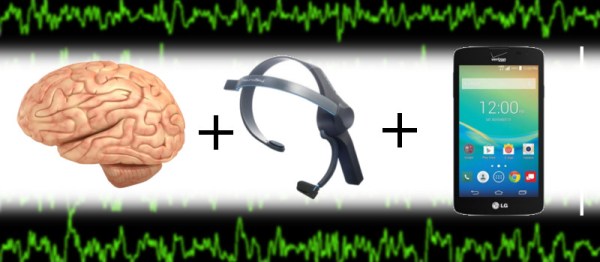
The build is centered around the Neurosky Mindwave headset. This is an off-the-shelf product designed specifically for capturing EEG data. It outputs raw brainwave data which is key for doing proper analysis. The project then uses an Arduino Mega to tie everything together, along with some Sparkfun Bluetooth modules to talk to a cell phone to send an SMS for help in the event of a seizure.
The real difficulty in a project like this comes from developing an algorithm that can reliably detect seizures, as well as a unit robust enough to work in the real world. It’s no use if your headset is detecting a seizure in progress, but the help message is never sent because a wire fell out of your breadboard. It’s considerations like this, combined with the threat of litigation, behind why medical devices are so rigorously engineered and certified. For a proof of concept, however, such concerns are not as important.
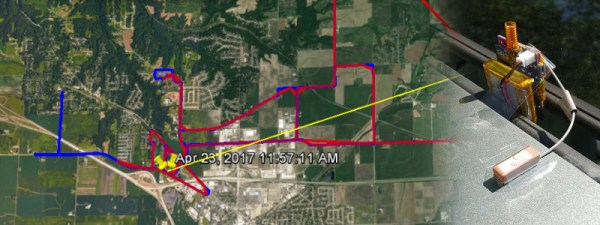
WiFi and Bluetooth have their use cases, but both have certain demands on things like battery life and authentication that make them unsuitable for a lot of low-power use cases. They’re also quite limited in range. There are other standards out there more suitable for low-power and wide area work, and thankfully, LoRa is one of them. Having created some LoRa pagers, [Moser] decided to head out and test their range.
Now, we’ve done range tests before. Often this involves sending one party out with a radio while the other hangs back at base. Cellphones serve as a communications link while the two parties go back and forth, endlessly asking “Is it working now? Hang on, I’ll take a few steps back — what about now?”
It’s a painful way to do a range test. [Moser]’s method is much simpler; set a cellphone to log GPS position, and have the pager attempt to send the same data back to the base station. Then, go out for a drive, and compare the two traces. This method doesn’t just report straight range, either — it can be used to find good and bad spots for radio reception. It’s great when you live in an area full of radio obstructions where simple distance isn’t the only thing affecting your link.
Build details on the pagers are available, and you can learn more about LoRa here. While you’re at it, check out the LoRa tag for more cool builds and hacks.
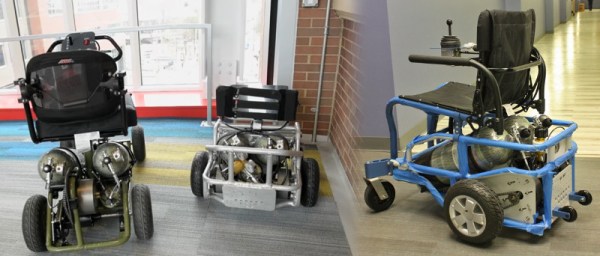
Electric wheelchairs are responsible for giving back independence to a great many people the world over. They do have their limitations, however, including long recharge times and a general aversion to large amounts of water. Being weatherproof is one thing, but taking one to a waterpark is another thing entirely. Fear not, for The University of Pittsburgh has the answer: the air-powered wheelchair.
Known as the PneuMobility project, the chair relies on a couple of compressed air tanks as a power source. They appear to be a of composite construction, which would cut down on weight significantly and help reduce risk of injury in the case of a failure. The air is passed through a system of valves to a special compressed air motor, allowing the user to control the direction of travel. Unfortunately details on the drive system are scant — we’d love to know more about the design of the drivetrain! Reportedly a lot of the components come from the local hardware store, though we haven’t seen a whole lot of compressed air drive motors on the racks of Home Depot/Bunnings/et al.
Range for the wheelchairs is listed as about 1/3 of an electric wheelchair but recharging compressed air takes minutes, not hours. Developed by the university’s Human Engineering Research Laboratories, the wheelchair isn’t just a one off. There are plans to supply ten of the machines to the Morgan’s Wonderland amusement park to enable wheelchair users to share in the fun of the water park.
Voice-based assistants are becoming more common on devices these days. Siri is known for being particularly good at responding to natural language and snarky responses. In comparison, Google’s Assistant is only capable of the most obvious commands, and this writer isn’t even sure Microsoft’s Cortana can understand English at all. So it makes sense then, if you want voice control for your PC, to choose Siri as your weapon of choice. [Sanjeet] is here to help, enabling Siri to control a PC through Python.
The first step is hooking up the iPhone’s Notes app to a Gmail account. [Sanjeet] suggests using a separate account for security reasons, as you’ll need to place the username and password in a Python script. The Python script checks the Gmail account every second, looking for new Notes from the iPhone. Then, it’s as simple as telling Siri to make a Note (for example, “Siri, Note shutdown”) and the Python script can then pick up the command, and act accordingly.
I dig cars, and I do car stuff. I started fairly late in life, though, and I’m only just starting to get into the whole modification thing. Now, as far as automobiles go, you can pretty much do anything you set your mind to – engine swaps, drivetrain conversions, you name it – it’s been done. But such jobs require a high level of fabrication skill, automotive knowledge, and often a fully stocked machine shop to match. Those of us new to the scene tend to start a little bit smaller.
So where does one begin? Well, there’s a huge realm of mods that can be done that are generally referred to as “bolt-ons”. This centers around the idea that the install process of the modification is as simple as following a basic set of instructions to unbolt the old hardware and bolt in the upgraded parts. Those that have tread this ground before me will be chuckling at this point – so rarely is a bolt-on ever just a bolt-on. As follows, the journey of my Mazda’s differential upgrade will bear this out.
The car in question, currently known as the “Junkbox MX-5” until it starts running well enough to earn a real name. It somehow looks passable here, but in person I promise you, it looks awful. Credit: Lewin Day
It all started when I bought the car, back in December 2016. I’d just started writing for Hackaday and my humble Daihatsu had, unbeknownst to me, just breathed its last. I’d recently come to the realisation that I wasn’t getting any younger, and despite being obsessed with cars, I’d never actually owned a sports car or driven one in anger. It was time to change. Continue reading “Different Differentials & The Pitfalls Of The Easy Swap”→