Blue Pill Vs Black Pill: Transitioning From STM32F103 To STM32F411

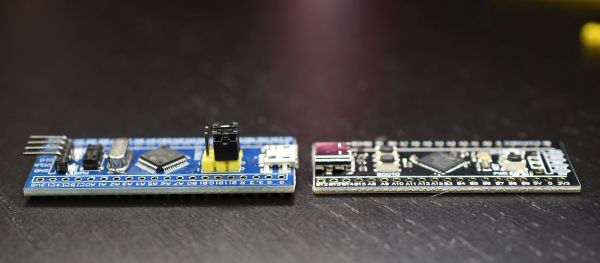
For many years now, the so-called ‘Blue Pill’ STM32 MCU development board has been a staple in the hobbyist community. Finding its origins as an apparent Maple Mini clone, the diminutive board is easily to use in breadboard projects thanks to its dual rows of 0.1″ pin sockets. Best of all, it only costs a few bucks, even if you can only really buy it via sellers on AliExpress and EBay.

Starting last year, boards with a black soldermask and an STM32F4 Access (entry-level) series MCUs including the F401 and F411 began to appear. These boards with the nickname ‘Black Pill’ or ‘Black Pill 2’. F103 boards also existed with black soldermask for a while, so it’s confusing. The F4xx Black Pills are available via the same sources as the F103-based Blue Pill ones, for a similar price, but feature an MCU that’s considerably newer and more powerful. This raises the question of whether it makes sense at this point to switch to these new boards.

Our answer is yes, but it’s not entirely clearcut. The newer hardware is better for most purposes, really lacking only the F103’s dual ADCs. But hardware isn’t the only consideration; depending on one’s preferred framework, support may be lacking or incomplete. So let’s take a look at what it takes to switch. Continue reading “Blue Pill Vs Black Pill: Transitioning From STM32F103 To STM32F411”

The (Probably) Most Thoroughly Commented Linker Script For The SAM D21 MCU

Linker scripts are one of those things which nobody who does software development really wants to deal with, but like many things in life sometimes they are inevitable to make things work. Although one could keep pretending linker scripts do not exist and let IDEs handle such pesky details, some of us suffer from this unfortunate condition called ‘curiosity’ and just have to know. People like [Thea].

Recently, [Thea] wrote a blog post on exactly what the linker script generated by the Microchip IDE for a Cortex-M-based SAM D21 project does. The result is a nicely annotated overview of the file’s contents, accompanied by links to the Arm and GCC documentation as well as other references where appropriate. The entire linker script (.ld file) can be viewed on GitHub. With the SAM D21 being a popular choice for Arduino and Arduino-compatible board, this article is a good starting point to understanding what a linker script does and how it affects one’s project.

For other (Cortex-M) MCUs this linker script is also useful as a starting point. Especially knowing which sections are required and what changing them affects in the final (ELF) binary and the firmware that is ultimately written to the MCU. We recently covered linker scripts for Cortex-M as well, along with the concept of memory-mapped I/O.

NVMe Blurs The Lines Between Memory And Storage

The history of storage devices is quite literally a race between the medium and the computing power as the bottleneck of preserving billions of ones and zeros stands in the way of computing nirvana. The most recent player is the Non-Volatile Memory Express (NVMe), something of a hybrid of what has come before.

The first generations of home computers used floppy disk and compact cassette-based storage, but gradually, larger and faster storage became important as personal computers grew in capabilities. By the 1990s hard drive-based storage had become commonplace, allowing many megabytes and ultimately gigabytes of data to be stored. This would drive up the need for a faster link between storage and the rest of the system, which up to that point had largely used the ATA interface in Programmed Input-Output (PIO) mode.

This led to the use of DMA-based transfers (UDMA interface, also called Ultra ATA and Parallel ATA), along with DMA-based SCSI interfaces over on the Apple and mostly server side of the computer fence. Ultimately Parallel ATA became Serial ATA (SATA) and Parallel SCSI became Serial Attached SCSI (SAS), with SATA being used primarily in laptops and desktop systems until the arrival of NVMe along with solid-state storage.

All of these interfaces were designed to keep up with the attached storage devices, yet NVMe is a bit of an odd duck considering the way it is integrated in the system. NVMe is also different for not being bound to a single interface or connector, which can be confusing. Who can keep M.2 and U.2 apart, let alone which protocol the interface speaks, be it SATA or NVMe?

Let’s take an in-depth look at the wonderful and wacky world of NVMe, shall we?

Continue reading “NVMe Blurs The Lines Between Memory And Storage”

Visualizing Ionizing Radiation With DIY Plastic Scintillators

Although most types of radiation are invisible, except for the visible part of the EM spectrum, there are many ways that we can make various types of radiation visible. One of these methods is called ‘scintillation’, which can be used to make ionizing radiation visible. Recently [Lukas Springer] demonstrated how to make scintillators out of what is essentially plastic: bisphenol-A (E45, ‘epoxy’) resin with hardener and other additives.

The essential principle of operation behind a scintillator is its sensitivity to ionizing radiation, along with the tendency to absorb the energy and re-emit it in the form of light, i.e. luminescence. This is akin to the luminescence of LEDs, except that in their case the underlying principle is that of electro-luminescence. In the case of a plastic scintillator, the scintillating material is suspended in the solid polymer matrix base.

As [Lukas] points out, plastic scintillators are hardly ideal when it comes to their sensitivity to ionizing radiation, but they compensate for this by being easy to shape and produce, while being very durable. For this experiment, he used regular epoxy as the scintillator matrix, p-Terphenyl as primary scintillator and Coumarin 102 as the wavelength shifter. These three compounds act as a reaction chain, with the matrix absorbing the radiation and transferring it to the primary scintillator, which in turns emits the energy as light.

As the primary scintillator tends to radiate in the deep UV part of the EM spectrum, a wavelength shifter (i.e. secondary scintillator) which ‘shifts’ the emitted UV radiation into the visible part of the spectrum.

After producing a batch of plastic scintillators following the above recipe, [Lukas] irradiated them with gamma radiation, and found them to perform worse than some already not remarkable Russian PS-based scintillators. [Lukas’s] guess is that the matrix may be absorbing the primary scintillator’s output, or a mismatch between the primary and second scintillator.

While tricky to get right, it does seem like a fun hobby if one has some interesting in chemistry. [Lukas] (@GigaBecquerel on Twitter) provides a basic recipe as well as many other compounds to use for the primary and secondary scintillator, as well as the matrix compound. Enough to get started with.

Bare-Metal STM32: Universal, Asynchronous Communication With UARTs

One of the most basic and also most versatile communication interfaces on an MCU is the UART, or Universal Asynchronous Receiver/Transmitter. Usually found in the form of either a UART or USART, the former allows for pure asynchronous serial communication, whereas the latter adds flow control. When working with MCUs, they’re also one of the most common ways to output debug information.

While somewhat trickier to set up and use than a GPIO peripheral, the U(S)ART of ST’s STM32 families is fairly uncomplicated to use, and immediately provides one with an easy way to communicate in a bi-directional fashion with a device. In this article we’ll see what it takes to get started with basic UART communication on STM32 microcontrollers.

Continue reading “Bare-Metal STM32: Universal, Asynchronous Communication With UARTs”

Powered Exoskeletons In Rough Terrain: An Interesting Aspect Of The Chang’e 5 Recovery Mission

At this point in time, one would be hard pressed to find anyone who is not at least aware of some of the uses of exoskeletons as they pertain to use by humans. From supporting people during rehabilitation, to ensuring that people working in industrial and warehouse settings do not overexert themselves, while also preventing injuries and increasing their ability to carry heavy loads without tiring.

During the recovery mission of the Chang’e 5 sample container in the rough terrain of Inner Mongolia, the crew which was tasked with setting up the communications center, electrical supply systems and other essential services in the area wore exoskeletons. Developed by a relatively new Chinese company called ULS Robotics (see embedded promotional video after the break), the powered exoskeletons allowed the crew to carry 50 kg loads at a time for a hundred meters across the rough, snowy terrain.

The obvious benefit of an exoskeleton here is that while humans are pretty good at navigating rough terrain, this ability quickly degrades the moment a heavy load is involved, as anyone who has done serious mountain trekking can probably attest to. By having the exoskeleton bear most of the load, the wearer can focus on staying upright and reaching the destination quickly and safely.

With the growing interest for exoskeletons from various industries, the military, as well as the elderly, it probably won’t be too long before we’ll be seeing more of them in daily life the coming years.

(Thanks, Qes)

Continue reading “Powered Exoskeletons In Rough Terrain: An Interesting Aspect Of The Chang’e 5 Recovery Mission”

You Got Something On Your Processor Bus: The Joys Of Hacking ISA And PCI

Although the ability to expand a home computer with more RAM, storage and other features has been around for as long as home computers exist, it wasn’t until the IBM PC that the concept of a fully open and modular computer system became mainstream. Instead of being limited to a system configuration provided by the manufacturer and a few add-ons that really didn’t integrate well, the concept of expansion cards opened up whole industries as well as a big hobbyist market.

The first IBM PC had five 8-bit expansion slots that were connected directly to the 8088 CPU. With the IBM PC/AT these expansion slots became 16-bit courtesy of the 80286 CPU it was built around. These slotsĀ  could be used for anything from graphics cards to networking, expanded memory or custom I/O. Though there was no distinct original name for this card edge interface, around the PC/AT era it got referred to as PC bus, as well as AT bus. The name Industry Standard Architecture (ISA) bus is a retronym created by PC clone makers.

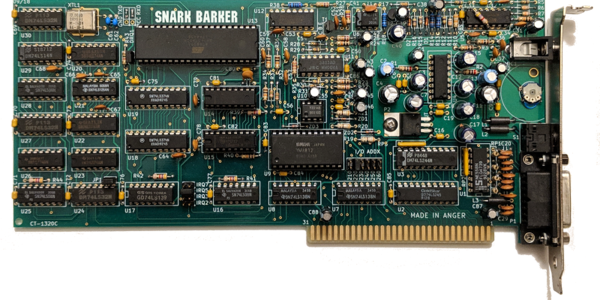
With such openness came the ability to relatively easy and cheaply make your own cards for the ISA bus, and the subsequent and equally open PCI bus. To this day this openness allows for a vibrant ecosystem, whether one wishes to build a custom ISA or PCI soundcard, or add USB support to a 1981 IBM PC system.

But what does it take to get started with ISA or PCI expansion cards today? Continue reading “You Got Something On Your Processor Bus: The Joys Of Hacking ISA And PCI”