Driving A T6963C Based Graphic LCD

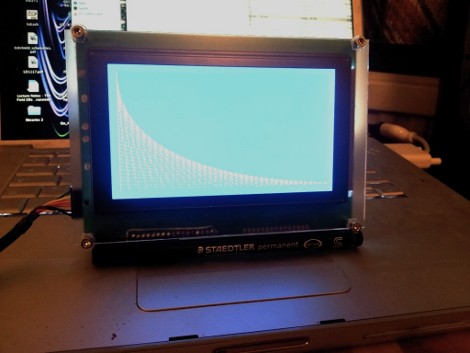
[Tom Fleet] spent the dreary weekend inside learning how to drive this T6963C based graphic LCD controller. Although this is his first time venturing away from HD44780 character displays, the availability of an Arduino library helped him go from being a newbie to coding his own animated graphics.

The hardware setup is straight-forward. The screen has a 20-pin connector and operates at 5V. We don’t see it on his protoboard, but usually these displays also need a potentiometer which serves as a voltage divider for the screen contrast. The data and control pins eat up most of the available I/O on the ATmega328 chip he used, but the I2C and SPI pins are still open and he plans a future project to make this a wireless display for his PC using one of those protocols.

As for fonts and animation, [Tom] links to several tools which will come in handy. There’s a font program that will convert Windows system fonts into a C file for use on the Arduino. The animations start with a 1:1 ratio animated graphic drawn with his favorite image editing software. He then converts those to monochrome bmp files and used bmp2c to convert each frame to a C array. After the break there’s a seven second example that would work well as a boot screen for his project.

Continue reading “Driving A T6963C Based Graphic LCD”

Cardboard Hexapod Gets Around With Three Motors

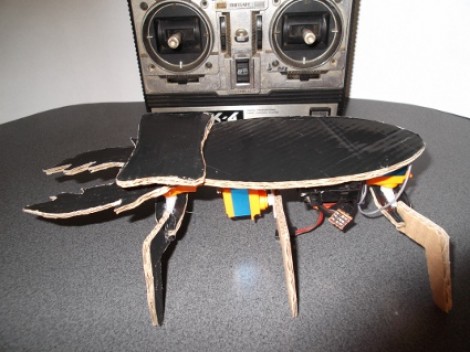
Here’s a lesson in doing a lot with very little. [Oldrobot] built this hexapod using cardboard for most of the pieces. He still had the box from his vacuum clear and it just happened to have a large black area the makes the top of the beetle look like it’s been painted.

The control board is from an old radio controlled airplane. Since RC airplanes used servos for flight control, it was a snap to hook up the three that make the bug go. One controls the set of middle legs which lift the body and change which of the propulsion legs are in contact with the ground. The other two servers move pairs of the front or back legs. It uses the same concept as this other RC controller hexapod, but much less time went into crafting the chassis and legs.

As you can see in the video after the break, the control scheme isn’t the most intuitive. But once you get a hang of which stick orientation affects each leg movement the bot ends up having fairly precise steering.

Continue reading “Cardboard Hexapod Gets Around With Three Motors”

Cabbage Haters Can Turn Their Leftovers Into Litmus Paper

[William Finucane] is making his own litmus paper by harnessing the power of cabbage. The process is much easier than the faux gunpowder he made, as it take just the one ingredient and a few kitchen tools.

In case you’ve forgotten your High School chemistry, Litmus is a set of dyes that change color when exposed to basic or acidic materials. It is common in liquid form, or as a paper. [William] is getting his dye from the leaves of red cabbage by running half a head through a blender with just a bit of water. Once that is reduced to pulp and boiled in the microwave (mmm, must smell great!) he separates the liquid using a coffee filter. A fresh coffee filter serves as a donor for the substrate, just dip some strips in the cabbage juice and let them dry. You can test them with some Ammonia as seen in the video after the break, or just start grabbing whatever is under the sink and see what happens.

Continue reading “Cabbage Haters Can Turn Their Leftovers Into Litmus Paper”

MIT Students Take Tetris To A Grand Scale

Careful, this hack might foster doubts about the level of fun you’re having at you own Computer Science department. Last weekend a group of students at MIT pulled off a hack of great scale by turning a building into a Tetris game board.

The structure in question is the Green Building on the Massachusetts Institute of Technology Campus. It houses the Earth, Atmospheric, and Planetary Sciences Departments, but was chose based on the size and regularity of the grid formed by the windows on one side. The group hasn’t provided much in the way of details yet, but the video after the break shows the game play and start-up screen. The middle portion of the building is used as a scrolling marquee to display the word “Tetris” before the game pieces start falling. We’re only guessing (and we hope you will add your conjecture in the comments section) but we’d bet they assembled a set of wireless RGB LED lamps and set one on the sill of each window. There does seem to be a number of ‘dead’ pixels, but it doesn’t diminish the fun of the overall effect.

If you don’t have your own building to play on, you should go small-scale and implement Tetris on a character display.

Continue reading “MIT Students Take Tetris To A Grand Scale”

DCPU-16 Running Pac-Man

If you’ve been trying to think of stuff you can do with the DCPU-16 this may inspire you to write a clone of  a classic game.

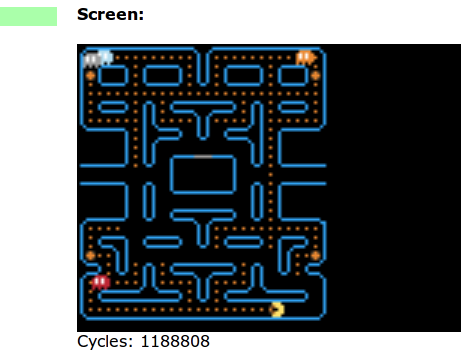
This version of Pac-Man was written using a sprite system with a 16 color pallette. It runs in an HTML-based emulator, so you can even monkey around with the assembly code to help you figure out how it works. But if you’re not into writing code that is this machine-close, you can just click the ‘run’ button and use your keyboard arrows to play through a level or two. You’ll notice there’s only one game board available so far and some things are still missing like that familiar waka-waka as he gobbles up the dots. Let us know if you mange to extend the features of this version.

In case you missed it, this emulator is running the DCPU-16 spec from Notch’s new game, 0x10c (. We have no idea how that’s going to shape up, but getting in on the game early will pay off it turns out to be as popular as Minecraft.

Simple Proximity Sensor

[Dustin Andrews] built this add-on board which works as a proximity sensor. He wanted a standalone sensor for his Arduino projects which would use a single pin as a trigger. This lets him alert the Arduino when an object approaches the sensor without the need for polling or extra code on the Arduino side of things.

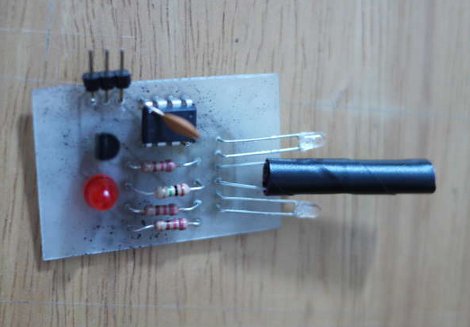
As you can see, a single chip on the board takes care of all the work. That’s an ATtiny13, they’re inexpensive and sometimes you can even salvage them from consumer electronics like this color changing light bulb. The microcontroller monitors the phototransistor which is wrapped in electrical tape to isolate it from the IR LED emitters on either side. This setup creates a reflective sensor. When an object nears the board, the infrared light from the emitters reflects off of it and onto the phototransistor. And since the Arduino works as an AVR programmer you don’t need special hardware to program the device.

Computer Control For Your Xbox Controller

This wiring nightmare lets [H. Smeitink] map all the buttons from an Xbox 360 controller to his PC. It gives him the ability to push control input from his PC to the console. But it goes a step further than that because it actually acts as a pass-through device. He connected a wired controller to the computer and uses a program he wrote to translate those inputs and send them to the hacked controller.

The software is written in C#. It’s got a recording function that lets him save the keypress data from the wired controller while it’s sent to the Xbox in real time. When he finds a combination that he uses frequently he plucks out those commands, sets them up as a macro, and assigns one of the buttons to execute it. The controller hack uses one transistor for each button, and a PIC 18F4550 which controls them and provides USB connectivity with the PC.

This isn’t one nice package like some integrated rapid-fire and macro solutions we’ve seen. But it certainly opens up a lot more possibilities. See for yourself in the clip after the break.

Continue reading “Computer Control For Your Xbox Controller”