Tricorder Project Brings The Fabled Devices Into Existence

Whether or not you love Star Trek we’d bet you know what a Tricorder is. The handheld device capable of gathering information about the environment around you, or taking health diagnostics about an injured crew member, seemed like unfathomably advanced technology when first seen on the original television series. But our technology has advance so quickly that you can now build a Tricorder of your own. That’s exactly what [Peter Jansen] has done. He founded the Tricorder project as a way to put a useful scientific instrument in the hands for the curious masses.

In the promo video embedded after the break [Dr. Jansen] gives us a recap of his progress so far. Three versions of the project have already been produced, and a fourth is under way. The first iteration could take atmospheric, spacial, and magnetic readings. This covers things like temperature, humidity, GPS data, light intensity, and distance measurements among others. Housed in a dark grey case it looks much like the original prop.

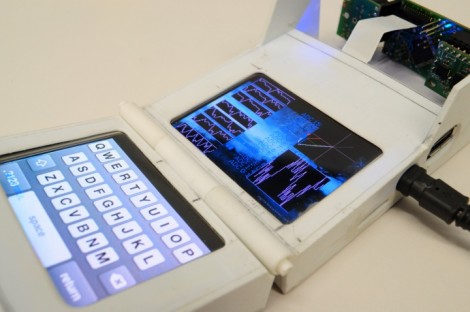
The second model, which is seen above, implements a swapable sensor board. That’s the part hanging off the top, but the finished model will enclose that part of the case. The hardware on this is fantastic, using an ARM processor running Linux and two 2.8″ OLED touchscreen displays. But both of these models have a price tag that’s just too high for widespread use. He’s been working on two more, the Mark 3 and Mark 4. The most recent is in software development right now with the hopes of mass production when all the details are worked out.

There’s a lot of info to dig through on the project’s site. It’s open source and all the goodies we usually look for are there.

Continue reading “Tricorder Project Brings The Fabled Devices Into Existence”
V-Synch Detector Lets You Use 3D Shutter Glasses On Linux Systems

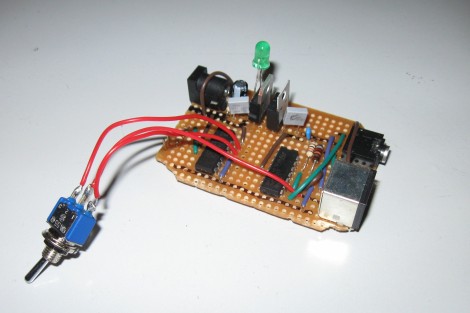
This circuit is how [John Tsiombikas] makes his cheap 3D shutter glasses work with a Linux machine. It’s not that they were incompatible with Linux. The issue is that only certain video cards have the stereo port necessary to drive the head-mounted hardware.

Shutter glasses block light from one eye at a time, so that different renderings can be shown to create the stereoscopic effect. Since stimulating the muscles in the eye doesn’t actually work, you need to find a way to drive the glasses in perfect time with the video signal. His circuit watches for the V-Sync signal, then uses it to toggle the shutter glasses. Since the hardware has no way of knowing whether the left or right frame is being generated, he included the toggle switch as a user-controlled adjustment. If the 3D isn’t coming together, you’re probably viewing the frames with the wrong eye and need to flip the switch.

There’s really no way to show the effect without trying out the hardware in person. But [John] reports that it works like a charm when used with the OpenGL stereo wrapper.

Android On Your Netbook

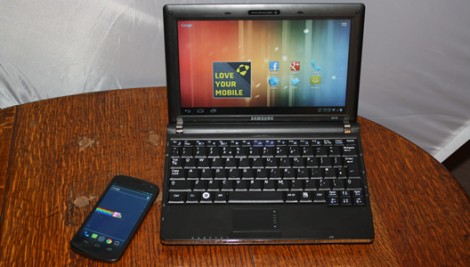
Looks like there’s a pretty easy way to install Ice Cream Sandwich, the newest version of Android, on your Netbook. Actually this is limited to a few types of hardware including netbooks like the eeePC. That’s because the ISO files used during installation have been tailored to the hardware used on those devices. As with other Linux distros, the ISO file can be loaded on a thumb drive using Unetbootin. From there you can give it a whirl as a Live CD (or USB as it were) or choose to install it on your hard drive. We haven’t given it a spin as the eeePC version doesn’t want to boot on our Dell Mini 9, but we don’t see a reason why this couldn’t be set up as a dual boot option.

Now why would you want to run Android on your netbook? We’ve already seen that there’s a way to run Android apps in Ubuntu. We bet some people just love Android, and others just hate the Unity desktop that Ubuntu now uses… especially when the Netbook Remix had a lot of good things going for it.

Coin Cell Battery Charger

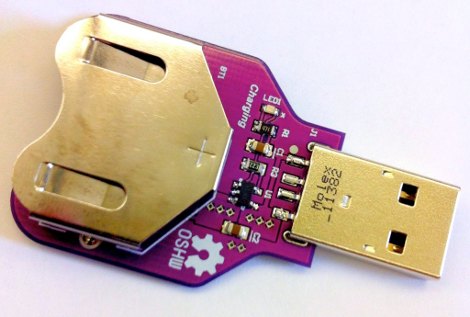
[Jay Kickliter] built his own coin cell battery recharger. This won’t work on the vast majority of coin cells as they are manufactured as disposable parts. But there are rechargeable options out there with model numbers that start with LR instead of CR. In this case he tailored the charging circuit around MCP73832 IC and chose components best suited for charging his 110 mAh LR2450. But we believe all of the LR options out there are rated for 3.6V so altering his design for use with different models should be a breeze.

We’ve been unhappy with the use of disposable coin cell batteries for some time. Sure, in a real-time clock where the cell might last 6-8 years this is not very wasteful. But in an Apple TV remote that gets a lot of use, we hate the choice of a disposable battery. All of our less-hip remotes which use AA or AAA have NiMH rechargeables in them and have used the same pair for year and years. So we’re happy to see this charger project come along.

Now the bad news. We looked around and indeed you can find LR2032; a rechargeable replacement for the CR2032. But the capacity rating falls way flat. The model we looked at boasts only 50 mAh while the disposable CR2032 offers something along the lines of 240 mAh. Hopefully this will change as battery tech evolves.

ATtiny44 Drop-in Replacement For Ikea Dioder’s Stock PIC Controller

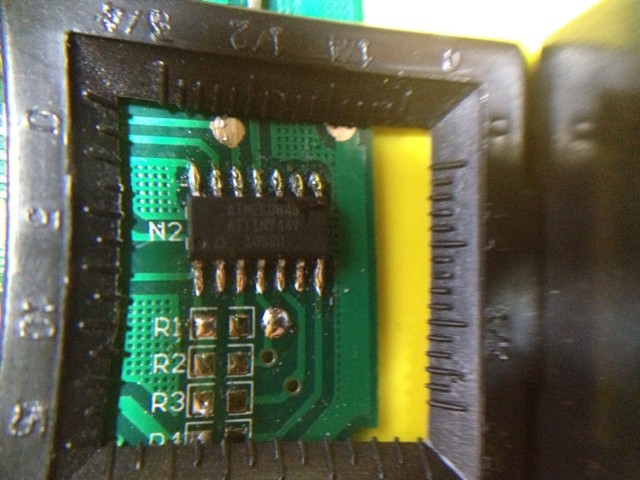
The Ikea Dioder is an LED light sold at the big blue and yellow building that lets you mix your own colors using a simple button and wheel controller. [Marco Di Feo] looked at all of the other projects out there that alter the controller and figured out that the IC can be directly replaced with an ATtiny44 microcontroller. With that chip soldered onto the board he added IR control so that he can change colors using his universal remote control (translated).

[Marco] removed the potentiometer normally responsible for selecting the color. This frees up one pin on the microcontroller which he then uses to receive signals from a TSOP1736 IR receiver. The video after the break shows the device, which illuminates the back of his home entertainment center, reacting to commands from his remote control.

Of course this can be done without the chip swap as the PIC 16F684 that comes with it can be reprogrammed in place. But [Marco] didn’t have a PICkit or other programmer on hand. Continue reading “ATtiny44 Drop-in Replacement For Ikea Dioder’s Stock PIC Controller”

Building A Better Circuit For Renewable Energy Harvesting

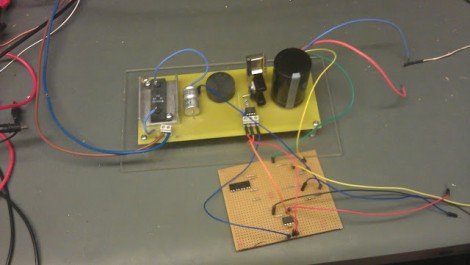
[David], [Ian], and [Sajjad] finished and submitted their entry to the ChipKIT challenge just under the wire. They designed and built a maximum power tracking circuit for use with renewable sources. That is to say, this is a voltage regulator for use with solar cells and other generative sources like wind or water power. The idea is to use the best concepts of switch-mode power supply design, but replace the more wasteful parts with circuits that can harness and roll the loss back into the output.

We have to admit, following their development choices from the write-up at the top is a bit rocky. But luckily they filmed an in-depth description of the design choices, as well as a demonstration of the circuit along with various test measurements. If you’ve got twenty minutes and some patience all will become clear in the video after the break.

This will go along great with that bucket-based hydro generator you built.

Continue reading “Building A Better Circuit For Renewable Energy Harvesting”

Piano Box Is A Digital Synthesizer Made Of Paper

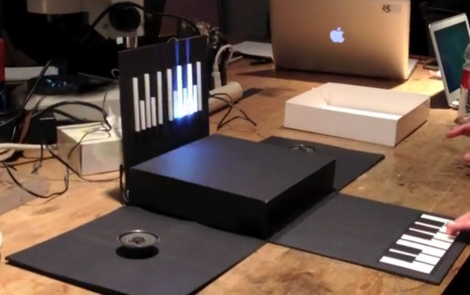
We love the look of this papercraft piano which [Catarina] built along with some friends at NYC Resistor, a hackerspace in the big apple. It starts off as a cubic black box with a white top. But just lift that top as [Catarina] does in the video after the break and three of the sides fall flat to reveal a pair of speakers and the single-octave keyboard.

The key’s don’t move when you press them. Instead, she decided to use the CapSense Arduino library to implement touch sensitive keys. Each key is made up of a plane of copper foil tape, with a strip of tape running back to the center of the box where it is interfaced with an Arduino Mega hidden there. The Tone library produces the waveforms which are played by the speakers, and a set of LEDs on the upright side of the box illuminate the keyboard diagram as you press each key. You can see that there are short white bars on that display which correspond to the black keys on the keyboard.

If you take a look at the code, you’ll see the libraries really make the code for the project simple.

Continue reading “Piano Box Is A Digital Synthesizer Made Of Paper”