Polish Your Understanding Of Capacitors By Building This Meter

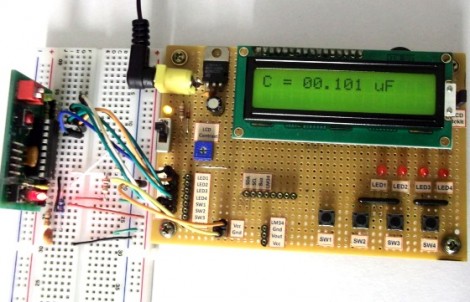
Building a capacitance meter is a great exercise. If you’re feeling quite safe in your digital-circuit-only life, this will push just far enough out of the comfort zone for you to see there’s nothing to fear in adding analog circuits to your designs. Here, [Raj] compares a voltage divider and RC timer to calculate the value of a capacitor. The project is aimed at teaching the concepts, and will be easy to follow for anyone who has at least a bit of experience working with a programmable microcontroller.

The meter is based on an established equation that uses are starting and ending voltage, as well as the time it took to transition between the two, to calculate capacitance. The capacitor will be charged from 0 volts to 0.5 volts. Using the built-in analog comparator is the easiest way to do this. [Raj] breadboarded a voltage divider to establish a 0.5V reference on one of the comparator’s pins. The other input comes from a circuit that places a resistor in line with the capacitor being tested. When that reading rises above the 0.5 volt reference the comparator match will be tripped, stopping a timer that had been running during the charge cycle. From there it’s just a matter of using the timer value in the calculation.

Resurrecting A Cellphone With Blown USB Circuitry

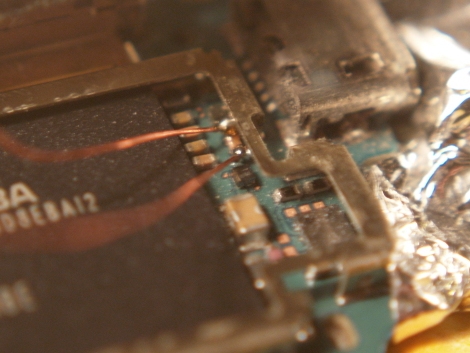
[Script] is pretty lucky. One of the engineers who designed his cellphone included over-voltage protection in the circuit. Of course you probably wouldn’t know about this if there wasn’t a service schematic available. But a bit of searching around let him resurrect the fried USB segment of his Nokia N900.

Now [Script] has been experimenting with portable solar power like the system featured at 25C3 a few years back. Unfortunately he made an error which routed 12V into the USB connector’s 5V rail. After this unfortunate mistake the phone would not longer connect via USB, or charge the battery. Luickly the N900 is a favorite with the hacker community (you can see all kinds of N900 related projects here at Hackaday) and [Script] found his way to their N900 Schematic page. Digging into page four he found part F5300 which is labeled 2.0A. He removed the PCB and shielding, and tested the part with a multimeter to confirm it was blown. A quick wire bridge got the phone charging again, but [Script] plans to position a new fuse as soon as he can source the part.

Who says these devices aren’t user serviceable? If we could just get our hands on more service schematics perhaps our gear would last longer.

Fool Me Once… Or As Often As Possible

There was a time when posting a fake story was fun for all involved. But in this age of constant trolling, it’s near impossible to pull it off with our savvy readership. Instead of letting you down with a really poorly advised how-to, we’re putting in a call to hear what you’ve got in your own bag of pranks. Consider this another holiday theme and tell us what you’re planning for April Fools’ Day.

As always, we’re looking for your own posts on the topic. We always want to give credit where it’s due so post your prank on your blog or other favorite corner of the interwebs and send us the link. Don’t have a place to put it? You can always start a thread in our project log forum, or check out this for additional spots to stake your claim.

In case you need some help coming up with something, we’ve got a few examples to get you thinking. You can go the route of fake video demonstrations like this Gmail gestures hoax, or the more recent Human BirdWings Project. But those require a lot of production time and a clever seed idea. Perhaps something really simple will go a long way with the roommates. We’re thinking soap covered in clear nail polish to prevent sudsing, or perhaps you want to reconfigure your router to render pages upside down. We can’t wait to see what you come up with!

Brute Force A Password Protected PDF Using The BeagleBone

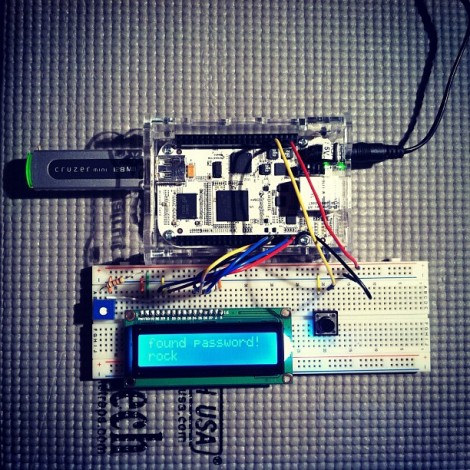
The biggest benefit to using the BeagleBone is it’s 700 MHz ARM processor. If you’re just messing around with basic I/O that power is going unused, but [Nuno Alves] is taking advantage of its power. He built a PDF password cracker based on the $85 development board.

We recently saw how easy it is to perform basic I/O using the BeagleBone. Those techniques are in play here, used to drive a character LCD and sample a button input from the breadboard circuit. [Nuno] even published separate posts for each of these peripheral features.

The password protected PDF file is passed to the device on a thumb drive. Since the BeagleBone is running embedded Linux you don’t need to mess around with figuring out how to read from the device. A click of the button starts the process. Currently the code just uses a brute force attack which can test more than 6000 four-character passwords per second.  This is quite slow for any password more than four or five characters long, but [Nuno] does mention the possibility of running several ARM processors in parallel, or using a dictionary (or rainbow table) to speed things up. Either way it’s an interesting project to try on the hardware. You can see his video demo of the device after the break.

Continue reading “Brute Force A Password Protected PDF Using The BeagleBone”

Digital Gaming Table Made With No Smoke, Just A Mirror

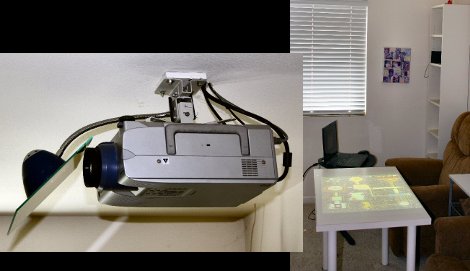
The concept of having a digital gaming table got stuck in [RobotGuy’s] mind over the weekend and he managed to whip this up in no time using materials on hand. He already had a ceiling-mounted projector which just happens to reside immediately above the space occupied by his coffee table. By swapping that piece of furniture out for a white Ikea table, and adding a mirror to the projector he now has the virtual gaming surface he was looking for. The mirror mount is nothing more than a desk lamp that includes a spring clamp and flexible neck. He hot glued the piece of mirror to this, and attached it to the projector’s ceiling anchor. Since rear-projection screens are common, all digital projectors have the ability to mirror and rotate the image being displayed so that it appears on the table in the correct orientation.

We love the look, but this is really only one portion of a digital gaming project. We think the table needs some interactivity. We often see this done using infrared light processed by a webcam. That multi-touch option is not going to work with a standard table since the camera needs to be on the opposite side of a translucent surface. But if you don’t mind using a stylus this IR whiteboard technique would work.

Arduino Aquarium Lights

[Kalle Hyvönen] just finished building his own aquarium lights. He used four powerful soft-white LEDs, mounting them on a pair of heat sinks to keep things cool. Now he could have just connected them to the power supply and plugged it into the wall, but instead he included is own controller. An Arduino drives the switch-mode power supply, offering dimming thanks to PWM, and the ability to automatically switch the light on and off using an RTC chip with a battery backup. The sketch includes the ability to alter the lighting schedule and other variables by sending serial commands through a USB connection. This protocol is detailed with comments in his sketch.

We’ve seen a lot of interesting aquarium light projects. This one that uses heat from the LEDs to warm the water is one of our favorites. Others are full of features like this version that includes a moonlight mode. But Arduino enthusiasts don’t have to look far to find offerings like this PAR meter build, or this aquarium light controller library which can be recreated using the ubiquitous controller board.

Accelerometer-based Game Control Using An IOS Device Courtesy Of HTML5

This game of Space Invaders is played by tilting your iPhone to the left or right. It’s a demonstration of HTML5 used to link devices in-browser. The only setup that’s required is for the base device to load up a webpage, then the control device scans a QR code (or just types in a link) to connect with the game. You can give it a try right now if you want.

It only works with iOS devices but we believe that’s because mobile Safari has the ability to poll accelerometer data and other browsers do not. If this was using on-screen buttons rather than the tilt controls it would work on any device that implements HTML5. The connection is facilitated by Node.js and Socket.IO. The QR code that is generated by the host machine’s page includes a unique ID which allows the control device to link with it. Once loaded, commands from the controller are sent via Socket.IO to the node on the host machine.

As with this HTML5-based sensor data application, we think this method is important because it allows control without the need for a standalone application. We’re hoping to see a lot of this in embedded projects in the future. By serving data to a smart phone or other device you remove to need for a physical user interface in your projects, which means you can make great things while spending less.

[via Reddit]