Browser-based Circuit Simulator Boasts A Mountain Of Features

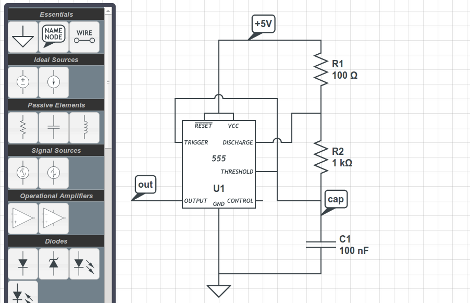
CircuitLab is an electronics simulator which you can run in a browser. Above you can see one of the example circuits provided to help show the power of the application. You can build your schematic (perhaps you want to try [Jeri’s] psu shut-off timer?) in the editor mode, then switch over to the simulator to get data back from the components. In that mode, your cursor becomes a probe, and clicking on different parts of the circuit will return the calculated input and output voltages for that component. But wait, there’s more. It’s got time and frequency simulation in addition to the voltage simulator. This lets you look at waveforms fed through analog filters, or timing data like in the 555 timer circuit above.

Where does this fantastic tool come from? [Humberto Evans] and [Mike Robbins], the guys behind NerdKits developed this site. We’ve seen a lot of their hacks around here, like milling solenoids and making them play a xylophone. Check out the CircuitLab quick start video they put together after the break. Continue reading “Browser-based Circuit Simulator Boasts A Mountain Of Features”

Wind-powered POV Weather Station

The more we think about this one the more we like it. [Michael] built himself a wind-powered persistence-of-vision weather station. Okay, that sounds interesting, but he ups the ante when you find out what’s included in the system.

A stepper motor acts as the generator which powers the electronics. As we’ve seen before; if you spin the shaft of a stepper motor electricity is produced. [Michael] is actually spinning the housing of the motor, with the shaft mounted to the base that holds the weather station in place. This way, the electrical contacts are spinning along with the blades of the generator. By mounting all of the electronics on these blades he gets around the problem of transferring power onto a spinning platform.

A set of LEDs on the end of the blades display temperature and relative humidity readings. A hall effect sensor pulled form an old floppy drive syncs the display with the rotational speed. He’s even got a shunt system which keeps the input voltage at a safe level, and will act as a break in high winds to keep the rotors from spinning out of control. See what we mean? An interesting idea because a fantastic project when you build in features like these!

A Zoom Lens For Your Webcam

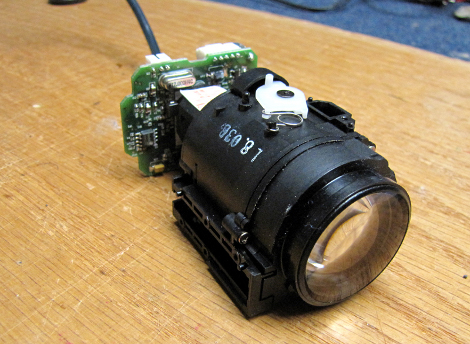
We need to find the kind of friends that [Dino] has. They seem to drop off all of their older, yet totally awesome, electronics with him once they’re through with the devices. One example of this is the Sony Handycam that came into his possession. He decided to crack it open and repurpose the 20x optical zoom lens for use with a webcam.

We always like [Dino’s] style. You can tell that he has no idea if he’s going to be able to pull off his goal, but at the same time he has an intuitive sense that he’ll make it happen. In the video after the break he starts off investigating what components are in the camera. At first the lens is passing no light at all, but he just strips down parts until he can see through it.

There are a couple of servo motors which control zoom and focus. He removes those before attaching the CCD from a Logitech webcam. At the end of his video he shows a demo of the functionality, which is pretty finicky when focusing by hand. But we think this hack would make a fantastic camera for soldering projects, it just needs a custom controller so the motors can be once again used to adjust focus.

Continue reading “A Zoom Lens For Your Webcam”

Auto Power Circuit For An Arcade Machine

Some of the pinball machines which [Jeri Ellsworth] has restored have ended up in the break room at her work. We’re sure her coworkers are thankful for this, but sometimes they forget to turn off the power to the machines, and letting them run constantly means more frequent servicing will be necessary. She set out to fix the situation by building a circuit that will automatically power the machines.

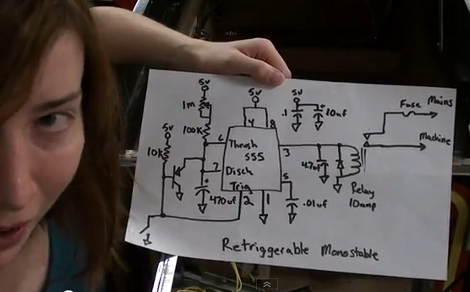
We think the solution adds some much needed functionality. Instead of hunting for the power switch, you can now power the machine up by hitting the left flipper, and it will automatically shut off after about five minutes of not having that flipper button pressed. For this she grabbed a 555 timer chip and built a circuit to control the relay switching the mains power.

She added a magnet and reed switch to the left flipper switch assembly to control her add-on circuit. It connects to the base of a PNP transistor which controls a resistor network and capacitor. This part of the circuit (seen to the left of the 555 in the schematic) allows the timer to be re-triggered. That is, every time you press the flipper the 555 will reset the timer. Don’t miss the demo she filmed after the break.

Continue reading “Auto Power Circuit For An Arcade Machine”

Klackerlaken Gets The Common Man Excited About Electronics

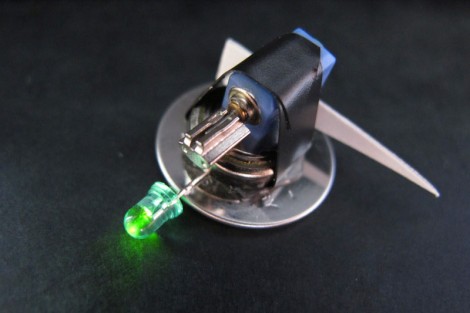
The Klackerlaken is a combination of LED throwie and bristlebot. The bauble is easy to build and really has no other purpose than to delight the masses. The diminutive devices were first seen in the wild at the 2011 CCC (Chaos Communications Camp) as a hands-on workshop. Check out the clip after the break and you’ll see why this really sucks in the spectators.

We’ve seen a ton of Bristlebots before (this tiny steerable version is one of our favorites) and were intrigued to see bottle caps used as the feet instead of the traditional toothbrush head. In fact, that video clip shows off several different iterations including two caps acting as an enclosure for the button cell and vibrating motor. Googly eyes on the top really complete the look on that one.

Decorating the robots with LEDs, fake eyes, tails, and feathers helps to temper the technical aspects that kids are learning as they put together one of their own. We’re glad that [Martin] shared the link at the top which covers the creations seen at a workshop held by Dorkbot Berlin. This would be a great activity for your Hackerspace’s next open house! Perhaps its possible to have follow-up classes that improve on the design, using rechargeable cells instead of disposable buttons, or maybe supercaps would work.

Continue reading “Klackerlaken Gets The Common Man Excited About Electronics”

A One-bit Processor

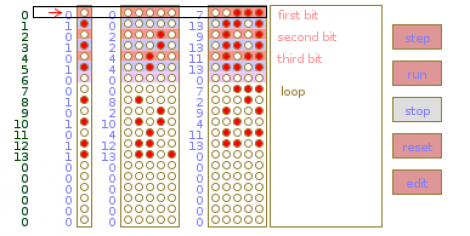
Put on that abstract thinking cap, get out the pen and paper, and spend some time figuring out how this one-bit processor works. [Strawdog] came up with the concept one day during his commute to work (don’t worry, he takes the train… much safer than [Dave Jones’] frightening drive-time podcasts). He sketched it out on paper to make sure he knew where he was going with the project, then collaborated with Legion Labs to implement it in processing as an easier way to visualize its functionality. Since it’s one-bit there’s only room for one instruction. That instruction is a copy, then branch-if instruction. It copies the current bit to one address, and if that bit was one, it branches to a second address.

Going a bit fast for you? We think the description is fairly good, but if you can’t quite put it together from the article’s description, you may want to build this 2-bit paper processor and learn how it works first. It should teach you the basic concepts you need to understand the 1-bit version. As you can see in the image above, there’s also a single-step feature in the processing example that lets you analyze the effects of each instruction during program execution.

Microsoft Shows Off Their Transparent 3D Desktop Prototype

We think most would agree that the Microsoft Kinect is a miraculous piece of hardware. The affordable availability of a high-quality depth camera was the genesis of a myriad of hacks. And now it seems that type of data is making an intriguing 3D display possible.

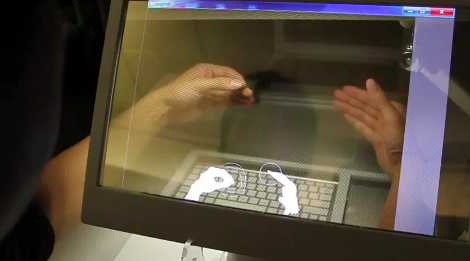
What you see above is a 3D monitor concept that Microsoft developed. It starts off looking much like a tablet PC, but the screen can be lifted up toward the user whose arms reach around it to get at the keyboard underneath. There is as depth camera that can see the hands and fingers of the user to allow manipulation of the virtual environment. But that’s only part of the problem. You need some way to align the user’s eyes with what’s on the screen. They seem to have solved that problem too, using another depth camera to track the location of the user’s head. This means that you can lean from one side to the other and the perspective of the virtual 3D desktop will change to preserve the apparent distance of each object.

Don’t miss the show-and-tell video after the break. As long as there’s only one viewer this looks like a perfect non-glasses alternative to current 3D hardware offerings. Continue reading “Microsoft Shows Off Their Transparent 3D Desktop Prototype”