DIY Intervalometer Uses A Great Looking Enclosure

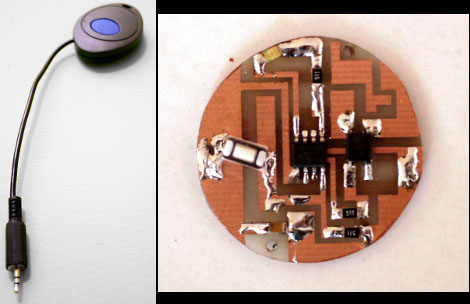
That finished look for your project is all about the enclosure you find to host it. We think [Punge] really did a great job with the case for this DIY intervalometer. The build section of the project page links to the company that makes the enclosures. They’re meant to host round PCBs with several options for button configuration. Combine this with enough space for a coin cell and you’ve got a great looking custom device.

The intervalometer itself is much like others we’ve seen. It uses an audio-jack connector to control the camera. You have the option of using a three or four contact version depending on what your camera supports. The PIC 12F683 uses an optocoupler with a built-in transistor to do the switching. A single button seen at nine o’clock on the board above is all it takes to start the device off. Press and hold once to wake it up, then wait for your desired interval and press the button again to start the timed shots.

You’ll notice that there is no programming head in this design. A separate board was etched to attach the PicKit, with the surface mount chip just held in place during programming.
Investigating Parking Assist Sensors

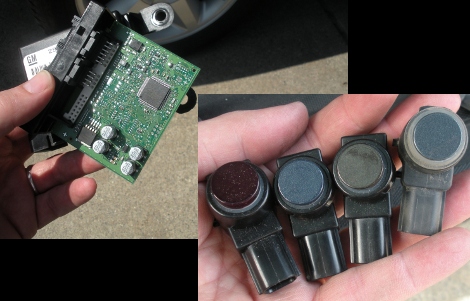
While his wife was out-of-town [James] jumped at the opportunity to do some snooping around with her Chevy Tahoe’s parking assist sensors. We can understand how pulling parts out of someone’s car would make them none too happy. But we find it hilarious that it’s a leased company car he’s tinkering around with. But we’re glad he did, the ten-page write-up he published about the project is a fascinating read.

You can see the control board above which is housed beneath the passenger seat. It uses a Freescale microcontroller to read from the four bumper-mounted ultrasonic sensors. But just looking at what parts are used obviously isn’t enough to satisfy a hacker’s appetite for knowledge. [James] busted out a CAN bus tool to sniff the data packets. These sensors use a custom chip designed by GM, utilizing a single wire communications system. He figures out the communication scheme and builds an mbed based test rig to read them directly.

[via Dangerous Prototypes]

IOU Management For Roommate Chores

[Chris] shares a dorm room with five other people. When living with others its important to stay on top of cleaning and to do so equitably the sextuplet came up with a well-planned whiteboard of chores. The problem lies in getting everyone to do theirs in a timely manner. To help facilitate this, [Chris] came up with a system that lets roommates swap chores, giving each other IOU’s for future duties.

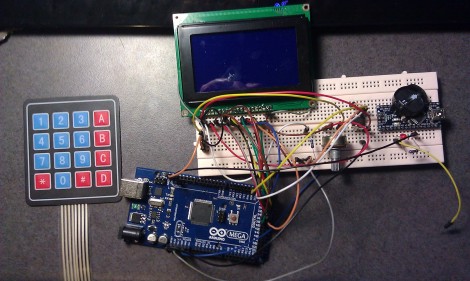
The system uses an Arduino board along with an RTC chip for precise timekeeping. The user interface is made up of a graphic LCD and a keypad with everything mounted inside of a cardboard box. [Chris] shows off his system in the video after the break, spending the majority of time on the debt system. The roommates have a pot of money for group groceries and this system will let you know where everyone stands. But according to his written description this also stores the calendar of chores that need to get done, and will let you trade with one another to fit your personal schedule.

So now the issue is getting everyone to use the system. But we don’t think that’s going to be too tough since all six of them are computer scientists.

Continue reading “IOU Management For Roommate Chores”

Hackaday Links: February 26, 2012

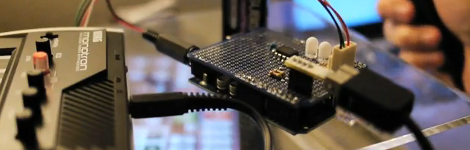
Wii Nunchuk controlled Monotron

Adding a bit of motion control to your music synthesizer turns out to be pretty easy. Here’s an example of a Wii Nunchuk used to control a Monotron. [Thanks John]

Hackers on the Moon and other space related goals

Yep apparently a non-government backed expedition to the moon is in the works. But you’ve got to walk before you can crawl and one of the first parts of the process is to launch a hackerspace-backed satellite network called the Hackerspace Global Grid. Check out this interview with one of the initiative’s founders [Hadez]. [Thanks MS3FGX]

Laser pointers and frosted glass

We were under the impression that a laser show required finely calibrated hardware. But [Jas Strong] proves us wrong by making pretty colors with laser pointers and slowly rotating glass. [Thanks Mike]

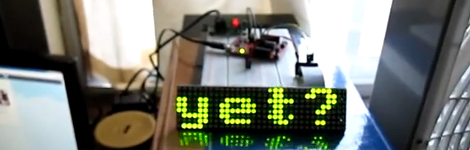
MSP430 Twitter Ticker

[Matt] built a Twitter ticker using the TI Launchpad. It works on an LED matrix or OLED display along with a Python script which handles the API.

Android floppy drive hack

[Pedro] shows us how he reads floppy disks with his Android tablet. The hardware includes a docking station to add a USB port to the tablet, as well as a hub and USB floppy drive. On the software side of things an Android port of DOSbox does the rest.

3D Printed Lugs For Your Custom Bike

We haven’t heard much about 3D printing using stainless steel as the medium, but that’s exactly what’s going on with the lugs used to assemble this bicycle frame. They’re manufactured using LaserCusing, which is a brand name for parts produced using Selective Laser Melting. The video after the break gives you an overview of what it takes to clean up each of these parts.

The laser melts metal power to solidify areas needed in the final part. Just like the hobby printing we’ve seen on the RepRap or Makerbot there are structural supports necessary to complete the print job, and these need to be removed after the laser has done its work. This is where the majority of the labor comes in. You’ll see a ton of waste material pulled out of the cage-like lug, and we’re sure there’s no shortage of filing and polishing to finish up. But wow, what an interesting result. We just need to figure out if anyone has found a cost-effective way to hack together one of these metal-powder printers.

Continue reading “3D Printed Lugs For Your Custom Bike”

All PCB Quadcopter Makes The Most Of Each Component

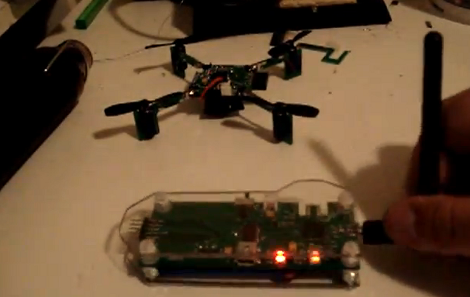
It’s difficult to contain our excitement for this tiny quadcopter project called the Picopter. [Frank] managed to pull together an impressive collection of features when developing the project. First off, the quadcopter itself uses all-PCB construction. Even the supports for the motors are PCBs with keyed slots to mate perpendicular to the main control board, then held firm with solder joints. We think this will be a more resilient option than this other all-PCB build.

The control board seen in the foreground has an edge connector which mates with a Wii classic controller connector. This is what you use for flight control. But there’s even more. The pinheader just visible on the left side of the controller mates with a socket on the ‘copter board. This allows you to sync the two so that there’s no radio frequency interference, and recharge the batteries from a USB connection. Speaking of those wireless communications, [Frank] chose to use an ATmega128RFA1. This is a newer microcontroller from Atmel that has a radio built into it. Add a gyroscope sensor and some motor control and you’re in business.

Don’t miss [Frank’s] video after the break when he explains all of the goodies found in his build. Continue reading “All PCB Quadcopter Makes The Most Of Each Component”

Touch-based Wirless RGB Lamp Control

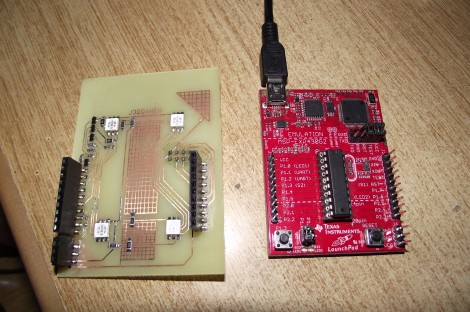
[Alex] built an add-on board for his TI launchpad that lets him use it as a wireless controller for an RGB lamp (translated). As you can see above, the board has a pair of female pin-headers which make it easy to install or remove the board. This way you can use it for other projects without any hassle.

The board itself doesn’t have any buttons. Instead, [Alex] etched a two-sided PCB, including pads for use as capacitive touch sensors. Here we only see the underside of the board, which hosts four RGB LED modules. These give feedback by showing the levels which are about to be set for each color. In the clip after the break you’ll get a good look at the touch sensors. There are two that act like buttons, scrolling through each color channel, and sending the updated values to the lamp via a wireless module mounted on that same side. There are also four pads which act as a slider. We didn’t see any code but apparently this uses one of TI’s touch sensor libraries.

Continue reading “Touch-based Wirless RGB Lamp Control”