A Chink In The Armor Of WPA/WPA2 WiFi Security

Looks like your WiFi might not be quite as secure as you thought it was. A paper recently published by [Stefan Viehböck] details a security flaw in the supposedly robust WPA/WPA2 WiFi security protocol. It’s not actually that protocol which is the culprit, but an in-built feature called Wi-Fi Protected Setup. This is an additional security protocol that allows you to easily setup network devices like printers without the need to give them the WPA passphrase. [Stephan’s] proof-of-concept allows him to get the WPS pin in 4-10 hours using brute force. Once an attacker has that pin, they can immediately get the WPA passphrase with it. This works even if the passphrase is frequently changed.

Apparently, most WiFi access points not only offer WPS, but have it enabled by default. To further muck up the situation, some hardware settings dashboards offer a disable switch that doesn’t actually do anything!

It looks like [Stephan] wasn’t the only one working on this exploit. [Craig] wrote in to let us know he’s already released software to exploit the hole.

Leaking Water Detector From An Old Smoke Alarm

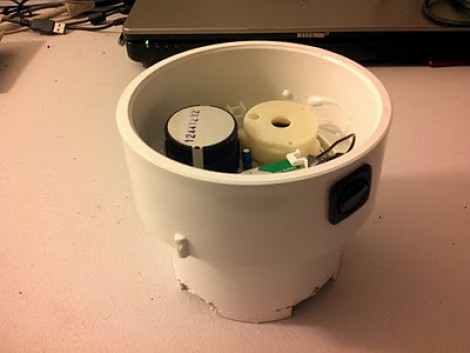
[Thomas Clauser] had his basement flood last year when a hurricane swept over New England. The problem with flooding or leaking water is that chances are you won’t notice until it’s too late. He decided to protect against this in the future by building his own leaking water detector. It’s a simple device that sits on the floor of his basement and triggers an audio alarm if water begins to cover the floor.

He used an old smoke detector for the build; a nice choice since it’s loud, and designed for long-term battery operation. It also has a button for testing if the detector is working. [Thomas] removed the PCB from the smoke detector case and soldered wires onto the test button contacts. He cut a sponge to squeeze it inside of a PVC pipe connector housing. That sits against the floor, with the wires for the test button contacts placed through the sponge. If water is soaked up by the sponge it completes the circuit and triggers the alarm.

A few other design features really make this a nice setup. He notched out the bottom of the PVC connector so that water can flow freely, and added a switch to one of the probe wires lets him kill the alarm when inspecting the damage.

Rooting A Motorola Actv (Android Wristwatch)

[Chris’] family made the mistake of giving him a hackable Christmas gift. We’d bet they didn’t see much of him for the rest of the day as he set about rooting this Android wristwatch.

This thing has some pretty powerful hardware under the hood. It’s sporting an OMAP3 processor running at 600 MHz along with 256 MB of RAM. [Chris] needed to get his hands on a firmware image in order to look for security holes. He found a way to spoof the update application in order to intercept an upgrade image from the Internet.

He dumped the firmware locations and got to work searching for a way to exploit the device. Details are a bit scarce about want exactly he did, but you can download his modified image, letting you root your own Motorola Actv using the Android Debug Bridge.

We’ve embedded a demo video after the break. The OS is pretty snappy on the tiny device. We’re not sure what will come of this functionality, but we assume [Chris] was really only interested in the challenge of rooting process itself.

Continue reading “Rooting A Motorola Actv (Android Wristwatch)”

Self-balancing Unicycle Only For Those With Good Balance

The only problem with this self-balancing unicycle is it’s inability to balance itself. You see, it automatically balances along the axis that is parallel to the line of travel. But since there’s only one wheel the rider is responsible for balancing perpendicular to travel. This is really not too much different from a bicycle; balancing while in motion is pretty simple. Only when you slow down or stop are you in trouble.

[Stephen Boyer] built the vehicle and uses it for most of his travel around the MIT campus. It carries a pair of 12V batteries that pack enough punch to travel five miles between charges. A 5DOF board senses motion and orientation, with an ATmega328 microcontroller calculating the corrections necessary to keep the rider upright.

The demo video after the break never really gives you good look at the thing, but it’s enough to prove that it does indeed work very well. We’re also glad to see that [Stephen] is using a kill-switch while riding.

If you’re aching for more electric unicycle video check out this other project too. Continue reading “Self-balancing Unicycle Only For Those With Good Balance”

Arcade Cabinet That Doesn’t Monopolize Your Space

We’re guessing that if you ever though of buying an arcade cabinet it was only briefly, and you decided against based on the difficulties of moving and finding a place for such a large and heavy item. You could go the opposite way and build a controller for a  MAME box, but for some, there’s no replacement for the real hardware. This Christmas gift is the best of both worlds, a JAMMA box which uses traditional hardware in a more compact cabinet.

[Majtolycus’] boy friend is a sucker for a game of Battle Balls. She looked around for an original logic board and after several weeks of searching had to settle for the Japanese version of the game called Senkyu. To patch into the board she also picked up a JAMMA harness, power supply, RGB to VGA video converter, speaker, and some Happ arcade controls. The whole thing goes into a wood box which connects to a VGA monitor (or the VGA port on your HDTV).

The system is easier to store than a full-sized cabinet, and if a deal comes along, you can buy additional JAMMA logic boards to play.

[Thanks Adam]

Counting Down To The New Year

[Rod] is in a position to provide a community service on New Year’s Eve. He spends the evening at a relative’s house next to the beach. There are fireworks at midnight, but the crowd has no communal way to count down to the deadline. This year, he build his own count-down display so that everyone can join in during the last few seconds.

This is a temporary build so each digit is housed in a cardboard box. [Rod] first drew the outline of the seven segment digit on the front, then added holes for three LEDs in each segment. He’s feeding the segments with 12V and therefore is able to run the LEDs in series, along with a resistor, switching each segment with one transistor. He chose an Arduino to drive the display, and since he had two sitting around, used both instead of grabbing a shift register as port expander.

If you’re looking for a more permanent solution, we really like the digit displays designed for this scoreboard. But you’re going to have to etch the boards yourself if you want them done in time for the festivities.


Using An ATmega8 To Program PIC24FJ Chips

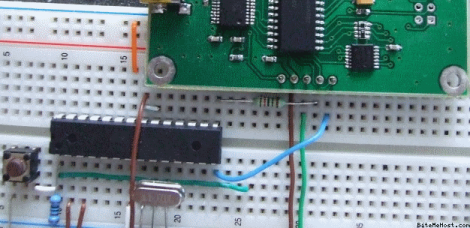
[Fezoj] likes to play around with microcontrollers and decided that he wanted to try a Bus Pirate as a new tool in his adventures. Since it’s open hardware he had his own board made and populated it himself. The trouble is, he works only with AVR chips and doesn’t have a PIC programmer. No problem, he figured out how to flash the PIC24FJ using an ATmega8.

To get started, he grabbed a copy of the flash programming specifications from Microchip. Once he had implemented the protocol in the AVR code, it was just a matter of getting the downloaded PIC firmware to the AVR. An RS232 chip gives him the serial connection he needs, with the help of his own programming software written with Visual Studio.

It’s not a robust solution for prototyping on the PIC platform, but maybe it could be developed for that purpose. For now, all he needed was a bootloader so that he could flash the Bus Pirate via a USB connection.

[via Dangerous Prototypes]