Full Featured Security Lock Demonstration

[Arshad Pathan] let us know about his latest project, a modular code lock that can be adapted to many different situations.

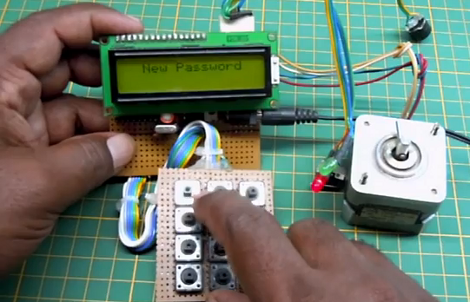
The user interface is made up of a character LCD screen and a 3×4 keypad. For this example [Arshad] is using a stepper motor as the locking mechanism. When the board is first powered up it runs the stepper in one direction until receiving input from a limiting switch. In this way, the microcontroller calibrates itself to ensure the lock is in a known position. From there it waits for user input. An unlocked door can be locked at any time by pressing the * key. Unlocking requires entry of the correct password. And a password can be changed by entering 9999 (followed by the old password when prompted).

In the video after the break [Arshad] does a great job of demonstrating the various modes which he has programmed. This stands on its own, but we always love to have more details so we’ve asked if [Arshad] is willing to share a schematic and the source code. We’ll update this post if we hear back from him.

Update: [Arshad] sent in a couple of schematics which can be found after the break.

Continue reading “Full Featured Security Lock Demonstration”
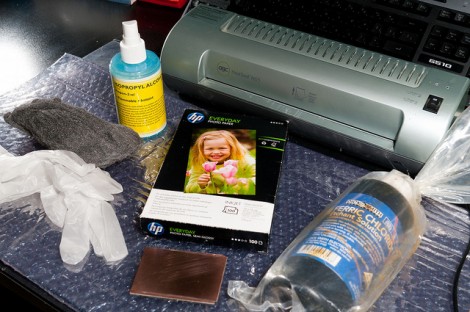
Etching Your Own PCBs

When [Adr1an] wrote in to share a link to his PCB etching tutorial he mentioned that he knew we had already covered a ton of these guides. He’s absolutely right, not only have we featured a great number of them, but we also wrote our own quite a while ago. But that doesn’t mean we ignore them when they come in on the tips line. In fact, we read all of them that have something to offer and are pleased to feature the ones that are well presented… like this one!

[Adr1an] went all out with his writeup. He not only covers all of the elements that go into this, but discusses where to purchase them and his thoughts on how he arrived at the choice. He’s using the toner transfer method and prefers Brother branded toner for its coverage and resistance to over-etching. He prints on HP Everday Photopaper, then uses a laminator to transfer to the copper clad board. For this guide he used 2oz copper but prefers 1oz copper as it etches faster. His etchant of choice is Ferric Chloride, which can be ordered as a dry powder. He uses the direct etch method of loading etchant into a sponge an applying that to the board.

The board he makes in the guide looks great, and it only took him 28 minutes!

Toaster Oven Reflow Control Without Modifying The Oven

[Eberhard] wanted his own reflow oven but didn’t really want to mess around with the internals that control the heating element. He put his microcontroller programming experience to work and came up with an add-on module that controls the oven by switching the mains power.

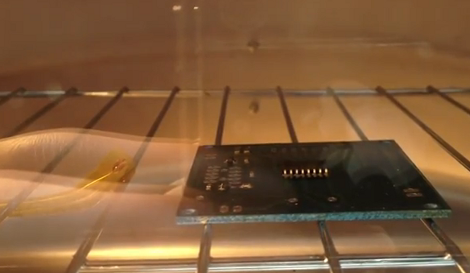
The image above shows a board in the midst of the reflow process. If you’re not familiar, solder paste usually comes with a recommended heat curve for properly melting the slurry. [Eberhard] managed to fit three of these temperature profiles into his firmware.

The ATtiny45 which makes up the controller samples oven temperature via the thermistor seen next to the board. A PID algorithm is used to calculate when to switch mains power on and off via a relay. One button and one LED make up the controller’s user interface for scrolling through the three preprogrammed temperature profiles.

It looks like it works great, see for yourself in the clip after the break.

Continue reading “Toaster Oven Reflow Control Without Modifying The Oven”

Name These Parts: Verifone Payment Module Tear Down

[Jerzmacow] got his hands on this Verifone Vx570 handheld payment terminal at a flea market. It’s got a thermal printer, a magnetic card reader, and then there’s the big LCD screen and buttons. In other words, lots of parts for his hacking amusement. But first, he decided to take a look at the parts that went into the design. He carefully disassembled the device, documenting what he found along the way. He mentions that there’s a switch pressing against the underside of the LCD which disables the hardware when disassembled. So it sounds like he won’t be able to get it to work again (there’s a Lithium battery inside which we’d guess powers some type of hardware kill switch circuit).

He posted an HD video of the tear down which we’ve embedded after the break. We find some of the design to be quite peculiar. Normally we have [Dave Jones] to walk us through design choices in his EEVblog hardware reviews. Since [Jerzmacow] wasn’t able to provide that level of insight, we’d love to hear what you think each piece of hardware is for. Leave your comments, along with time-stamps from the video. Specifically, what’s up with that strange board shown at 1:51? Continue reading “Name These Parts: Verifone Payment Module Tear Down”

Fixing That Broken Laptop Power Jack

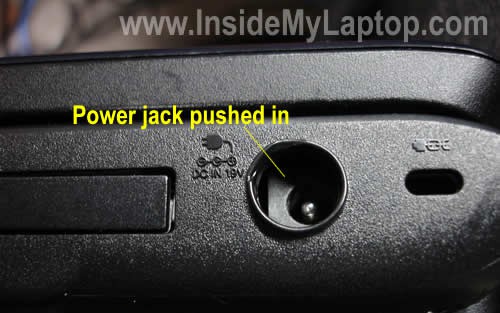
It seems that there’s a whole range of Toshiba Satellite laptop computers that suffer from a power jack design that is prone to breaking. We see some good and some bad in this. The jack is not mounted to the circuit board, so if it gets jammed into the body like the one above it doesn’t hose the electronics. But what has happened here is the plastic brackets inside the case responsible for keeping the jack in place have failed. You won’t be able to plug in the power adapter unless you figure out a way to fix it.

We’d wager the hardest part of this repair is getting the case open. Once inside, just cut away all of the mangled support tabs to make room for the replacement jack. The one used here has a threaded cuff that makes it a snap to mount the new part to the case. Clip off the old jack and solder the wires (mind the polarity!) and you’re in business.

Anyone know why we don’t see more of the magnetic connectors (MagSafe) that the Apple laptops have? Is it a patent issue?

[Thanks Dan]

Sparkfun Announces Free Day 2012

We got word that it was coming, and now SparkFun has just announced that Free Day 2012 will take place on January 11th. This is the third time around for the purveyor of goodies for electronic enthusiasts. Each year the offer is a little different, but like in the past you stand to get $100 of free stuff!

The first Free Day back in 2010 saw a lot of hammering which left the SparkFun servers a steaming pile of slag. In 2011 they bolstered their bandwidth handling and tried a quiz-based system for the giveaway. This time around they’re not asking questions but leaving the awards up to chance. Each person has the opportunity to win a $100 credit during the contest window (not specifically announced yet, but definitely starting at 9AM MST on 1/11/2012). There will be some type of bot monitoring, but other than that you can try to claim your credit as many times as you want, with the awards being randomly assigned to a pool of entrants. We recommend you keep an eye on their announcements for more details, but we’ll try to keep this thread updated as we hear more.

Not wanting to wait that long for your components? Don’t miss some of the sales that are going on over this Holiday weekend.

[via Reddit]

Reading Inputs From Shift Registers Using Just One Single Pin

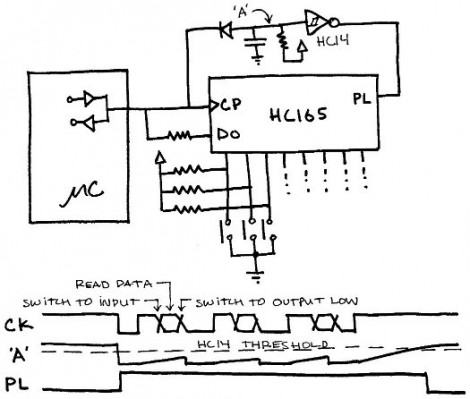
Here’s an interesting article about reading data from shift registers using less than three pins. 74HC165 shift registers are a popular choice for adding inputs to a microcontroller. They have a parallel input register which can be read using the latch, then shifted into a microcontroller via the data and clock pins. For those counting, that’s the three pins normally associated with driving these devices.

This hack first does away with the latch pin. The addition of a carefully trimmed RC circuit (capacitor is charged by the clock pin, then the resistor lets that cap slowly discharge) means that the device will not latch until after the clock stops toggling. This technique drops the control down to just two pins (data and clock). You can still use hardware SPI to read the data using this method. It’s the same as using SPI to drive 595 shift registers except the microcontroller reads data instead of writing it.

But wait, there’s more! The diagram above actually shows a way of reading this shift register with just one pin. Notice that the clock and data pins are now connected to just one of the microcontroller pins. The data pin has an added resistor, which keeps the current low enough that it will not compete with the clock signal coming from the microcontroller. In between clock pulses, the microcontroller switches from output to input to read the data pin on each cycle. Give it a try, it’s a fun experiment!