AppleCrate II Doubles The Cluster Computing Fun

apple_crate_II

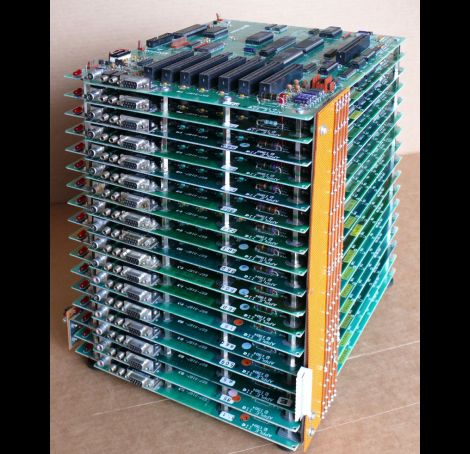
Back in 2004, Apple hobbyist/guru [Michael Mahon] built a cluster of Apple IIe main boards dubbed the “AppleCrate” as an experiment in parallel computing. Now that a few years have passed, he is back with a new iteration of the device, aptly named AppleCrate II.

AppleCrate II was built to address some of the design limits of his first cluster project as well as to expand his parallel computing capabilities. His gripes with the first model were primarily structural in nature. The new system is organized in horizontal layers, using metal standoffs between each main board, rather than relying on a shaky wooden superstructure to keep things together. He also found his previous 8-processor configuration a bit limiting, so the AppleCrate II has 17 nodes – 16 slaves and one main board dedicated to running the operation. The cluster even uses his own homebrew networking stack known as NadaNet to enable communications between the boards.

The project is pretty impressive, so be sure to swing by his site if you want to learn more.  He has a ton of technical details there, as well as copies of all of the software he used to get the cluster up and running.

[via BoingBoing]
DIY Sunrise Alarm Clock

sunrise_alarm_clock

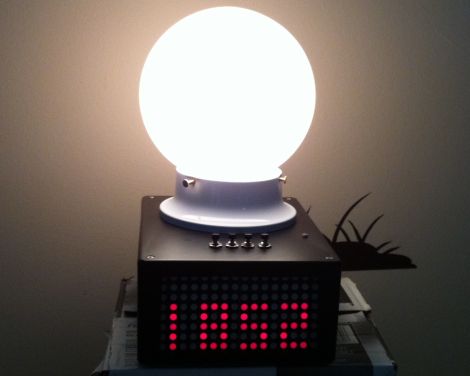
As a project for an embedded systems class, [Alan] recently built himself a sunrise-simulating alarm clock. You are probably familiar with these sorts of timepieces – they gradually light up the room to awaken the sleeping individual rather than jarring them awake with a buzzer or the radio. Since many commercial units with this feature are sold for $70 and up, his goal was to replicate the functionality at a fraction of the cost, using only open source components.

An Arm Cortex M3 processor runs the show, displaying the time via a pair of 8×8 LED matrix panels on the front of the device. The clock is programmed to gently wake up its user by simulating a sunrise over a period of 5, 15, 30, 45, or 60 minutes. If the user has not woken up before the sunrise simulation is complete, the clock resorts to a traditional piezo alarm to rouse the heavy sleeper.

The project is nicely done, and after looking at his bill of materials it seems to be far cheaper than many sunrise alarm clocks you will find in stores.

Meet Mr. Clappidoo

mr_clappidoo

[Laurence] tinkers around the house quite a bit, making all sorts of fun interactive toys for his children to play with. Mr. Clappidoo is a toy that he finished a while back, which bears a striking resemblance to one of his projects we recently showed you, Papydoo. This is not a coincidence, as Papydoo was created after Mr. Clappidoo was built, borrowing many features from his predecessor.

Who is your daddy and what does he do?

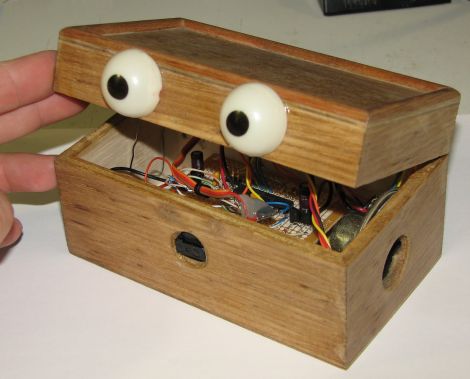
It’s a good thing you asked. Mr. Clappidoo uses an IR motion sensor to detect nearby objects, waking up and interacting with whatever crosses his path. He is capable of four different random moods ranging from angry to flirty. He projects these moods by changing the color of his LED-lit eyes as well as playing simple sounds. A balsa wood chest makes up Clappidoo’s body, and he repeatedly claps his lid mouth open and shut using a small servo, hence the name.

Like his other projects, [Lawrence] has focused his efforts to ensure that the three AA batteries used to power Clappidoo last as long as possible. He says that with moderate usage the device can run off the same set of batteries for a few months before needing replacement.

It’s a fun little contraption, sure to please the kids. Stick around for a quick video of Clappidoo in action.

Continue reading “Meet Mr. Clappidoo”

Real-time Robotic Arm Control With Blender

robotic_arm

Last year, [Justin Dailey] was coming down the home stretch of his senior year as a Computer Engineering student and needed to build a final design project. He always wanted to construct a robotic arm, and figured that there was no better way to legitimize such a project, than to claim that it was “homework”.

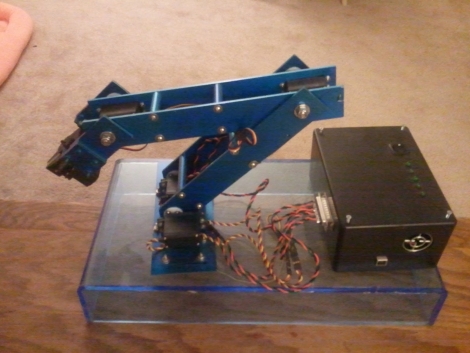
While he originally wanted to control the arm with a joystick, he had been messing with Blender quite a bit leading up to his final project, and thought it would be pretty cool to let Blender do the work. He started out by testing his ability to control a single servo with Blender, then slowly increased the complexity of the project. He prototyped the arm using cardboard, and satisfied with his progress thus far, began constructing the arm out of aluminum.

Once he had all six of his servos attached to the arm’s joints and wired to his Roboduino, he got busy constructing a 3D model in Blender. Using a few Python scripts, the movements inside Blender are translated to serial data in real-time, which is relayed to the Roboduino in order to control the arm.

Check out his site if you get a chance – there’s plenty of code to be had, as well as several videos of the arm in various stages of construction and testing.

A Weighted Companion Cube Worth Saving From The Incinerator

companion_cube

It’s honestly sad that Valve has not released any official Portal-related items to the masses, as a market for them clearly exists. As the saying goes, “necessity is the mother of invention”, and [Jamie] needed a Weighted Companion Cube in the worst way.

Actually he constructed his Companion Cube in order to test out some modifications and upgrades he performed on his homebrew CNC Mill. Judging by how the cube turned out, and the fact that he was able to keep tolerances within .005”, we would say that his mill is working just fine.

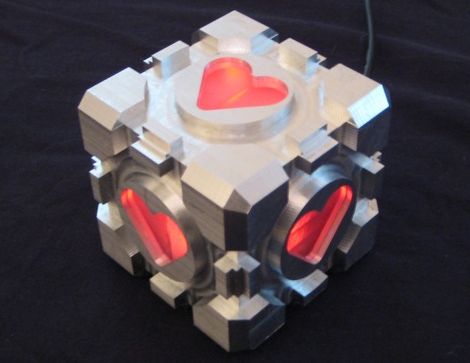
The cube was designed in Solidworks, and passed through the BobCAD plugin to generate the GCode for the mill. The base of the cube was machined out of a 3” solid block of aluminum, hollowed out on one side to give him access to the cube’s innards. He milled out heart shaped openings on each side, covering them with frosted Lexan.

He added a BlinkM to the mix, mounting it on the cover plate he milled for the open side of the cube. Once lit it cycles through several colors, including the pinkish tone anyone who has played Portal is quite familiar with.

We would say that it’s a great job, but it doesn’t do his work justice – it’s absolutely stunning. We’re not just saying that because we want one, though we do want one…badly.

LED Matrix Glasses Keep All Eyes On You

my_shades_are_so_bright_i_gotta_wear_um_something

Instructables user [llopez-garcia] was looking for something that would make him stand out at music events or clubs, and decided that an LED matrix built into a set of sunglasses would do the trick.

He grabbed some LEDs and the biggest pair of sunglasses he could find at WalMart, then he got down to business. He had no experience in programming micro controllers, so he chose a PICAXE 20X2 to run his glasses, figuring that it would be easier to program in BASIC for his first project than C.

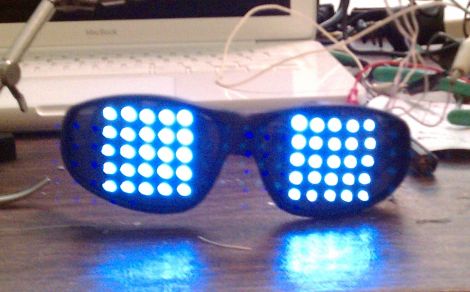
He drilled holes in the lenses and wired up two 5×5 LED grids, connecting them to the PICAXE as a single 10×5 array. That setup was chosen because the 20X2 limited him to 15 usable pins and he wanted to avoid using a shift register or LED driver to keep the part count down. The rest of the build is relatively straightforward with resistors in all the right places, and a pair of AAA batteries to power it – one strapped to either temple.

We think these are pretty cool, though we’re not sure if he can see anything while wearing them. Then again, who cares? You don’t need to be able to see with glasses this awesome.

If he had to do it all over again, [llopez-garcia] says he would beef up the LED structure a bit, as well as choose a different micro controller that can be programmed in C since he felt the PICAXE was a bit limited by BASIC.

Stick around to see a quick demo video of the glasses in action.

Continue reading “LED Matrix Glasses Keep All Eyes On You”

Large Remote-controlled Game Of Life Display

game_of_life

Sometimes it’s just plain fun to over-engineer. [Stephanie] gets a warm fuzzy feeling when she successfully adds way more electronics components to a project than she really needs – just because she can. We can’t really argue with her if that is the intended goal, nor can we find fault with the sweet Game of Life display she put together.

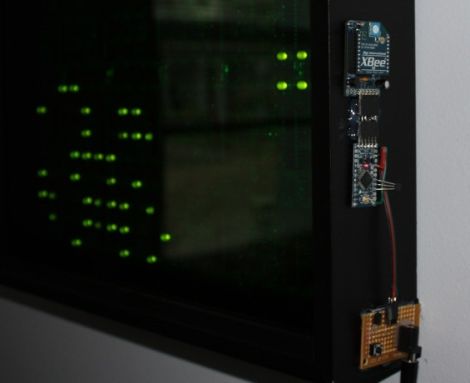
She started off with six Game of Life kits from Adafruit, but she quickly caught the LED bug and her collection grew until she had 20 kits (that’s 320 LEDs for those of you keeping count). After piecing them all together, they were mounted in a wooden frame and placed behind a dark piece of acrylic. It looked great and worked just fine, but it wasn’t overdone enough for her tastes.

In the end, she added a small Arduino and Xbee module to the Game of Life display, which enables it to be controlled by her network-enabled thermostat we featured a few weeks back. The thermostat was fitted with an Xbee unit as well, which allows it to turn the Game of Life on and off at whatever times [Stephanie] specifies.

We’ll take two please.

[via Adafruit Blog]