Pi Zero Gives Telescope Hands Free Focus

It seems like [Jason Bowling] never gets tired of finding new ways to combine the Raspberry Pi with his love of the cosmos. This time he’s come up with a very straightforward way of focusing his Celestron 127SLT with everyone’s favorite Linux SBC. He found the focus mechanism on the scope to be a bit fiddly, and operating it by hand was becoming a chore. With the Pi Zero and a stepper motor, he’s now able to focus the telescope with more accuracy and repeatability than clumsy human fingers will be able to replicate.

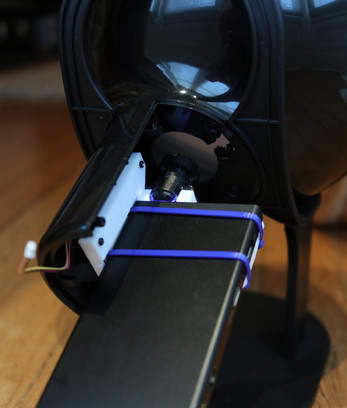
On this particular type of telescope, the focus knob is a small knob on the back of the scope (rather than on the eyepiece), which just so happens to be the perfect size to slide a 15mm bore pulley over. With a pulley on the focus knob, he just needed to mount a stepper motor with matching toothed pulley next to it and find a small enough belt to link them together. Through the magic of Amazon and McMaster-Carr he was able to find all the parts without having to make anything himself, beyond the bent piece of aluminum he’s using as a stepper mount.

To control the stepper, [Jason] is using an EasyDriver connected up to the Pi’s GPIO, which along with a 5V regulator (which appears to be a UBEC from the RC world) is held in a tidy weather proof box mounted to the telescope’s tripod. The regulator is necessary because the whole setup is powered by a 12V portable “jump start” battery pack for portability. Handy when you’re stargazing in the middle of a field somewhere.

[Jason] promises a future blog post where he details how he used Flask to create a web-based control for the hardware, which we’ll be keeping an eye out for. In the meantime, he reports that his automated focus system is working perfectly and keeps the image stable in the eyepiece even while moving (something he was never able to do by hand).

Last year this same scope had a Raspberry Pi camera mounted to it to deliver some very impressive pictures without breaking the bank. We’re interested in seeing how [Jason] ties these systems together going forward.

Flood Damaged 386 Gets A Modern Rebuild

Until a flood claimed its life, the 386 tower [Tylinol] found on the side of the road served him well as a DOS gaming rig. In the aftermath of the flood, the machine was left with ruined internals and a rusted case; it ended up being tossed in storage where it was slowly rotting away. But a recent idea got him to drag this old dinosaur back out into the light of day and give it a new lease on life with some modern gear.

For our viewing pleasure [Tylinol] documented the restoration of the computer, dubbed SErEndIPITy, from start to finish. The rebuild starts with tearing the machine down to the steel frame and sanding all the rust off. Luckily it looks like no structural damage was done, and a coat of engine enamel got the frame looking more or less like new. The original motherboard mounting solution wouldn’t work for his modern board, so he ended up riveting a piece of sheet metal in and drilling new holes for standoffs to thread into.

A nice element of this rebuild is that [Tylinol] didn’t want to drastically change the outward appearance of the machine. The customary yellowed plastic was left alone, and wherever possible the original hardware was reused. Rather than blow a hole in the case, he took his Dremel to the decorative ribbed design of the front panel and turned it into a stock-looking vent.

The real star of this rebuild is the LED CPU “Speed” display on the front of the case. In its original form, this was a fake display that simply cycled through predefined digits when you pressed the “Turbo” button on the front panel. By grounding them one at a time, [Tylinol] figured out which lines on the PCB controlled each segment of the display and wired it up to a Teensy 3.5. He was then able to write a C# plugin for CoreTemp to display the temperature.

The rebuilt machine is packing an i5-6500 processor, GTX 970 video card, and 8 GB of DDR4 RAM. Not exactly a speed demon compared to some of the modern desktops out there, but it certainly beats the original hardware. Incidentally, so does the Teensy 3.5 controlling the front panel display. There’s a certain irony there…

Cramming modern hardware into the carcass of an outdated computer is nothing new, of course. But we especially like the builds that take the time to make it all look stock.

[via /r/DIY]

Reverse Engineering A Bitcoin Miner

If you’re brave enough to have dipped your toes into the Wild West that is cryptocurrency, you probably know that people have long since abandoned trying to mine on their desktop computers. Farms of GPUs are all the rage now, but dedicated mining hardware has also enjoyed a following among those who are serious about their fictitious money. The state-of-the-art for such devices is moving just as rapidly as cryptocurrency itself is, which means older mining gear can now be picked up fairly cheap on the second-hand market. This is an excellent opportunity for those who want to experiment with this type of hardware and potentially utilize it for some other purpose, but first you’ve got to figure out how the thing works.

To that end, [Tomasz Wątorowski] wrote in to the tip line to tell us about the progress he’s made reverse engineering the control protocol for the Antminer S1. As is often the case, the documentation didn’t have all the details he needed, but it did have a schematic of the BM1380 chip at the heart of the device.

Performance of the Antminer S1 controlled via UART

The Antminer S1 contains 64 BM1380 chips on an internal UART bus. With the information from the schematic, [Tomasz] was able to tap into this UART bus with a USB adapter and start listening in on the conversation. He compiled a collection of commands and learned enough to be dangerous (which is always the goal here at Hackaday).

For example, he found that the could set the frequency of the BM1380 as high as he wished without any consideration for thermal overload. This could potentially allow somebody to run  the hardware to the point of destruction, à la Stuxnet.

Once he figured out how to give the hardware hashes to work on over the UART interface, he setup a little head-to-head competition between the software he wrote to command the Antminer S1 and the official control software. No drop in performance was found between his software and the real deal, which sounds like a win in our book.

Even if he can’t improve on the performance of this particular piece of outdated mining hardware, it still beats doing it by hand on a piece of paper.

Curing A Parrot’s Amnesia With BLEAH

[Dandu] recently wrote in to tell us how he managed to revive his Parrot Flower Power after the manufacturer told him it couldn’t be repaired. To save you the trouble of opening Google in another tab, the Parrot Flower Power is a Bluetooth Low Energy (BLE) “smart” device for your flower pot. Because of course that’s a thing.

A healthy Flower Power connected

When [Dandu] noticed his Flower Power was no longer being detected by his iOS devices, he contacted support who told him that sadly this was a hardware failure and that he should just throw it away. But he had his doubts about this diagnosis as other devices such as his Raspberry Pi could still communicate with it. Upon closer inspection, he realized that the Flower Power didn’t have a name, and could only be contacted by its MAC address directly. Reasoning the lack of a name might be upsetting the “It Just Works” sensibility of his iGadget, [Dandu] started researching if there was some way to get the device to take a new name remotely.

Luckily for our hero, BLE is kind of broken. Searching for a solution to his problem brought him to a blog post by the creator of BLEAH which demonstrated exactly what [Dandu] was looking to do. Following along, it took only a single command to push a new name to the Flower Power’s BLE configuration. With that, his “broken” device was brought back to life. Why the device lost its name, or how to prevent it from happening in the future are questions for another day. [Dandu] will take the win.

If you’re interested in the popular new technology that’s compromising our security in the name of convenience and improved battery life, the rabbit hole starts here.

Celebrating The Olympics With Flaming Windmills

Like many of us, [Gustav Evertsson] was looking for an excuse to set stuff on fire and spin it around really fast to see what would happen. Luckily for him (and us) the Winter Olympics have started, which ended up being the perfect guise for this particular experiment. With some motors from eBay and some flaming steel wool, he created a particularly terrifying version of the Olympic’s iconic linked rings logo. Even if you won’t be tuning in for the commercials Winter Games, you should at least set aside 6 minutes to watch this build video.

The beginning of the build starts with some mounting brackets getting designed in Fusion 360, and you would be forgiven if you thought some 3D printed parts were coming up next. But [Gustav] actually loads the design up on a Carbide 3D CNC and cuts them out of wood.

A metal hub is attached to each bracket, and then the two pieces are screwed onto a length of thin wood. This assembly is then mounted up to the spindle of a geared motor rated for 300 RPM. The end result looks like a large flat airplane propeller. Five of these “propellers” are created, one for each ring of the Olympic’s logo.

Once the sun sets, [Gustav] takes his collection of spinners outside and lines them up like windmills. At the end of each arm is a small ball of fine-grade steel wool, which will emit sparks for a few seconds when lighted. All you’ve got to do is get the 10 pieces of steel wool alight at the same time, spin up the motors, and let persistence of vision do the rest. If you can manage the timing, you’ll be treated with a spinning and sparking version of the Olympic rings that wouldn’t look out of place in a new Mad Max movie.

Generally speaking, we don’t see much overlap between the hacker community and the Olympics. You’d have to go all the way back to 2012 to find another project celebrating this particular display of athleticism. We would strongly caution you not to combine both of these Olympic hacks at the same time, incidentally.

Continue reading “Celebrating The Olympics With Flaming Windmills”

ESP8266 Broadcasts Memorial WiFi Spam

John Perry Barlow, founding member of the Electronic Frontier Foundation and Freedom of the Press Foundation, died on February 7th, 2018. To say that he left his mark on the Internet, and by extension modern culture, is something of an understatement. He may not be a household name, but between this activism (online and off), lectures, written work, and various entrepreneurial projects, his 70 years of life were surely not wasted. Barlow was once quoted as saying “I want to be a good ancestor”, and by pretty much any metric it would seem he made good on that goal.

To mark his passing, [Moritz Metz] came up with a rather unusual memorial. Using a bit of code on an ESP8266 board, he created a device that would broadcast out Barlow’s “A Declaration of the Independence of Cyberspaceline-by-line in the form of 228 WiFi SSIDs. Perhaps not the most effective way to get Barlow’s words out to the people, but we’ll give him extra points for style.

The code itself is based on FakeBeaconESP8266, which as the name implies, allows the user to create fake WiFi networks. to broadcast the manifesto of your choosing, you need only add in the appropriate sendBeacon() lines at the bottom of the code. It would appear that prefixing each line with a number is required to make devices scanning for networks show the lines of text in proper sequence. At least on the devices demoed, anyway.

Just to be clear: you should definitely not do this. Jamming up the local environment with a bunch of fake networks is a pretty terrible idea. But as a memorial for a man who occasionally claimed to be an anarchist, you could do worse. Plus we have to admit “Giants of Flesh and Steel” is an awesome name for a network.

Continue reading “ESP8266 Broadcasts Memorial WiFi Spam”

Count Your Fans With This Stylish ESP8266 Display

Continuous self-affirmation is a vital component to the modern lifestyle. Of course you know the world loves you, but exactly how much do they love you? Checking your phone every few minutes to see if you’ve gained any followers is gauche, and perhaps more to the point, doesn’t let you show off when you’ve got visitors over. In the modern era, the up-and-coming social media star needs a stylish way to display just how popular they are for the world to see.

That’s the idea behind this very slick social media counter created by [Becky Stern]. Built into a standard shadow box frame and using LED displays glowing through a printed piece of paper, the finished product looks more like modern art than the usual hacker fare.

The counter is powered by a NodeMCU, but you could drop in your favorite variant of the ESP8266 and things would work more or less the same. For the displays, [Becky] is using four Adafruit 7-Segment LED modules, which are easily controlled via I2C which keeps the wiring to a minimum.

It’s interesting to note that since her follower count on Twitter has already hit five digits, two of the display modules are used next to each other for that particular service. Her Instructables and Instagram counters only have one display each however, limiting her counts on those services to 9,999 each. There’s probably something to be learned here in terms of the relative follower counts you can expect on the different social networks if you’re targeting your content to the hacker and maker crowd, but we’ll leave the analysis to those with a better handle on such matters.

Hardware aside, [Becky] spends a lot of time in the video talking about the code she’s come up with to pull her stats from the various services and push them out to the LED displays at a regular interval. It’s nice to see so much attention and explanation given to the software side of a project like this, as more often than not you’re left to your own to figure out what the source code is doing.

This project is quite similar to the YouTube Play Button hack we covered a few months back, but the addition of multiple social networks in one device is a nice improvement over the basic concept.

Continue reading “Count Your Fans With This Stylish ESP8266 Display”