Pi Pico QR Display Hands Out WiFi Info With Style

At this point, you’re likely aware that you can store your wireless network’s credentials in a QR code, so that anyone who wants to connect with their smartphone need only scan the 2D barcode. Whether you print it out on paper, extrude it out of plastic, or paint the thing on the wall, it still works the same. It’s a neat trick for when you’ve got friends and family over, and saves you having to explain your ponderously long WPA key.

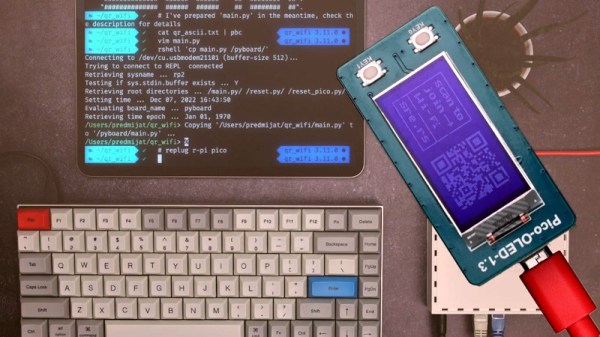
But what if you want to change up the encryption key every so often? Sure would be a hassle to have to repaint the wall. Enter this interesting project from [Predrag Mijatovic], which uses a few scripts to automatically set up a new encrypted guest WiFi network and present the appropriate QR code on an OLED display attached to a Raspberry Pi Pico. It’s a bit convoluted, and almost certainly won’t work on your network without significant tweaks, but we’re intrigued by the idea.

As [Predrag] explains, the whole thing is based on a Latvian MikroTik router that can be configured over SSH. A Bash script generates a new encryption key by base64 encoding the output /dev/urandom,  logs into the router to set up a new network using it, and then generates the matching ASCII QR code. With some sed trickery, the code is then embedded into a MicroPython program that gets uploaded to the connected Pi Pico.

In the video after the break [Predrag] takes us through the process manually so it’s easier to see what’s going on. Under normal circumstances, it would all happen automatically and would take just a few seconds to complete. We’d feel more comfortable if the scripts had some error correction that would allow them to gracefully exit if something goes wrong, but as a proof of concept, it certainly works.

We’d like to see this concept explored a bit further, perhaps using one of the physical QR code displays we’ve seen over the years. A programmable electronic paper display would also be a logical way to show off a dynamic QR code.

Continue reading “Pi Pico QR Display Hands Out WiFi Info With Style”
DrLCD Is Here To Give Your MSLA Printer A Checkup

Over the last couple years, we’ve seen an absolute explosion of masked stereolithography (MSLA) 3D printers that use an LCD screen to selectively block UV light coming from a powerful LED array. Combined with a stepper motor that gradually lifts the build plate away from the screen, this arrangement can be used to produce high-resolution 3D prints out of photosensitive resins. The machines are cheap, relatively simple, and the end results can be phenomenal.

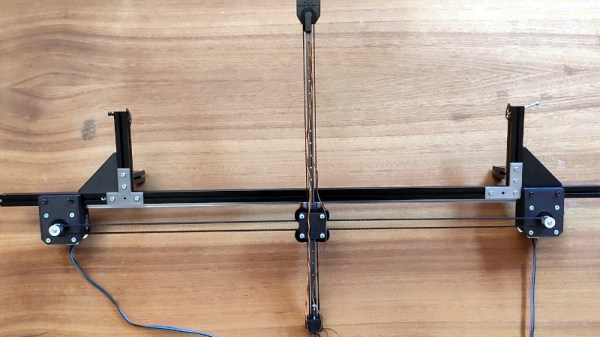
But they aren’t foolproof. As [Jan Mrázek] explains, these printers are only as good as their optical setup — if they don’t have a consistent UV light source, or the masking LCD isn’t working properly, the final printed part will suffer. In an effort to better understand how these factors impact print quality, he designed the DrLCD: a TSL2561 luminosity sensor mounted to a robotic arm with associated software to map out the printer’s light source.

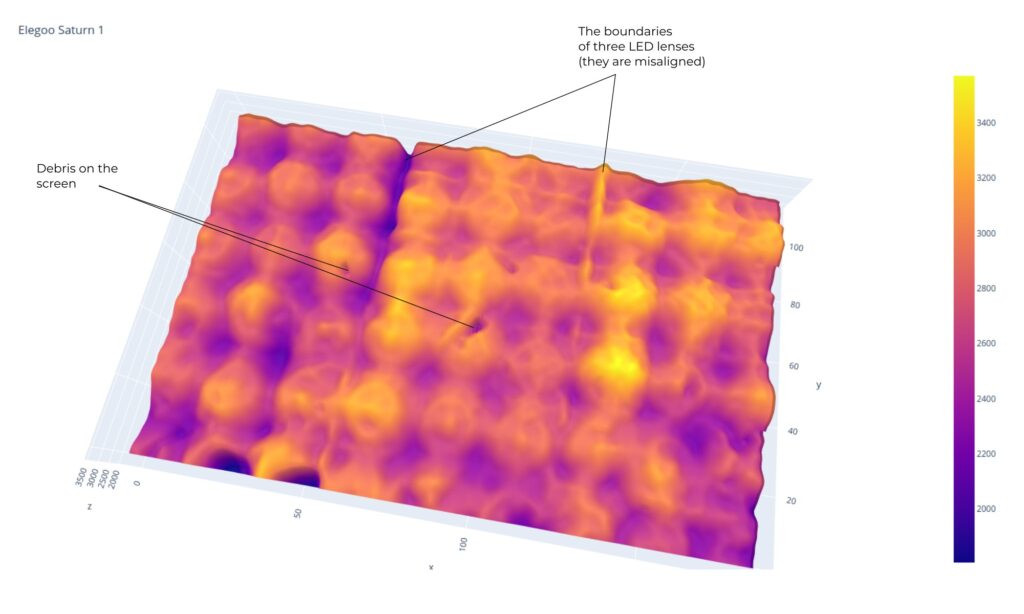
The individual LED assemblies are clearly visible.

The results when running DrLCD against a few different types of printers is fascinating. [Jan] was clearly able to make out the type of lenses used, and in one case, was even able to detect that a darker spot in the scan was due to a bit of resin having leaked into the light source and clouded up the optics.

But DrLCD can do more than just tell you where you’ve got a dark spot. Using the data collected from the scan, it’s possible to create a “compensation map” that can be combined with the sliced model you wish to print. As the slicer assumes an idealistic light source, this map can help by adding additional masking where bright spots in the display have been detected.

[Jan] goes on to compare the dimensional accuracy of printed parts before and after the compensation map has been applied to the model, and was able to identify a small but distinctive improvement. Not everyone is going to be concerned about the 157 µm deviation observed without the backlight compensation, but we certainly aren’t going to complain about 3D printers getting even more dimensionally accurate.

A couple years back we covered a similar technique that used a DSLR to capture high-resolution images of the bed. While arguably much easier to pull off, we can’t help but fall in love with the glorious overengineering that went into the DrLCD system, and we can’t wait until it starts making house calls.

Review: Inkplate 2 Shrinks Down, Adds Color

Regular Hackaday readers may recall the Inkplate family of devices: open source all-in-one development boards that combine the power and versatility of the ESP32 with electronic paper displays salvaged from commercial e-readers. By taking the sharp, high-speed, displays intended for readers such as Amazon’s Kindle and bundling it together with all the hardware and software you need to make it work, the Inkplate provided a turn-key platform for anyone looking to get serious with e-paper.

Given the fact that their screens were pulled from recycled readers, it’s no surprise the previous Inkplate entries came in familiar 6 and 10 inch variants. There was even an upgraded 6 inch model that benefited from newer reader technology by adopting a touch-sensitive backlit panel, which we took a close look at last year. Their large displays make them excellent for wall mounted applications, such as a household notification center or constantly-changing art display. Plus, as you might expect, the Inkplate is an ideal choice for anyone looking to roll their own custom e-reader.

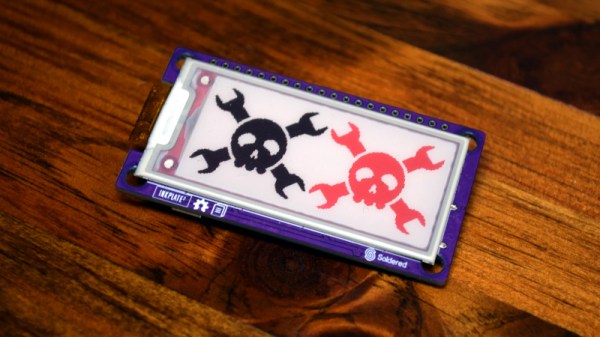
But of course, not every application needs so much screen real estate. In fact, for some tasks, such a large display could be considered a liability. Seeing a void in their existing product lineup, the folks at Soldered Electronics (previously e-radionica) have recently unveiled the diminutive Inkplate 2. This new miniature Inkplate uses the same software library as its larger predecessors, but thanks to its 2.13 inch three-color display, lends itself to a wider array of potential projects. Plus it’s considerably cheaper than the larger Inkplate models, at just $35 USD.

Considering the crowd sourced funding campaign for the Inkplate 2 blew past its goal in just 72 hours, it seems clear there’s plenty of interest in this new smaller model. But if you’re still not sure if it’s the e-paper solution you’ve been waiting for, maybe we can help — the folks at Soldered sent along a pre-production version of the Inkplate 2 for us to play around with, so let’s take it for a test drive and see what all the fuss is about.

Continue reading “Review: Inkplate 2 Shrinks Down, Adds Color”

The Amateur Rocketry Hack Chat Reaches For The Stars

Hackaday has been around long enough to see incredible changes in what’s possible at the hobbyist level. The tools, techniques, and materials available today border on science-fiction compared to what the average individual had access to even just a decade ago. On a day to day basis, that’s manifested itself as increasingly elaborate electronic projects that in many cases bear little resemblance to the cobbled together gadgets which graced these pages in the early 2000s.

Kip Daugirdas

But these gains aren’t limited to our normal niche — hobbyists of all walks have been pushing their respective envelopes. Take for example the successful launch of MESOS, a homebuilt reusable multi-stage rocket, to the very edge of the Kármán line. It was designed and built by amateur rocket enthusiast Kip Daugirdas over the course of several years, and if all goes to plan, will take flight once again this summer with improved hardware that just might help it cross the internationally recognized 100 kilometer boundary that marks the edge of space.

We were fortunate enough to have Kip stop by the Hack Chat this week to talk all things rocketry, and the result was a predictably lively conversation. Many in our community have a fascination with spaceflight, and even though MESOS might not technically have made it that far yet (there’s some debate depending on who’s definition you want to use), it’s certainly close enough to get our imaginations running wild.

Continue reading “The Amateur Rocketry Hack Chat Reaches For The Stars”

Hackaday Podcast 195: No NABU For You, Self-Assembling 3D Prints, Black Hats Look At EV Chargers

This week, Editor-in-Chief Elliot Williams and Managing Editor Tom Nardi find themselves in the middle of a slow news week, so they dispense with the usual timely chit-chat and dive right into the results of a particularly tricky “What’s that Sound” challenge.

From there they’ll cover the new breed of ATtiny microcontollers (and why you probably won’t be buying them), a recently unearthed Z-80 consumer gadget that’s begging to be reverse engineered, the fine art of electrifying watercraft, and a particularly impressive speech recognition engine. Stick around till the end to hear about the potential dangers of unsecured EV chargers, and take a walk down memory lane to a time when soldering irons and paper schematics ruled the world.

Check out the links below if you want to follow along, and as always, tell us what you think about this episode in the comments!

Download the podcast for safe-keeping!

Continue reading “Hackaday Podcast 195: No NABU For You, Self-Assembling 3D Prints, Black Hats Look At EV Chargers”

Turn Your Furniture Into A Light Show With Hyelicht

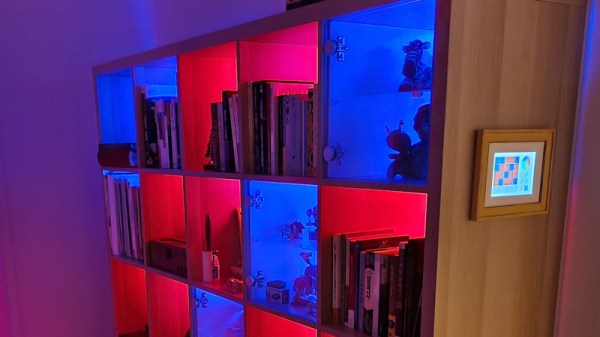
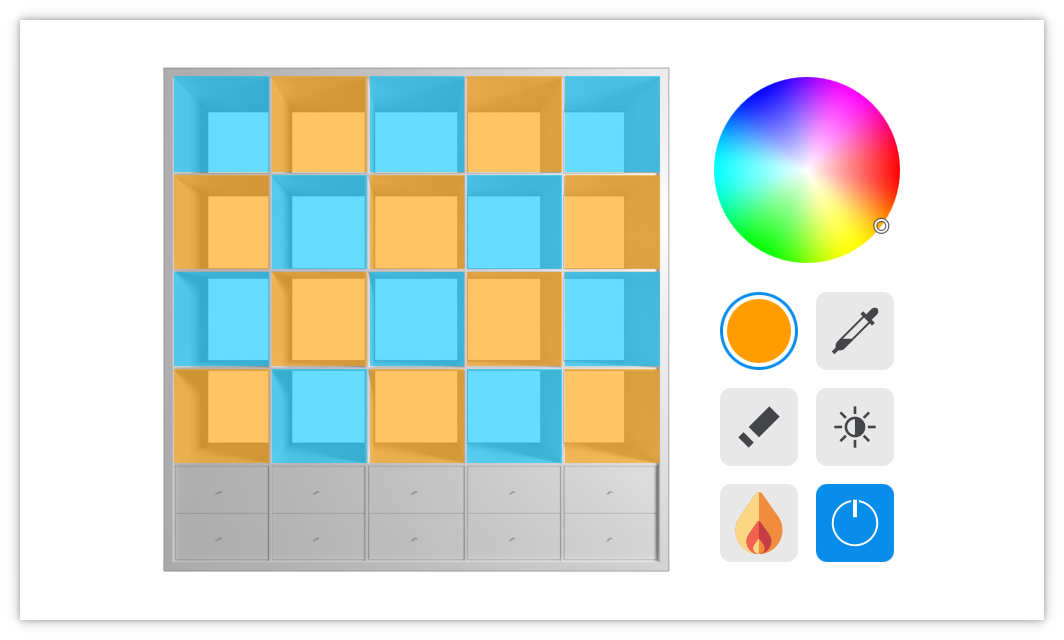
There’s something about the regimented square shapes of the IKEA Kallax shelf that convinced [Eike Hein] it could benefit from some RGB LED lighting, and while he could have simply used a commercial solution, he decided instead to develop Hyelicht: an incredibly well documented open source lighting system featuring multiple control interfaces and APIs. We’d say it was overkill, but truth be told, we dream of a world where everyone takes their personal projects to this level.

Hyelicht’s default touch UI

In the boilerplate configuration, [Eike] shows off controlling the LEDs using a graphical user interface running on a Waveshare 7″ touch screen mounted to the side of the shelf. That’s the most direct way of controlling the LEDs, as the touch screen is plugged into the Raspberry Pi 4B that’s actually running the software. But the same interface can also be remotely accessed by your smartphone or desktop.

You can also skip the GUI entirely and control the LEDs with a command line interface, or maybe poke Hyelicht’s HTTP REST interface instead. The system can even integrate with the Philips Hue ecosystem, if you prefer going that route.

The 5×5 Kallax shelf is the project’s official reference hardware, but of course it will work with anything else you might wish to cover with controllable LEDs. We’ve seen similar setups used to light storage bins in the past, but nothing that can even come close to the documentation and customization possibilities offered by Hyelicht. This is definitely a project to keep a close eye on if you’ve got the urge to add a little color to your world.

Telnet Gets Stubborn Sony Camera Under Control

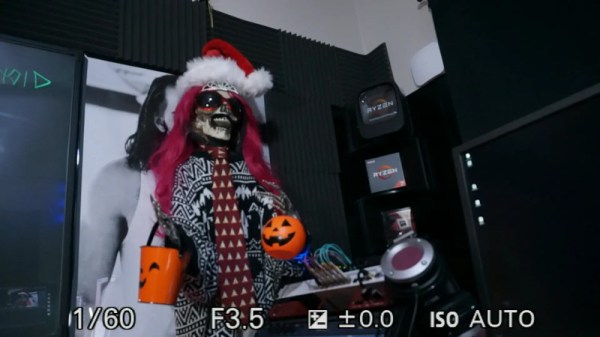
According to [Venn Stone], technical producer over at LinuxGameCast, the Sony a5000 is still a solid option for those looking to shoot 1080p video despite being released back in 2014. But while the camera is lightweight and affordable, it does have some annoying quirks — namely an overlay on the HDMI output (as seen in the image above) that can’t be turned off using the camera’s normal configuration menu. But as it so happens, using some open source tools and the venerable telnet, you can actually log into the camera’s operating system and fiddle with its settings directly.

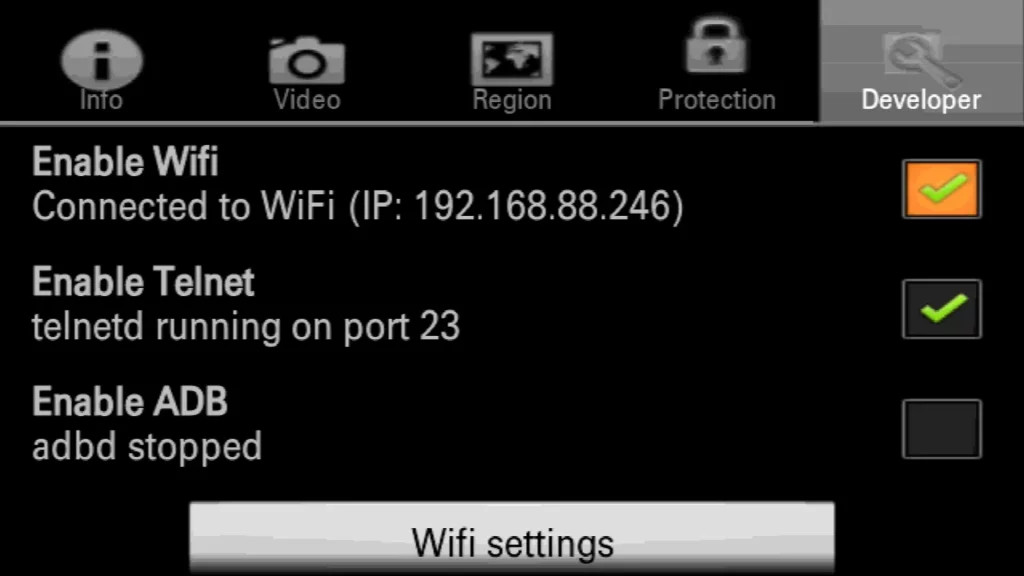
As explained in the write-up, the first step is to install Sony-PMCA-RE, a cross-platform suite of tools developed for reverse engineering and modifying Sony cameras. With the camera connected via USB, this will allow you to install a program on the camera called Open Memories Tweak. This unlocks some developer options on the camera, such as spawning a telnet server on its WiFi interface.

With the a5000 connected to your wireless network, you point your telnet client to its IP address and will be greeted by a BusyBox interface that should be familiar to anyone who’s played with embedded Linux gadgets. The final step is to invoke the proper command, bk.elf w 0x01070a47 00, which sets the specific address of the camera’s configuration file to zero. This permanently disables the HDMI overlay, though it can be reversed by running the command again and setting the byte back to 01.

As you might expect, the Sony-PMCA-RE package is capable of quite a bit more than just unlocking a telnet server. While it might not be as powerful as a firmware modification such as Magic Lantern for Canon’s hardware, those looking for a hackable camera that won’t break the bank might want to check out the project’s documentation to see what else is possible.

Continue reading “Telnet Gets Stubborn Sony Camera Under Control”