An Open Source Detector For Identifying Plastics

One of the challenges involved in recycling plastic is determining the specific type of plastic a given item is actually made of. To keep up with demand, large scale recycling centers rely on various automated systems to separate different types of plastic from a stream of incoming material. But in less technologically advanced parts of the world, workers can find themselves having to manually identify plastic objects; a time consuming and error-prone process.

To try and improve on the situation, [Jerry de Vos], [Armin Straller], and [Jure Vidmar] have been working on a handheld open hardware device that they refer to simply enough as the Plastic Scanner. The hope is that their pocket-sized unit could be used in the field to positively identify various types of plastic by measuring its reflectivity to infrared light. The device promises to be very easy to operate, as users simply need to bring the device close to a piece of plastic, push the button, and wait for the information to pop up on the OLED display.

Or at least, that’s the idea. While the team eventually hopes to release a kit to build your own handheld Plastic Scanner, it seems that the hardware isn’t quite ready for production. The most recent work appears to have been put in, not unexpectedly, the development board that lets the team refine their process. The development unit combines an array of IR LEDs with wavelengths ranging from 850 to 1650 nanometers, a InGaAs photodiode connected to an ADS1256 24-bit analog-to-digital converter (ADC), and an Arduino Uno. In comparison, the final hardware uses a Raspberry Pi Zero and a smaller “breakout board” that contains the sensor and IR LEDs.

Browsing through the software repository for the project, we can see the device uses Python, TensorFlow Lite, and a database of IR reflectivity values for known plastics to try and determine the closest match. Obviously the accuracy of such a system is going to be highly dependent on the quantity of known-good data, but at least for now, it appears the user is responsible for building up their own collection or IR values.

As interesting as this project is, we’re a bit skeptical about its purely optical approach to identifying plastics. Automated recycling centers do use infrared spectroscopy, but it’s only one tool of many that are employed. Without additional data points, such as the density or electrostatic properties of the plastic being tested, it seems like the Plastic Scanner would have a fairly high margin of error. Just taking into account the wide array of textures and colors the user is likely to encounter while using the device will be a considerable challenge.

Continue reading “An Open Source Detector For Identifying Plastics”

Vacuum Forming With 3D Printer Filament

Even if they don’t have one themselves, we’d wager the average Hackaday reader is at least vaguely aware of how a vacuum former works on a fundamental level. You heat up a plastic sheet until it’s soft, then use a vacuum pump to pull the ductile material down onto an object and hold it there while it cools off. It’s easy to build a vacuum forming rig yourself, but small commercial units are cheap enough that it might not be worth your time. If everything goes to plan, the technique is a quick and effective way of duplicating items around the home and shop.

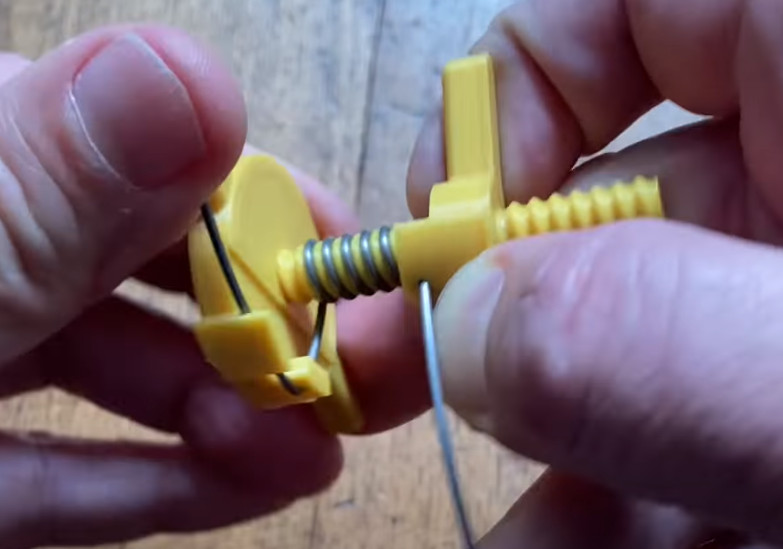
But we were recently tipped off to a variation of this classic technique that’s certainly worth further research. As demonstrated in a recent video, [Nathan Martinez] shows how 3D printed sheets can be used in place of the 5″ x 5″ squares of thermoplastic film that his imported vacuum former was designed to use. It’s easy enough to do: just model up a square with the appropriate 2D dimensions in your CAD package of choice, and extrude it to a height of about .5 mm.

A printed mesh pattern could be used to form custom shaped filters or strainers.

So what’s the advantage? Well for one thing, it’s cheaper. Though admittedly, not by much. Going rate on Amazon seems to be about 90 cents per sheet for the real stuff, and some back of the envelope math shows the printed version coming in at around 30 cents given nominal filament costs. Whether or not those savings are worth the extra effort is certainly debatable.

But that’s not really the most interesting part. With printed sheets loaded into the vacuum former, you’ve got access to a much wider array of materials to work with. For example, [Nathan] shows off some very interesting flexible pieces he was able to produce using sheets of TPU. You can also experiment with different surface textures. These can not only be used to give your vacuum formed pieces a bit of interesting visual flair, but could actually have some practical applications. In the video we see how a printed mesh could be formed over a piece to create a conformal air vent or filter.

To be sure, there’s some room for improvement here. Not all the pulls were successes, and [Nathan] says getting the printed sheets up to the proper temperature can be tricky. But when it works, it works quite well, and we think there could be some untapped potential in this unexpected melding of new and old methods of at-home plastic production.

Continue reading “Vacuum Forming With 3D Printer Filament”

Adding Optical Audio To The Raspberry Pi With One Chip

In the home theater space most people would tell you the age of optical audio, known officially as TOSLINK, is over. While at one time they were the standard for surround sound systems, the fiber cables with their glowing red tips have now been largely supplanted by the all-in-one capabilities of HDMI on new TVs and audio receivers. But of course, that doesn’t mean all that TOSLINK-compatible hardware that’s in the field simply disappears.

If you’re looking to connect a Raspberry Pi to the optical port of your AV system, [Nick Sayer] has you covered. His “TOSLINK Transceiver Hat” utilizes a WM8804 chip from Cirrus Logic to go from the Pi’s I2S audio output to S/PDIF. From there the signal goes directly into the TOSLINK input and output modules, which have the appropriate fiber optic hardware and drivers built-in. All you have to do from a software standpoint is enable a boot overlay intended for a digital-to-analog converter (DAC) from HiFiBerry.

Continue reading “Adding Optical Audio To The Raspberry Pi With One Chip”

Two-Stage Dust Collector Recycles Blasting Media

A critical element of a good blasting cabinet setup is a vacuum system that can suck out the dust, blasting media, and bits of removed material faster than it collects inside the chamber. A cyclone separator can get the job done, but since it dumps all the waste from the cabinet into one bucket, it can make reusing the blasting material a dirty job. But as [Daniel Bauen] explains in the latest Engineerable video, his two-stage dust collector is able to keep the cabinet clear while separating the used blasting material into its own container.

The cheap dust separator only works on large particles.

Basically, the idea here is to to use two different cyclone separators: one that’s very effective, and a cheap model that’s only able to remove large particulates. By running the air from the cabinet through the cheap separator first, the used blasting media is captured in a dedicated bucket. From there, the air runs through the high-efficiency separator to extract the finer dust. Finally, the shop vacuum [Daniel] is using has its own washable HEPA filter to catch anything that makes it through the two extractors; though he notes that it only rarely needs to be cleaned out.

Normally this system is attached directly to the blasting cabinet, and it does a good job of capturing the bulk of the used blasting media in real-time. But to make sure the media is really cleaned up being using it again, [Daniel] will actually run the contents of the first bucket through the system a few more times to separate out any of the more stubborn dust that might be mixed in.

Of course not everyone has the space, or even the need, for such an elaborate blasting setup. If you’re just trying to quickly clean up some parts on the cheap, you can make a basic blaster for around $6. Good luck capturing the media though.

Continue reading “Two-Stage Dust Collector Recycles Blasting Media”

Prusa XL Goes Big, But That’s Only Half The Story

For a few years now it’s been an open secret that Prusa Research was working on a larger printer named, imaginatively enough, the Prusa XL. Positioned at the opposite end of their product spectrum from the wildly popular Prusa Mini, this upper-tier machine would be for serious hobbyists or small companies that need to print single-part objects that were too large for their flagship i3 MK3S+ printer. Unfortunately, the global COVID-19 pandemic made it difficult for the Czech company to focus on bringing a new product to market, to the point that some had begun to wonder if we’d ever see this mythical machine.

But now, finally, the wait is over. Or perhaps, it’s just beginning. That’s because while Prusa Research has officially announced their new XL model and opened preorders for the $1,999+ USD printer, it’s not expected to ship until at least the second quarter of 2022. That’s already a pretty substantial lead time, but given Prusa’s track record when it comes to product launches, we wouldn’t be surprised if early adopters don’t start seeing their machines until this time next year.

So what do you get for your money? Well, not an over-sized Prusa i3, that’s for sure. While many had speculated the XL would simply be a larger version of the company’s popular open source printer with a few modern niceties like a 32-bit control board sprinkled in, the reality is something else entirely. While the high purchase price and ponderous dimensions of the new machine might make it a tough sell for many in the hacker and maker communities, there’s little question that the technical improvements and innovations built into the Prusa XL provide a glimpse of the future for the desktop 3D printer market as a whole.

Continue reading “Prusa XL Goes Big, But That’s Only Half The Story”

PiGlass V2 Embraces The New Raspberry Pi Zero 2

Well, that certainly didn’t take long. It’s been just about a month since the Raspberry Pi Zero 2 hit the market, and we’re already seeing folks revisit old projects to reap the benefits of the drop-in upgrade that provides five times the computational power in the same form factor.

Take for example the PiGlass v2 that [Matt] has been working on. He originally put the Pi Zero wearable together back in 2018, and while it featured plenty of bells and whistles like a VuFine+ display, 5 MP camera, and bone conduction audio, the rather anemic hardware of the original Zero kept it from reaching its true potential.

But thanks to the newly released Pi Zero 2, slapping quad-core power onto the existing rig was as easy as unplugging a couple cables and swapping out the board. With the increased performance of the new Pi, he’s able to play multimedia content through Kodi, emulate classic games with RetroPie, and even stream live video to YouTube. Using the custom menu seen in the video below, a small off-the-shelf Bluetooth controller from 8BitDo is all he needs to control the wearable’s various functions without getting bogged down with a full keyboard and mouse.

Although it might not have the punch of its larger siblings, the new Pi Zero 2 is definitely a very exciting platform. The highly efficient board delivers performance on par with the old Pi 3, while still being well positioned for battery powered projects like this one. We’re eager to see what develops as the new SBC finds its way into the hands of more hackers and makers in the coming months.

Continue reading “PiGlass V2 Embraces The New Raspberry Pi Zero 2”

ESP32 Brings Air Purifier Online With Home Assistant

A lot of hackers are rightfully concerned about the privacy issues that surround many of today’s “smart” gadgets, but it’s hard to argue that the ability to remotely control devices around your home isn’t convenient. Enter self-hosted, open source projects like Home Assistant. This provides the framework for building out a home automation system without having your soul information sold, but as you might expect, you’re going to have to put some effort in to get the most of it.

For example, take a look at this Phillips AC4014 air purifier that [Anton] connected to Home Assistant by way of an ESP32. Rather than getting too bogged down in reverse engineering the purifier’s surprisingly complex internal electronics, he took the easy way out and wired a couple of relays across the power and fan speed buttons; this allows the device to be easily controlled by the microcontroller, without impacting the functionality of the original controls.

But since those front panel controls still work, that meant [Anton] needed a way for the ESP32 to detect the device’s status and report that to Home Assistant so everything stayed in sync. So he looked around on the PCB for a trace that got powered up when the air purifier was up and running, which he connected to a pin of the microcontroller through a transistor. This let’s the firmware determine if the machine is running or not just by checking if the appropriate pin has gone high.

Speaking of the firmware, [Anton] decided to use ESPHome rather than trying to write his own code from scratch. This project allows you to rapidly add new devices to Home Assistant by providing the firmware with a relatively simple YAML configuration file, which he’s provided as an example. In fact, he’s provided quite a lot of examples with this project, down to an annotated image of the PCB that shows where to tap your wires into. He’s done quite a service for anyone who’s got this same model of air purifier.

This unit doesn’t appear to have any capability of actually checking the quality of the air in the room, but we’ve recently seen a low-cost IKEA product that can do exactly that. Even better, it can be easily modified to report its findings over the network using the ESP8266.