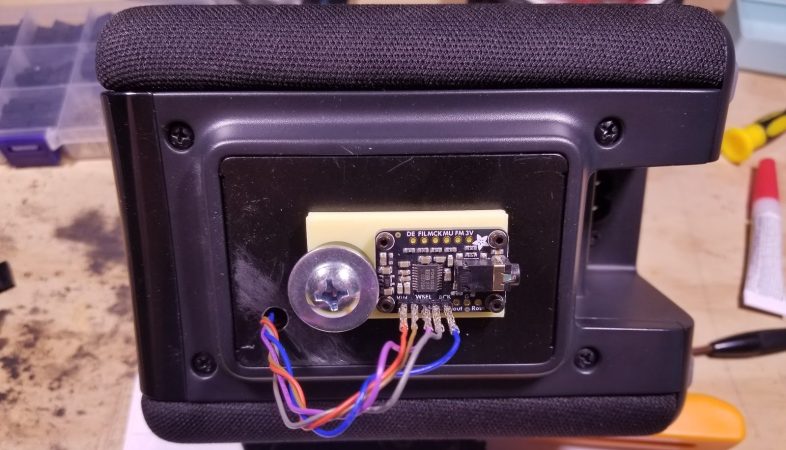
A Yamaha smart speaker, now with external DAC.

Smart Speaker Gets Brain Surgery, Line-Out

Sometimes you find a commercial product that is almost, but not exactly perfect for your needs. Your choices become: hack together a DIY replacement, or hack the commercial product to do what you need. [Daniel] chose door number two when he realized his Yamaha MusicCast smart speaker was perfect for his particular use case, except for its tragic lack of line out. A little surgery and a Digital-to-Analog Converter (DAC) breakout board solved that problem.

You can’t hear it in this image, but the headphones work.

[Daniel] first went diving into the datasheet of the Yamaha amplifier chip inside of the speaker, before realizing it did too much DSP for his taste. He did learn that the chip was getting i2s signals from the speaker’s wifi module. That’s a lucky break, since i2s is an open, well-known protocol. [Daniel] had an Adafruit DAC; he only needed to get the i2s signals from the smart speaker’s board to his breakout. That proved to be an adventure, but we’ll let [Daniel] tell the tale on his blog.

After a quick bit of OpenSCAD and 3D printing, the DAC was firmly mounted in its new home. Now [Daniel] has the exact audio-streaming-solution he wanted: Yamaha’s MusicCast, with line out to his own hi-fi.

[Daniel] and hackaday go way back: we featured his robot lawnmower in 2013. It’s great to see he’s still hacking. If you’d rather see what’s behind door number one, this roll-your-own smart speaker may whet your appetite.
3D Printed Spirograph Makes Art Out Of Walnut

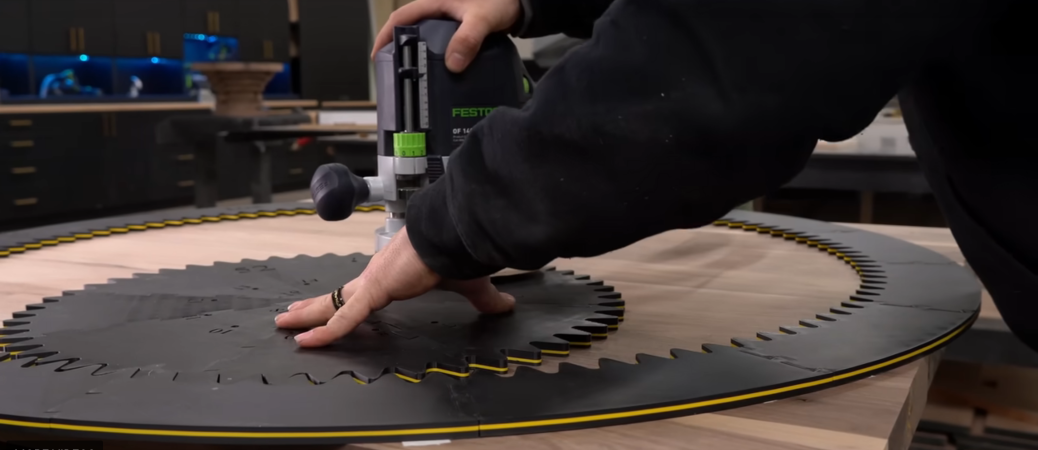
Who else remembers Spirograph? When making elaborate spiral doodles, did you ever wish for a much, much bigger version? [Fortress Fine Woodworks] had that thought, and “slapped a router onto it” to create a gorgeous walnut table.

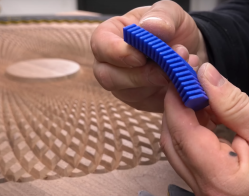
Hands holding a 3d printed sanding block, shaped to fit the grooves routed in the table which is visible in the background.
This printed sanding block was a nice touch.

The video covers not only 3D printing the giant Spirograph, which is the part most of us can easily relate to, but all the woodworking magic that goes into creating a large hardwood table. Assembling the table out of choice lumber from the “rustic” pile is an obvious money-saving move, but there were a lot of other trips and tricks in this video that we were happy to learn from a pro. The 3D printed sanding block he designed was a particularly nice detail; it’s hard to imagine getting all those grooves smoothed out without it.

Certainly this pattern could have been carved with a CNC machine, but there is a certain old school charm in seeing it done (more or less) by hand with the Spirograph jig. [Fortress Fine Woodworks] would have missed out on quite the workout if he’d been using a CNC machine, too, which may or may not be a plus to this method depending on your perspective. Regardless, the finished product is a work of art and worth checking out in the video below.

Oddly enough, this isn’t the first time we’ve seen someone use a Spirograph to mill things. It’s not the first giant-scale Spirograph we’ve highlighted, either. To our knowledge, it’s the first time someone has combined them with an artful walnut table.

Continue reading “3D Printed Spirograph Makes Art Out Of Walnut”

Is This The Truck We’ve Been Waiting For?

Imagine a bare-bones electric pickup: it’s the size of an old Hilux, it seats two, and the bed fits a full sheet of plywood. Too good to be true? Wait until you hear that the Slate Pickup is being designed for DIY repairability and modification, and will sell for only $20,000 USD, after American federal tax incentives.

Using the cellphone for infotainment makes for a less expensive product and a very clean dash. (Image: Slate Motors)

There are a few things missing: no infotainment system, for one. Why bother, when almost everyone has a phone and Bluetooth speakers are so cheap? No touch screen in the middle of the dash also means the return of physical controls for the heat and air conditioning.

There is no choice in colors, either. To paraphrase Henry Ford, the Slate comes in any color you want, as long as it’s grey. It’s not something we’d given much though to previously, but apparently painting is a huge added expense for automakers. Instead, the truck’s bodywork is going to be injection molded plastic panels, like an old Saturn coupe. We remember how resilient those body panels were, and think that sounds like a great idea. Injection molding is also a less capital-intensive process to set up than traditional automotive sheet metal stamping, reducing costs further.

That being said, customization is still a big part of the Slate. The company intends to sell DIY vinyl wrap kits, as well as a bolt-on SUV conversion kit which customers could install themselves. The plan is to have a “Slate University” app that would walk owners through maintaining their own automobile, a delightfully novel choice for a modern carmaker.

Continue reading “Is This The Truck We’ve Been Waiting For?”

Printable Pegboard PC Shows Off The RGB

Sometimes it seems odd that we would spend hundreds (or thousands) on PC components that demand oodles of airflow, and stick them in a little box, out of sight. The fine folks at Corsair apparently agree, because they’ve released files for an open-frame pegboard PC case on Printables.

According to the write-up on their blog, these prints have held up just fine with ordinary PLA– apparently there’s enough airflow around the parts that heat sagging isn’t the issue we would have suspected. ATX and ITX motherboards are both supported, along with a few power supply form factors. If your printer is smaller, the ATX mount is per-sectioned for your convenience. Their GPU brackets can accommodate beefy dual- and triple-slot models. It’s all there, if you want to unbox and show off your PC build like the work of engineering art it truly is.

Of course, these files weren’t released from the kindness of Corsair’s corporate heart– they’re meant to be used with fancy pegboard desks the company also sells. Still to their credit, they did release the files under a CC4.0-Attribution-ShareAlike license. That means there’s nothing stopping an enterprising hacker from remixing this design for the ubiquitous SKÅDIS or any other perfboard should they so desire.

We’ve covered artful open-cases before here on Hackaday, but if you prefer to hide the expensive bits from dust and cats, this mid-century box might be more your style. If you’d rather no one know you own a computer at all, you can always do the exact opposite of this build, and hide everything inside the desk.

Pi Pico Throws Us For A (MIDI) Loop

Modern micro-controllers are absolute marvels, but it isn’t too many projects use one and nothing else. For an example of such simplicity, take a look at [oyama]’s Pi Pico MIDI looper.

It uses the PicoW to interface with a synth via MIDI-BLE, which can be anything from pro equipment to an app on your smartphone. The single control button is already provided by the Pico W– the bootsel button is wearing a lot of hats here, allowing one to select betwixt 4 tracks (all different drums), set the tempo, and input notes on the selected track.

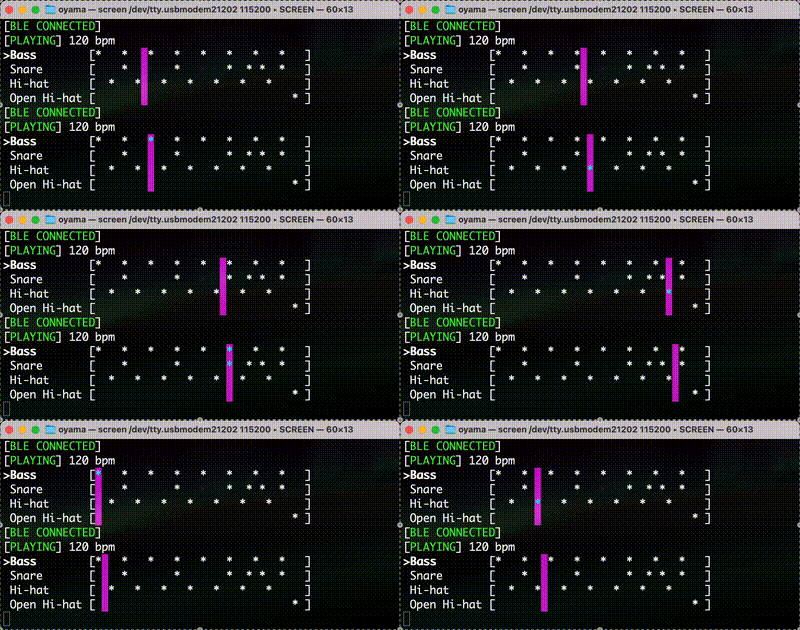
The action is simple: pound out the rhythm for each track, and it will repeat forever, or at least until you press the single button again to change it. There’s also a nice serial interface so you can see what’s going on via UART or USB. For what it does, it is amazingly simple: the BOM is one item, the Pi Pico W. To see it in action, check out the demo video below.

Given the ADC chops on the Pico, it would probably be easy to extend this build with a speaker to make a tiny stand-alone, one-button synth. Or you could add more buttons buttons, but then it’s no longer the beautifully simple single-line BOM project that [oyama] showed us.

Of course, everything is open-source on GitHub, under the BSD license, and forking is encouraged, so [oyama] would doubtless be more than happy to see you go nuts hacking and extending this tiny MIDI looper.

We’ve actually seen the MIDI-BLE standard used before, like this hack adding it to a Eurorack. If you like synths, you may be interested to see what it takes to design one from scratch, sans microcontroller. Continue reading “Pi Pico Throws Us For A (MIDI) Loop”

An array of current or next-generation boosters powered by methalox engines.

How Methane Took Over The Booster World

Go back a generation of development, and excepting the shuttle-derived systems, all liquid rockets used RP-1 (aka kerosene) for their first stage. Now it seems everybody and their dog wants to fuel their rockets with methane. What happened? [Eager Space] was eager to explain in recent video, which you’ll find embedded below.

Space X Starship firing its many Raptor engines.
Space X Starship firing its many Raptor engines. The raptor pioneered the new generation of methalox. (Image: Space X)

At first glance, it’s a bit of a wash: the density and specific impulses of kerolox (kerosene-oxygen) and metholox (methane-oxygen) rockets are very similar. So there’s no immediate performance improvement or volumetric disadvantage, like you would see with hydrogen fuel. Instead it is a series of small factors that all add up to a meaningful design benefit when engineering the whole system.

Methane also has the advantage of being a gas when it warms up, and rocket engines tend to be warm. So the injectors don’t have to worry about atomizing a thick liquid, and mixing fuel and oxidizer inside the engine does tend to be easier. [Eager Space] calls RP-1 “a soup”, while methane’s simpler combustion chemistry makes the simulation of these engines quicker and easier as well.

There are other factors as well, like the fact that methane is much closer in temperature to LOX, and does cost quite a bit less than RP-1, but you’ll need to watch the whole video to see how they all stack up.

We write about rocketry fairly often on Hackaday, seeing projects with both liquid-fueled and solid-fueled engines. We’ve even highlighted at least one methalox rocket, way back in 2019. Our thanks to space-loving reader [Stephen Walters] for the tip. Building a rocket of your own? Let us know about it with the tip line.

Continue reading “How Methane Took Over The Booster World”

RP2040 Spins Right ‘Round Inside POV Display

Sometimes, a flat display just won’t cut it. If you’re looking for something a little rounder, perhaps your vision could persist in in looking at [lhm0]’s rotating LED sphere RP2040 POV display.

As you might have guessed from that title, this persistence-of-vision display uses an RP2040 microcontroller as its beating (or spinning, rather) heart. An optional ESP01 provides a web interface for control. Since the whole assembly is rotating at high RPM, rather than slot in dev boards (like Pi Pico) as is often seen, [lhm0] has made custom PCBs to hold the actual SMD chips. Power is wireless, because who wants to deal with slip rings when they do not have to?

The LED-bending jig is a neat hack-within-a-hack.

[lhm0] has also bucked the current trend for individually-addressable LEDs, opting instead to address individual through-hole RGB LEDs via a 24-bit shift-register. Through the clever use of interlacing, those 64 LEDs produce a 128 line display. [lhm0] designed and printed an LED-bending jig to aid mounting the through-hole LEDs to the board at a perfect 90 degree angle.

What really takes this project the extra mile is that [lhm0] has also produced a custom binary video/image format for his display, .rs64, to encode images and video at the 128×256 format his sphere displays. That’s on github,while a seperate library hosts the firmware and KiCad files for the display itself.

This is hardly the first POV display we’ve highlighted, though admittedly it isn’t the cheapest one. There are even other spherical displays, but none of them seem to have gone to the trouble of creating a file format.

If you want to see it in action and watch construction, the video is embedded below.

Continue reading “RP2040 Spins Right ‘Round Inside POV Display”