Filters Are In Bloom

If you are a fan of set theory, you might agree there are two sets of people who write computer programs: those who know what a Bloom filter is and those who don’t. How could you efficiently test to see if someone is one set or another? Well, you could use a Bloom filter.  [SamWho] takes us through the whole thing in general terms that you could apply in any situation.

The Bloom filter does perform a trade-off for its speed. It is subject to false positives but not false negatives. That is, if a Bloom filter algorithm tells you that X is not part of a set, it is correct. But if it tells you it is, you may have to investigate more to see if that’s true.

If it can’t tell you that something is definitely in a set, why bother? Usually, when you use a Bloom filter, you want to reduce searching through a huge amount of data. The example in the post talks about having a 20-megabyte database of “bad” URLs. You want to warn users if they enter one, but downloading that database is prohibitive. But a Bloom filter could be as small as 1.8 megabytes. However, there would be a 1 in 1000 chance of a false positive.
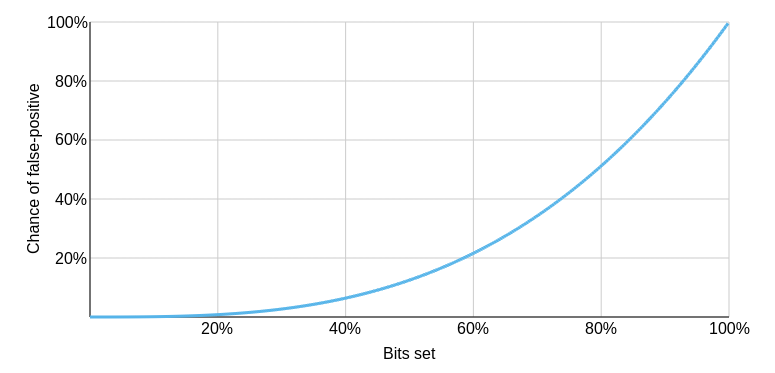
Increase the database size to 3.59 megabytes, and you can reduce false positives to one in a million. Presumably, if you got a positive, you could accept the risk it is false, or you could do more work to search further.

Imagine, for example, a web cache device or program. Many web pages are loaded one time and never again. If you cache all of them, you’ll waste a lot of time and push other things out of the cache. But if you test a page URL with a Bloom filter, you can improve things quite a bit. If the URL may exist in the Bloom filter, then you’ve probably seen it before, so you might want to cache it.

If it says you haven’t, you can add it to the filter so if it is ever accessed again, it will cache. Sure, sometimes a page will show a false positive. So what? You’ll just cache the page on the first time, which is what you did before, anyway. If that happens only 0.1% of the time, you still win.

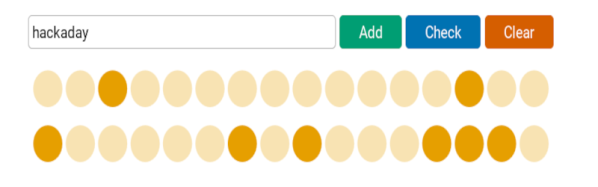
In simple terms, the Bloom filter hashes each item using three different algorithms and sets bits in an array based on the result. To test an item, you compute the same hashes and see if any of the corresponding bits are set to zero. If so, the item can’t be in the set. Of course, there’s no assurance that all three bits being set means the set contains the item. Those three bits might be set for totally different items.

Why does increasing the number of bits help? The post answers that and looks at other optimizations like a different number of hash functions and counting.

The post does a great job of explaining the filter but if you want a more concrete example in C, you might want to read this post next. Or search for code in your favorite language. We’ve talked about Python string handling with Bloom filters before. We’ve even seen a proposal to add them to the transit bus.

Unlimited Cloud Storage YouTube Style

[Adam Conway] wanted to store files in the cloud. However, if you haven’t noticed, unlimited free storage is hard to find. We aren’t sure if he wants to use the tool he built seriously, but he decided that if he could encode data in a video format, he could store his files on YouTube. Does it work? It does, and you can find the code on GitHub.

Of course, the efficiency isn’t very good. A 7 K image, for example, yielded a 9-megabyte video. If we were going to store files on YouTube, we’d encrypt them, too, making it even worse.

The first attempt was to break the file into pieces and encode them as QR codes. Makes sense, but it didn’t work out. To get enough data into each frame, the modules (think pixels) in the QR code were small. Combined with video compression, the system was unreliable.

Simplicity rules. Each frame is 1920×1080 and uses a black pixel as a one and a white pixel as a zero. In theory, this gives about 259 kbytes per frame. However, to help avoid problems decoding due to video compression, the real bits use a 5×5 pixel block, so that means you get about 10 kbytes of data per frame.

The code isn’t perfect. It can add things to the end of a file, for example, but that would be easy to fix. The protocol could use error correction and compression. You might even build encryption into it or store more data — old school cassette-style — using the audio channel. Still, as a proof of concept, it is pretty neat.

This might sound like a new idea, but people way back in the early home computer days could back up data to VCRs. This isn’t even the first time we’ve seen it done with YouTube.

Spectrum Analyzer Buyer’s Guide

Having a scope in a home lab used to be a real luxury, but these days, its fairly common for the home gamer to have a sophisticated storage scope (or two) hanging around. Dedicated spectrum analyzers are a bit less common, but they have also dropped in price while growing in capabilities. Want to buy your very own spectrum analyzer? [Kiss Analog] has a buyer’s guide for what to consider.

If you’ve already got a scope, it may have a Fast Fourier Transform (FFT) function, and he talks about how it could be used in place of a spectrum analyzer or vice versa. But it really depends on what you’re planning on using it for. If you’re doing compliance testing for emissions, an analyzer is invaluable. If you like building transmitters or even just oscillators for other purposes, viewing the output on a spectrum analyzer can show you how well or poorly your design is performing. Any application where you need to visualize large swaths of the RF spectrum is a candidate for a spectrum analyzer.

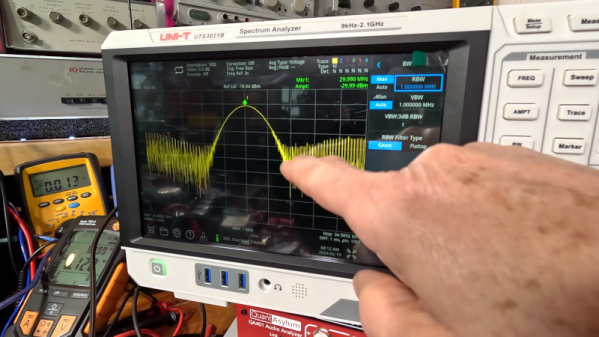
Towards the end of the video, you’ll get to see some actual uses on a Uni-T UTS3021B. While those are at the higher end of the hobby price spectrum (no pun intended), it has many features that would have required an instrument ten times that price in years gone by.

There are also some very inexpensive options out there. While it is true, to a degree, that you get what you pay for, it is also true that even these cheap options would be amazing to an engineer from the 1990s. Yes, of course. You could do it with a 555.

Continue reading “Spectrum Analyzer Buyer’s Guide”

Multicolor Resin Prints: Give It A Shot

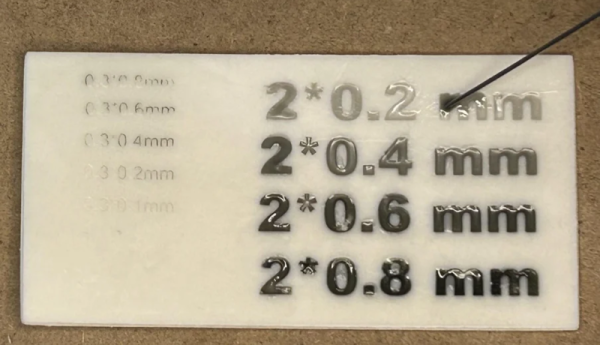
[Thomas TEMPE] has been making two-color resin prints. While printing in multiple colors is old hat for FDM printers, the way resin printers work makes it a more difficult proposition. [Thomas] has a simple solution. First, he prints an item with a cavity where he would like the second color. Then, after printing, he fills the cavity with a different color resin using a syringe and cures it. Simple, really.

Of course, it is all about technique. For fine lines, you’ll want a smaller needle, and you flood the area with the alternate resin and wipe away the excess. For wider lines, you simply fill the cavity from a larger syringe.

Continue reading “Multicolor Resin Prints: Give It A Shot”

Steampipe: All SQL All The Time

Although modern Linux has slightly shifted, the old Unix mantra was: everything’s a file. With Steampipe, a better saying might be: everything’s a SQL table. The official tagline is “select * from cloud” which also works. The open-source program relies on plugins, and there are currently 140 sources ranging from GitHub to Google Sheets and more.

There are command line interfaces for the major platforms. You can also add the system to PostgresSQL or SQLite for even more SQL goodness. Continue reading “Steampipe: All SQL All The Time”

Linux Fu: Forward To The Past!

Ok, so the title isn’t as catchy as “Back to the Future,” but my guess is a lot of people who are advanced Linux users have — at least — a slight interest in retrocomputing. You’d like an Altair, but not for $10,000. You can build replicas of varying fidelities, of course. You can also just emulate the machine or a similar CP/M machine in software. There are many 8080 or Z80 emulators out there, ranging from SIMH to MAME. Most of these will run on Linux or — at the least — WINE. However, depending on your goals, you should consider RunCPM. Why? It runs on many platforms, including, of course, Linux and other desktop systems. But it also will work with the Arduino, Teensy, ESP32, or STM32 processors. There is also experimental support for SAM4S and Cyclone II FPGAs.

It’s pretty interesting to have one system that will work across PCs and embedded hardware. What’s more is that, at least on Linux, the file system is directly translated (sort of), so you don’t have to use tricks or special software to transfer files to and from CP/M. It is almost like giving Linux the ability to run CP/M software. You still have to have virtual disks, but they are nothing more than directories with normal files in them.

Goals

Of course, if your goal is to simulate a system and you want to have 180 kB floppies or whatever, then the direct file system isn’t a benefit. But if you want to use CP/M software for education, nostalgia, or cross-development, this is the way to go, in my opinion.

It isn’t just the file system, either. If you need a quick utility inside your bogus CP/M environment, you can write it in Lua, at least on desktop systems. On the Arduino, you can access digital and analog I/O. Theoretically, you could deploy an embedded Altair for some real purpose fairly cheaply. Continue reading “Linux Fu: Forward To The Past!”

Not A FrogPad But Close

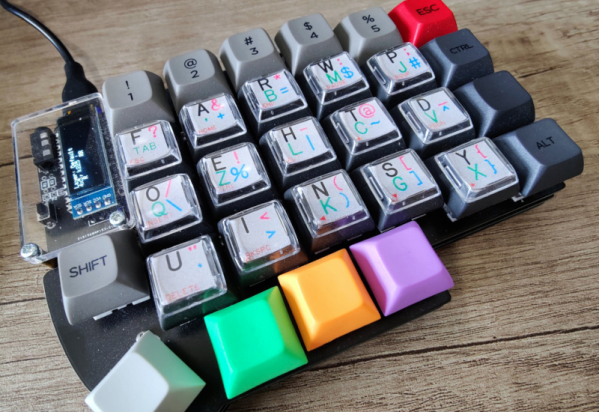
While you might think one-handed keyboards are a niche item, if you have reduced function in one hand or you only have one hand, they are pretty important. [Kian] was getting ready for surgery that would put his left arm out of commission for a while, which spurred the construction of a one-handed keyboard inspired by FrogPad.

There was a time when creating a new keyboard would have been a significant task. These days, it is reasonably easy and [Kian] simply repurposed an existing kit for a split keyboard. Using just half the board was easy since it is made in two parts already.

There have been many attempts at building effective one-handed input devices over the years, and the circa 2002 FrogPad is one of the better devices. Like most one-handed keyboards, it uses layers. The top layer has the most common keystrokes to minimize the number of layer changes required to type common text.

Continue reading “Not A FrogPad But Close”