Easier Self Hosting With Umbrel

While it is undeniable that cloud-based services are handy, there are people who would rather do it themselves. For many of us, it is because we want what we want the way we want it. For others, it is a distrust of leaving your personal data on someone’s server you don’t control. Umbrel is a Linux distribution just for people who want to self-host popular applications like NextCloud or Home Assistant. [ItsFoss] has a good review that points out some of the plusses and minuses of the early version of Umbrel.

What’s really interesting, though, is the approach the distro takes to installing software. Like most modern distributions, Umbrel has a package manager. Unlike most, though, the packages are actually docker containers. So when you install an app, it is preconfigured and lives in its own bubble, unlikely to conflict with other things you might install.

We also like that it has a specific build for a Raspberry Pi, although it will work on other 64-bit hardware and you can even install it within docker on top of your normal operating system. Of course, the docker container concept is also a drawback — at least for now — because it can be difficult to adjust settings inside the container compared to a more conventional install.

It amazes us that hardware has become so capable that it is easier to just duplicate entire operating systems than it is to work out the required dependency interactions. Still, it works, and in most cases, it works well.

If you want to know more about Docker, we’ve covered it a few times in the past. You can even use it for very simple development cases if you like.

Continue reading “Easier Self Hosting With Umbrel”

Trying Out A 3D Printed Microscope Lens Adapter

If you want to take pictures of tiny things close up, you need a macro lens. Or a microscope. [Nicholas Sherlock] thought “Why not both?” He designed a 3D-printed microscope lens adapter that you can find on Thingiverse. Recently, [Micael Widell] tried it out with a microscope lens and you can see the results in the video below.

A $20 microscope lens allows for some amazing shots. There are two designs that fit different cropped-image and full-frame cameras. As you might expect, the depth of field is razor-thin, probably sub-millimeter. Additionally, with a 4X lens on a 35 mm sensor, the field of view is about 9 mm so you have to have a steady hand just to keep everything in frame.

Continue reading “Trying Out A 3D Printed Microscope Lens Adapter”

Pico Makes Capable Logic Analyzer

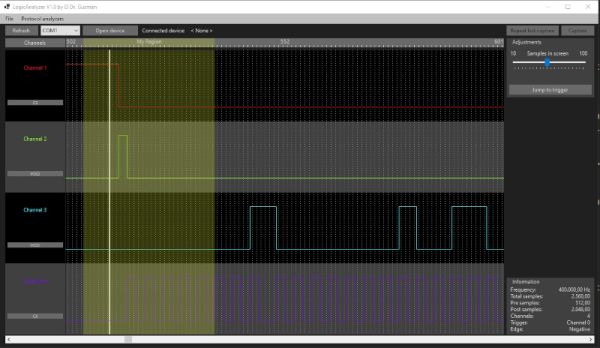
A common enough microcontroller project is to create some form of logic analyzer. In theory, it should be pretty easy: grab some digital inputs, store them, and display them. But, of course, the devil is in the details. First, you want to grab data fast, but you also need to examine the trigger in real time — hard to do in software. You may also need input conditioning circuitry unless you are satisfied with the microcontroller’s input characteristics. Finally, you need a way to dump the data for analysis. [Gusmanb] has tackled all of these problems with a simple analyzer built around the Raspberry Pi Pico.

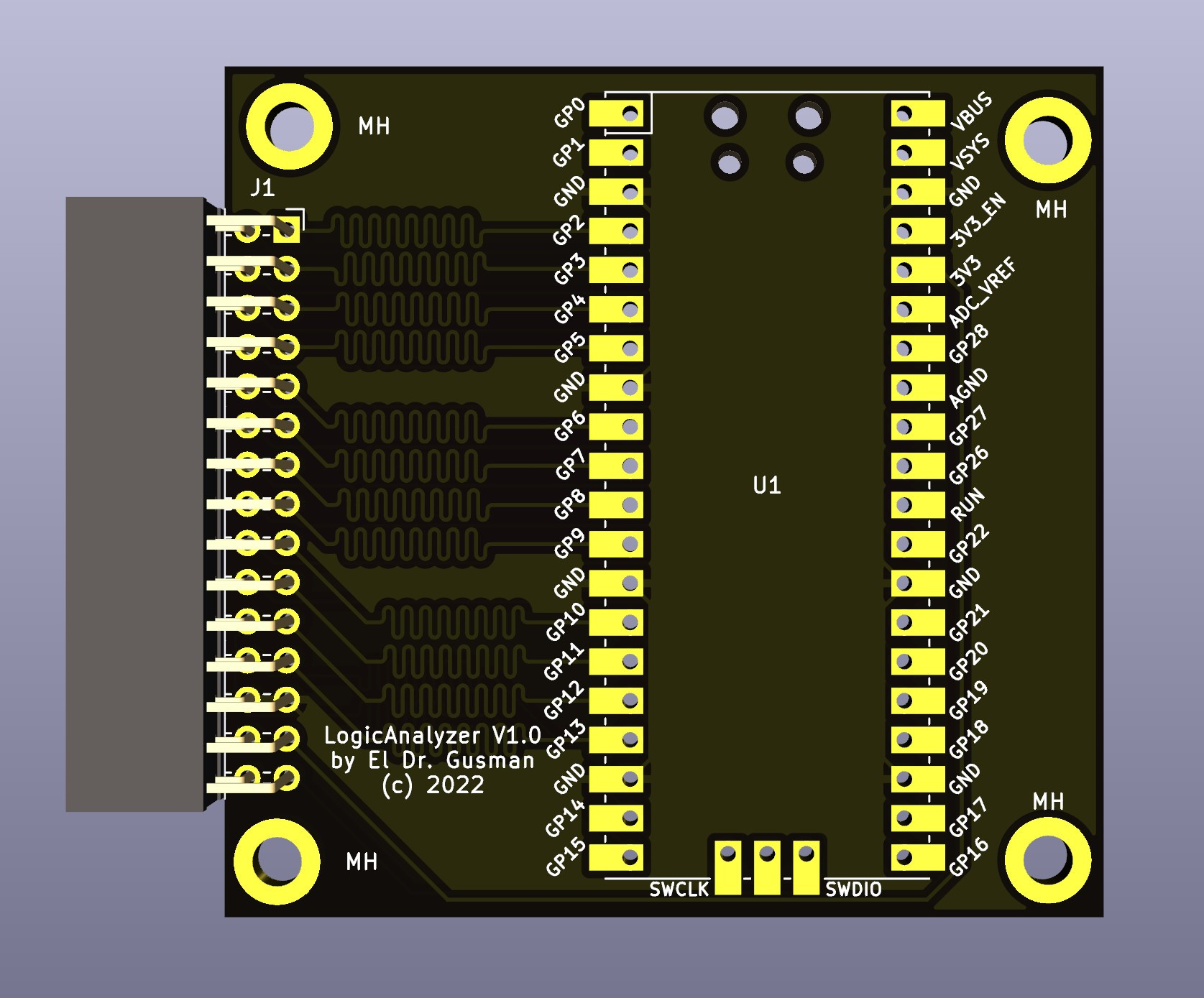
On the front and back ends, there is an optional board that does fast level conversion. If you don’t mind measuring 3.3 V inputs, you can forego the board. On the output side, there is custom software for displaying the results. What’s really interesting, though, is what is in between.

The simple PCB is completely optional.

The Pico grabs 24 bits of data at 100 MHz and provides edge and pattern triggers. This is impressive because you need to look at the data as you store it and that eats up a few instruction cycles if you try to do it in software, dropping your maximum clock rate. So how does this project manage it?

It uses the Pico’s PIO units are auxiliary dedicated processors that aren’t very powerful, but they are very fast and deterministic. Two PIO instructions are enough to handle the work for simple cases. However, there are two PIOs and each has four separate state machines. It still takes some work, but it is easier than trying to run a CPU at a few gigahertz to get the same effect. The fast trigger mode, in particular, abuses the PIO to get maximum speed and can even work up to 200 MHz with some limitations.

If you want to try it, you can use nothing more than a Pico and a jumper wire as long as you don’t need the level conversion. The project page mentions that custom software avoids using OpenBench software, which we get, but we might have gone for Sigrok drivers to prevent having to reinvent too many wheels. The author mentions that it was easier to roll your own code than conform to a driver protocol and we get that, too. Still, the software looks nice and even has an SPI protocol analyzer. It is all open source, so if you want other protocols before the author gets to them, you could always do it yourself.

If you do want a Pico and Sigrok, we’ve covered a project that does just that. Most of the logic analyzers we use these days we build into our FPGA designs.

Linux Fu: The Browser Emacs Fusion

It is no secret that I have a few things permanently burned into my neurons: the 1802 instruction set, the commands for WordStar, and the commands for emacs. There was a time when emacs was almost my operating system. With no X11, emacs gave you a way to have a shell in one window, check your mail, and keep your work open.

I still use emacs a lot (although I’ve been getting more and more pleased with vscode with an emacs keybinding extension). But I also spend a lot of time — like right now — writing in a Web browser. Especially if I’m writing about code, it gets hard to remember which set of keys you have to use and I’ve wanted to do something about it for a long time. The answer is a very cool program called Autokey. (You can download my files for it, but you probably want to read more first.) It probably doesn’t work if you have switched to Wayland, but it can do a lot for you ranging from saving you some typing to reprogramming your favorite program to have different keystrokes. However, it isn’t without its problems, and I’ll tell you what I know about it.

The Value Proposition

Autokey sits in your system tray and it watches what you type. In its most simple usage, you can set up different phrases to substitute what you type.

For example, I might reprogram HaD to show up as Hackaday to save myself some typing. I usually use some odd character at the start or end so I don’t accidentally trigger things. So maybe I’m tired of typing or mistyping http://www.hackaday.com. I could set up ~had to automatically type the correct URL for me.

Continue reading “Linux Fu: The Browser Emacs Fusion”

Viewing Atoms With Electrons

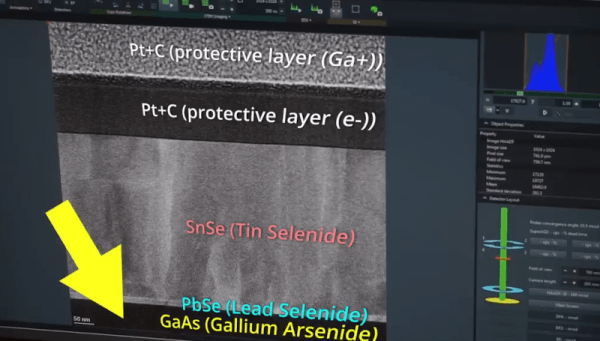
When we were in school, they always told us we can’t see atoms. If you have an electron microscope, then they were wrong. [AlphaPhoenix] has access to a scanning tunneling transmission electron microscope and he shows us some atoms in a very thin slice of a crystal.

Of course, you aren’t directly imaging the atoms. You are looking at the shadows of the atoms, but still. If you’ve never worked with a SEM or STEM before, there are plenty of little details that are interesting like the sample holders and the vacuum system.

Continue reading “Viewing Atoms With Electrons”

Photovoltaic Cells In LTSpice

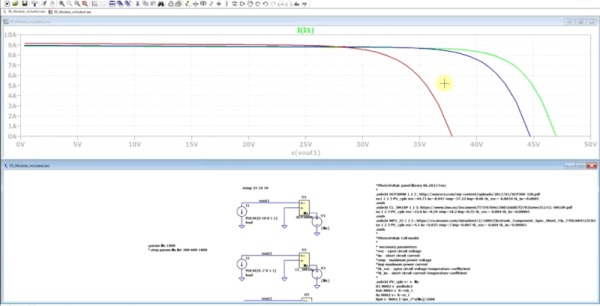
We like to build things using real parts. But we do think the more you can model using tools like LTSpice, the less time you can spend going down dead ends. If you need to model a common component like a resistor or even an active device, most simulators have great models and you can tweak them to have realistic parasitic effects. But what if the component you want isn’t in the library or doesn’t have the fidelity you want? [FesZ] wanted to model photovoltaic cells and had to build his own model. The resulting two videos are well worth watching.

Building your own models in Spice isn’t necessarily very difficult. However, knowing exactly what to add to model different real-world effects can be challenging. The videos do a good job of showing how to mutate a simple diode into one that produces current when exposed to light.

Continue reading “Photovoltaic Cells In LTSpice”

Need A Linux Kernel Module? Scratch That

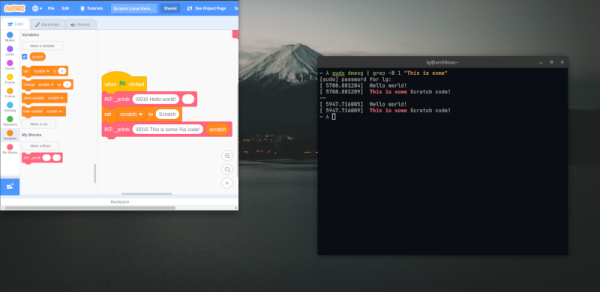
If you have been for (or against) Rust in the Linux kernel, get ready for a Linux kernel module written in… Scratch. That’s right. Scratch, the MIT-developed language with blocks popular for teaching kids to code. We didn’t mean “from scratch.” We meant IN Scratch. The bootstrap code and Makefile is out there on GitHub.

Of course, it is a simple module and the reason it is possible is because of the scratchnative system that lets you compile Scratch into C code. If you want to look at the decidedly simple code, you can open it in your browser.

Continue reading “Need A Linux Kernel Module? Scratch That”