Should You Build For Windows, Mac, IOS, Android, Or Linux? Yes!

The holy grail of computer languages is to write code once and have it deploy effortlessly everywhere. Java likes to take credit for the idea, but UCSD P-Code was way before that and you could argue that mainframes had I/O abstraction like Fortran unit numbers even earlier. More modern efforts include Qt, GTK, and other things. Naturally, all of these fall short in some way. Now Google enters the fray with Flutter.

Flutter isn’t new, but in the past, it only handled Android and iOS. Now it can target desktop platforms and can even produce JavaScript. We haven’t played with the system enough to say how successful it is, but you can try it in your browser if you want some first-hand experience.

Continue reading “Should You Build For Windows, Mac, IOS, Android, Or Linux? Yes!” →

KiwiSDR Vs RaspberrySDR — A Tale Of Two SDRs

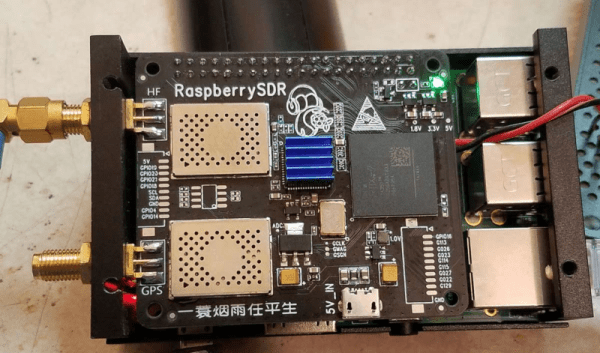
Once you move away from the usual software defined radio (SDR) dongles, you have only a few choices unless you want to drop some serious cash. One common hobby-grade SDR is the KiwiSDR. This popular unit runs Linux and can receive up to 30 MHz. The platform uses a dedicated A/D converter, an FPGA, and BeagleBone computer. Success of course breeds imitators, and especially when you have an open source design like the Kiwi, you are going to find similar devices with possibly different end goals. That’s how the RaspberrySDR came to be. This is a very similar unit to the KiwiSDR but it uses a Raspberry Pi, along with a handful of other differences. What’s different? [KA7OEI] tells us in a recent blog post.

Other than the obvious difference of the computer and all that it entails, the RaspberrySDR has a higher speed A/D (125 MHz vs 66 MHz) and 16-bits of resolution instead of the Kiwi’s 14 bits. This combines to give the Raspberry a wider receive range (up to 60 MHz) and — in theory — better performance in terms of dynamic range and distortion.

Continue reading “KiwiSDR Vs RaspberrySDR — A Tale Of Two SDRs” →

Linux-Fu: Making AWK A Bit Easier

awk is a kind of Swiss Army knife for text files. However, some of its limitations are often a bit annoying. I’ve used a simple set of functions to make awk a bit better, although I will warn you: it does require GNU extensions to awk. That is, you must use gawk and not other versions. Your system probably maps /usr/bin/awk to something and that something might be gawk. But it could also be mawk or some other flavor. If you use a Debian-based distro, update-alternatives is your friend here. But for the purposes of this post, I’m going to assume you are using gawk.

By the end of the post, you’ll see how to use my awk add-on functions to split up a line into fields even when there is no single character to separate all fields. In addition, you’ll be able to refer to the fields using names you decide. You won’t have to remember that $2 is the time field. You’ll say Fields_fields["time"] instead.

The Problem

awk does a lot of common work for you when you use it to process text files. It reads files a record at a time. Normally, a record is a single line. Then it splits the line on fields using whitespace, or some other choice of field separators. You can write code that manipulates the line or individual fields. This default behavior is great, especially since you can change the end of record character and the field separator. A surprising number of files fit this sort of format.

Until, of course, they don’t. If you have data coming from a data logging instrument or some database, it could be formatted in a variety of ways. Some fields might have structured data with a variety of separators. This isn’t a deal-breaker. Since you can get at the whole line, you can do almost anything you want, but the logic is harder and the whole point to using awk is to make things easier.

For example, suppose you had a file from a data recorder that had an eight-digit serial number, followed by a six-character tag, and then two floating point numbers separated by colons. The pattern might look like

^([0-9]{8})([a-zA-Z0-9]{6})([-+.0-9]+),([-+.0-9]+)$

This would be hard to handle with the conventional field splitting and you’d normally just write code to split everything apart.

Continue reading “Linux-Fu: Making AWK A Bit Easier” →

NASA Claims Cold Fusion Without Naming It

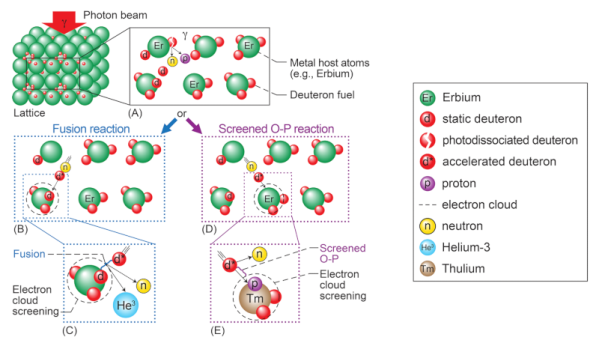
Do you remember in 1989 when two chemists announced they’d created a setup that created nuclear fusion at room temperature? Everyone was excited, but it eventually turned out to be very suspect. It wasn’t clear how they detected that fusion occurred and only a few of the many people who tried to replicate the experiment claimed success and they later retracted their reports. Since then, mentioning cold fusion is right up there with perpetual motion. Work does continue though, and NASA recently published several papers on lattice confinement fusion which is definitely not called cold fusion, although it sounds like it to us.

The idea of trapping atoms inside a metallic crystal lattice isn’t new, dating back to the 1920s. It sounds as though the NASA method uses erbium packed with deuterium. Photons cause some of the deuterium to fuse. Unlike earlier attempts, this method produces detectable neutron emissions characteristic of fusion.

Continue reading “NASA Claims Cold Fusion Without Naming It” →

Cheap Current Probe Gets Good Review

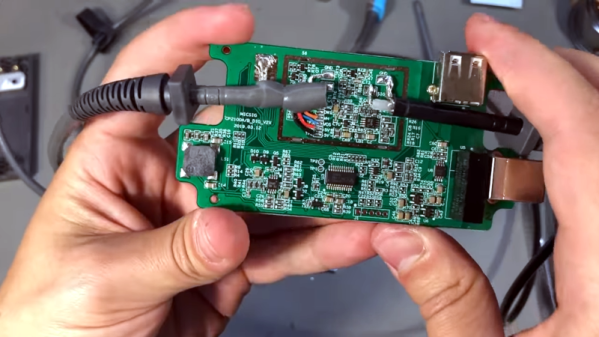
A current probe isn’t a very common fixture on most workbenches because they are pretty expensive. [VoltLog] looks at a fairly inexpensive current probe from Micsig. He seemed impressed with the workmanship and it looks similar to more expensive offerings. There are two models with different bandwidth numbers (800 kHz and 2 MHz). It can measure current on a 10A and 100A scale.

According to [VoltLog] comparable probes from other vendors are more expensive and have lower bandwidth. He also liked that the device powers from USB since most newer scopes will have a USB port available.

Continue reading “Cheap Current Probe Gets Good Review” →

Robotic Worm Uses NinjaFlex Filament

If you think about building a moving machine, you probably will consider wheels or tracks or maybe even a prop to take you airborne. When [nwlauer] found an earthworm in the garden, it inspired a 3D-printed robot that employs peristaltic motion. You can see a video of it moving, below.

The robot uses pneumatics and soft plastic, and is apparently waterproof. Your printer’s feed path has to be pretty rigid to support flexible filament without jamming. There’s also some PVA filament and silicone tubing involved.

Continue reading “Robotic Worm Uses NinjaFlex Filament” →

Plaster Annealing 3D Prints For Strength

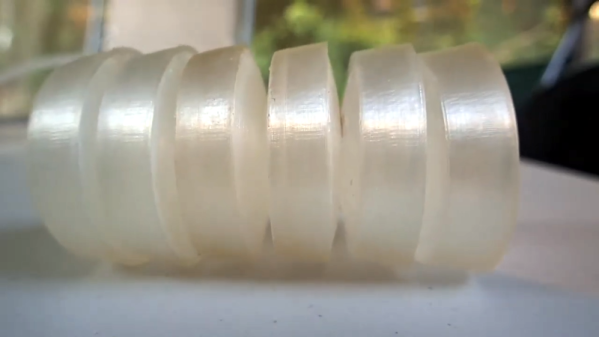
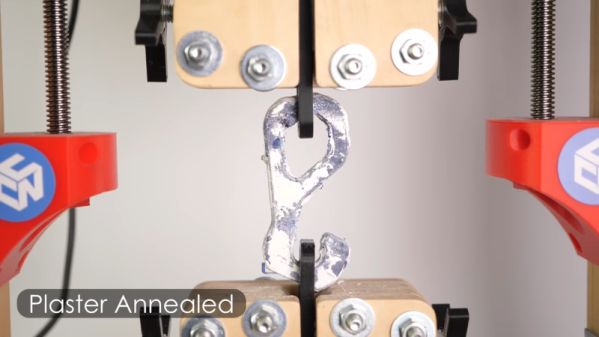
[Stefan] is always trying to make stronger 3D prints. Annealing can strengthen prints, but often at the expense of the part’s exact dimensions. His latest approach is to embed the prints in plaster and then anneal in an attempt to fuse the plastic together without changing its shape or size. Did it work? See for yourself in the video below.

He’s done a lot of work we’ve taken note of before where he measures the strength of parts after different post-processing steps. His test plastic parts used both PLA and PETG.

Continue reading “Plaster Annealing 3D Prints For Strength” →