The Ohio Scientific 300 Trainer

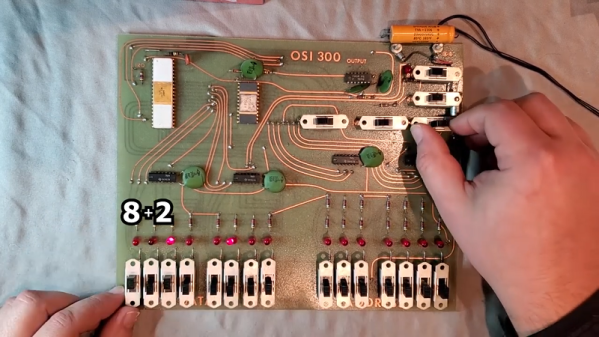
In the late 1970s there were a host of companies that dominated the computer market before the introduction of the IBM PC. One of these was Ohio Scientific or OSI. [BradH] has an OSI Model 300 trainer — their first major product — and gives us a peek at it along with some history of the company.

Companies like OSI, Southwest Technical Products, Osborne, Northstar, and PolyMorphic were the second wave after the likes of MITS and IMSAI had opened the personal computer market. Only a few companies like Apple hung on and made it work over the long haul.

Continue reading “The Ohio Scientific 300 Trainer”

RemoteXY Simplifies Arduino Control

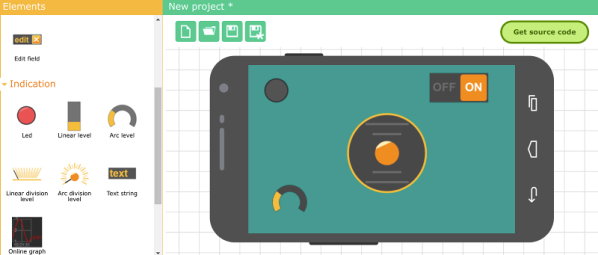
[Labpacks] wanted to build a robot car controlled by his phone. As a Hackaday reader, of course you probably can imagine building the car. Most could probably even write a phone application to do the control. But do you want to? In most cases, you are better off focusing on what you need to do and using something off the shelf for the parts that you can. In [Labpacks’] case, he used Visuino to avoid writing ordinary code and RemoteXY to handle the smartphone interface.

RemoteXY is a website that allows you to easily build a phone interface that will talk to your hardware over Bluetooth LE, USB, or Ethernet (including WiFi). One thing of interest: even though the interface builder is Web-based, the service claims that the interface structure stays on the controller. There’s no interaction with the remote servers when operating the user interface so there is no need for an external Internet connection.

Continue reading “RemoteXY Simplifies Arduino Control”

Understand Linux Htop Visually

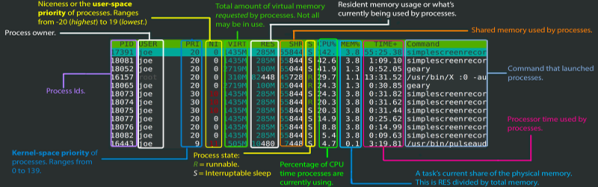
If you want to know exactly what’s going on in your Linux system, some of you might reach for top. For the connoisseur of system monitors, nothing less than htop will do. Not familiar with htop? [Umer Mansoor] did a beautiful job of explaining it graphically.

We’ve mentioned htop in a previous Linux Fu, but we’ve never gotten a chance to dig into it. And now, we don’t have to.  Like top, the htop program is still text-based, but it has a much nicer interface with colors, and easier way to send signals to processes, and support for tree displays. You can even use the mouse with it if you want to.

[Umer] did a lot of work to take screenshots of htop at work and annotate them. Sure, you could read the man page, but we think this is a lot better.

Of course, there are other improvements to top. Glances is pretty interesting, for example. For serious system administration help, you can try Webmin or Cockpit.

Tensors Explained

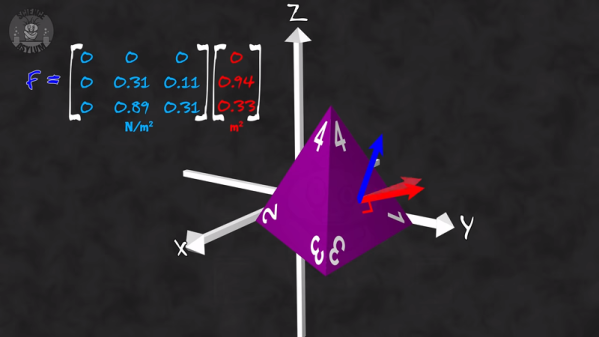
You can do a lot of electronics without ever touching a tensor, but there are some situations in which tensors are absolutely essential. The problem is that most math texts give you a very dry description that is difficult to internalize. That’s where [The Science Asylum] comes in. Their recent video (see below) starts with the dry definition and then shows you what it means and why.

According to the video, the textbook definition is:

A rank-n tensor in m-dimensions is a mathematical object that has n indices and mn components and obeys certain transformational rules.

That sounds a lot like an array but we are not sure what “certain transformational rules” really means to anyone.

Wikipedia does a little better:

[A]n algebraic object that describes a linear mapping from one set of algebraic objects to another.

These constructs are key to anything electromagnetic (including antennas) and show up a lot in stress calculations and quantum mechanics. Even Einstien’s theory of relativity uses tensors.

Continue reading “Tensors Explained”

DDR-5? DDR-4, We Hardly Knew Ye

This month’s CES saw the introduction of max speed DDR5 memory from SK Hynix. Micron and other vendors are also reportedly sampling similar devices. You can’t get them through normal channels yet, but since you also can’t get motherboards that take them, that’s not a big problem. We hear Intel’s Xeon Sapphire Rapids will be among the first boards to take advantage of the new technology. But that begs the question: what is it?

SDRAM Basics

Broadly speaking, there are two primary contenders for a system that needs RAM memory: static and dynamic. There are newer technologies like FeRAM and MRAM, but the classic choice is between static and dynamic. Static RAM is really just a bunch of flip flops, one for each bit. That’s easy because you set it and forget it. Then later you read it. It can also be very fast. The problem is a flip flop usually takes at least four transistors, and often as many as six, so there’s only so many of them you can pack into a certain area. Power consumption is often high, too, although modern devices can do pretty well.

Continue reading “DDR-5? DDR-4, We Hardly Knew Ye”

[Eric] Talks Crystal Radios

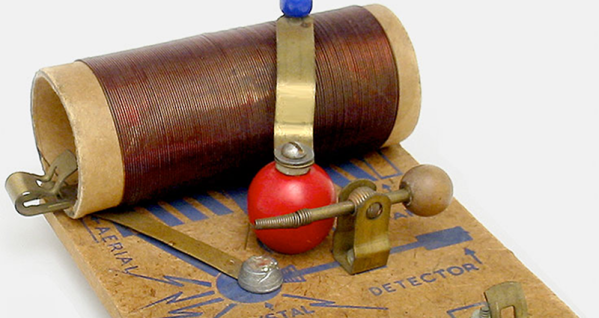
The AM broadcast band doesn’t have a lot of mainstream programming on it across much of the United States today. That’s a shame because a lot of kids got their first taste of radio and electronics by building simple crystal radios. [Eric Wrobbel] has a well-done page discussing some of the crystal radio kits and toys that have been around.

[Eric] should know, as he’s written two books on toy crystal radios. The pictures range from a 1945-era “Easy Built Radio Kit” which looks like a piece of masonite with a coil, some Fahnestock clips, and a cat whisker, to a very slick looking Tinymite from 1949. Honestly, though, the one we really want is the X-50 Space Helmet Radio that comes in a box marked “For Young Moon Travelers.”

Continue reading “[Eric] Talks Crystal Radios”

ESP32-Cam Does Time Lapse

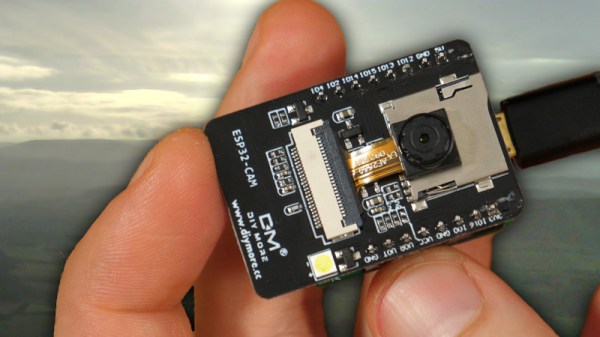
Just a few years ago, had someone asked you how much a digital camera with WiFi would cost, you probably wouldn’t have said $6. But that’s about how much [Bitluni] paid for an ESP32-CAM. He wanted to try making the little camera do time lapse, and it turns out that’s pretty easy to do.

Of course, the devil is in the details. The camera starts out needing configuration on the USB interface and that enables the set up of Arduino integration and WiFi configuration. Because it stores each frame of the image on an SD card, the board can’t take rapid-fire pictures. [Bitluni] reports a 3-second delay was about the shortest he could manage, but for most purposes, he was using at least ten seconds.

The program has a live preview window to help you set up the shot, but before your recordings start that should be turned off so as not to overload the little processor and the I/O buses. The result is a bunch of JPG images that you can easily convert to a video on a PC if you wish.

This might be a good way to fit a camera on a 3D printer, especially if the time lapse effect was desired. Otherwise, you might sync to a layer change. Now all [bitluni] needs is an orbital rig.

Continue reading “ESP32-Cam Does Time Lapse”