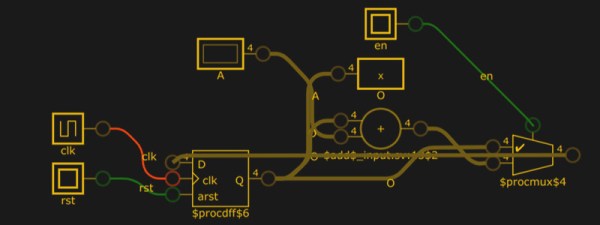
You don’t usually think of simulating Verilog code — usually for an FPGA — as a visual process. You write a test script colloquially known as a test bench and run your simulation. You might get some printed information or you might get a graphical result by dumping a waveform, but you don’t usually see the circuit. A new site combines Yosys and a Javascript-based logic simulator to let you visualize and simulate Verilog in your browser. It is a work in progress on GitHub, so you might find a few hiccups like we did, but it is still an impressive piece of work.
Author: Al Williams4506 Articles
Transistor Fundamentals Animated
When we were in school, every description of how transistors work was pretty dry and had a lot of math involved. We suppose you might have had a great instructor who was able to explain things more intuitively, but that was luck of the draw and statistically unlikely. These days, there are so many great videos on the Internet that explain things that even if you know the subject matter, it is fun to watch and see some of the great animations. For example [Sabin] has this beautifully animated explanation of how MOSFETs work that you can see below.
It uses the same basic graphics and style as his earlier video on bipolar transistors (second video, below) which is a great one to watch, too. In all fairness to your electronics teacher, the kind of graphics in these videos would have cost a fortune to do back in the 20th century — just watch some of the videos we talk about in some of our historical posts.
Learn FPGA With This Persistence Of Vision Hack
Everybody wants to give FPGA development a try and here’s a great way to get into it. You can build your own Persistence of Vision display using a $30 dev board. It’s a fun project, and you’ll learn quite a bit about designing for an FPGA, as well as using the Quartus design software.
The inspiration for this article comes from [vpecanins] who did an example project where you wave the board back and forth and a message appears in mid air. This uses the MAX1000, a pretty powerful yet odd FPGA board for about $30. It contains an Intel MAX10 (when did Intel start making FPGAs? Remember, Intel bought Alterra back in 2015). I find the board odd because it also holds an accelerometer that you can talk to using SPI. That’s a little strange for a generic FPGA board, but paired with eight on-board LEDs it’s perfect for this demo.
Since I didn’t find any written documentation for this example, I thought we’d help out and take you on a step-by-step tour of the project. What’s more, in a future installment, I’ll show you how to make some significant changes to the tutorial that will make it even more practical as a base for other projects.
Continue reading “Learn FPGA With This Persistence Of Vision Hack”
Linux Fu: Modernize Your Command Line
If you use Linux and its associated tools on the desktop or on a Raspberry Pi, or on a server, you probably have used the command line. Some people love it and some people hate it. However, many of us have been using Linux for years and sometimes Unix before that, and we tend to use the same old tried-and-true tools. [Remy Sharp] had a recent post talking about how he had created aliases to replace those old tools with great modern replacements and it is definitely worth a read.
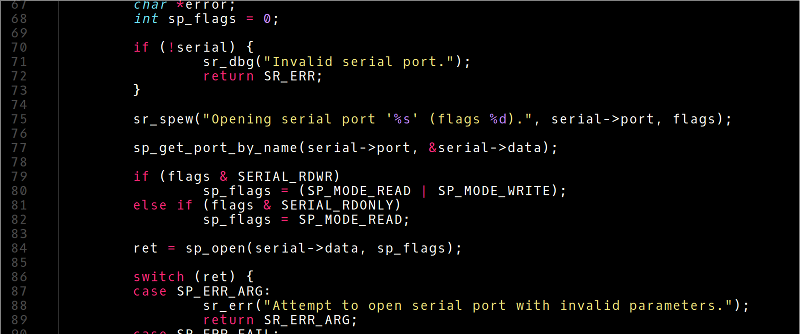
We’ll be honest, when we first saw the post we almost skipped reading it. A lot of Linux tip posts are pretty uninteresting unless you are a total beginner. But [Remy] has a lot of really great tools and how he has them installed including bat, which is like cat but with syntax coloring (see picture above), and fzf — a command line history search on steroids. He even shows how to join fzf and bat to make a very cool file browser from the command line (see below).
NASA Shows Off Its Big Computer In 1986
Sometimes it is hard to remember just how far computers have come in the last three or four decades. An old NASA video (see below) has been restored with better sound and video recently that shows what passed for a giant computer in 1986. The Cray 2 runs at 250 MHz and had two gigabytes of memory (256 megabytes of million 64-bit words).
Despite the breathless praise, history hasn’t been kind to the Cray 2. Based on ECL, it had 4 processors and –in theory — could reach 1,900 megaFLOPs/second (a FLOP is a floating point operation). However, practical problems made it difficult to get to that theoretical maximum.
Self Folding Origami From A 3D Printer
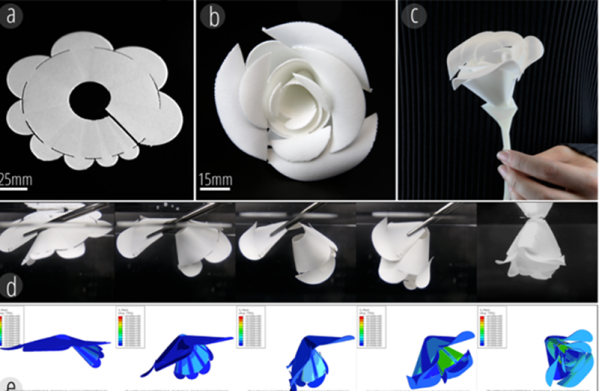
If you’ve done much 3D printing, you probably curse how plastic warps as it cools down and heats. There’s nothing more upsetting than watching a six hour print start curling off the bed and starting its inexorable march to the trash can. However, researchers at Carnegie Mellon have found a way to harness that tendency to warp with heat to make self-folding structures like those seen in the video below. There’s a paper about how it works available, too.
The Thermorph process uses commercially-available 3D printers, but requires special software. You might wonder why you would want to fold, say, a rose, when you could just print it as a fully-formed 3D model. The paper suggests that printing self-folding structures is faster and can save up to 87% on print times for the right models.
Arduino Gets Command Line Interface Tools That Let You Skip The IDE
Arduino now has an officially supported command-line interface. The project, called arduino-cli, is the first time that the official toolchain has departed from the Java-based editor known as the Arduino IDE. You can see the official announcement video below.
Obviously this isn’t a new idea. Platform IO and other command-line driven tools exist. But official support means even if you don’t want to use the command line yourself, this should open up a path to integrate the Arduino build process to other IDEs more easily.
The code is open source, but they do mention in their official announcement that you can license it for commercial use. We assume that would mean if you wanted to build it into a product, not just provide an interface to it. This seems like something Arduino expects, because a lot of the command line tools can produce json which is a fair way to send information to another application for parsing.
The command line interface doesn’t just build a sketch. You can do things like install and manage libraries. For example, to create a new sketch:
Continue reading “Arduino Gets Command Line Interface Tools That Let You Skip The IDE”