Tinkercad Does Arduino

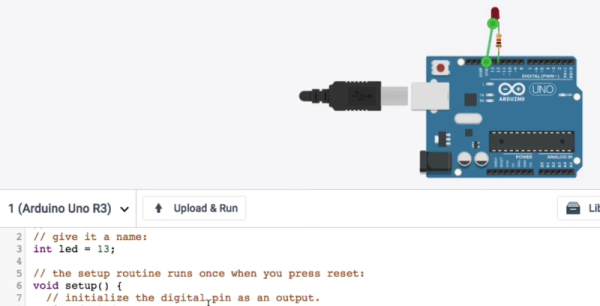
If you’ve done 3D printing, you’ve probably at least heard of Tinkercad. This popular CAD package runs in your browser and was rescued from oblivion by Autodesk a few years ago. [Chuck] recently did a video about a new Tinkercad feature: building and simulating virtual Arduino circuits. You can watch it below.

There are a variety of components you can add to your design. You’ll find an integrated code editor and a debugger. You can even get to the serial monitor, all in your browser with no actual Arduino hardware. You can also build simple circuits that don’t use an Arduino, although the component selection is somewhat limited.

Continue reading “Tinkercad Does Arduino”

Digitool Helps Debugging

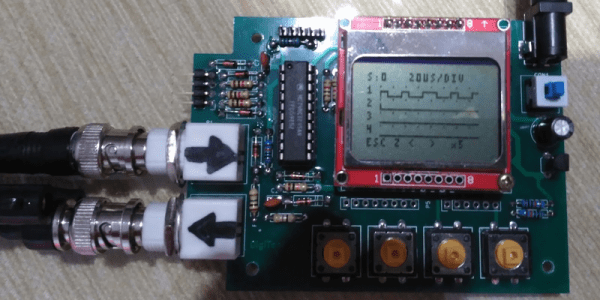
Logic analyzers used to be large boxes full of high-speed logic and a display monitor. Today, they are more likely to be a small box with a USB port that feeds data to a PC application. [Juan Antonio Rubia Mena] wanted something more self-contained, so he built Digitool. Built around a PIC18F2525, the device can measure frequency up to 10 MHz and inject square waves up to 1 MHz into the circuit under test. Oh yeah. It also has a simple four-channel logic analyzer that displays on a tiny LCD.

The 500,000 sample per second rate and the 1024 sample buffer isn’t going to put any logic analyzer vendors out of business, but it is still enough to help you figure out why that SPI or I2C logic is messed up. It looks like a fun project that could have some usefulness.

Continue reading “Digitool Helps Debugging”

Robot: Do My Bidding!

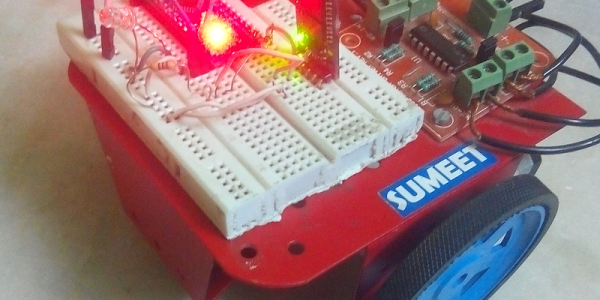
Remote control robots are nothing new. Using Bluetooth isn’t all that unusual, either. What [SayantanM4] did was make a Bluetooth robot that accepts voice commands via his phone. The robot itself isn’t very remarkable. An Arduino and an HC05 module make up most of the electronics. A standard motor driver runs the two wheels.

The Arduino doesn’t usually do much voice processing, and the trick is–of course–in the phone application. BT Voice Control for Arduino is a free download that simply sends strings to a host computer via Bluetooth. If you say “Hello” into your phone, the robot receives *Hello# and that string could be processed by any computer that can receive Bluetooth data.

Continue reading “Robot: Do My Bidding!”

COSMAC Elf Calculator Gets New Firmware

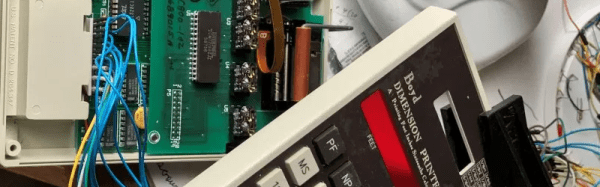
Everyone remembers their first. Their first CPU, that is. For many of us, it was the RCA 1802 thanks to the COSMAC Elf articles that ran in Popular Electronics. The later versions of the chip family were much better but were never as popular, but the 1805 did find its way into a printing calculator for dimensions from a company named Boyd. Some of these recently showed up on the surplus market and–of course–were subsequently hacked.

[Bill Rowe] is active in the groups that still work with the 1802. Because of some specialized uses you can still get the chips readily, some four decades after they were new. Other computers at the time were difficult to build and relatively expensive, while for $100 almost anyone could wire wrap a simple 1802-based computer together in a weekend or less.

Continue reading “COSMAC Elf Calculator Gets New Firmware”

Robot Solves Sudoku On Paper

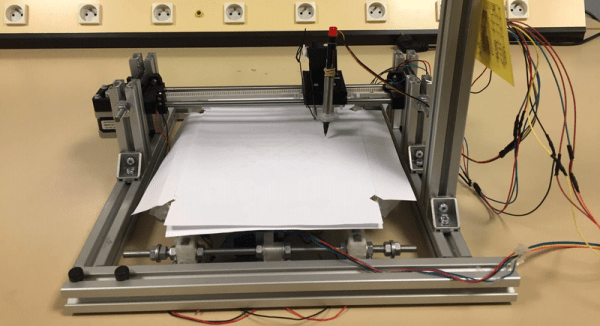
Sudoku is a great way to pass some time, especially on a long flight. However, we don’t think the airlines will let [Sanahm] board with his sudoku-solving robot. The basic machine looks like a 2D plotter made with aluminum extrusion, with the addition of a Raspberry Pi and a camera. The machine can read a sudoku puzzle, solve it, and then fill in the puzzle with a pen. Unlike humans, it should never need to erase its work.

The software uses OpenCV to process the camera data, find the grid, and the cells provided by the puzzle. TensorFlow recognizes the numbers. From there, it is all just math to solve the puzzle. Once solved, the plotter part of the robot takes over and fills in the blanks. After all that, this seems like the easy part.

Continue reading “Robot Solves Sudoku On Paper”

Dual Trace Scope 1939 Style

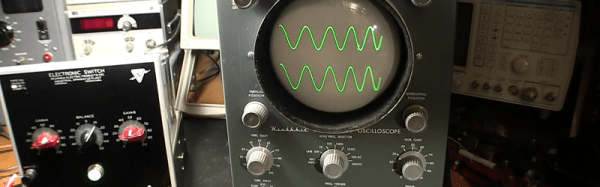
If you buy a serious scope these days, it is a good bet it will have at least two channels. There is a lot of value to being able to see two signals in relation to one another at one time. Even though the dual-trace oscilloscope goes back to 1938, they were uncommon and expensive for many years. [Mr. Carlson] found a device from 1939 that would turn a single channel scope into a dual trace scope. In 1939, that was quite the engineering feat.

Today, a dual trace scope is very likely to be digital. But some analog scopes used CRTs with multiple beams to actually draw two traces on the same screen. Most, however, would draw either one trace followed by the other (alternate mode) or rapidly switch between channels (chopper mode). This Sylvania type 104 electronic switch looks like it takes the alternate approach, switching between signals on each sweep using vacuum tubes. You can see the device in action in the video, below.

The inputs and outputs of the device are just simple binding posts, but the unit looked to be in good shape except for the power cord. [Mr. Carlson] does a teardown and he even traced out a hand-drawn schematic. Fair warning. The video is pretty long. If you want to get right to the switch actually driving a scope, that’s at about one hour and seven minutes in.

We doubt we’ll see a tube-based Quake game anytime soon. If you want to get into restoring old tube-based gear yourself, you could do worse than read about radio restoration.

Continue reading “Dual Trace Scope 1939 Style”

ISM Communications For Arduino

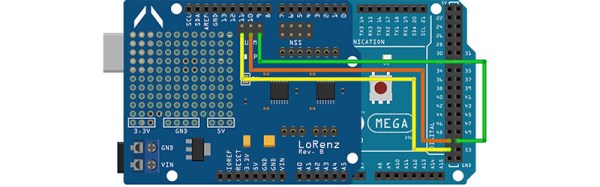
If you want to wirelessly communicate between devices, WiFi and Bluetooth are obvious choices. But there’s also the ISM (industrial, scientific, and medical) band that you use. There are inexpensive modules like the SX1278 that can handle this for you using LoRa modulation, but they haven’t been handy to use with an Arduino. [Jan] noticed the same thing and set out to build a shield that allowed an Arduino to communicate using LoRa. You can find the design data on GitHub. [Jan] calls it the LoRenz shield.

According to [Jan], the boards cost about $20 to $30 each to make, and most of that cost was in having PC boards shipped. LoRa lets you trade data rate for bandwidth, but typical data rates are fairly modest. As for range, that depends on a lot of factors, too, but we’ve seen ranges quoted in terms of miles.

Depending on where you live, there may be legal restrictions on how you use a radio like the SX1278. You should understand your local laws before you buy into using the ISM bands. We aren’t sure it would be wise, but the board can coexist with three other similar shields. So you could get 4 radios going on one Arduino if you had too and could manage the power, RF, and other issues involved. The breakout board the module uses has an antenna connector, so depending on your local laws, you could get a good bit of range out of one of these.

[Jan] promises a post on the library that makes it all work shortly, but you can find the code on GitHub now. If you look at the code in the examples directory, it seems pretty easy. You’d have to sling some software, but the SX1278 can support other modes in addition to LoRA including FSK and other data modulation techniques.

We’ve seen other LoRa shields, but not many. If you are interested in other wireless technologies, we’ve talked about them quite a bit. If you want a basic introduction to LoRa, [Andreas Spiess’] video below is a good place to start.

Continue reading “ISM Communications For Arduino”