Disposable Vape Becomes Breath-Activated Synth

Makers and hardware hackers have been collecting disposable vapes for some time now, usually to salvage their batteries or the unique displays many models now come with. But you can also repurpose them for other ends, such as playing music. [Becky Stern]’s vape synth is a perfect example of this.

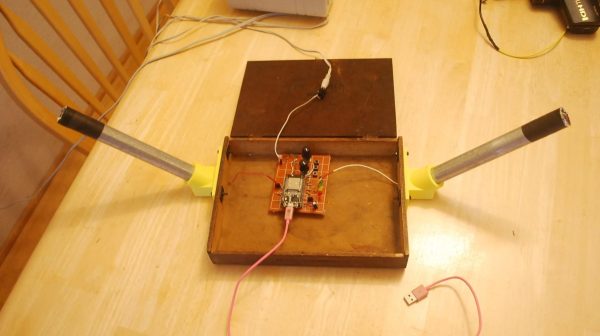
The build started with an ElfBars BC5000 vape. [Becky] notes there may be similar models under different names out there that would work just as well. The vape is effectively gutted for parts, with the LiPo cell, USB charging board, and the low-pressure sensor the main things that remain. These parts are combined with a drop-in 555 synthesizer circuit complete with speaker, which has its pitch controlled by a series of six photoresistors. When the low pressure sensor is triggered by inhalation, the 555 circuit is triggered, and operates at a pitch depending on the resistance of the photoresistor stack.

The output of the vape synth is kind of shrill, and frankly a little bit annoying — which is somehow rather fitting for what it is. If you want to make a better-sounding synth at home, we’ve featured such projects, you’re just unlikely to fit them entirely within the housing of a disposable vape.

Continue reading “Disposable Vape Becomes Breath-Activated Synth”

Build This Open-Source Graphics Calculator

Graphics calculators are one of those strange technological cul-de-sacs. They rely on outdated technology and should not be nearly as expensive as they are, but market effects somehow keep prices well over $100 to this day. Given that fact, you might like to check out an open-source solution instead.

NumOS comes to us from [El-EnderJ]. It’s a scientific and graphic calculator system built to run on the ESP32-S3 with an ILI9341 screen. It’s intended to rival calculators like the Casio fx-991EX ClassWiz and the TI-84 Plus CE in terms of functionality. To that end, it has a full computer algebra system and a custom math engine to do all the heavy lifting a graphic calculator is expected to do, like symbolic differentiation and integration. It also has a Natural V.P.A.M-like display—if you’re unfamiliar with Casio’s terminology, it basically means things like fractions and integrals are rendered as you’d write them on paper rather than in uglier simplified symbology.

If you’ve ever wanted a graphics calculator that you could really tinker with down to the nuts and bolts, this is probably a great place to start. With that said, don’t expect your local school or university to let you take this thing into an exam hall. They’re pretty strict on that kind of thing these days.

We’ve seen some neat hacks on graphics calculators before, like this TI-83 running CircuitPython. If you’re doing your own magic with these mathematical machines, don’t hesitate to notify the tips line.

Stream Deck Radio Controller Built With Cheap Yellow Display

Stream decks are pretty useful in all kinds of contexts, but commercial models can feel a bit pricy for what is effectively a bunch of buttons. [WhiskeyTangoHotel] has whipped up one of their own on the cheap using some readily available parts.

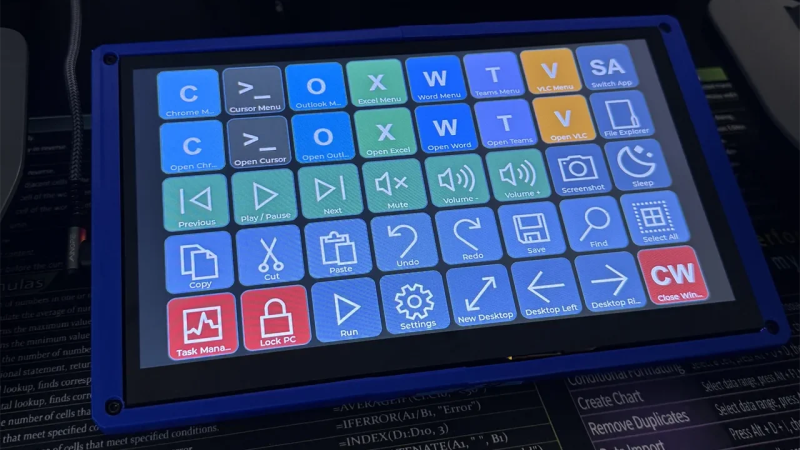
The build came about due to the use of Stream Decks as a common way to control the Flex-6400 software-defined radio. [WhiskeyTangoHotel] figured that using a full-priced Elgato Stream Deck was overkill for this purpose, and that a cheaper interface could be put together for less. Enter the Cheap Yellow Display—a combination of the ESP32 microcontroller with a 2.8-inch touchscreen LCD. It was simple enough to code the device such that it had four big touch buttons to control RIT-, RIT+, XIT-, and XIT+ on the Flex-6400. Plus, with the ESP32 having WiFi onboard, it’s able to control the radio wirelessly—you just need to feed the unit 5 volts, and you’re up and running.

Continue reading “Stream Deck Radio Controller Built With Cheap Yellow Display”

Better Faux-Analog VU Meters

One of the coolest things about old hi-fi hardware is that it often came with flickety needles that danced with the audio level. You can still buy these if you want, or you can simulate the same look on a screen, as [mircemk] demonstrates.

It isn’t [mircemk]’s first rodeo in this regard. An earlier project involved creating simulated VU meters on round displays, but they were somewhat limited. Using the Adafruit GFX library on an ESP32 netted a working setup, but it was jerky and very jagged and digital-looking. It was more akin to a fake needle display running on an 8-bit computer than something that looked like a real vintage VU meter.

Continue reading “Better Faux-Analog VU Meters”

Portable CRT TV Becomes Retro Cyberdeck

These days, it’s pretty easy to slap together a single-board computer and a cheap LCD screen to whip up a cool cyberdeck fast. But what if you wanna go more retro? [Manu] found a portable TV straight out of the original Blade Runner film, and decided this would be the perfect base for a cyberdeck rocking a whole-ass CRT screen.

The build started with a Panasonic TR-545 television. Back in the day, it took many large batteries to power this thing up—no surprise given how power hungry CRTs are. This gave [Manu] a neat opportunity to sneak all the new cyberdeck hardware into the original battery tray, including a new lithium-ion battery pack that is much more compact than the original. A Raspberry Pi 5 is running the show, computer-wise, and it’s hooked up to an HDMI RF modulator that allows the video output signal to be hooked up to the TV’s original antenna input. It’s not the cleanest way to go, but it allowed [Manu] to make the mod entirely reversible. All the new hardware slots neatly into the repurposed battery tray, and can be removed quite easily without damage to this vintage specimen. Even the keyboard fits nicely into the setup, as [Manu] was able to find a suitable 60% layout foldable unit right off the shelf.

Check out the slide deck for more details on the build, but be warned—it’s a 241 MB PDF. Bonus points if you calculate what that would cost to store on a hard drive in 1979 when the Panasonic TR-545 was on the market. We’ve seen a similar build before, too, with a classic black & white Magnavox unit. If you like squinting at a tiny blurry screen, a CRT cyberdeck is absolutely the way to go. Just be warned that the other screenwriters at your local coffee shop will be more interested in your hardware than whatever you’re actually working on. Good luck with your next pitch all the same. Video after the break.

Continue reading “Portable CRT TV Becomes Retro Cyberdeck”

Powering USB Devices With A Bench Supply Adapter Board

Sometimes you wanna test a piece of USB hardware, but you don’t just want to plug it into a random old phone charger. [KS-Elektronikdesign] has whipped up a useful tool for just that case, allowing one to easily power USB hardware from a common bench supply.

It would have been simple enough to whip up an adapter board to connect banana jacks to the power pins of a regular USB port. Easing the hookup process was indeed a part of the motivation for this project, in making it easy to power hardware that hooks up via USB-A and USB-C. However, it also goes a little further. It includes TUSB319 chip to handle the all-important power negotiation, without which many USB devices will not feel confident drawing their required amount of current.

There is also polarity protection and over-voltage protection to stop you from blowing stuff up if you hook the board up wrong, which might save you a smartphone or three in the lab. The board will allow negotiated output power up to 10 W via USB-A and 15 W via USB-C, which isn’t heaps, but will be fine for lots of smaller devices. You can up that to 25 W and 35 W respectively if the board is switched to pass-through mode. We particularly like the physical design—the board will plug straight into the banana plugs on any supply with a jack spacing of 19 to 23 mm.

Overall, this is a useful tool to have in the lab if you want to run USB hardware with the flexibility of the voltage and current limits available on your bench supply. There are other ways to power modern USB devices, too, and you can do all kinds of wild stuff if you learn about USB PD and USB PPS. If you’re working up your own nifty lab tools for similar purposes, we’d love to know about it on the tipsline.

Recording HDR Video With A Raspberry Pi

The Raspberry Pi line of single-board computers can be hooked up with a wide range of compatible cameras. There are a number of first party options, but you don’t have to stick with those—there are other sensors out there with interesting capabilities, too. [Collimated Beard] has been exploring the use of the IMX585 camera sensor, exploiting its abilities to capture HDR content on the Raspberry Pi.

The IMX585 sensor from Sony is a neat part, capable of shooting at up to 3840 x 2160 resolution (4K) in high-dynamic range if so desired. Camera boards with this sensor that suit the Raspberry Pi aren’t that easy to find, but there are designs out there that you can look up if you really want one. There are also some tricks you’ll have to do to get this part working on the platform. As [Collimated Beard] explains, in the HDR modes, a lot of the standard white balance and image control algorithms don’t work, and image preview can be unusable at times due to the vagaries of the IMX585’s data format. You’ll also need to jump some hurdles with the Video4Linux2 tools to enable the full functionality of these modes.

Do all that, recompile the kernel with some tweaks and the right drivers, though, and you’ll finally be able to capture in 16-bit HDR modes. Oh, and don’t forget—you’ll need to find a way deal with the weird RAW video files this setup generates. It’s a lot of work, but that’s the price of entry to work with this sensor right now. If it helps convince you, the sample shots shared by [Collimated Beard] are pretty good.

If you’re looking to record some really juicy, colorful imagery with the Raspberry Pi, this is a difficult but viable way to go. We’ve seen some other hardcore Raspberry Pi camera hacks of late, too.

Continue reading “Recording HDR Video With A Raspberry Pi”