Standalone DJ System Runs On ESP32

There are plenty of ways to DJ with a laptop and various controller setups. However, if you find hauling around an entire computer can be a bit much, you might like this lighter system from [Daniel Vučinović].

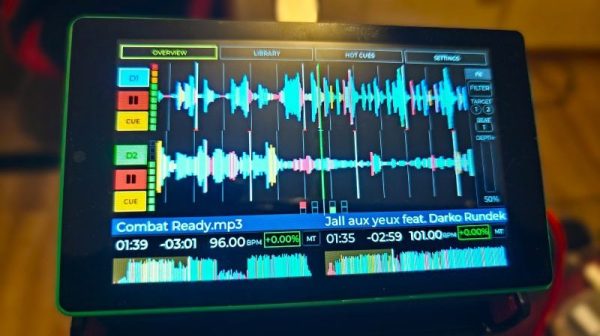
It’s called Pajoniiir, and it’s intended to replace a laptop in the DJ booth. In its place stands an ESP32-P4 microcontroller, hooked up to a 4.3-inch touchscreen display in an off-the-shelf combo from Guition. The ESP32’s twin USB interfaces are hooked up in turn to a Pioneer DDJ-FLX4 controller, and a USB stick carrying a Rekordbox music library. The microcontroller is then also hooked up to a PCM5102A DAC module for audio output.

The ESP32 reads and plays tracks in MP3, WAV, and FLAC formats, responds to commands from the DJ controller, and displays the waveforms and other controls on the touchscreen. It’s doing most of what a laptop would do in this case, only it costs $50 and won’t get stuck in a bootloop for a Windows update 10 minutes before you’re due to go on.

We’ve featured a few good DJ controller hacks over the years, like this Hercules rig that was modded for better scratching.

Continue reading “Standalone DJ System Runs On ESP32”

After Decades, NASA May Finally Replace Mars Relays

We’ve yet to find any definitive evidence that there’s biological life on present-day Mars, but to say it’s a dead planet isn’t exactly accurate. Since the first Viking lander touched down in 1976, a revolving cast of humanity’s robotic envoys have worked on and around the Red Planet — and as access to space becomes cheaper and more routine, the mechatronic population of Mars will continue to grow.

Given the number of landers, rovers, and orbiting spacecraft that have been sent to study Mars over the last 50 years, you might be surprised to find that the communications systems in place to transmit all that critical scientific data back to Earth aren’t nearly as robust as you’d think. While it’s understandable that the first craft to arrive at Mars had to operate in isolation, even the flagship Perseverance and Curiosity rovers carry their own high-gain radio systems so they can communicate directly with Earth. Given the incredible premium put on the mass of an interplanetary craft, each mission that needs to bring along its own link back to Earth effectively reduces its payload of much scientific equipment.

It’s not that satellites in orbit around the planet aren’t used to relay signals between Martian ground assets and their controllers back on Earth. In fact these relay links are used extensively for bandwidth-intensive tasks such as image transfers. But it’s also true that the craft currently available to act as intermediaries between the two planets aren’t terribly well suited to the task. The current fleet of Mars orbiters were conceived primary as research vehicles, and so every decision regarding their design and positioning around the planet was made with that goal in mind. What relatively limited capability they do have as communication relays is further hindered by the age of their hardware.

But after decades of false starts and shifting budgets, NASA is closer than ever to finally establishing the Mars Telecommunications Network, a dedicated high-bandwidth communication relay that will ensure current and future missions always have a way to phone home.

Continue reading “After Decades, NASA May Finally Replace Mars Relays”

Solar Powered Traffic Monitoring

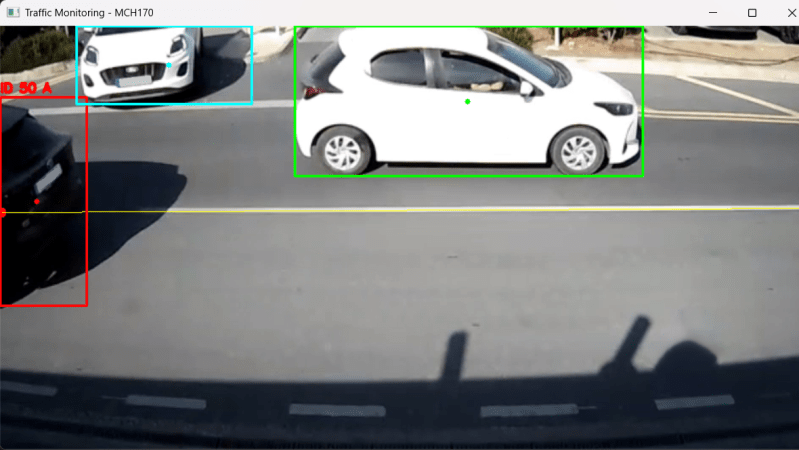
[Marios Christoforou] recently undertook a Computer Engineering degree at the University of Cyprus. His final year project involved implementing a solar-powered device to count vehicular traffic, while logging results to the cloud.

The project is built around a Raspberry Pi 5, specifically the version with 4 GB of RAM. It runs Raspberry Pi OS and is equipped with a basic webcam with 720p video output. The single-board computer runs off a 12 volt lead acid battery, which is charged via a 100 W solar panel hooked up to a basic charger module. Identifying vehicles in traffic is achieved with the YOLOv8 Nano machine vision model, which outputs bounding boxes around cars, trucks, buses, and motorcycles captured in the webcam feed. Software algorithms are used to ensure vehicles are only counted once as they pass through the camera’s field of view.

There’s plenty of detail on how the project was refined to meet initial goals. To make the most of the solar power available, [Marios] optimized the setup with an eye to performance and low power draw. To that end, the Raspberry Pi had Bluetooth, the PCIe slot, audio, and HDMI ports all disabled, while the CPU and GPU were both under-clocked for good measure. Software tweaks were also used, like running headless and dropping unimportant parts of the video frame for more efficiency.

We’ve featured other homebrew traffic monitors before. These days, though, it’s Flock cameras that seem to be making all the headlines in this area.

Reconstructing Device Firmware From SPI Reads

If you wanted to extract the firmware from a mystery device, you might pull the flash chip out of it and toss it into a reader. But if you only had one chance to get it right and couldn’t risk damaging the device in the process, physically removing the chip may seem much less attractive. Reading the chip in-circuit failed — because of course it did — so what does that leave?

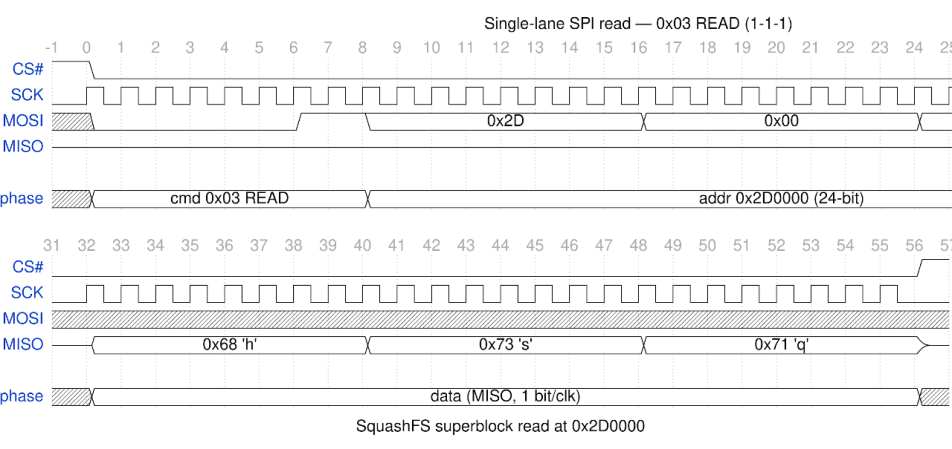
Well, if you follow the example of [Matthew “wrongbaud” Alt], the next tool you reach for might be a logic analyzer. In a recent write-up, [wrongbaud] explains the process of identifying, capturing, and ultimately decoding the SPI read operations used to load the firmware from a common W25Q-series flash chip at boot time. He notes it’s not a perfect solution, as in the end you’ll only be able to sniff out what the CPU actually reads, not necessarily the entire contents of the chip, but it’s a big step in the right direction if you’re reverse engineering something in the dark.

Continue reading “Reconstructing Device Firmware From SPI Reads”

Audio Spectrum Analyzer On An ESP32 Display Board

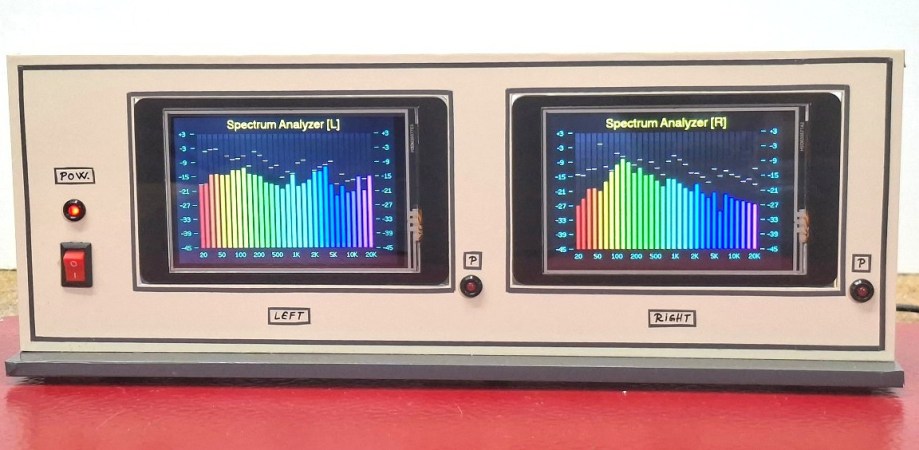
A slick spectrum analyzer used to be the kind of thing that would have been tricky to include in a DIY project, but as [Mirko “mircemk” Pavleski] demonstrates, a modern microcontroller like the ESP32 can handle the task with nothing more than a display panel and a few passives.

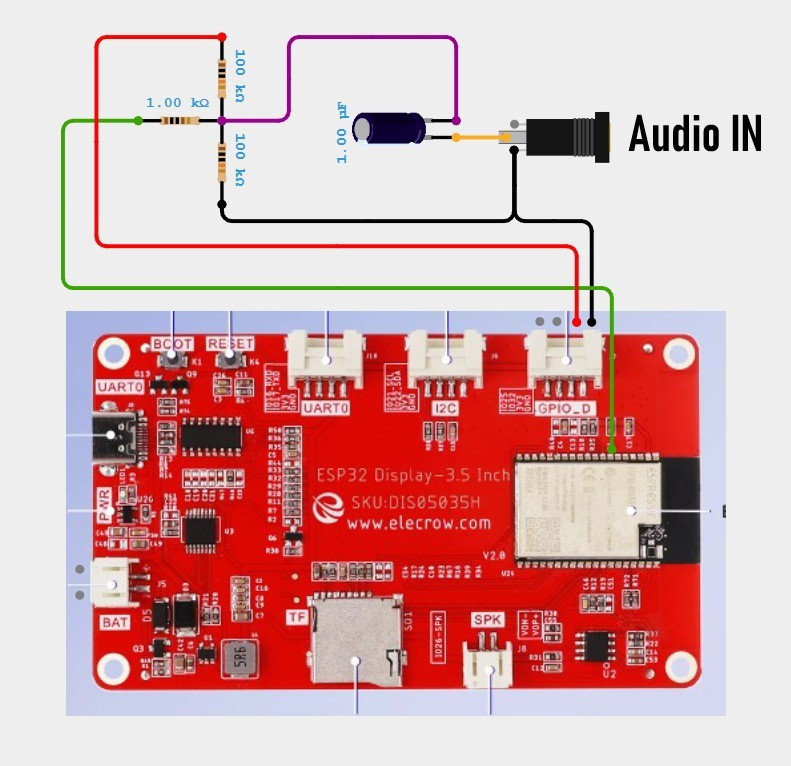
This particular example is built around the CrowPanel 3.5, which combines the powerful microcontroller with a 480×320 touch screen LCD. But there’s nothing inherently special about the CrowPanel, and you could get similar results with whatever display you might have kicking around the parts bin — albeit potentially with some code changes to account for the different hardware.

Beyond the microcontroller and the display, all you need to recreate what [mircemk] has done here is a handful of passives to tame the incoming analog audio signal so it can be piped into one of the analog-to-digital converter (ADC) pins on the MCU.

This project is fairly simple, but if you’re looking for something a little more advanced from [mircemk], don’t worry. The more daring home players can try their hand at recreating this high-voltage X-ray machine made from an old TV vacuum tube.

Continue reading “Audio Spectrum Analyzer On An ESP32 Display Board”

A Tiny Toy Synth For Smaller Computers

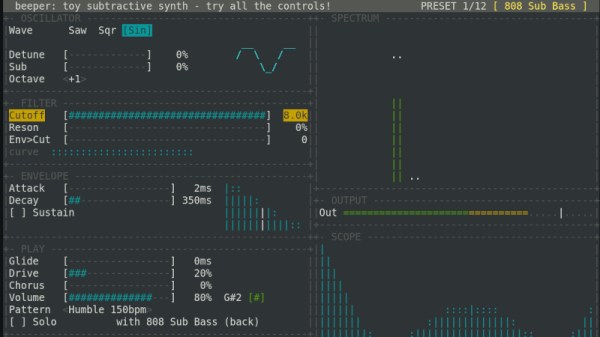
Even for the non-musical among us there is a lot of fun to be had with a simple synthesiser and sequencer, as the different controls can be manipulated to show their effect on the sound. Beeper, from [Valentyn Danylchuk] is just such a synth, and with only built-in loops, it has a focus on the instrument rather than the arrangement. What you get are a simple set of controls, from which you can modify the sound to your liking. We’ve been playing with it here, and it’s surprisingly addictive.

The target for Beeper is ESP32 microcontrollers, with builds for the S3 and P4, but there’s also a web version and one for the Mac. It’s operated using the arrow keys on your keyboard, and  the web one at least isn’t the most responsive piece of software. Below the break you can see (and hear) it on a Tanmatsu ESP32-P4 based handheld computer.

It’s certain that there are more accomplished synthesisers and sequencers to be found, but there’s still a place for one that’s simply a musical toy like this. Sometimes playing with something is more important than achieving something with it.

Continue reading “A Tiny Toy Synth For Smaller Computers”

Modern USB Controllers On Win98 (and Up)

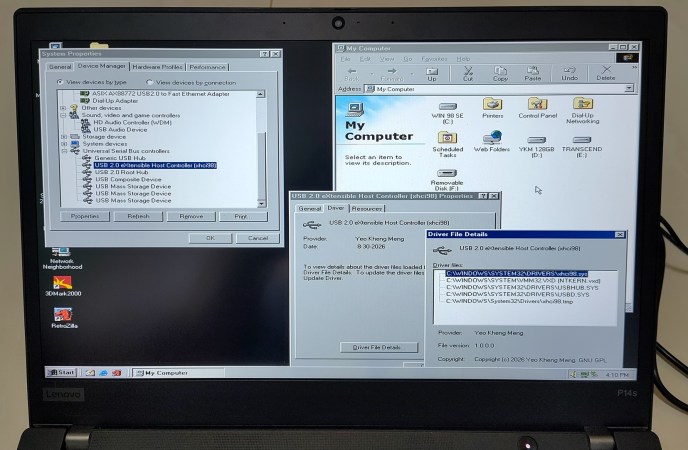
[Yeo Kheng Meng] has a problem: he likes Windows 98, but he also likes his 2020 ThinkPad, which only has an xHCI USB controller– you know, the kind needed for USB 3.0, something that post-dates Windows 98 by a full decade. Drivers? Finding none existed, he decided to do it himself, or at least guide the process of using  LLMs to produce drivers for Windows 98 and up.

Some of you just stopped reading, but can you blame him for making a demonic pact for this project? Driver development isn’t really a one-man show, especially as a part-time hobby project you’re not sure anyone else will ever use. If you do want to use it, you can find the code on GitHub.

It does work, though, he admits it might be buggy. Unlike purely vibe-coded projects, [Meng] intends to address bugs put forth in the repo, at least. If you want to know how he did it, check out the link to [Meng]’s blog– which is human-authored, we can tell– and the videos embedded therein. He demonstrates it working on a 2020 ThinkPad, which should be usable even with Windows 11, and another model from 2016– neither of which have any old-style USB ports. Older laptops might, while any desktop can just use a PCI card with a USB2.0 controller– or you can do like [Meng] did prior to this project, and use the PCI card via adapters. 

[Yeo Kheng Meng] evidently gets as much of a kick out of joining old and new as we do, like running DOS a modern ThinkPad X13, and running Slack on Windows 3.11 For Workgroups on a slightly-less-modern but still 21st Century Thinkpad T400.