DecayDock Keeps Track Of Spoilage

Many of us have suffered the common experience of buying a great deal of (now very expensive) food, only to have it go off before it can be consumed. [ptallthings93] has whipped up a simple device to try and tackle this problem.

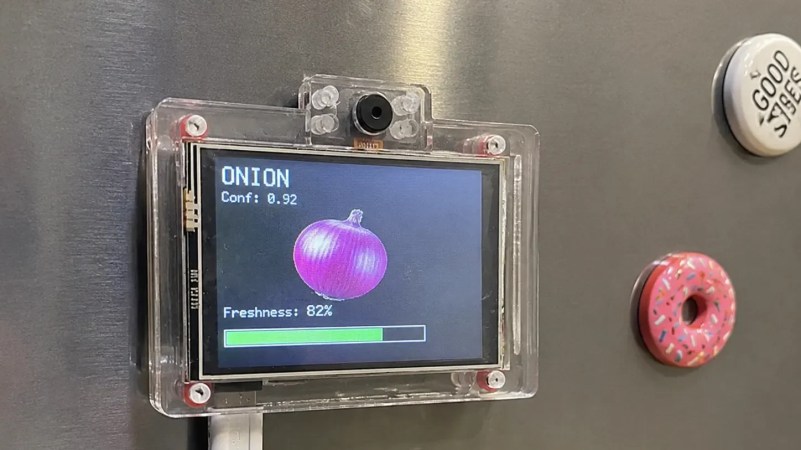
The result is DecayDock, which lives on a fridge and tries to keep track of what’s going on inside. It achieves this with the use of an ESP32-CAM module, which combines the capable microcontroller with a camera for image detection work. With the aid of an Edge AI model, it’s able to detect common food items that are held in front of the camera, which are in turn added to an internal inventory. The items are tracked over time based on expected shelf lives, and the freshness of various items in the fridge is displayed on an attached LCD screen with a green/yellow/red color coding system.

The system is only making estimates—it’s not able to actually identify when the cheese has gone moldy or the milk has gone sour. Still, if you struggle to remember what you should be prioritizing to use in your fridge, it might be a handy aid.

Ultimately, we never really saw smart fridges dominate the market, even though the idea has long been a popular one in futurist circles. Perhaps none of them thought that nobody really wants to stand staring down at a screen on the fridge all day. In reality, some areas of the home are best left unsmartified.
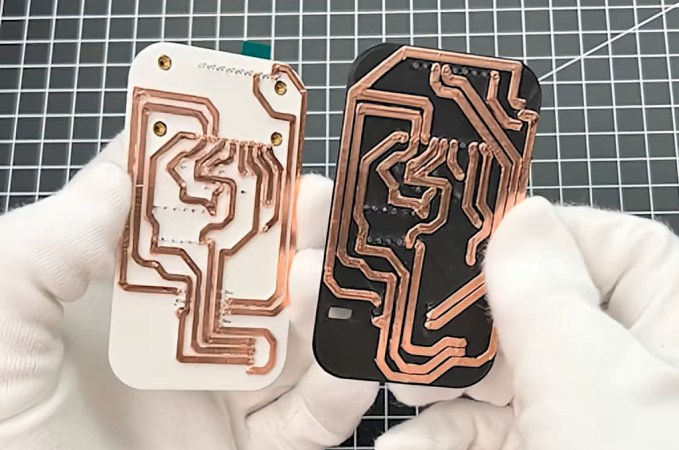
Two printed circuit boards made from 3D prints and copper foil. One white and one black substrate.

Using 3D Printers To Make Circuit Boards

Custom printed circuit boards have become more and more accessible to the average hobbyist over the last decade. But one problem still remains: your circuits will take at least a couple days to make. But what if you needed some really rapid prototypes? [The Raccoon Lab] shows us how to do it with a 3D printer.

You start with the usual hobby PCB pipeline: take your idea, make a schematic, and then lay it out in KiCad. That’s where the changes start: to keep traces strong, they are made very thick. The PCB is then exported and opened in 3D CAD software, where the traces are extruded to be 2 mm tall. Off to the printer! The newly printed “circuit board” is made conductive by applying copper tape to it, and traces are cut out along their raised edges.

The result is a very quick and dirty PCB. Sure, it isn’t exactly production-ready, but for just about any simple microcontroller project it’ll do just fine, and it’s a whole lot more accessible than milling one using a CNC! We’ve seen a few variations on this approach recently, including some custom software designed to help along the process.
Continue reading “Using 3D Printers To Make Circuit Boards”

Building A Device To Map Magnetic Fields

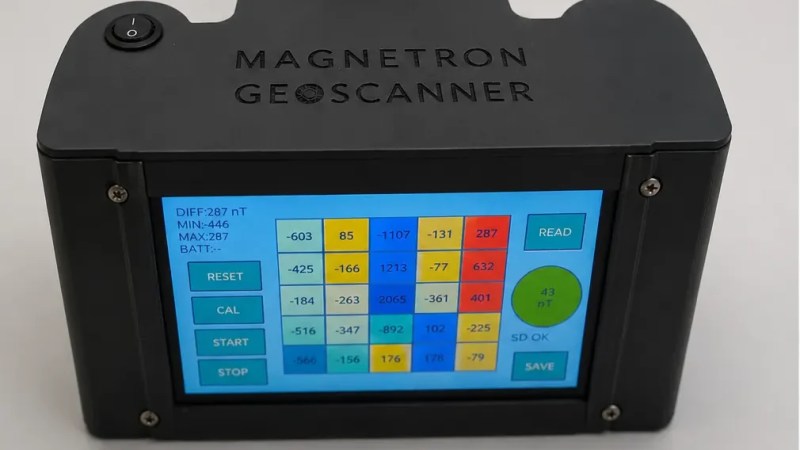
Magnetic fields are all around us. We can’t really feel or see them ourselves, per se, but we can map them with the right hardware, like this device built by [edosari50].

The build uses an ESP32 microcontroller, which is built on to a board with an integrated 4.3″ touchscreen LCD. It’s paired with an Arduino Nano, which does the work of actually talking to a pair of EMS100 Fluxgate magnetic sensors. The slower, less capable Arduino handles the low-level chatter and then passes the readouts to the ESP32 over a UART connection. Power is courtesy of a pair of 18650 lithium-ion cells, and a XL4005 DC-DC converter. A lithium-ion charging module is on hand to keep the batteries topped off safely.  Scan results are visualized on the device itself using a heatmap representation, and can also be exported to SD card for later analysis if so desired.

Unless you’re in the geological field or otherwise hunting for stuff underground, this probably isn’t a tool you’ll have a lot of use for. However, if you like finding magnetic anomalies and investigating them, it might be very much in your wheelhouse. We’ve featured other tools for magnetic visualization before, too. Video after the break.
Continue reading “Building A Device To Map Magnetic Fields”

The 8-bit Web Server

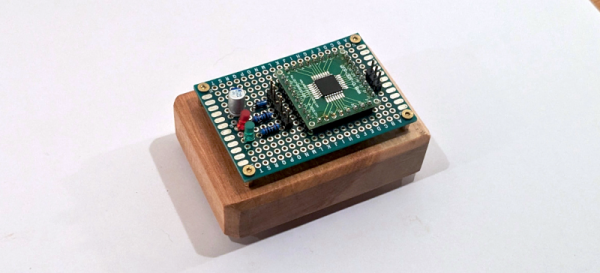
Even [maurycyz] doesn’t think it is a good idea, but it is possible to use an AVR 8-bit CPU to serve web pages. Of course, it is a vastly simplified web server, but it does serve pages — OK, technically just one page — to the public Internet.

Working backward, it is fairly easy to get the microcontroller to note an HTTP request and then simply spit out a prerecorded HTTP response to provide the page. The hard part is connecting the little processor to the network. The server is dead simple, just a CPU and a scant number of components like filter caps and LEDs. The trick is to use SLIP, an ancient protocol used to connect dial-up modem terminals to the network.

Linux supports SLIP, so the MCU connects to a Linux computer via SLIP. Then the Linux computer uses WireGuard to network with the remote web server that serves [maurycyz’s] site. The SLIP implementation assumes that IP packets aren’t fragmented, which is normally true these days. TCP was a bit more complicated since you have to track the connection state and possibly re-transmit lost packets. Still, nothing the AVR with 8 K of RAM and 64 K of flash can’t handle.

Practical? No. Cool? Sort of. Funny that a disposable vape has more CPU power. Of course, something like an ESP32 is an obvious choice.

Building A Pip Boy Themed Smartwatch

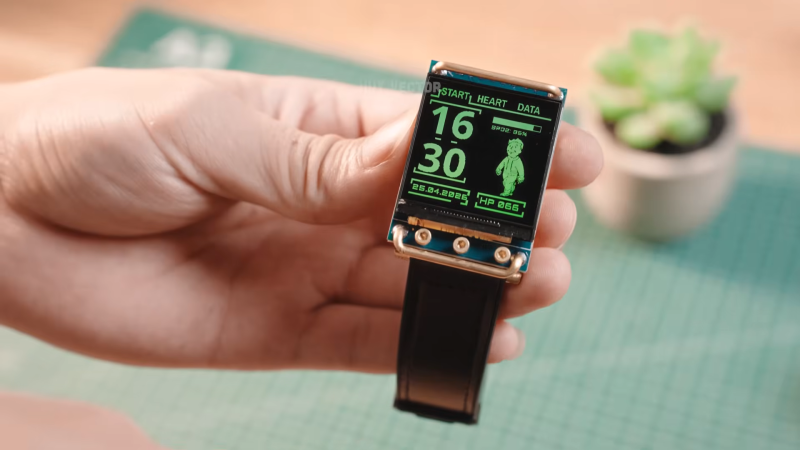
One of the problems with good science fiction is that it introduces us to all kinds of cool devices that we can’t actually have in real life. [Huy Vector] has tried to fix that a little with this fantastic smartwatch build inspired by everybody’s favorite wrist computer from the Fallout series.

The build is based around a Xiao ESP32-S3 board, which hosts the capable microcontroller and has all that useful wireless connectivity built in. It’s hooked up to a MAX30102 heart rate sensor to collect the wearer’s vital signs, as well as a 1.54″ LCD screen for displaying the fantastic Pip Boy themed interface. Power is courtesy of a small lithium-ion cell tucked in behind the display. A little copper tubing and brass hardware helps tie everything together, with the latter serving as capacitive touch points for controlling the device. A simple leather watch strap completes the build.

It’s a bit of a diversion from the classic Pip Boy design, in that it’s a small smartwatch instead of a chunky device that takes up most of the wearer’s forearm. However, this isn’t so bad in reality—it’s far more practical while still rocking those classic green-on-black graphics that we all love so much.

If you’re craving a more authentic Pip Boy recreation, we’ve featured a few of those, too.

Continue reading “Building A Pip Boy Themed Smartwatch”

Recreating A Broken Laminated Wooden Furniture Part

Everyone loves those rather bouncy wooden lounge chairs that got popularized by a certain Swedish seller of furniture, but as tough as they are, the laminated wood can still break at some point. The chair that [John’s Furniture Repair] got in for repair had cracked right around where a bolt hole had been drilled, apparently creating a weak spot that over the years turned into a crack.

The way to fix this issue is to recreate the one piece of curved, laminated wood as demonstrated in the video. This starts with tracing the contours of the original part on a piece of MDF, which then gets doubled up by a second plate of MDF. After cutting out the contours this then creates the two halves of a mold for the laminated part.

Next is preparing the layers of wood that will become the new part, making sure to keep the same final thickness as the original. With everything glued up the layers are put into the mold, clamped down and the glue left to dry.

Finally, the part is freed from the mold, cut to its final size, and sanded down to prepare it for final treatment and installation on the lounge chair. Perhaps the only negative one can say about this kind of fix is that after you’re done, you really get that itch to sand down and re-lacquer all of the other parts as well so that they also look new and shiny.

Continue reading “Recreating A Broken Laminated Wooden Furniture Part”

How Pulse Oximetry Figures Out Your Blood Oxygen Levels

If you’ve ever had a medical team investigating cardiac issues, you’ve probably had a bunch of electrodes stuck all over your chest and been hooked up to an electrocardiogram. This is the gold standard when it comes to understanding electrical activity in the heart and can diagnose a great many conditions. However, sometimes doctors just need the basic information—your pulse rate, and whether or not there’s actually any oxygen in your blood.

Thankfully, there’s a cheap and simple device that can offer that exact information. It’s the pulse oximeter, and it’s a key piece of equipment that’s just about vital for monitoring vitals. Let’s learn how it works!

Continue reading “How Pulse Oximetry Figures Out Your Blood Oxygen Levels”