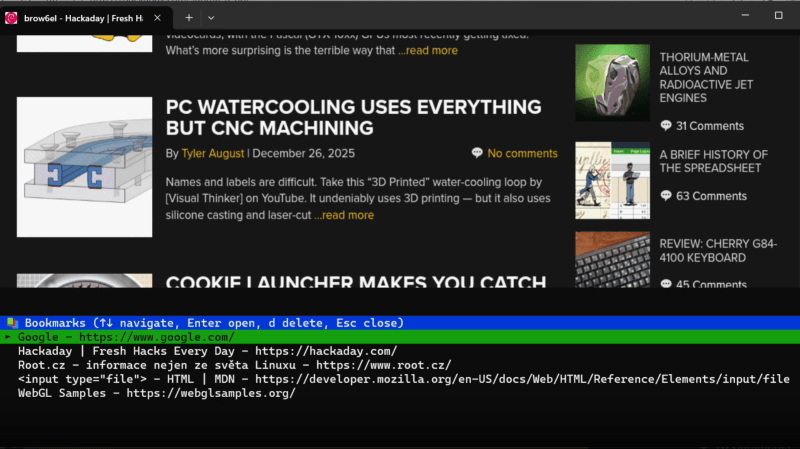
A tab-based terminal window is shown, with the label “brow6l – Hackaday.” The Hackaday website is visible in the upper part of the terminal screen, and in the lower part is a text display containing information about the website and interface information.

Terminal-Based Web Browsing With Modern Conveniences

Programmers hold to a wide spectrum of positions on software complexity, from the rare command-line purists to the much more common web app developers, and the two extremes rarely meet. One point of contact, though, might be [Jan Antos]’s Brow6el, which uses sixel graphics to display a fully graphical web browser within a terminal.

Behind the scenes, the Chromium Embedded Framework renders webpages headless, then Brow6el uses libsixel to convert the rendered output image to sixels, a simple kind of console-based graphics representation, which it then outputs to the terminal. It regularly re-renders the page to catch page updates and display them in real time, and it can send mouse or keyboard input back to the webpage. For more advanced work, it also has a JavaScript development console, and it’s possibly to manually inject scripts into rendered webpages, or inject them automatically using URL match patterns. Continue reading “Terminal-Based Web Browsing With Modern Conveniences”


Different Algorithms Sort Christmas Lights

Sorting algorithms are a common exercise for new programmers, and for good reason: they introduce many programming fundamentals at once, including loops and conditionals, arrays and lists, comparisons, algorithmic complexity, and the tradeoff between correctness and performance. As a fun Christmas project, [Scripsi] set out to implement twelve different sorting algorithms over twelve days, using Christmas lights as the sorting medium.

The lights in use here are strings of WS2812 addressable LED strips, with the program set up to assign random hue values to each of the lights in the string. From there, an RP2040-based platform will step through the array of lights and implement the day’s sorting algorithm of choice. When operating on an element in the array the saturation is turned all the way up, helping to show exactly what it’s doing at any specific time. When the sorting algorithm has finished, the microcontroller randomizes the lights and starts the process all over again.

For each of the twelve days of Christmas [Scripsi] has chosen one of twelve of their favorite sorting algorithms. While there are a few oddballs like Bogosort which is a guess-and-check algorithm that might never sort the lights correctly before the next Christmas (although if you want to try to speed this up you can always try an FPGA), there are also a few favorites and some more esoteric ones as well. It’s a great way to get some visualization of how sorting algorithms work, learn a bit about programming fundamentals, and get in the holiday spirit as well.

Illustrated Kristina with an IBM Model M keyboard floating between her hands.

Keebin’ With Kristina: The One With The C64 Keyboard

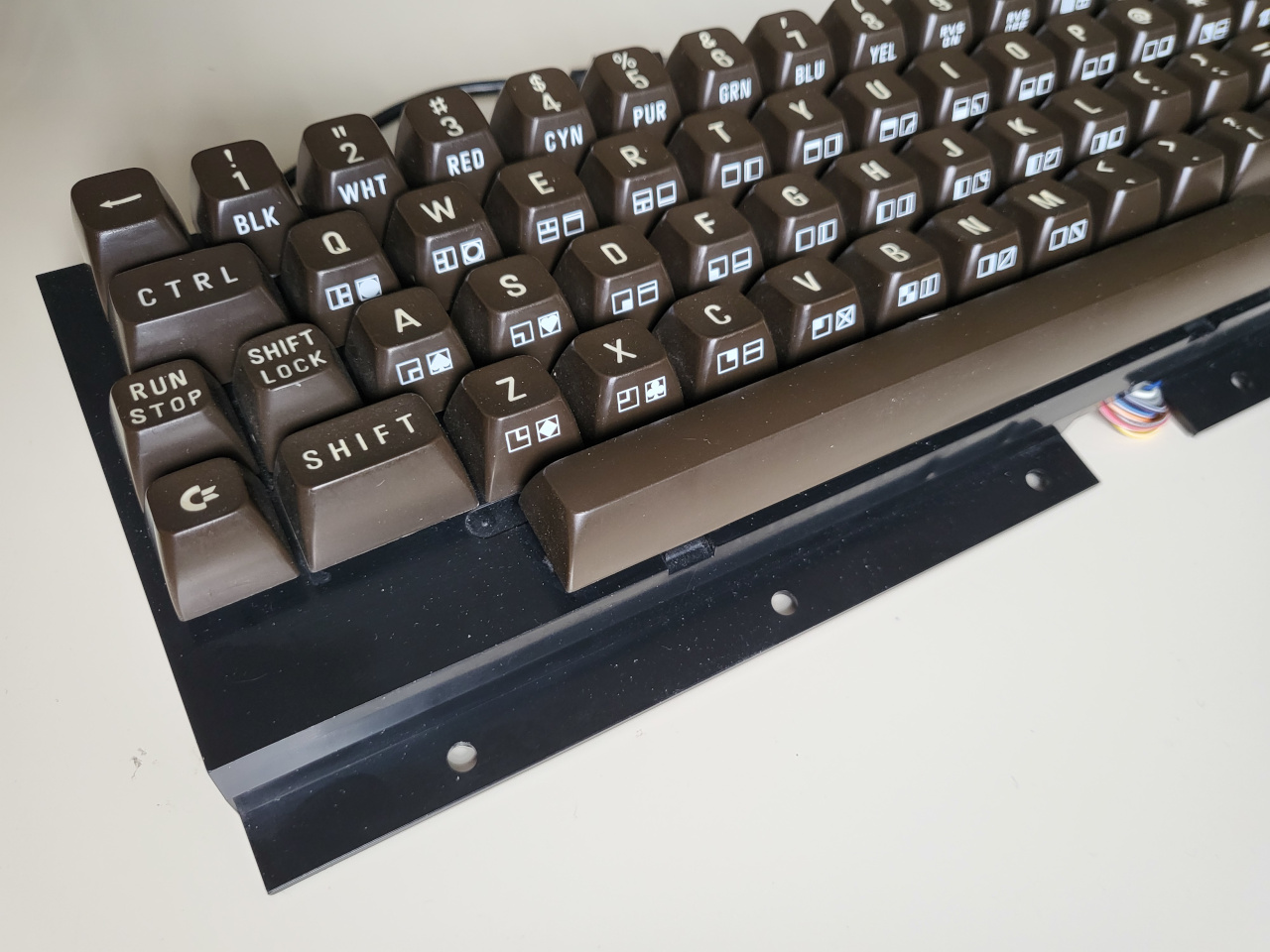
[Jean] wrote into the tips line (the system works!) to let all of us know about his hacked and hand-wired C64 keyboard, a thing of beauty in its chocolate-brown and 9u space bar-havin’ glory.

A C64 keyboard without the surrounding C64.
Image by [Jean] via GitHub
This Arduino Pro Micro-based brain transplant began as a sketch, and [Jean] reports it now has proper code in QMK. But how is a person supposed to use it in 2025, almost 2026, especially as a programmer or just plain serious computer user?

The big news here is that [Jean] added support for missing characters using the left and right Shift keys, and even added mouse controls and Function keys that are accessed on a layer via the Shift Lock key. You can see the key maps over on GitHub.

I’ll admit, [Jean]’s project has got me eyeing that C64 I picked up for $12 at a thrift store which I doubt still works as intended. But don’t worry, I will test it first.

Fortunately, it looks like [Jean] has thought of everything when it comes to reproducing this hack, including the requisite C64-to-Arduino pinout. So, what are you waiting for?

Continue reading “Keebin’ With Kristina: The One With The C64 Keyboard”

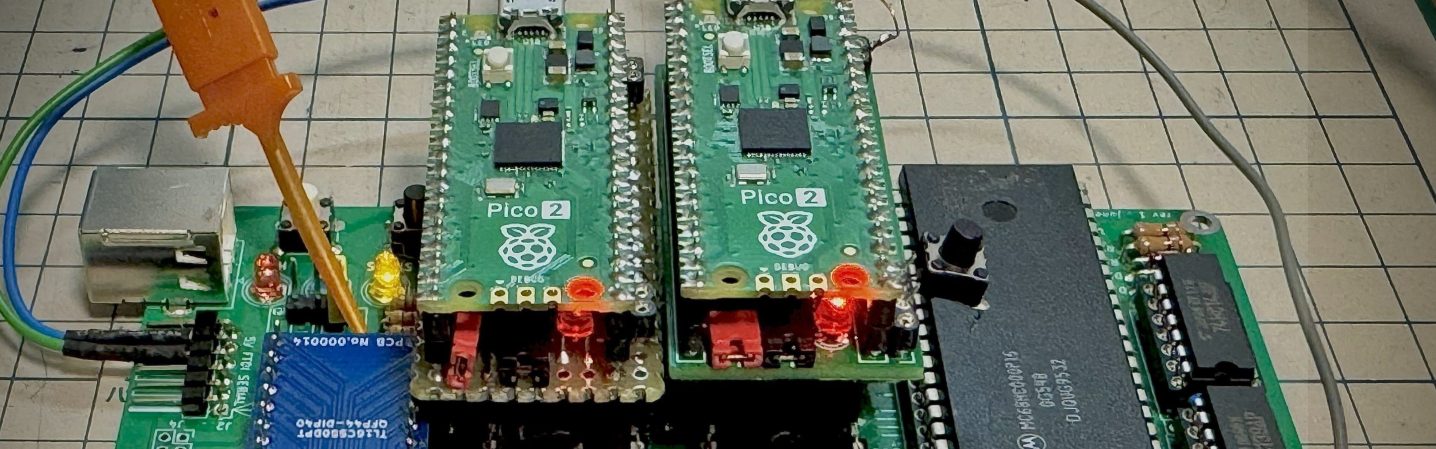
Emulate ROMs At 12MHz With Pico2 PIO

Nothing lasts forever, and that includes the ROMs required to make a retrocomputer run. Even worse, what if you’re rolling your own firmware? Period-appropriate EPROMs and their programmers aren’t always cheap or easy to get a hold of these days. [Kyo-ta04] had that problem, and thanks to them, we now all have a solution: Pico2ROMEmu, a ROM emulator based on, you guessed it, the Raspberry Pi Pico2.

Continue reading “Emulate ROMs At 12MHz With Pico2 PIO”

In Which I Vibe-Code A Personal Library System

When I was a kid, I was interested in a number of professions that are now either outdated, or have changed completely. One of those dreams involved checking out books and things to patrons, and it was focused primarily on pulling out the little card and adding a date-due stamp.

Of course, if you’ve been to a library in the last 20 years, you know that most of them don’t work that way anymore. Either the librarian scans special barcodes, or you check materials out yourself simply by placing them just so, one at a time. Either way, you end up with a printed receipt with all the materials listed, or an email. I ask you, what’s the fun in that? At least with the old way, you’d usually get a bookmark for each book by way of the due date card.

As I got older and spent the better part of two decades in a job that I didn’t exactly vibe with, I seriously considered becoming a programmer. I took Java, Android, and UNIX classes at the local junior college, met my now-husband, and eventually decided I didn’t have the guts to actually solve problems with computers. And, unlike my husband, I have very little imagination when it comes to making them do things.

Fast forward to last weekend, the one before Thanksgiving here in the US. I had tossed around the idea of making a personal library system just for funsies a day or so before, and I brought it up again. My husband was like, do you want to make it tonight using ChatGPT? And I was like, sure — not knowing what I was getting into except for the driver’s seat, excited for the destination.

Continue reading “In Which I Vibe-Code A Personal Library System”

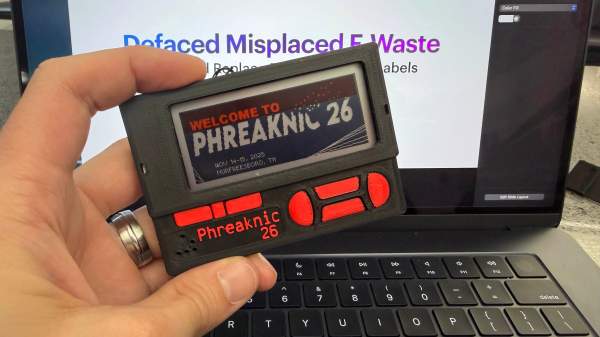
PN26 badge

Shelf Life Extended: Hacking E-Waste Tags Into Conference Badges

Ever wonder what happens to those digital price tags you see in stores once they run out of juice? In what is a prime example of e-waste, many of those digital price tags are made with non-replaceable batteries, so once their life is over they are discarded. Seeing an opportunity to breathe new life into these displays, [Tylercrumpton] went about converting them to be the official badge of the Phreaknic 26 conference.

Looking for a solution for a cheap display for the upcoming conference badge, [Tylercrumpton] recalled seeing the work [Aaron Christophel] did with reusing electronic shelf labels. Looking on eBay, he picked up a lot of 100 ZBD 55c-RB labels for just $0.70 a piece. When they arrived, he got to work liberating the displays from their plastic cases. The long-dead batteries in the devices ended up being easily removed, leaving behind just the display and the PCB that drives it.

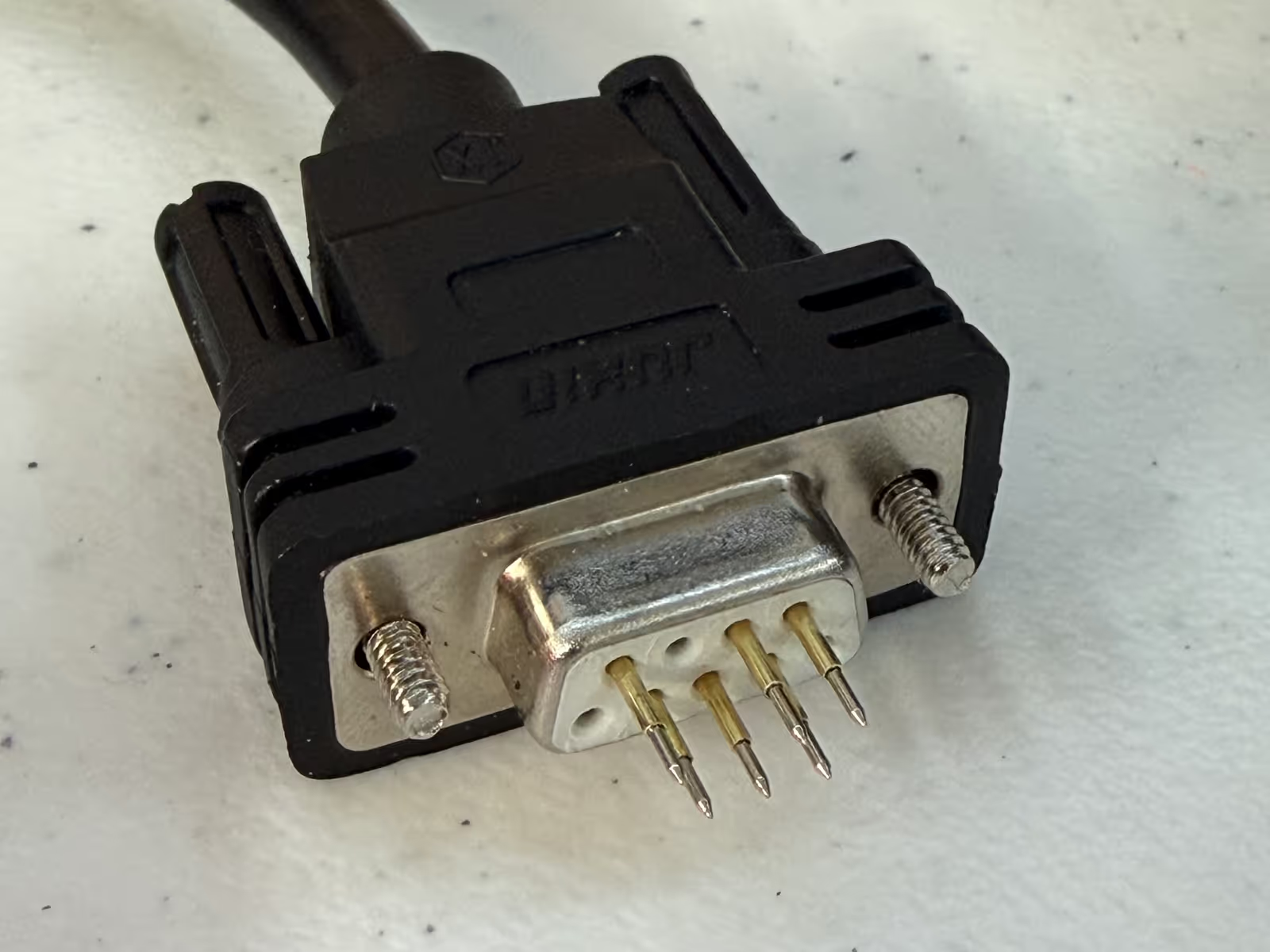
db9 programmerAnother hacker assisting with the badge project, [Mog], noticed that the spacing of the programming pads on the PCB was very close to the spacing of a DB9/DE9 cable. This gave way to a very clever hack for programming the badges: putting pogo pins into a female connector. The other end of the cable was connected to a TI CC Debugger which was used to program the firmware on the displays. But along the way, even this part of the project got an upgrade with moving to an ESP32 for flashing firmware, allowing for firmware updates without a host computer.



The next challenge was how to handle customizing 200 unique badges for the conference. For this, each badge had a unique QR code embedded in the back of the 3D printed case that pointed to an online customization tool. The tool allowed the user to change which of the images was used for the background, as well as input the name they wanted to be displayed on the badge. Once finished, the server would provide a patched firmware image suitable for flashing the badge. The original intent was to have stations where attendees could plug in their badge and it would update itself; however, due to some 11th hour hiccups, that didn’t pan out for this conference. Instead, [Tylercrumpton] ran the update script on his machine, and it gave him a great opportunity to interact with conference attendees as they stopped by to update their badges.

For the Phreaknic 27 badge, the plan is to once again use electronic shelf labels, but this time to utilize some of the advanced features of the tags such as the EEPROM and wireless communications. We’re eager to see what the team comes up with.

Continue reading “Shelf Life Extended: Hacking E-Waste Tags Into Conference Badges”

MicroCAD Programs CAD

We love and hate OpenSCAD. As programmers, we like describing objects we want to 3D print or otherwise model. As programmers, we hate all the strange things about OpenSCAD that make it not like a normal programming language. Maybe µCAD (or Microcad) is the answer. This new entry in the field lets you build things programmatically and is written in Rust.

In fact, the only way to get it right now is to build it from source using cargo. Assuming you already have Rust, that’s not hard. Simply enter: cargo install microcad. If you don’t already have Rust, well, then that’s a problem. However, we did try to build it, and despite having the native library libmanifold available, Rust couldn’t find it. You might have better luck.

Continue reading “MicroCAD Programs CAD”