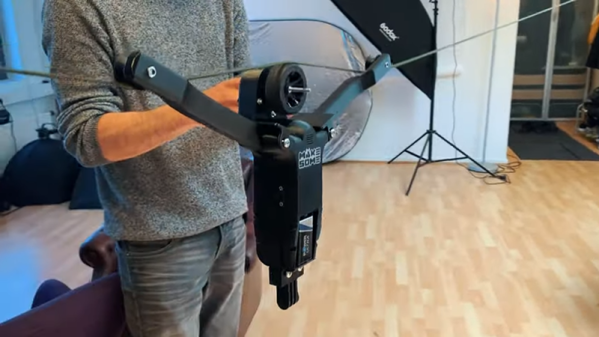
RC Car Becomes Cable Cam

The prevalence of drones has made airborne photography much more widespread, especially among hobby photographers and videographers. However, drone photos aren’t without their problems. You have to deal with making the drone follow the shot which can be difficult unless you have a very expensive one. Worse, you can’t really fly a drone through heavily wooded or otherwise obstructed terrain.

[Makesome’s] friend faced these issues and wanted to buy a cable cam — a mount for the camera that could go back and forth on a cable strung between two trees or other structures. Instead of a design from scratch, they decided to cannibalize a cheap RC car along with an HP printer and the effect — as you can see in the video below — is pretty good.

Repurposing toys is an honored tradition and, after all, what do you need but a motor that goes forward and reverses? We can’t help but notice though that toy hacking is much easier now that you can 3D print custom widgets to connect everything together.

Continue reading “RC Car Becomes Cable Cam”

The Real Story: How Samsung Blu Ray Players Were Bricked

In June, many owners of Samsung Blu Ray players found that their devices were no longer usable. Stuck in a boot loop, speculation was rife as to the cause of the issue. Now it seems that the issue has become clear – a badly formatted XML file may be responsible for the problems (via The Register).

The problem stems from the logging system that stores user data and passes it back to Samsung over the Internet. Which data is logged and sent back is managed by an XML file which contains the policy settings that control this behaviour. According to a source known only as “Gary” “Gray”, the XML file posted on Samsung’s servers on June 18 featured a malformed list element. This caused a crash in the player’s main software routine, leading the player to reboot.

The failure was exacerbated by the fact that the XML file is parsed very early in the boot sequence, even before checking for firmware updates or a new XML file. This has prevented Samsung from rolling out an update or fix over the air, and is why the player gets stuck in a loop of continuous reboots.

Reportedly, the file can be found at this URL, though is now an updated version that shouldn’t brick players. Samsung have had to resort to a mail-in repair scheme, wherein technicians with service tools can manually remove the offending XML file from the player’s storage, allowing it to boot cleanly once again. While this shows our initial assumptions were off the mark, we’re glad to see a solution to the problem, albeit one that requires a lot of messing around.

[Thanks to broeckelmaier for the tip!]

A Tin Can Modem, Just For Fun

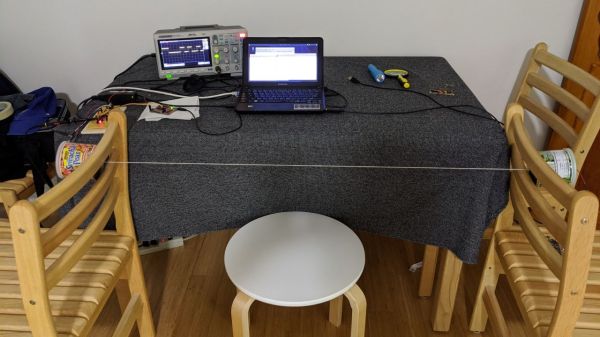
Anyone old enough to fondly recall the “bleep-burp-rattle” sequence of sounds of a modem negotiating a connection over a phone line probably also remembers the simple “tin-can telephone” experiment, where a taut string transmits sound vibrations from the bottom of one tin can to another.  This tin can modem experiment puts both of those experiences together in a single project.

As [Mike Kohn] notes, this project was harder than it would seem that it should be. He actually had a much harder time getting the tin can phone part of the project optimized than getting the electronics sorted out, resulting in multiple tries with everything from the canonical tin cans to paper coffee cups before eventually settling on a pair of cardboard nut cans, the kinds with the metal bottoms. Linked together with a length of kite string — dental floss didn’t work — [Mike] added a transmitter on one end and a receiver on the other.

The transmitter used an ATtiny 2313 and everyone’s favorite audio amplifier, the LM386, while the receiver sported an electret mike preamp board, an LM566 tone decoder, and an MSP430 microcontroller. The modulation scheme was as simple as possible — a 400 Hz tone whose length varies whether it’s a one or a zero, or a stop or start bit. Connected to a pair of terminal programs, [Mike] was able to send his name over the wire string at what he calculates to be six or seven baud.

This project has all the hallmarks of lockdown boredom, but we don’t care because it’s good fun and a great learning opportunity, particularly for the young ones. There’s plenty of room for optimization, too — maybe it could even get fast enough for the Hackaday Retro 300-baud challenge.

Continue reading “A Tin Can Modem, Just For Fun”

An HDMI Monitor From Your Phone

Digital video has proceeded to the point at which we have near-broadcast-quality HD production capabilities in the palm of our hand, and often for a surprisingly affordable price. One area in which the benefits haven’t quite made it to our wallets though is in the field of small HD monitors of the type you might place on top of a camera for filming. It’s a problem noted by [Neon Airship], who has come up with a solution allowing the use of an Android mobile phone as an HDMI monitor. Since many of us will now have a perfectly capable older phone gathering dust, it’s an attractive proposition with the potential to cost very little.

The secret isn’t the most elite of hacks in that it uses all off-the-shelf hardware, but sometimes that isn’t the only reason to be interested in a project such as this one. [Neon] is using an HDMI-to-USB capture card of the type that has recently become available from the usual sources for an astoundingly small sum. When paired with a suitable USB OTG cable, the adapter can be seen by the phone as just another webcam.

We see him try a few webcam viewer apps including one that rather worryingly demands a direct APK download, and the result is a very good quality HDMI monitor atop his camera that really didn’t break the bank. Sometimes the simplest of solutions deliver the most useful of results.

This is something of special interest to those of us who experiment with our own camera form factors.

Continue reading “An HDMI Monitor From Your Phone”

Faux Radar Uses Ultrasound & Python

Radars are simply cool, and their portrayal in movies and TV has a lot to do with that. You get a sweet glowing screen that shows you where the bad guys are, and a visual representation of your missiles on their way to blow them up. Sadly, or perhaps thankfully, day to day life for most of us is a little less exhilarating. We can make do with a facsimile of the experience instead.

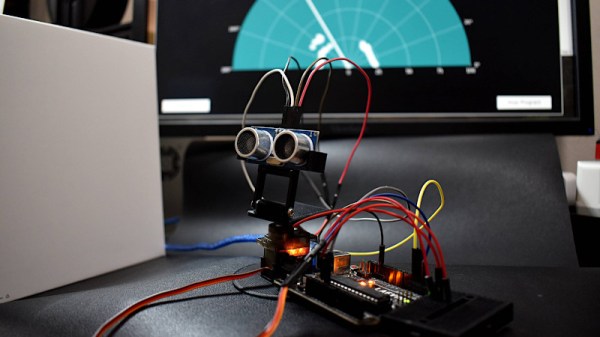
The project consists of an Arduino Uno outfitted with an ultrasound module that can do basic range measurements on the order of tens of centimeters. The module is then placed on a servo and scanned through a 180 degree rotation. This data is passed back to a computer running a Python application, which plots the results on a Plan Position Indicator, or PPI – the sweeping display we’re all so familiar with.

While it’s unlikely you’ll be using such a setup to engage bandits, it could prove as a useful module for robot navigation or similar applications. We’ve seen ultrasonic transducers used for exactly that. Video after the break.

Continue reading “Faux Radar Uses Ultrasound & Python”

Reverse Engineering Teaches An Old Scope New Tricks

[PMercier] clearly loves his old Tektronix TDS3014 scope, which did however lack essentially modern connectivity such as an Ethernet port for control and a USB port for a convenient way to capture screenshots. So he decided to do some in-depth reverse engineering and design his own expansion card for it. The scope already has an expansion port and an expansion card, but given this model was first released in 1998, purchasing an OEM part was not going to be an option.

They don’t make ’em like they used to. Test equipment is today is built to last a decade — but usually lives on much longer. This is certainly true for the previous generations of kit. It’s no surprise that for most of us, hand-me-downs from universities, shrewd eBay purchasing, and even fruitful dumpster dives are a very viable way to attain useful and relevant test equipment. Now, while these acquisitions are more than adequate for the needs of a hobbyist lab, they are admittedly outdated and more to the point, inaccessible from a connectivity and communication standpoint. A modern lab has a very high degree of automated data acquisition and control over ethernet. Capturing screen dumps on a USB is a standard feature. These modern luxuries don’t exist on aging equipment conceived in the age of floppy disks and GPIB.

Continue reading “Reverse Engineering Teaches An Old Scope New Tricks”

Tool Changing 3D Printers Shouldn’t Break The Bank

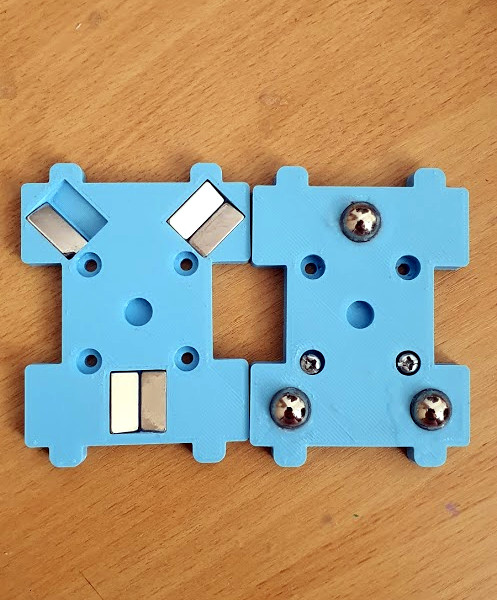
Close-up on the magnetic coupling

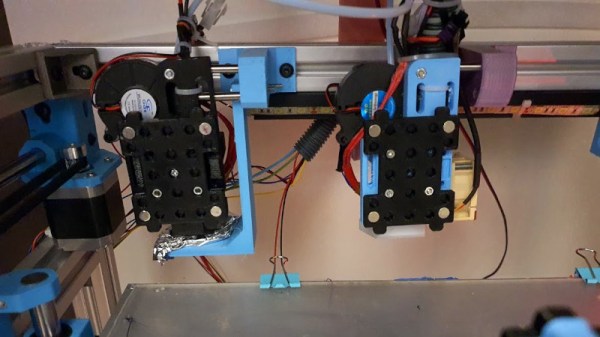
One of the Holy Grails of desktop 3D printing is the ability to print in multiple materials, for prints that mix colours or textures. There are printers with multi-way hot ends, add-ons that change your filament, or printers with tool changers, that swap hot ends as needed. [Amy] has taken the final route with her Hypercube, and her Doot Changer allows her to print in two materials with ease. Best of all, she tells us it only cost her $20 to make.

For those not familiar with Hypercube-style printers, they have a roughly cubic frame made using aluminium extrusion. On the rear upper rail are a couple of receptacles with metal locating pins onto which a hot-end unit can be slotted. The printer carriage has a magnetic coupling that can pick up or disengage a hot end from its receptacle at will, as can be seen in action in a short video clip.

All the parts can be found on Thingiverse, and there is a photo album with plenty of eye-candy should you wish to see more. Meanwhile as far as tool changers go, we’ve been there before in great depth.