Video Quick Bit: The Best In Human Computer Interfaces

We’re neck deep in the Hackaday Prize, and we just wrapped up the Human Computer Interface Challenge. This is an incredible contest to go beyond traditional mice and keyboards to find new ways to transfer your desires directly into a computer. Majenta Strongheart is back at it again, giving us a look at some of the coolest Human Computer Interface builds in this year’s Hackaday Prize

The Hackaday Prize is all about hacking, really, and there’s no better project that demonstrates this than [Curt White]’s hacked fitness tracker. This is a tiny, $35 fitness tracker that’s loaded up with Bluetooth and an ECG front end. With a few slight modifications this cheap bit of consumer electronics can become a prototyping platform for ECG/EMG/EEG projects. Awesome work.

But when it comes to Human Computer Interfaces, what’s really cool is games. Remember the Power Glove? Of course, everyone does. How about the Sega Activator, the first full-body motion controller? Yeah, now we’re getting into the good stuff. [Arcadia Labs] build a Head Tracker for their favorite space flight sims, and the results are remarkable. Take a look at the videos and you can see the promise of this kind of tech.

The biggest advance in Human-Computer Interaction in the last few years is obviously VR. Once the domain of some early-90s not-quite cyberpunk, VR is now showing up in living rooms. The HiveTracker is an ingenious device that reverse engineers the technology behind the Vive Tracker from HTC. This is a tiny little device that allows for sub-millimeter 3D positioning, and also adds a 9DOF IMU to the mix. If you’ve ever wanted to know exactly where you are, this is the project for you.

Right now we’re plowing through the Musical Instrument Challenge where we’re asking you to build something that pushes the boundaries of instrumentation. If you’re building a synth, we want to see it. If you’re making music with vacuum tubes, we want to see it. Got one of those guitars that are like, double guitars? Yes, we want that too. Twenty of the Musical Instrument Challenge submissions will be selected to move on to the finals and win $1000 in the process. The top five entries of the 2018 Hackaday Prize will split $100,000! This is your chance, so enter now!


What’s A Couplate? The Stepping Stone To Integrated Circuits

We are spoiled these days because you can shop online and get all manner of inexpensive electronic goodies shipped to your door. This is due to the fantastic electronic fabrication workflow that has grown into a global powerhouse, facilitated by complex yet inexpensive integrated circuits! But it took a few intermediate steps to get here, and one of those is known as a couplate.

When I was a kid, the big deal was to find an old radio in the trash. You could spend a few hours stripping all sorts of parts from the thing and add it to your collection for a future project. Of course, old radios from the 1970s and earlier had a lot of the usual parts we use today, even though many of them were bigger — no surface mount parts yet. Since older radios were the usual find in a dumpster, tubes were common but you could find some transistor radios.

Once in a while something older. There would be a little box with some wires poking hiding in an old radio from the 1940s or 1950s (too early for ICs). In a way, though, these were predecessors to the Integrated Circuit and they went by a few names, depending on who sold them. PEC (Printed Electronic Circuit), a couplate, or a BulPlate, are all names for hardware that was a stepping stone between discrete circuitry and ICs.

Continue reading “What’s A Couplate? The Stepping Stone To Integrated Circuits”

Friday Hack Chat: Playing With Fire

We’re pretty sure all the hackers and tinkerers and makers out there were a tiny bit of a pyromaniac in their youth. That’s what makes this week’s Hack Chat so exciting: we’re talking about Hacking With Fire.

Our guest for this week’s Hack Chat will be [Brice Farrell], who, like most of us, has been interested in fire his entire life. He’s taken this interest and turned his amateur passion into something semi-professional. He’s a PGI certified pyrotechnician, an electrical engineer, and an ice carver. This year, he appeared on BattleBots where he built the flame system for Battle Royale with Cheese.

Given [Brice]’s extensive expertise, this Hack Chat is going to cover the relevant safety concerns of work with fire, how to keep yourself safe, and how to do everything legally. We’ll be talking about fireball shooters of all sizes, ignition techniques, and the use (and introduction) of fire in combat robotics. That last point is extremely interesting: is fire on a BattleBot actually useful, and what can you do to protect your bot from it?

Points of interest for this Hack Chat will include:

  • Fire safety
  • The difference between generating flames and fireballs
  • Ignition techniques
  • Fire safety
  • Fire in combat robotics
  • Fire safety

You are, of course, encouraged to add your own questions to the discussion. You can do that by leaving a comment on the Hacking with Fire event page and we’ll put that in the queue for the Hack Chat discussion.

join-hack-chat

Our Hack Chats are live community events on the Hackaday.io Hack Chat group messaging. This week is just like any other, and we’ll be gathering ’round our video terminals at noon, Pacific, on Friday, September 14th. That’s not the same in every time zone, but don’t worry, we have some amazing time conversion technology.

Click that speech bubble to the right, and you’ll be taken directly to the Hack Chat group on Hackaday.io.

You don’t have to wait until Friday; join whenever you want and you can see what the community is talking about.

Gorgeous Omnidirectional 3D Printed Speaker

With all due respect to the hackers and makers out there that provide us with all these awesome projects to salivate over, a good deal of them tend to prioritize functionality over aesthetics. Which isn’t a bad thing necessarily, and arguably better than the alternative. But for many people there’s a certain connotation around DIY, an impression that the final product is often a little rough around the edges. It’s usually cheaper, maybe even objectively better, but rarely more attractive.

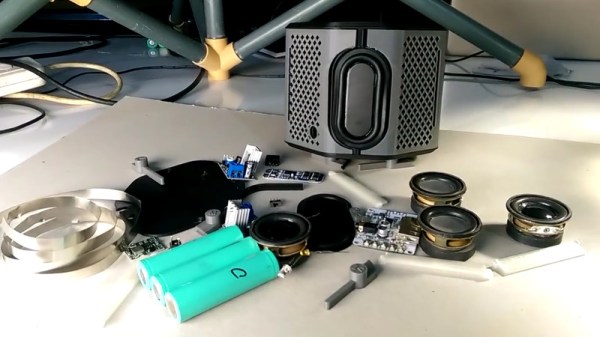
Which makes builds like this absolutely beautiful 3D printed Bluetooth speaker by [Ahmsville] especially impressive. Not only did he engineer a fantastic sounding speaker that projects stereo sound no matter where you are in the room, he clearly gave a lot of thought into making the final product look as good as it sounds.

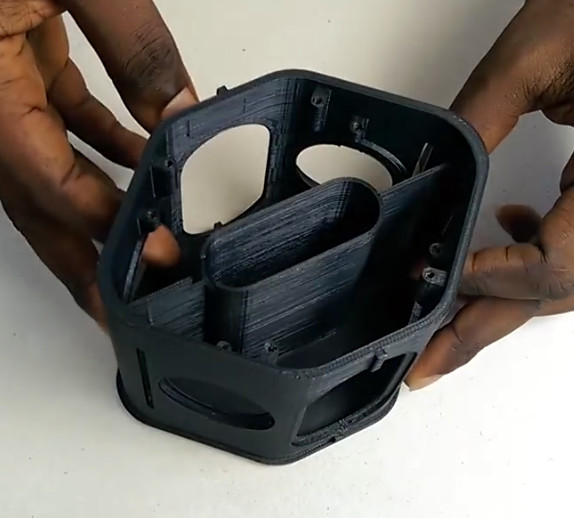
The 3D-printed enclosure provides separation for the four internal speakers and two passive radiators, as well as holding the electronics. A custom made 3S battery powers the Bluetooth module though an isolated step-down module, and the twin 18 W TDA2030 amplifiers feed their respective pair of drivers.

The device is surrounded by an impressively detailed 3D-printed mesh, which is then wrapped with some speaker grill fabric to give it a very professional look. In the video after the break, [Ahmsville] shows a time-lapse of building the speaker, as well as a demonstration of how it sounds on his desk.

If you’re more about function than what the finished product looks like, we’ve covered speaker enclosures made out of various types of actual trash which you can take a look at.

Continue reading “Gorgeous Omnidirectional 3D Printed Speaker”

PLA: The Plastic That Grows

If you’ve ever taken a coast-to-coast car trip across the United States, the one thing that’s sure to impress you is the mind-bogglingly immense amount of corn that we grow here. If you take the northern route — I’ve done it seven times, so I know it by heart — you’ll see almost nothing but corn from Ohio to Montana. The size of the fields is simply staggering, and you’re left wondering, “Do we really eat all this corn?”

The simple answer is no, we don’t. We grow way more corn than we can eat or, once turned into alcohol, drink. We do feed a lot to animals, many of which subsequently end up as burgers or pork chops. But even after all that, and after accounting for exports, we still have a heck of a lot of corn to put to work. There are lots of industrial uses for this surplus corn, though, and chances are pretty good you’ve got an ear or two worth coiled up next to your 3D-printer, in the form of polylactic acid, or PLA.

Continue reading “PLA: The Plastic That Grows”

Turning A Cheap Engraver Into A Decent PCB Mill

We know, we know. Getting PCBs professionally fabricated anymore is so cheap and easy that making them in-house is increasingly becoming something of a lost art. Like developing your own film. Or even using a camera that has film, for that matter. But when you’re in Brazil and it takes months for shipments to arrive like [Robson Couto] is, sometimes you’re better off sticking with the old ways.

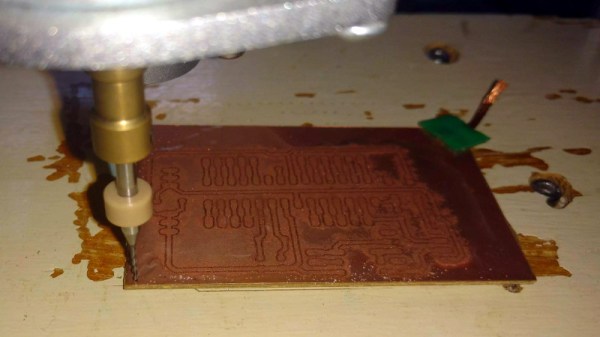
[Robson] writes in to tell us how he decided to buy a ~$150 CNC “engraver” kit from an import site, in hopes that it would allow him to prototype his designs without having to use breadboards all the time. The kit turned out to be decent, but with a series of modifications and a bit of trial and error, he’s improved the performance significantly and is now putting out some very nice looking boards.

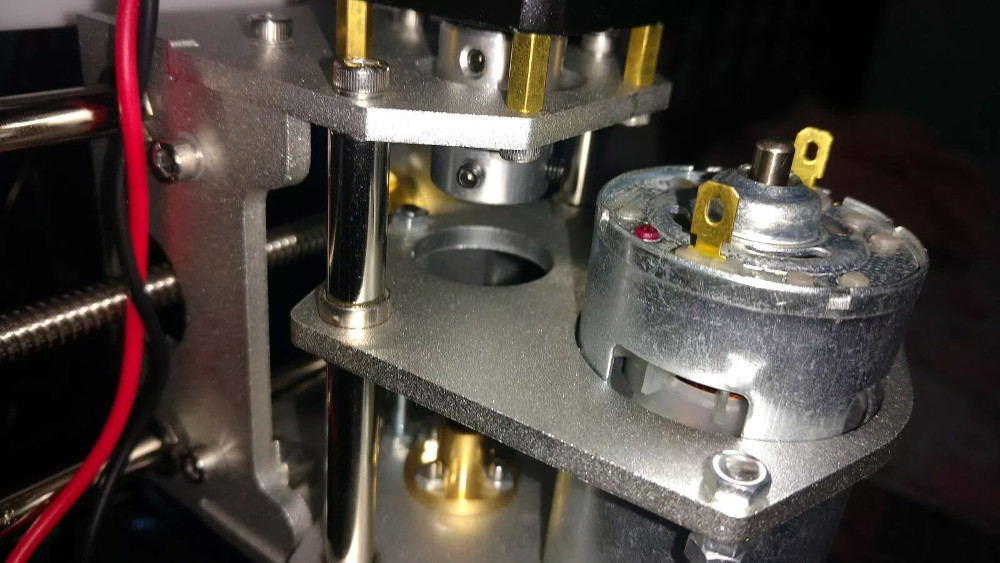
The primary hardware issues [Robson] ran into were in the Z axis, as some poor component selections made the stock configuration wobble a bit too much. He replaced some flimsy standoffs as well as swapping in some bushings he salvaged from dead inkjet printers, and the movement got a lot tighter.

Despite the fact that the version of Grbl flashed onto the engraver’s cloned Arduino Uno supports Z leveling, it’s not actually enabled out of the box. [Robson] just needed to add some extra wiring to use the spindle’s bit as a probe on the copper clad board. He also went ahead and updated to the latest version of Grbl, as the one which ships with the machine is fairly old.

He wraps up the post by going through his software workflow on GNU/Linux, which is useful information even if you’ve taken the completely DIY route for your PCB mill. If you’d like to know more about the ins and outs of milling your own boards, check out this excellent primer by [Adil Malik].

Continue reading “Turning A Cheap Engraver Into A Decent PCB Mill”

Less Is More: A Micromatrix Display In A Square Inch

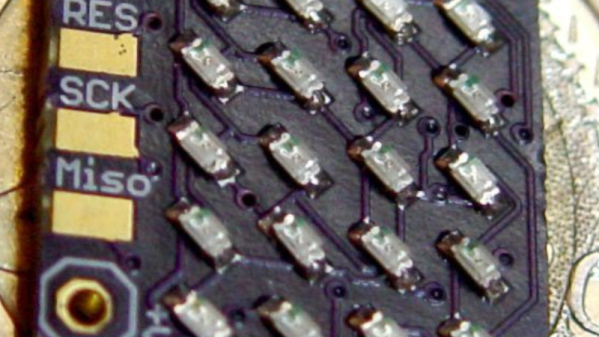
In your living room, the big display is what you want. But in an embedded project, often less is more. We think [bobricius] will agree since he submitted a tiny 4×5 LED display into our square inch challenge. The board features an ATtiny CPU and twenty SMD LEDs in a nice grid. You can see them in action, scrolling to some disco music in the video below.

There is plenty of room left in the CPU for bigger text strings — the flash memory is just over 10% full. A little side-mounted header makes it easy to program the chip if you want to change anything.

Continue reading “Less Is More: A Micromatrix Display In A Square Inch”