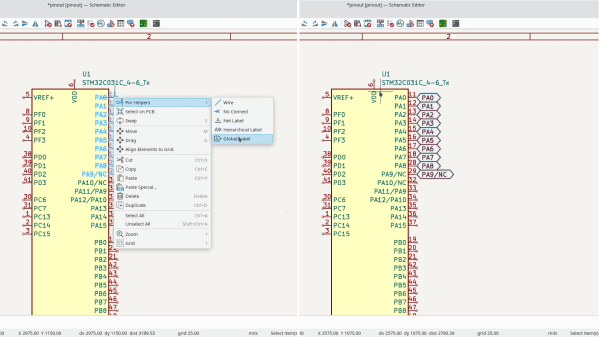
A few days ago, KiCad 8 was released, and it’s a straight upgrade to any PCB designer’s quality of life. There’s a blog post as usual, and, this year, there’s also a FOSDEM talk from [Wayne Stambaugh] talking about the changes that we now all get to benefit from. Having gone through both of these, our impression is that KiCad 8 developers went over the entire suite, asking: “this is cool, but could we make it better”? The end result is indeed a massive improvement in a thousand different ways, from small to fundamental, and all of them seem to be direct upgrades from the KiCad 7 experience.
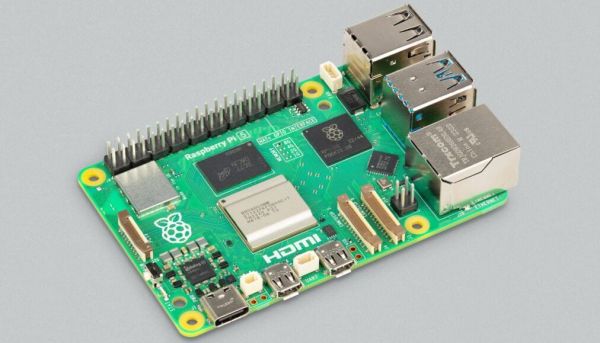
DietPi recently released version 9.1, which among other changes includes new images for the Raspberry Pi 5, Radxa Rock 4 SE and NanoPi R5S/R5C & 6. The Radxa Rock 4 SE image was necessary because the Rock 4’s RK3399 SoC is subtly different from the RK3399-T’s SoC in terms of memory support, which prevents a Rock 4 image from booting on the Rock 4 SE. Meanwhile the Raspberry Pi 5 image is all new and still a bit rough around the edges, with features like the changing of the resolution and camera module support not working yet. These new images are all available for testing.
We covered DietPi previously with their 8.12 release, along with the reasons why you might want to use DietPi over Armbian and Raspberry Pi OS. Essentially DietPi’s main focus is on performance combined with a small installed size, with the included configuration tools and the setup allowing for many more features to be tweaked than you usually find. If the performance improvements, lower RAM usage and faster boot times seen with the Raspberry Pi 4 holds up, then DietPi can just give the Raspberry Pi 5 a nice little boost, while saving power in the process.
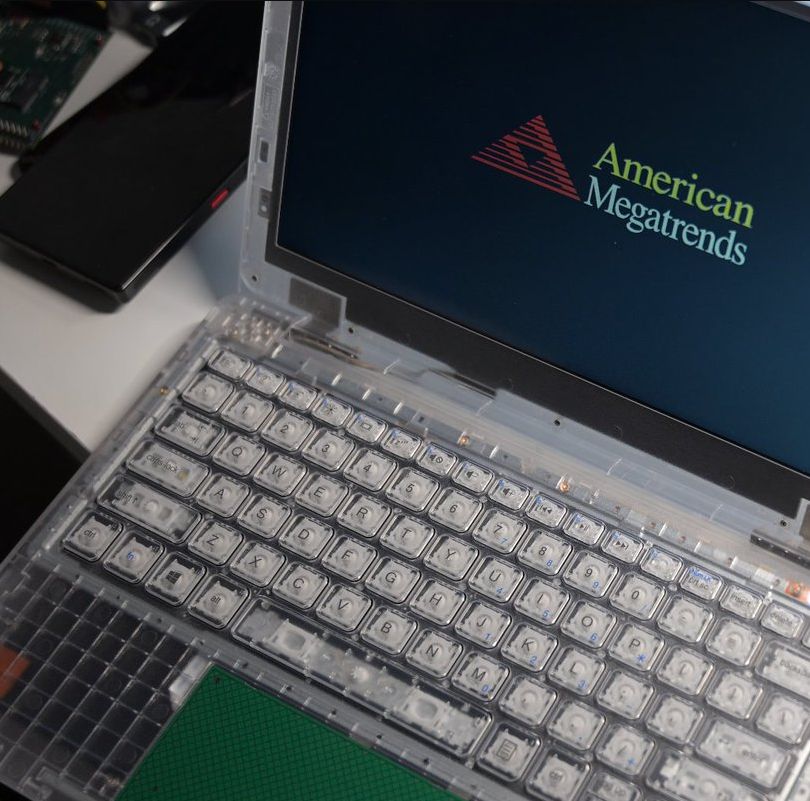
The phenomenon of prison electronics is by now relatively well-documented, with striking transparent radios, televisions, and kin easy to recognize. Yet what about prison laptops? As it turns out, these are a thing as well, and [Zephray Wenting] got one from eBay to investigate, as documented over at Twitter (ThreadReader single page). Much like their audiovisual brethren, these laptops lack basic features in the name of prison security, which in the case of this laptop means for example no USB ports. Even the spacebar stabilizer rod is missing. Weaponized keyboards are apparently a thing in corrections facilities.
The Justice Tech Solutions Securebook 5. (Credit: Zephray Wenting)
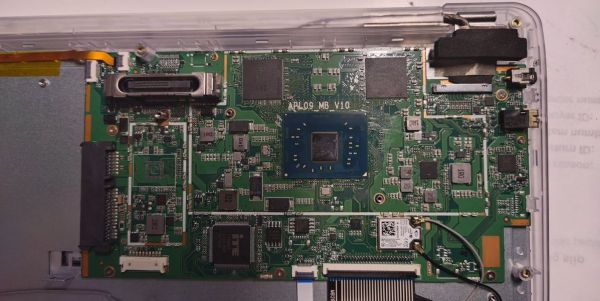
Called the Justice Tech Solutions Securebook 5, it has been superseded by the Securebook 6. Inside this earlier unit, you’ll find an Intel N3450 with 4 GB LPDDR3, with SATA for storage and a special dock connector. Some laptops come with WiFi hardware installed, others are unpopulated. It appears that these Securebooks by default have a BIOS password that cannot be erased, even by removing it from the NVRAM (‘CMOS’), as it’ll return on the next boot due to an automatic BIOS reset. This was temporarily bypassed through a hacky external SPI Flash adapter, but the reward for all this trouble was a BIOS setup screen with just the ‘Security’ tab.
It’s now been sleuthed out that the default password is N%(dU32p as reported by Hackaday’s own [Adam Fabio] on Twitter. It turns out the password was available on a (now private) YouTube video. [Techknight] on Twitter has delved into EFI BIOS hacking. He has an alternate BIOS image that does provide access to the full BIOS setup utility. With BIOS access not being necessary to boot the system, the question that [Zephray] went ahead with was how to boot it into an OS since the original HDD or SSD had been removed prior to being sold. The bad news here is that it turned out that the system has a HDD whitelist (which [Sark] found a way to bypass). The good news is that someone has probed the system before, with the storage device being reported as ‘China SATA3 240GB SSD’.
Rather than mess with this, it was attempted to boot from USB, by tapping into the USB lines for the touchpad, which turned out to allow booting into a live image of Ubuntu without fuss. As an ongoing project, it’ll be interesting to see what more functionality can be wrung out of this piece of prison kit, all hopefully from the right side of the prison bars.
When all else fails, blame it on the cloud? It seems like that’s the script for just about every outage that makes the news lately, like the Wyze camera outage this week that kept people from seeing feeds from their cameras for several hours. The outage went so far that some users’ cameras weren’t even showing up in the Wyze app, and there were even reports that some people were seeing thumbnails for cameras they don’t own. That’s troubling, of course, and Wyze seems to have taken action on that quickly by disabling a tab on the app that would potentially have let people tap into camera feeds they had no business seeing. Still, it looks like curiosity got the better of some users, with 1,500 tapping through when notified of motion events and seeing other people walking around inside unknown houses. The problem was resolved quickly, with blame laid on an “AWS partner” even though there were no known AWS issues at the time of the outage. We’ve said it before and we’ll say it again: security cameras, especially mission-critical ones, have no business being connected with anything but Ethernet or coax, and exposing them to the cloud is a really, really bad idea.
Streaming content online has never been more popular than it is now, from YouTube to Twitch there are all kinds of creators around with interesting streams across a wide spectrum of interests. With that gold rush comes plenty of people selling figurative shovels as well, with audio mixing gear, high-quality web cams, and dedicated devices for controlling all of this technology. Often these devices take the form of a tablet-like device, but [Lenochxd] thinks that any tablet ought to be able to perform this task without needing dedicated, often proprietary, hardware.
The solution offered here is called WebDeck, an application written in Flask that turns essentially any device with a broswer into a stream control device. Of course it helps to have a touch screen as well, but an abundance of tablets and smartphones in the world makes this a non-issue. With the software running on the host computer, the streamer can control various aspects of that computer remotely by scanning a QR code which opens a browser window with all of the controls accessible from within. It has support for VLC, OBS Studio, and Spotify as well which covers the bases for plenty of streaming needs.
Currently the host software only runs on Windows, but [Lenochxd] hopes to have MacOS and Linux versions available soon. We’re always in favor of any device that uses existing technology and also avoids proprietary hardware and software. Hopefully that’s a recipe to avoid planned obsolescence and unnecessary production. If you prefer a version with a little bit of tactile feedback, though, we’ve seen other decks which add physical buttons for quick control of the stream.
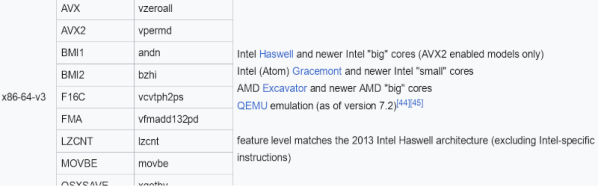
You may have heard Linux pundits discussing x86-64-v3. Can recompiling Linux code to use this bring benefits? To answer that question, you probably need to know what x86-64-v3 is, and [Gary Explains]… well… explains it in a recent video.
If you’d rather digest text, RedHat has a recent article about their experiments using the instructions set in RHEL10. From that article, you can see that most of the new instructions support some enhancements for vectors and bit manipulation. It also allows for more flexible instructions that leave their results in an explicit destination register instead of one of the operand registers.
Of course, none of this matters for high-level code unless the compiler supports it. However, gcc version 12 will automatically vectorize code when using the -O2 optimization flags.
Occasionally, the extra features added to a product can negate some of the reasons you wanted to buy the thing in the first place. Take, for example, Apple’s AirTag — billed as an affordable way to link your physical stuff to your phone. If some light-fingered ne’er-do-well wanders by and half-inches your gear, you get notified. The thing is, the AirTag also has an anti-stalking measure, which after a while, notifies nearby iPhones, should the tag move but not be near your iPhone!
In a recent video, [David Manning] explains that this feature is great for preventing the device from being used to track people. But it also means that if said thief happens to own an iPhone, they will be notified of the nearby tag, and can find it and disable it. So in the end, it’s a bit less useful as an anti-theft measure!
The solution is to pop the back off the tag and yank out the little sounder module from the rear plastic. You lose the ability to locate the tag audibly, but you gain a little more chance of returning your stolen goods. Apple could easily remove this feature with a firmware update, but it’s a matter of picking your poison: antistalking or antitheft?