Convert a Drill Press to a Mill

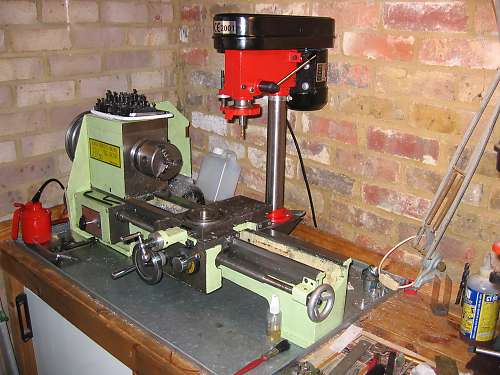
Bench Top Drill Press Converted To Milling Machine, Mounted To Lathe

Milling machines are nice to have around for precisely drilling holes or removing unwanted material from a part. However, they can be expensive and may not get a lot of use, two reasons why a mill purchase may not make sense for a home shop. [David] didn’t need a mill, he wanted one and he didn’t want to spend a lot of money. He did have an old bench top drill press and a lathe in his shop and thought it would be a good idea to combine them them into a DIY Milling Machine.

The problem with just throwing a milling bit in a drill press and trying to mill metal is that the drill press spindle ball bearings are not made for radial loading. [David] knew this and replaced the stock ball bearings with angular roller bearings. These new bearings would require an axial preload applied to keep the spindle in place. This was done by machining threads into the spindle’s shaft and adding a nut to secure and preload the new angular roller bearings.

[David] did not have an XY Table to donate to the project so he decided to mount the drill press to his lathe and use the lathe axes to move the work piece around underneath the mill. Thick plate steel was welded together to form a hefty bracket that bolted to both the lathe bed and drill press column. And yes, the lathe is still functional and the changeover process is simple. To go from Mill to Lathe; the work piece is removed from the lathe’s cross slide and replaced with the lathe tool holder. That’s it!

Overall, [David] is happy with his conversion. He doesn’t expect his project to be as precise or rigid as a proper milling machine but says he has no problem cutting 1mm deep passes in steel when using a 6mm diameter mill bit.
Arduino Floppy Music Shield

A Simple Floppy Music Controller

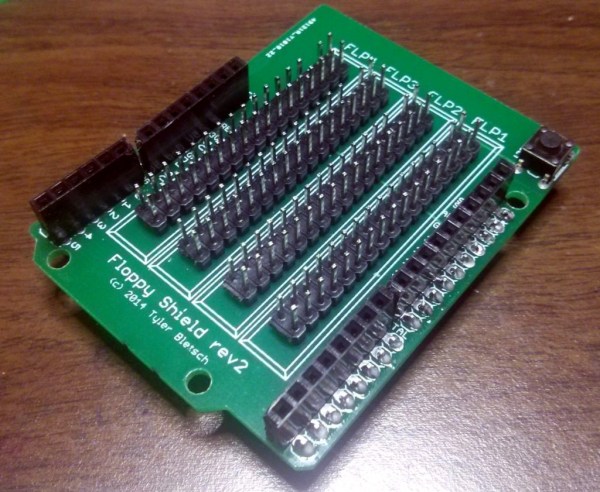
While playing music with floppy drives has been done many times over, making any device with a stepper motor play music still appeals to the hacker in all of us. [Tyler] designed an Arduino shield and a library which lets you get up and running in no time. [Tyler]’s shield includes pin headers to connect 4 floppy drives, which plug directly into the shield. The drives don’t need any modification before being used.

While you could simply wire a few floppy drives up to an Arduino with some jumpers, this breakout shield makes connecting your drives trivial. In addition to designing the shield, [Tyler] released an Arduino library to make things even easier. The library lets you simply set the frequency you want each drive to play, which saves a bit of legwork.

The floppy-controlling Arduino library is available on GitHub and a video of the controller is included after the break.

Continue reading “A Simple Floppy Music Controller”

Automatic Desk

College Dorm Transforms Into High Tech Office

College dorms are notoriously tiny; which either forces most students into a life of minimalism, or for [Thomas Hopmans], innovation to overcome the lack of square-footage.

His first step was getting a Murphy bed, which saves tons of space. But he wanted to add a few extra features to his, so instead he decided to make his own! He designed the entire thing in SolidWorks, which might seem like overkill, but he’s an Industrial Design student, and has become quite proficient in the software from his various work internships.

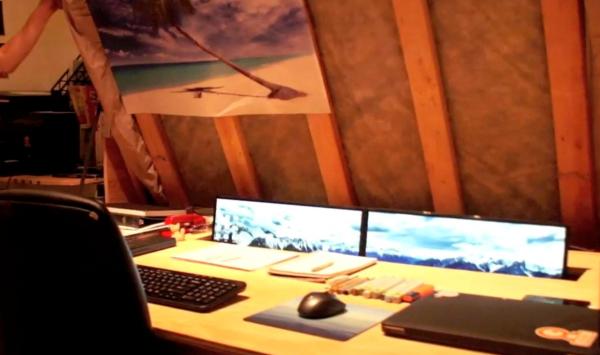
The bed uses pneumatic struts to make lifting and lowering the bed frame easy — the cool part is the mechanism he designed which causes his dual 28″ monitors to pop up from the desk. They’re directly coupled to the bed with a linkage which ensures they’ll never get accidentally crushed by the bed.

He admits he could have just mounted the monitors to the bottom of the bed, but that wouldn’t have been nearly as fun as this.  He estimates the total cost was around $350 for whole thing, which isn’t half bad for a bed… and a desk!

Continue reading “College Dorm Transforms Into High Tech Office”

Build Your Own Stand Alone Web Radio

If you’re the type who enjoys passing idle time by keeping up with podcasts or listening to web stations but don’t always want to occupy your laptop or tablet, this Arduino based radio player will provide a base station for tunes.

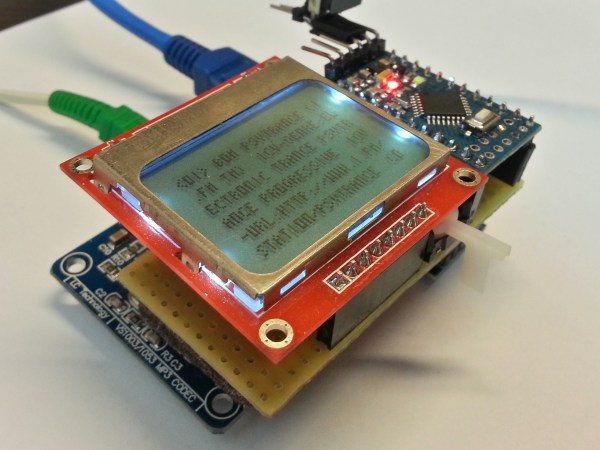
The Web Radio project by [Vassilis Serasidis] outlines in a pleasing amount of detail exactly how to wire up a short list of four modules. These including an Ethernet shield, LCD screen, MP3 decoder, and USB serial converter, with an Arduino Mini in order to bookmark and play fourteen of your favorite channels. His hand-soldered board couples everything into one neatly stacked package. The instructional video shows this off and he even explains how to locate your favorite stations on internet-radio.com and copy their port and IP number directly into an example sketch which is provided for use. If you’ve been wanting to build a self contained radio node for your desk free of extra baggage, this is a no-sweat project for both the hardware savvy and those more oriented with code writing.

If you’re going to build your own radio, it’s always cool to disguise your high-tech creation as something more rustic. Check out this project by [Dominic Buchstaller] for a great example of a vintage radio given a second calling.

Continue reading “Build Your Own Stand Alone Web Radio”

Mutant Kitchen TV Computer

In need of a kitchen entertainment system, [BoaSoft] headed to the parts bin and produced a project that can easily be called a mutant. That being said, we love the results!

Here’s the link to the original Russian language post. If your Russian is a bit rusty here’s a really awful machine translation. So let’s see if we can decipher this hack.

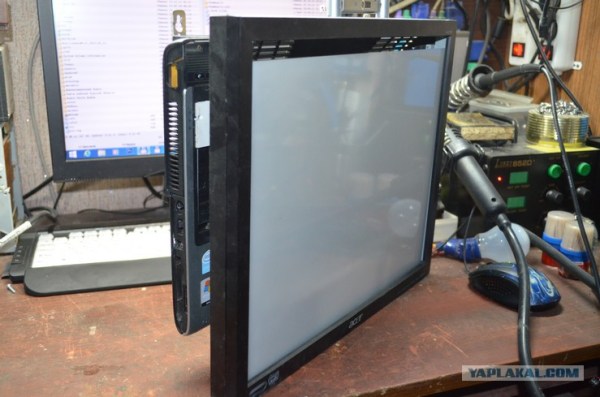
Sounds like [BoaSoft] had a broken Acer laptop on hand. Problem was the laptop can’t play over-the-air television (and similarly, a television can’t surf the net). The solution was to figure out how to utilized a TV tuner of unknown origin, combine that with the laptop and a computer monitor, then add back all the user interface you’d expect from an entertainment device.

The board shown in the first post of the thread is familiar to us. It seems to be based on the IgorPlug board which is a hack that goes waaaay back. This allows for the use of an IR media center remote and those input signals are easy to map to functions. The computer runs Windows Media Center which is already optimized for remote control but can use a wireless keyboard and mouse when more computer-centric functions are necessary.

With all on track the rest of the hack deals with hacking together a case. The laptop’s original body was ditched for some extended sides for the back of the monitor. [BoaSoft] did a great job of installing all the necessary ports in these extensions. Once in the kitchen everything is nice and neat and should stand the test of time.

[Thanks Dmitry]

Breadboard Circuit of a Funduino, a DS18B20 Temperature Sensor, and an ESP8266 module.

Keep An Eye On Your Fermenting Beer With BrewMonitor

The art of brewing beer is as old as civilization itself. Many people enjoy brewing their own beer at home. Numerous steps must be taken before you can take a swig, but fermentation is one of the most critical. [Martin Kennedy] took up the hobby with his friends, and wanted a convenient way to monitor the fermentation temperature remotely. He started working on the BrewMonitor, a cloud-based homebrewing controller powered by an Arduino clone.

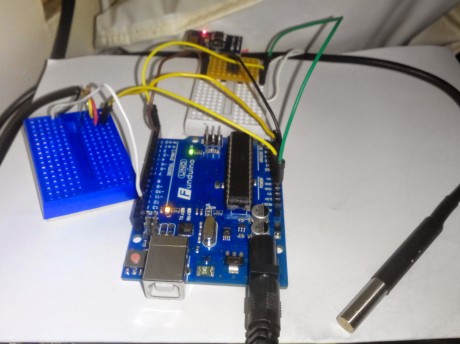
His goal was to create something cheap, convenient, and easy to set up. Traditional fermentation monitoring equipment is very expensive. The typical open-source alternative will set you back 80 euros (roughly $101), using the Arduino-sensor with a Raspberry Pi gateway via the BrewPi webserver. [Martin] did not want to go through the hassle of viewing BrewPi remotely, since it requires a home network and all of the configuration that would entail. Instead, he coupled an Arduino clone with a DS18B20 temperature sensor while using an ESP8266 module for wireless communication, all for less than 18 euros ($23). This connects to a simple webpage based on Scotch.io with a PHP backend (Laravel with RESTful API), a MySQL database, and an AngularJS frontend to display the graph. Once the sensor is placed into the fermenter bucket’s thermowell, the temperature is transmitted once a minute to the REST API. You can see the temperature over time (in Celsius). The design files are available on GitHub.

[Martin] would like to expand the functionality of BrewMonitor, such as adding the ability to adjust the temperature remotely by controlling a heater or fridge, and lowering its cost by single boarding it. Since the information is stored on the cloud, upgrading the system is much easier than using a separate gateway device. He doesn’t rule out crowdfunding campaigns for the future. We would like to see this developed further, since different yeast species and beer styles require very stringent conditions, especially during the weeks-long fermentation process; a 5-degree Celsius difference can ruin an entire brew! Cloud-based temperature adjustment seems like the next big goal for BrewMonitor. DIY brewers salute you, [Martin]!

[via Dangerous Prototypes]


Toaster Oven Reflow Controllers

With a lot of people who are suddenly too cool for through hole and of course the a few generations of components that are only available in SMD packages, it’s no surprise the humble toaster oven has become one of the mainstays of electronic prototyping. You’re gonna need a controller to ramp up those temperatures, so here are two that do the job quite nicely.

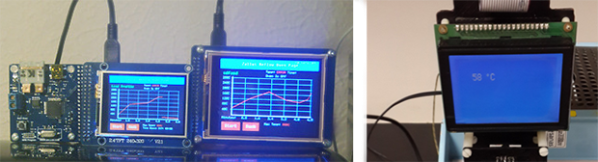
[Nathan]’s Zallus Oven Controller is a bit different than other reflow controllers we’ve seen on Kickstarter. He’s offering three versions, two with different sized touch screen displays, and one that is controlled with a PC and push buttons. The display for these is beautiful, and of course you can program your own temperature profiles.

If Kickstarter isn’t your thing, [Dirk] created his own reflow controller. Like the Zallus, this has a graphical display, but its homebrew lineage means it should be simpler to maintain. It uses a K-type thermocouple, and unlike every other reflow controller we’ve ever seen, [Dirk] is actually checking the accuracy of his temperature probe.

No, reflow oven controllers aren’t new, and they aren’t very exciting. They are, however, tools to build much cooler stuff, and a great addition to any lab.