Playing Footsie With Your Video Games

[Jon] will be tapping away with his toes during gaming session thanks to this foot controller which is packed with buttons and sensors. It’s the second iteration of the build. The original had some solder joints break and the USB stopped working. He had also been experiencing some erratic behavior and so he decided to upgrade the control hardware and add a few more things in the process.

This version uses an Arduino Uno as the interface board. He did a bunch of prototyping to find the best way to hook up all the analog sensors, and how to properly debounce the buttons. Once he was happy with the inputs he set about finding a better way to use the USB HID standard with the device. We were surprised to hear that the ATmega16u2 (one of the new AVR chips which includes USB hardware) doesn’t play nicely with Linux. But [Jon] managed to hack his way around that issue and now he’s gaming with an even better foot controller than before.

Time-based One-Time Passwords With An Arduino

Get your feet wet with Time-based One-Time Password (TOTP) security by building your own Arduino OATH system. OATH is an open standard authentication system that provides a platform to generate tokens, making your login more secure than a password alone would.

The TOTP approach is what is used with many companies that issue hardware-based dongles for logging in remotely. This security may have been compromised but it’s still better than passwords alone. Plus, if you’re building it around an Arduino we’d bet you’re just trying to learn and not actually responsible for protecting industrial or state secrets.

The hardware setup requires nothing more than the Arduino board with one button and a screen as a user interface. Since the board has a crystal oscillator it keeps fairly accurate time (as long as it remains powered). It will push out a new token every thirty seconds. The video after the break shows that the Arduino-calculated value does indeed match what the test box is displaying.

Continue reading “Time-based One-Time Passwords With An Arduino”

Cheap As Chips Arduino Ethernet Shield

It’s no secret that Ethernet shields for the Arduino are a little expensive. With the official Ethernet shield selling for about $50 and other options not much cheaper, there’s a lot of room for improvement for Arduinofied Ethernet. [Boris] over at Open Electronics has a solution to this problem: his Ethercard powered by a $3 Ethernet controller.

The Ethercard uses the Microchip ENC28J60, a through-hole Ethernet controller. There isn’t much else on the board apart from an RJ45 jack, caps, resistors, and a cheap buffer chip. This board was designed to be easily produced, and we’re thinking it might be possible to etch this board at home.

There are a few drawbacks to this ENC28J60 Ethernet shield – the official Arduino Ethernet shield has a 10/100 Mbps connection where the Microchip-powered shield is limited to 10 Mbps. Given the reduced cost, ease of assembly, and the fact that it’s pretty hard to saturate a 100Mbps connection with an Arduino this flaw can be easily ignored.

Pretty neat, especially considering how much you can do with an Ethernet connection on your Arduino. Files and code available in the git.

Laser-charged Glow In The Dark Message Board

This entry in the Red Bull Creation contest uses a laser to charge up a glow-in-the-dark message board. The concept is something we’ve seen several times before. Since light can excite a phosphorescent surface, moving pixels of light over that surface leaves a fading trail. Most recently we saw a spinning ring message board. This contest entry is different in that the board is stationary and the print head moves.

It’s basically a two-wheeled robot with a laser diode which can swivel perpendicular to the direction of travel. In this way, the laser prints the rows, and the motion of the robot takes care of advancing the columns. Since laser light has incredible intensity it is able to excite the phosphors much more thoroughly than LEDs. So the message will last longer than that spinning ring project or this awesome turntable hack. Don’t miss the video after the break that shows off the hack along with a bag full of theatrics.

Continue reading “Laser-charged Glow In The Dark Message Board”

A Look Inside What Makes Cruise Control Work

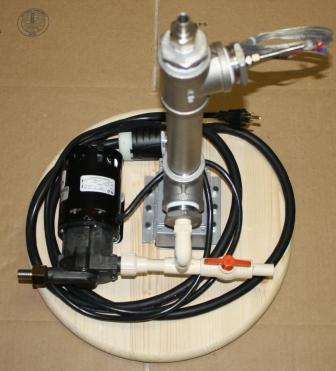
[Todd Harrison] took a look inside the business end of the cruise control system from his 1994 Jeep Grand Cherokee. We were a bit surprised at how the system operates. The parts seen in the image above make up the throttle control, using a trio of solenoids to vary the level of vacuum inside the device.

We categorized this as a repair hack, but [Todd] is just rubbernecking and doesn’t have any real plan to fix the system. It’s been on the fritz for ten years and this piece may not even be the culprit. But we’re still satisfied because he gives us a look at the system which uses the amber-colored stoppers on the three solenoids to plug three different sizes of weep holes. The unit is a vacuum enclosure where a throttle wire connects to a rubber diaphragm and adjust engine speed as the diaphragm moves. The vehicle’s computer actuates the three solenoids, allowing leakage to vary the level of vacuum, thereby keeping the throttle at just the right level. Neat!

Continue reading “A Look Inside What Makes Cruise Control Work”

Raspi Contest To Get The Kids Programming

The Raspberry Pi was originally conceived as an educational platform. Much like the BBC Micros and Apple ][s of yore, the Raspi is designed to get kids into programming by giving them a very tiny but still useful computer. Truth be told, we haven’t seen any educational hacks involving the Raspberry Pi, most likely because makers and tinkerers like us have been buying up all the available boards. The Raspi team is trying to correct this problem by holding a summer programming contest aimed at kids under 18 years of age.

The rules are simple: there are two age brackets, under 13, and ages 14-18. The kid who writes the best piece of software for the Raspberry Pi gets $1000, with five $200 runners-up in each category.The contest will run for eight weeks, timed perfectly to coincide with summer vacation.

There will be a few more weekly contests the Raspi team will be holding in the future, but with eight weeks to complete a project we can’t wait to see all the neat stuff kids are going to make.


Bricking A Seagate Drive While Trying To Make It Work In An Xbox 360

If you’re looking to replace the hard drive in your Xbox 360 without just buying an official unit, you may be out of luck. There is a tool which will let you do it if you are using aWestern Digital drive as the replacement. But if your new drive is a Seagate this tool will not work. [Darth Circuit] set out to make his Seagate work in the Xbox 360, but his manual changes ended up bricking the drive because of just one little error.

The tool that does this with WD drives is called HddHackr. [Darth] started his quest by finding out what the program actually does. In order to stand in for the original drive the new one must have the same model number, serial number, LBA, and firmware revision. Once these values are changed in a binary file it is written to the drive at a specific location. He changed these values on the drive itself, and got pretty far. That is until he tried a new command which ended up locking him out of the drive. Right now it’s pretty much a brick but we hope someone can pick up where he left off and turn this work into something useful for others. Good luck!