Preserve History And Dispose Of Asbestos

If you’ve ever visited Gettysburg, the turning point of the American Civil War, you’ve probably seen this illuminated topographical map. For years, it was housed in one of the many visitor centers in Gettysburg and demonstrated the progress of the 3-day battle with an amazing 1960s-era visualization using a 30 foot by 30 foot topographical map and many, many light bulbs. Even the coolest museum exhibits are eventually made obsolete, so this masterpiece of battlefield education is now up for sale. The starting price for this auction? Five dollars.

We’re going to be honest. We talked about using Hackaday’s influence (and funding to buy toys such as an AR Drone and the Oculus Rift) to put a project together to save this gigantic map. It’s got everything we love in a large-scale project: giant things weighing several tons, cool representations of data, and vintage electronics. Really, restoring this map is the perfect project for any (very) ambitious hacker. It also helps I live a half hour away from Gettysburg.

There’s a problem, though: the map is literally covered in asbestos. Also, it takes up four shipping containers and weighs 12 and a half tons. Basically, you’re bidding on a GSA auction to be responsible for a hazardous waste disposal project.

Now that our dreams of doing something really cool with five dollars have come crashing down, we’re turning it over to Hackaday readers. If you run an asbestos disposal company and are around South Central PA or Maryland, there may be some people who want to get in touch with you. Drop a note in the comments.

Really, we’d really just like someone to scan this 30-foot square map with a Kinect and a high-resolution camera, and maybe get our hands on a video of the hourly show when this map was still in operation. It should be possible to dig up some topographical data and replicate this map fairly easily… maybe someone should start a Kickstarter to build a smaller, non-asbestos laden copy?
Full-color Video On A Spinning POV Display

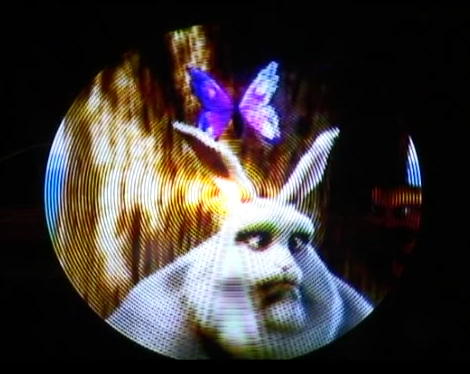
Watching Big Buck Bunny on a spinning POV display is pretty impressive. Sure, the circular display area cuts off some of the picture, but otherwise it looks fantastic. This POV display is based on a Gumstix board. It runs embedded Linux which makes video playback rather easy. But translating each frame to the round display is another story.

The device is the result of a course project at Telecom ParisTech. [Félix], [Sylvain], and [Jérémy] used an FPGA to do the pixel mapping. This uses an encoder wheel (rather than a traditional hall effect sensor) to ascertain the blade’s position. The sensor that monitors the disc sends quadrature encoded pulses which result in 10-bit position data. The FPGA uses that data to calculate where each LED falls in its arc, then looks up the pixel color for that position. It’s not the largest POV display we’ve seen, but it certainly has the very best RGB resolution by far.

Continue reading “Full-color Video On A Spinning POV Display” →

Robot Bar Tender Records Wedding Guests Getting Drunk

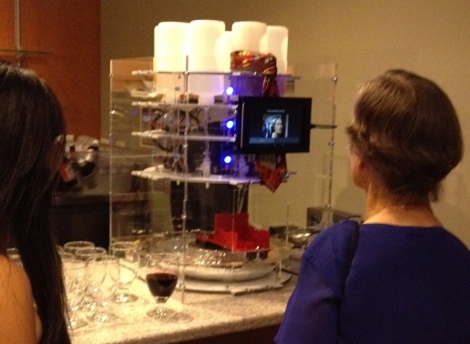
Having an open bar usually means hiring at least one bar tender. But this hack does away with those labor costs (and someone to make sure your teenage cousins aren’t drinking) by putting a robot in charge of things. But the fun doesn’t stop there. One of the features of this bartender is that it records a 30 second video every time it dispenses a beverage. We’d image these get a bit funny as the night wears on before taking a dramatic turn into sadness.

The link above shares a ton of details on the device so make sure that you click-through the different pages in the navigation bar. The mechanical page shows off all of the effort that went into designing the machine in Solidworks. The ingredients start on the top layer in inverted bottles. Each feeds to a valve which has its own nozzle. Like a round version of the Inebriator, a glass is placed in a trolley at the bottom that pivots around the center of the machine. Once it gets back to the opening in the acrylic case you can grab your drink, give it a quick stir, and off you go.

Check out the video after the break to get a look at the user interface which includes that recorded video greeting for the happy couple.

Continue reading “Robot Bar Tender Records Wedding Guests Getting Drunk” →

Binoculars As A Zoom Lens

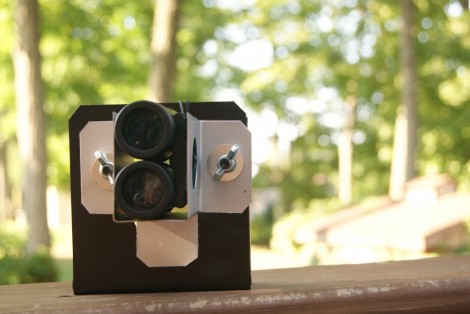
It may seem trivial at first, but the effect [Dan] gets when using binoculars as a telephoto lens is surprising. The images are well in focus with great colors. This technique not only brings your subject mater closer but also provides a depth-of-focus feature not normally available on simple cameras or camera phones.

The proof is in the example footage found after the break, but you’ll also find a video tutorial detailing the build. [Dan] already had the expensive components are a pair of mini binoculars and a Kodak Zx3 pocket camcorder. The camcorder is the same form factor as a smart phone so using different hardware will be a breeze. He started off by building a prototype out of paper. Basically it’s a bracket that properly aligns the camera with one lens of the binoculars. Once he had everything lined up he transferred his measurements to some sheet metal. The bracket for the binoculars is attached to the one for the camera using bolts and wing nuts to make it adjustable. One important part of the design is to gut a hole for access to the binocular focus wheel.

Continue reading “Binoculars As A Zoom Lens” →

IOIO Controller Replacement For An RC Truck

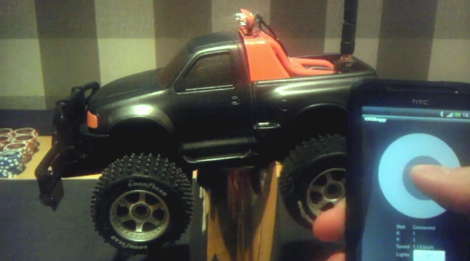
This RC truck can be controlled with the tip of your thumb or the tilt of a wrist. That’s thanks to the IOIO which was inserted in place of the toy’s original controller. [Exanko] made the hardware changes in order to use his Android phone as the controller. The white circle is a software joystick that acts as throttle when your thumb moves along the Y axis, and steering when it moves along the X axis. But while he was at it he also included accelerometer input as an alternative control option.

The IOIO board has a Bluetooth dongle connected to its USB port as a means of wireless communication. The dongle was hacked to accept an external antenna, thereby increasing the truck’s range. There is also some on-board flair like LEDs for lights and even a laser diode for… well we’re not sure what that’s for. Get a better look at the hardware internals in the clip after the break.

Continue reading “IOIO Controller Replacement For An RC Truck” →

Typewriter Is USB Keyboard, Also Awesome

If you’re a brooding author putting the finishing touches on the next Great American Novel™ while sipping a latte in Starbucks, a MacBook is far too common to impress uncultured proles guzzling caramel macchiatos. No, to impress the next [Joyce] or [T. S. Eliot] sitting at the table next to you, you’ll need something much more hip, like a kit to turn a typewriter into a USB keyboard.

This kit to turn an old Underwood into a USB keyboard comes from the drawing board of [Jack Zylkin], member of Philly hackerspace Hive 76. [Jack] managed to make the process of turning an old typewriter into a keyboard a relatively painless process.

[Jack] created a sensor board loaded up with 74HC595 shift registers that easily mounts to the frame of just about any typewriter. When a key on the typewriter is struck, the mechanical levers strike metal strips soldered to the sensor board. An ATMega microcontroller records these keypresses and sends them over a USB port just like any other USB keyboard.

Modifying a typewriter into a USB keyboard is one of those projects we’d dread; you’d think there would be far too much futzing about with a lot of small electrical contacts and dirty mechanical devices. [Jack] actually managed to put together a very nice kit to turn a typewriter into a keyboard here.

You can pick up a kit over at [Jack]’s etsy store, but doing the same thing with a bit of perf board isn’t out of the question. Awesome video after the break.

Continue reading “Typewriter Is USB Keyboard, Also Awesome” →

Giving The Nexus 7 HD Video Recording

As released, the Nexus 7 tablet includes a 1.2 Megapixel front-facing camera. Even though the camera supports taking pictures at a resolution of 1280 x 960, recording video is limited to a paltry 480p resolution. It turns out the inability to record HD 720p video isn’t a hardware limitation; engineers at either Google or Asus simply didn’t bother telling the Nexus 7 how to record in 720p.

[hillbeast] over on the XDA developers forum came up with a very easy fix for this problem that only involves a quick copy and paste job into the media_profiles.xml file.

After the break you can see two videos recorded with [thehillbeast]’s Nexus 7. The first is a 480p video of a bit of shrubbery and a fence, while the second video is the same scene recorded at 720p. A noticable difference in quality, and a neat hack to give the already awesome Nexus 7 some additional capabilities.

Continue reading “Giving The Nexus 7 HD Video Recording” →