Reverse Geocache Box Looks Great And Packed With Features

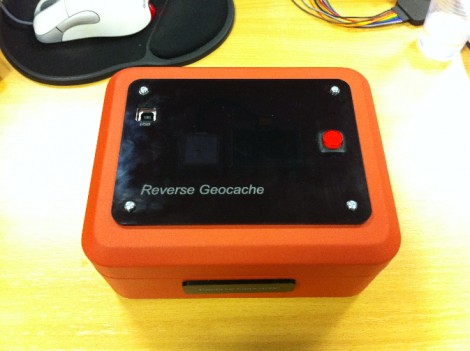
[Ranger Bob] crafted this great looking Reverse Geocache box. Our favorite feature is the black piece of acrylic on top. It’s laser cut (not sure if the letters are engraved or not) and gives a great finished look while hiding a couple of things at the same time.

The orange box is a metal cash box, and there’s a smooth indentation in the lid where the handle resides when not being carried. [Bob] removed the handle and mounted the GPS module in that void. But there’s also an OLED display mounted next to it. As you can see in the demo video after the break, the screen is bright enough to be seen clearly through the smoky acrylic covering that depression.

This project gave [Bob] the chance to order his first professionally made circuit board. He did the design in Eagle, managing to keep within the 5cmx5cm limits of Seeed Studio’s least expensive Fusion PCB option. The board hosts the PIC 18F87J50 responsible for handing the screen, GPS module, input button, and USB port. Power comes from an internal Lithium battery.

We’ve featured a lot of Reverse Geocache boxes and they’re still one of our favorite projects because so much love goes into the design and build process. Here’s another one that we chose randomly for your amusement.

Continue reading “Reverse Geocache Box Looks Great And Packed With Features”
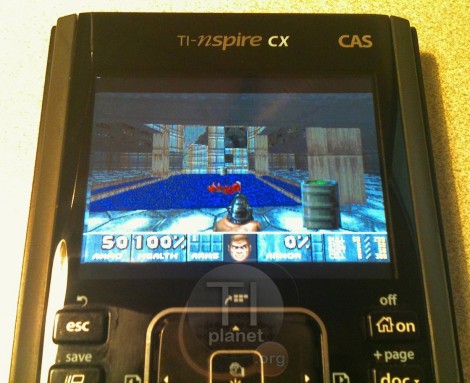
Doom For Your Calculator Gets A Color Upgrade

You’re not still playing nDoom in black and white, are you? What decade do live in? Thankfully, the Doom port for TI-nspire calculators has been upgraded to support color. That is if you’ve got the hardware to run it.

The video after the break (and the image above) shows a TI-nspire CX running the popular first-person-shooter. It’s seen several upgrades since the beta version which we saw piggy-backed with a different TI-83 hack a year ago. The control scheme has been tweaked, and a menu system was added. It’s not the same on-screen menu that you would see with the DOS version of the game, but it accomplishes that same thing. This port is packaged with the Ndless program that unlocks the hardware so that you can perform your own hacks.

Unfortunately there is still no sound available for the game but that is a project for a different time. We know it must be possible because we’ve seen a TI-84+ used to play music stored on a thumb drive. Continue reading “Doom For Your Calculator Gets A Color Upgrade”

Building A Variable Frequency Drive For A Three-phase Motor

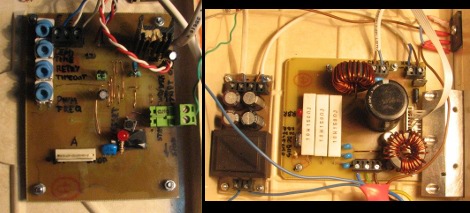
Here are the power and driver boards that [Miceuz] designed to control a three-phase induction motor. This is his first time building such a setup and he learned a lot along the way. He admits it’s not an industrial quality driver, but it will work for motors that need 200 watts or less of power.

The motor control board uses an MC3PHAC driver IC and an IRAMS06UP60A handles the power side of things. The majority of the board design came from studying the recommended application schematics for these two parts. But that’s far from all that goes into the setup. Motor drivers always include levels of protection (the whole reason to have a driver in the first place) and that comes in several different forms. [Miceuz] made sure to add EMI, over voltage, and over current protection. He discusses all of these, sharing links that explain the concepts of each.

Reusing An Old Pacemaker As A Flash Timer

pacemaker-flash-timer

Most people use pacemakers to, you know, keep their heart pumping at a steady rhythm. [David Prutchi] on the other hand has found a pretty novel use for some of the old pacemakers he has in his collection.

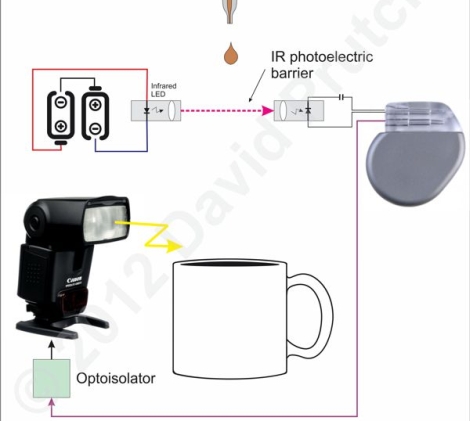
We really had no idea that pacemakers had uses outside the world of medicine, but [David] has taken advantage of their reliability in one of his favorite hobbies – high speed photography. In a darkened room, he set up an infrared barrier which feeds its signal to the atrium input of an old pacemaker. The signal is relayed through the ventricular output, which then fires his camera’s flash.

The pacemaker allows [David] to set an “AV” delay, which is the interval between when the atrium input receives an electrical impulse and when that signal is repeated from the ventricular output. This allows him to finely tune how much time elapses from when a drop of milk breaks the IR barrier to when his flash actuates.

We think this is a pretty cool way to reuse an old pacemaker, but check out the shots he has captured and judge for yourself.

Stop The Internet Blacklist Legislation

It doesn’t take much imagination at all to see what a horrible effect this censorship could have on sites like Hackaday. Please do your part to stop internet censorship.

Imagine how many companies would rather us not share with you how our brilliant readers have hacked their hardware to do bigger and better things than they were sold to do. Sites like Hackaday would not survive this censorship.


Forget Siri – Make Wolfram Alpha Your Personal Assistant

So you can spend a bundle on a new phone and it comes with a voice-activated digital assistant. But let’s be honest, it’s much more satisfying if you coded up this feature yourself. Here’s a guide on doing just that by combining an Asterisk server with the Wolfram Alpha API.

Asterisk is a package we are already familiar with. It’s an open source Private Branch Exchange suite that lets you build your own telephone network. Chances are, you’re not going to build one just for this project, but if you do make sure to document the process and let us know about it. With the Asterisk server in place you just need to give the assistant script an extension (in this case it’s 4747).

But then there’s the problem of translating your speech into text which can be submitted as a Wolfram query. There’s an API for that too which uses Google to do that translation. From there you can tweak abbreviations and other parameters, but all-in-all your new assistant is ready to go. Call it up and ask what to do when you have a flat tire (yeah, that commercial drives us crazy too).

[Thanks M]

Commandeer X10-based Home Automation With Your Favorite Microcontroller

X10 has been around for a long time. It’s the brand name for a set of wireless modules used to switch electrical devices in the home. There’s all kinds of different units (bulb sockets, electrical outlets and plug pass-throughs, etc.) and they’re mass-produced which makes them really inexpensive. Whether you already have some X10 controlled devices or just plan to add them later, we think you’ll find [Jeff Ledger’s] post on controlling the system with a Propeller chip interesting. The technique is not Propeller specific and will be simple to port to your microcontroller of choice.

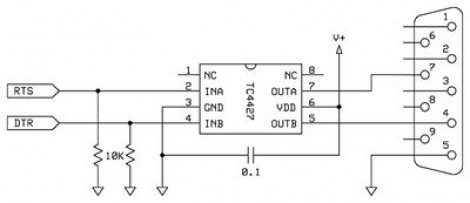
[Jeff] got his hands on an X10 Firecracker. This provides a DB-9 serial connection meant to be used for computer control. But the interface is so simple all you need is two I/O pins feeding the level converter circuit seen above. You can get the TC4427 for less than a dollar, and the Firecrcker module for as little as $6. Since [Jeff] has already covered adding Ethernet via a ENC28J60 he goes on to detail a web-server that lets him switch his devices, all served from the Propeller chip.

Here’s a different ENC28J60 Ethernet tutorial for those interested in webpages from microcontrollers. And then there’s also a ZigBee home automation project if you’re not warming up to the idea of using X10 modules.