[Jeri Ellsworth] has been working on a direct conversion receiver using an FPGA as an oscillator and a PC sound card DSP. Being the excellent presenter she is, she first goes through the history and theory of radio reception (fast forward to 1:30), before digging into the meat of the build (parts 2 and 3 are also available).
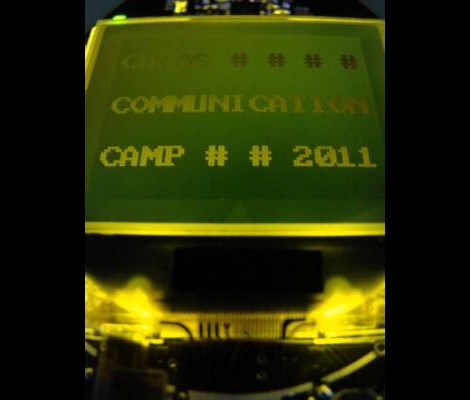
2011 CCC R0ket Badge

[Geekabit] wrote in asking if we’d seen the 2011 CCC badges yet. The answer is NO, we haven’t seen them because the image above is the only sneek peek we can find on their broken-certificate website. But we are glad that he shared the link with us, because it does tell the tale of what hardware and firmware features will be on this year’s badge.
Right off the bat we need to applaud them for several things. Most notably, the 3.7 volt 600 mAh LiPo battery which can be recharged via the USB port. It boasts an ARM Cortex M3 processor which is running what they call and ‘unbrickable’ bootloader that is programmed via the USB port. You can see there is an LCD screen which we’d guess is about 128×128 pixels (correct us if you know otherwise). You’ll be able to interact using a 5-way button, via the RF transceiver, and possibly using an optical interface but we’re not sure that feature made it into the final design. They’ve also rolled in a shield system for extra harware so that you can design your own add-ons before you get there.
As always, if you get your hands on one of these, we want to hear all about your project as well as get an overview of the stock badge and its features so don’t forget to drop us a line.
Update: [Never_gonna] left a comment with a link to a series of posts about r0cket development including a video which we’ve embedded after the break. Thanks!
Analyzing TV’s Talking Heads With Processing
[Michael] from Nootropic Design wrote in to share an interesting and fun project he put together using one of the products his company sells. The gadget in question is their “Video Experimenter” shield which was designed for the Arduino. It is typically used to allow the manipulation of composite video streams via overlays and the like, but it can also serve as a video analyzer as well.
When used for video analysis, the board lets you decode closed captioning data, which is exactly what [Michael] did here. He decided it would be fun to scrape the closed captioning information from various shows and commercials to do a little bit of content analysis.
Using a Processing sketch on his Arduino, he reads the closed captioning feed from his cable box, keeping a count of every word mentioned in the broadcast. As the show progresses, his sketch dynamically constructs a cloud that shows the most commonly used words in the video feed.
The results he gets are quite interesting, especially when he watches the nightly news, or some other broadcast with a specific target audience. We think it would be cool to run this application during a political debate or perhaps during a Hollywood awards ceremony to discover which set of speakers is the most vapid.
if you’re interested in learning more about the decoding process, [Michael] has put together a detailed explanation of how the closed captioning data can be pulled from a video stream. For those of you who just want to see the decoder in action, keep reading to see a quick video demonstration.
Continue reading “Analyzing TV’s Talking Heads With Processing”
Hackaday Links: Tuesday, July 19th
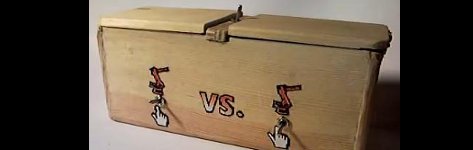
Here’s another “useless machine” variant. The trick to this one is that it has dual “fingers” and can work either way. Which way it turns off is selectable via a switch on the side, and the fingers can both be turned on to “fight” each other. Check out the video here.
This video depicts the assembly of a Gameboy MAME-style cabinet. For those wanting to try something like this, this video may fill you in on some of the required assembly techniques, such as how to put decals on the side of your cabinet.
This video featuring the “Autonomous Ultimate Wall-E” shows this robot’s navigational skills around the house. Additionally, it has some nicely actuated arms.
The Verbalizer is a microphone designed to be used with Google’s voice search. It’s also designed with Arduino compatibility in mind and is open-source. Could be a good tool for your next hack.
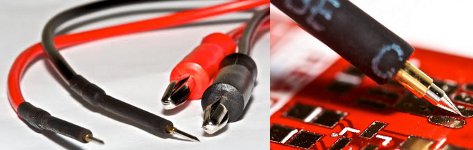
These clever multimeter probes were built using pogo pins used in electrical test equipment. The springs inside of these pins help keep them planted firmly on the test point in question and reportedly gives a very good connection.
Modelling Chemical Reactions Using An FPGA

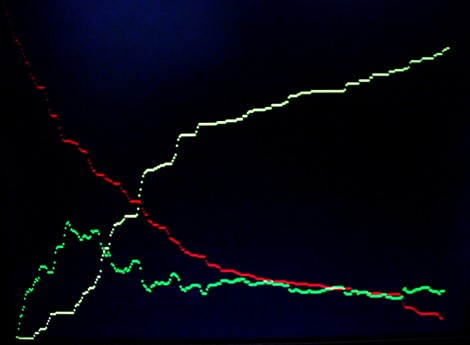
[Bruce Land] is a professor at Cornell University who was looking for a way to quickly solve chemical kinetic systems. He had used MATLAB but longed for a faster method. His upgrade achieves a 100 times speed increase by using an FPGA as a parallel stochastic solver.
It works by generating 100 pseudo-random 16-bit numbers using an Altera DE2 board. This is done once per cycle at 50 MHz so we’re talking about a lot of random numbers. They are run through the solver algorithms and used to compute each reaction cycle. On a 3.8 GHz P4 process running the MATLAB version one of these cycles would take about 1000 seconds, so the speed improvement can immediately be felt. It’s wonderful to have this new tool. It does make us wonder what could be done with GPU processing that we’ve seen for password cracking or bit coin mining. Much like FPGAs a GPU is prefect for running a large number of parallel operations.
Bringing An IWallet Back To Life

The iWallet is a slick little device if you’ve got a big wad of cash burning a hole in your pocket. The $600 price tag was a little much for [cmw] to swallow, so he bought a water damaged iWallet on eBay with hopes of repairing it. Once took a close look, he knew that repairing it was a lost cause, so he decided to hack it instead.
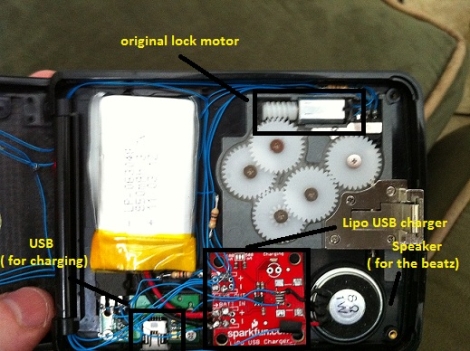
He pulled out most of the wallet’s electronics save for the motor that opens the device, and replaced the damaged parts with his own. He installed an Arduino pro as well as a Bluetooth module, powering the pair with a small rechargeable LiPo battery. The iWallet’s fingerprint reader was then replaced with a series of LEDs that show the device’s Bluetooth connectivity status.
[cmw] can now connect his wallet to his phone, issuing unlock commands via Bluetooth. If you don’t want to fork out the cash, his version is nearly as good as the real thing.
Continue reading to see a quick video of [cmw’s] iWallet hack in action.
Building A Computer Around A TTL CPU

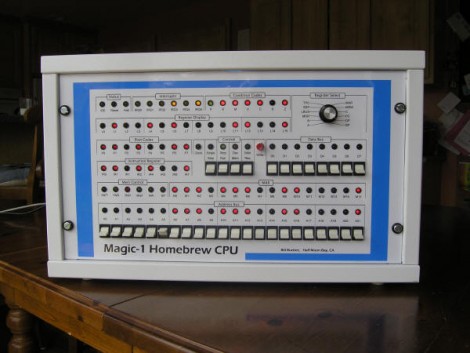
[Bill’s] worked on his homebrew computer for almost a decade. He didn’t start with a Z80 processor like a lot of the projects we’ve seen, but instead build the CPU itself from 74-series TTL chips and a ridiculous amount of wire wrapping to connect it all.
The video after the break shows off the functionality. We love the front panel, which is packed with information but manages to remain organized and offers many convenient features. Our favorite is the ability to pause execution and scroll through the registers by spinning the dial. The clock signal has a variable speed which is selected by an internal DIP switch package that can be changed during a pause. It runs MINIX and has a library of programs, but perhaps most surprising is its ability to serve webpages.
Lately we’ve been interested in drilling down through program language abstractions to understand what is going on inside the silicon. This has given us new respect for those building processors from scratch. Think of it this way, if you actually need to build each instruction out of gates, you’ll be able to understand how those instructions work at the most fundamental level.