A Smart Printer Enclosure For The Open Source World

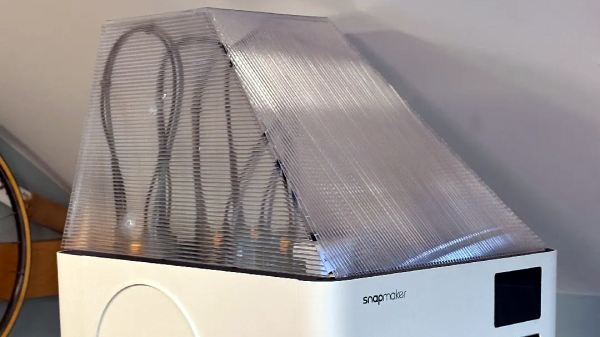
3D printing has had its time to spread its wings into the everyday home, yet many of those homes lack the proper ventilation to prevent the toxic VOCs from escaping. Because of this, [Clura] has put together an entire open-sourced smart enclosure for most open concept printers.

While certain 3D printers or filament choices lend themselves to being worse than others, any type of plastic particles floating around shouldn’t find their way into your lungs. The [Clura] enclosure design includes HEPA and carbon filters in an attempt to remove this material from the air. Of course, there’s always the choice to have a tent around your printer, but this won’t actually remove any VOCs and air located inside a simple enclosure will inevitably escape.

What makes this enclosure different from other, either commercial or open-source designs, is the documentation included with the project. There are kits available for purchase, which you may want for the custom PCB boards for smart features such as filament weighing or fume detection. Even still, if you don’t want to purchase these custom boards the Gerber files are available on their GitHub page.

As smart as this enclosure is, it still won’t fix the issues of what happens to the toxins in your print after it’s done printing. If you are interested in this big picture question, you are not alone. Make sure to stay educated and help others learn by checking out this article here about plastic in our oceans.

Selective Ironing Adds Designs To 3D Prints

While working on a project that involved super-thin prints, [Julius Curt] came up with selective ironing, a way to put designs on the top surface of a print without adding any height.

For those unfamiliar, ironing is a technique in filament-based 3D printing that uses the extruder to smooth out top surfaces after printing them. The hot nozzle makes additional passes across a top surface, extruding a tiny amount in the process, which smooths out imperfections and leaves a much cleaner surface. Selective ironing is nearly the same process, but applied only in a certain pattern instead of across an entire surface.

Selective Ironing can create patterns by defining the design in CAD, and using a post-processing script.

While conceptually simple, actually making it work was harder than expected. [Julius] settled on using a mixture of computer-aided design (CAD) work to define the pattern, combined with a post-processing script. More specifically, one models the desired pattern into the object in CAD as a one-layer-tall feature. The script then removes that layer from the model while applying the modified ironing pattern in its place. In this way, one can define the pattern in CAD without actually adding any height to the printed object. You can see it in action in the video, embedded below.

We’ve seen some interesting experiments in ironing 3D prints, including non-planar ironing and doing away with the ironing setting altogether by carefully tuning slicer settings so it is not needed. Selective Ironing is another creative angle, and we can imagine it being used to embed a logo or part number as easily as a pattern.

Selective Ironing is still experimental, but if you find yourself intrigued and would like to give it a try head over to the GitHub repository where you’ll find the script as well as examples to try out.

Continue reading “Selective Ironing Adds Designs To 3D Prints”

Hands On With Creality’s New M1 Filament Maker

Ever since 3D printing has become a popular tool, the question of waste has been looming in the background. The sad reality of rapid prototyping is that you’re going to generate a lot of prints that just aren’t fit for purpose, even if your printer runs them off perfectly every time. Creality has some products on the way aimed at solving that problem, and [Embrace Making] on YouTube has got his hands on a pre-production prototype of the Creality M1 Filament Maker to give the community a first look.

The M1 is actually only half of the system; Creality is also working on an R1 shredder to reduce your prints into re-usable shreds. [Embrace Making] hasn’t gotten his hands on that, but shredding prints isn’t the hard part. We’ve featured plenty of DIY shredders in the past. Extruding filament reliably at home has traditionally proven much more difficult, which is why we mostly outsource it to professionals.

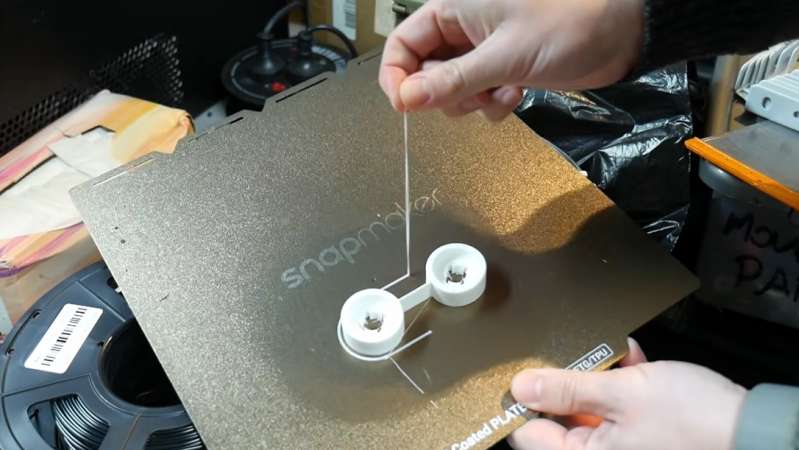
Lacking the matching shredder, and wanting to give the M1 the fairest possible shake, [Embrace] tests the machine out first using Creality-supplied PLA pellets. The filament diameter isn’t as stable as we’ve gotten used to, and the spool rolling setup needs a bit more work.

Again, this is an early prototype. Creality says they’re working on it and claims they’ll get to ±0.05 mm precision in the production models. Doubtless they’ll also fix the errors that led to [Embrace]’s messy spool. That’s probably just software given that the winding mechanism did a pretty good job on the Creality-supplied spool.

Most importantly, the M1-produced filament does print. The prints aren’t perfect due to the variation in diameter, but they turn out surprisingly well for home-made filament. [Embrace] also shows off the ability to mix custom colors and gradients, but, again, using raw PLA rather than shredded material. Hopefully Creality lets him test drive the R1 shredder once its design is further along.

This is hardly the first time we’ve seen a filament extruder. The goal of this product is to pair with a shredder and use it for recycling, but if you’re going to stick with raw plastic pellets, you may as well print them directly.

Continue reading “Hands On With Creality’s New M1 Filament Maker”

Printing An Underwater Diving Helmet With Floating Air Supply

Old-school diving helmets are deceivingly simple, even if they are – as [Hyperspace Pirate] puts it in a recent video – essentially the equivalent of an upside-down bucket with an air hose supplying air into it. While working on a 3D-printed diving helmet, he therefore made sure to run through all the requisite calculations prior to testing out said diving helmet in his pool.

The 3D model for the diving helmet can be found over at Thingiverse if you too feel like getting wet, just make sure that you size it to fit your own head. In the video CAD (cardboard-aided design) was used to determine the rough bounding box for the head, but everyone’s head is of course different. The helmet was printed in ABS, with the sections glued together before being covered in fiberglass and epoxy resin. Note that polyester resin dissolves ABS, so don’t use that.

On the helmet is a 1/4″ SAE fitting for the air hose, with the air provided from an oil-less compressor that in the final iteration is strapped to a floatation device along with an inverter and batteries. Of note is that you do not want to use a gas-powered compressor, as it’ll happily use any CO2 and CO it exhausts to send down the air hose to your lungs. This would be bad, much as having vaporized oil ending up in your lungs would be bad.

Although in the video the system is only tested in a backyard pool, it should be able to handle depths of up to ten meters, assuming the compressor can supply at least 41 L/minute. With some compressor-side miniaturization and waterproofing, [Hyperspace Pirate] reckons it would work fine for some actual ocean exploration, which while we’re sure everyone is dying to see. Perhaps don’t try this one at home, kids.

Continue reading “Printing An Underwater Diving Helmet With Floating Air Supply”

3D Printing A Harmonic Pin-Ring Gearing Drive

Cycloidal drives are a type of speed reducer that are significantly more compact than gearboxes, but they still come with a fair number of components. In comparison, the harmonic pin-ring drive that [Raph] recently came across as used in some TQ electric bicycles manages to significantly reduce the number of parts to just two discs. Naturally he had to 3D model his own version for printing a physical model to play with.

How exactly this pin-ring cycloidal drive works is explained well in the referenced [Pinkbike] article. Traditional cycloidal drives use load pins that help deal with the rather wobbly rotation from the eccentric input, but this makes for bulkier package that’s harder to shrink down. The change here is that the input force is transferred via two teethed discs that are 180° out of sync, thus not only cancelling out the wobble, but also being much more compact.

It appears to be a kind of strain wave gearing, which was first patented in 1957 by C.W. Musser and became famous under the Harmonic Drive name, seeing use by NASA in the Lunar Rover and beyond. Although not new technology by any means, having it get some more well-deserved attention is always worth it. If you want to play with the 3D model yourself, files are available both on GitHub and on MakerWorld.

The printer-based "pen" has a pistol form factor.

DIY 3D Pen Is Born To Weld

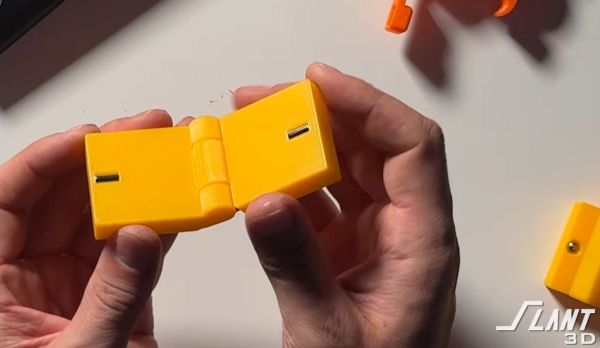
Depending who you ask, 3D pens are silly toys or handy tools. Those who use them as tools find them handy to fill gaps in printed assemblies or to use them as a PLA or PETG-based hot glue gun for their prints. [half-baked-research] on YouTube is in the second category, but knows that welding is better than gluing — so he built himself a 3D pen designed for plastic welding.

You can weld with a regular 3D pen, and [half-baked] demonstrates that in the video. But thanks to the low-conductivity tips on commercial pens, it’s a slow, fiddly business. By using a normal 3D printer hot-end, with its conductive brass nozzle, [half-baked] is able to get a lot more heat where it’s needed. That means the plastic on either side of the weld melts for a good bond with the stuff coming out the nozzle. He’s also able to push plastic much faster with the modified extruder he’s squeezed into the hot-glue-gun looking contraption. Those two things together conspire to make the whole process go much faster than with a commercial 3D pen. He calls his build a 3D pen, but given the form factor it might be more accurate to call it a ‘plastic extrusion gun’.

Starting at around 13:38 in the video, he performs some strength tests, something we wish more YouTubers would do. He’s able to demonstrate a stronger bond with his welding pen than the normal 3D pen, and a much, much stronger join than the usual superglue. A traditional plastic weld with hot air is even stronger, but [half-baked] points out elsewhere in the video that on thin-walled prints (as opposed to the solid test articles) hot air welding can be a very dicey business. Pen-welding offers much greater control, so is an interesting technique to keep in mind.

Alas, [half-baked-research] apparently still considers this idea too half-baked to release the design. If you don’t have time to wait or reinvent this particular wheel, we featured a much simpler implementation of a similar idea years ago, using PLA in a hot glue gun. If that won’t work for you — maybe you aren’t a fan of PLA — perhaps you might try friction welding with filament.

Continue reading “DIY 3D Pen Is Born To Weld”

Art of 3D printer in the middle of printing a Hackaday Jolly Wrencher logo

The Joys Of 3D Printing

Al and I were talking on the podcast today about a sweet 3D printed wide-format camera build, and we got to musing on why we 3D-print.

For Al, it’s an opportunity to experiment with 3D printing itself: tweaking his machines to get the best performance out of them. Other people make small, functional objects that they need in their daily life, like bag clips or spare parts for broken appliances. Some folks go for the ornamental or the aesthetic. The kids in my son’s class all seem obsessed with sci-fi props and fidget toys. The initial RepRap ideal was to replace all commercial fabrication with machines owned by the individual, rather than by companies – it was going to be Marxist revolutionary.

But there’s another group of 3D printer enthusiasts that I think doesn’t get enough coverage, and I’m going to call them the hobbyist industrial designers. These are the people who design a custom dog-poop-bag holder that exactly fits their extra-wide dog leash, not because they couldn’t find one that fit in the pet store, but because it’s simply fun to design and fabricate things. (OK, that’s literally me.)

It’s fun to learn CAD tools, to learn about how things are designed, how they work, and how to manufacture them at least in quantity one. Dreaming, designing, fabricating, failing, and repeating until you get it right is a great joy. And then you get to use the poop-bag holder every day for a few years, until you decide to refine the design and incorporate the lessons learned on the tough streets of practical use.

Of course none of this is exclusive to 3D printing. There were always people who designed-and-built things in the metal machine shop, or made their creations out of wood. In that sense, the 3D printer is just another tool, and the real fun isn’t in using the 3D printer, but rather in the process of bringing things out of your mind and into the world. So maybe there is nothing new here, but the latitude that 3D printing affords the hobby designer is amazing, and that makes it all the more fun, and challenging.

So do you 3D print for necessity, to stick it to the man, to pimp your printer, for the mini-figs, or simply for the joy of the process of making things? It’s all good. 3D printing is a big tent.