From Software To Tindie Hack Chat With Brian Lough

Join us Wednesday at noon Pacific time for the From Software to Tindie Hack Chat!

Brian Lough has followed a roundabout but probably not unusual route to the hardware hacking scene. Educated in Electronic and Computer Engineering, Brian is a software developer by trade who became enamored of Arduino development when the ESP8266 hit the market. He realized the microcontrollers such as these offered incredible capabilities on the cheap, and the bug bit him.

Since then, Brian has fully embraced the hardware hacking way, going so far as to live stream complete builds in a sort of collaborative “hack-along” with his viewers. He’s also turned a few of his builds into legitimate products, selling them on his Tindie store and even going so far as to automate testing before shipping to catch errors and improve quality.

Please join us for this Hack Chat, where we’ll discuss:

  • How software hacking leads to hardware hacking;
  • The creative process and how live streaming helps or hinders it;
  • The implications of going from project to product; and
  • What sorts of new projects might we see soon?

Continue reading “From Software To Tindie Hack Chat With Brian Lough”

Hackaday Links Column Banner

Hackaday Links: March 3, 2019

In this week’s edition of, ‘why you should care that Behringer is cloning a bunch of vintage synths’, I present to you this amazing monstrosity. Yes, it’s a vertical video of a synthesizer without any sound. Never change, Reddit. A bit of explanation: this is four Behringer Model Ds (effectively clones of the Moog Minimoog, the Behringer version is called the ‘Boog’) stacked in a wooden case. They are connected to a MIDI keyboard ‘with Arduinos’ that split up the notes to each individual Boog. This is going to sound amazing and it’s one gigantic wall of twelve oscillators and it only cost $800 this is nuts.

Tuesday is Fastnacht day. Fill your face with fried dough.

The biggest news this week is the release of a ‘folding’ phone. This phone is expensive at about $3000 list, but keep in mind this is a flagship phone, one that defines fashion, and an obvious feature that will eventually be adopted by lower-cost models. Who knows what they’ll think of next.

It’s a new Project Binky! This time, we’re looking at cutting holes in the oil sump, patching those holes, cutting more holes in an oil sump, patching those holes, wiring up a dashcam, and putting in what is probably the third or fourth radiator so far.

Here’s a Kickstarter for new Nixie tubes. It’s a ZIN18, which I guess means an IN18, a tube with a 40mm tall set of numbers. This is the king of Nixie clocks, and one tube will run you about $100. Nah, you can also get new Nixies here.

The Sipeed K210 is a RISC-V chip with built-in neural networks. Why should you care? Because it’s RISC-V. It’s also pretty fast, reportedly 5 times as fast as the ESP32. This is a 3D rendering test of the K210, with all the relevant code on the Github.

I’m not sure if everyone is aware of this, but here’s the best way to desolder through-hole parts. Heat the solder joint up and whack it against a table. It never fails. Hitting things is the best way to make them do what you want.

Leigh Johnson’s Guide To Machine Vision On Raspberry Pi

We salute hackers who make technology useful for people in emerging markets. Leigh Johnson joined that select group when she accepted the challenge to build portable machine vision units that work offline and can be deployed for under $100 each. For hardware, a Raspberry Pi with camera plus screen can fit under that cost ceiling, and the software to give it sight is the focus of her 2018 Hackaday Superconference presentation. (Video also embedded below.)

The talk is a very concise 13 minutes, so Leigh flies through definitions of basic terms, before quickly naming TensorFlow and Keras as the tools she used. The time she saved here was spent on explaining what convolutional neural networks are and how they work, just enough to prepare the audience. But all of that is really just background, the meat of the talk is self-contained examples that Leigh has put together and made available online. I love to see that since it means you go beyond just watching and try it out for yourself. Continue reading “Leigh Johnson’s Guide To Machine Vision On Raspberry Pi”

Hackaday Podcast 008: The Art Episode: Joe Kim, Strings And CRTs, Hydrogen Done 2-Ways

We know you love the original art on Hackaday. Those fantastic illustrations are the work of Joe Kim, and he joins us as a guest on this week’s episode to talk about his background, what inspires him, and how he pulls it all off.

This episode is still packed with hacks. Editors Mike Szczys and Elliot Williams somehow stumble into two projects that end up generating hydrogen (despite that not being their purpose). But that art angle this week goes beyond Joe’s guest appearance as we look at a hack to add green curve tracing goodness on a black and white CRT, and an incredible take on a string art building machine. We get a look at interesting hardware that landed on the clearance rack, ultralight robots that move with flex PCB actuators, a throwback to mechanical computing, and giving up control of your home heating and cooling to a Raspberry Pi.

Links for all discussed on the show are found below. As always, join in the comments below as we’ll be watching those as we work on next week’s episode!

Take a look at the links below if you want to follow along, and as always, tell us what you think about this episode in the comments!

Direct download (60 MB or so.)

Continue reading “Hackaday Podcast 008: The Art Episode: Joe Kim, Strings And CRTs, Hydrogen Done 2-Ways”

New Part Day: The STM32 That Runs Linux

There are a lot of ARM microcontrollers out there, and the parts from ST are featured prominently is the high-power builds we’re seeing. The STM32F4 and ~F7 are powerhouses with great support, and the STM32F0 and the other younger children of the family make for very good, low-power microcontrollers. Now, the STM32 family is getting a big brother. It runs Linux. It’s two ARM Cortex-A7 cores and one M4 core on the same chip. The STM32MP1 is the chip you want if you still can’t figure out how to waste computing cycles by blinking LEDs.

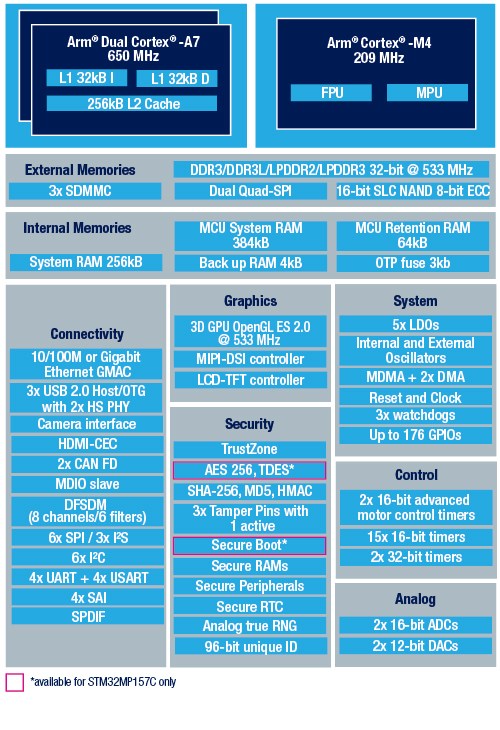
Block diagram of the STM32MP157 Image: ST

First, that Linux support. The STM32MP157C was mainlined into Linux last summer, and there is support for Android. So yes, this chip can run Linux. There is an optional 3D GPU in this family, a MIPI-DSI controller, support for HDMI-CEC, USB 2.0, and 10/100M or Gigabit Ethernet. This brings us the inevitable question of whether you can build a Raspberry Pi clone with these parts. Maybe, champ, but if you’re asking that question it’s probably not you that’s going to build one. It looks as if this chip is designed for phones, set-top boxes, and smart TVs. That doesn’t preclude a single board computer, but the biggest problem there is maintaining software support anyway.

The chip family in question all come with dual ARM Cortex-A7 processors running at a nominal 650MHz. There’s also a Cortex-M4 running at 209MHz, and the ST literature suggests that engineers are already running Linux on the A7 and an RTOS on the M4. This chip will need external memory, but DDR3 / DDR3L / LPDDR2 / LPDDR3 are supported.

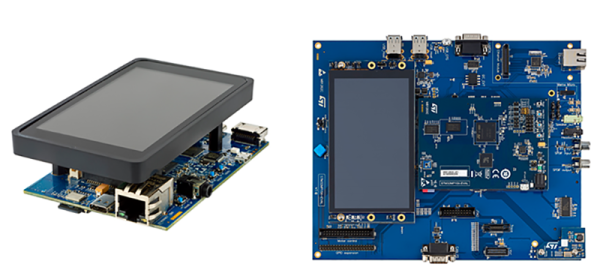
This chip is only announced right now, you can’t get it on Mouser or Digikey yet, and there’s no information on pricing. However, there are two development boards available, the Evaluation board, which features 1 GB of DDR3L, 128 MB of Flash, and an 8 GB eMMC. There’s a 5.5″ display, and enough connectors to make your heart flutter. The Discovery board is a bit more cut down, and comes with a 4″ 480×800 LCD, WiFi, Bluetooth LE, and of course it comes with GPIO expansion connectors for an Arduino and Raspberry Pi. The Discovery Board is not available at this time, but it will sell for $99 USD.

Ten 3D Printed Gadgets That Just Can’t Stay Still

There was a time, not so very long ago, when simply getting a 3D printer to squirt out an object that was roughly the intended shape and size of what the user saw on their computer screen was an accomplishment. But like every other technology, the state of the art has moved forward. Today the printers are better, and the software to drive them is more capable and intuitive. It was this evolution of desktop 3D printing that inspired the recently concluded 3D Printed Gears, Pulleys, and Cams contest. We wanted to see what hackers and makers can pull off with today’s 3D printing tools, and the community rose to the challenge.

Let’s take a look at the top ten spinning, walking, flapping, and cranking 3D printed designs that shook us up:

Continue reading “Ten 3D Printed Gadgets That Just Can’t Stay Still”

Hack My House: Raspberry Pi As A Touchscreen Thermostat

Your thermostat is some of the oldest and simplest automation in your home. For years these were one-temperature setting and nothing more. Programmable thermostats brought more control; they’re alarm clocks attached to your furnace. Then Nest came along and added beautiful design and “learning features” that felt like magic compared to the old systems. But we can have a lot more fun. I’m taking my favorite single-board computer, the Raspberry Pi, and naming it keeper of heat (and cool) by building my own touchscreen thermostat.

Mercury thermostats started it all, and were ingenious in their simplicity — a glass capsule containing mercury, attached to a wound bi-metal strip. As the temperature changes, the contraption tilts and the mercury bead moves, making or breaking contact with the wiring. More sophisticated thermostats have replaced the mercury bead with electronics, but the signaling method remains the same, just a simple contact switch.

This makes the thermostat the prime target for an aspiring home automation hacker. I’ve had this particular project in mind for quite some time, and was excited to dive into it with simple raw materials: my Raspberry Pi, a touchscreen, and a mechanical relay board.

Continue reading “Hack My House: Raspberry Pi As A Touchscreen Thermostat”