Getting The VIC-20 To Speak Again

The Commodore Amiga was famous for its characteristic Say voice, with its robotic enunciation being somewhat emblematic of the 16-bit era. The Commodore VIC-20 had no such capability out of the box, but [Mike] was able to get one talking with a little bit of work.

The project centers around the Adventureland cartridge, created by Scott Adams (but not the one you’re thinking of). It was a simple game that was able to deliver speech with the aid of the Votrax Type and Talk speech synthesizer box. Those aren’t exactly easy to come by, so [Mike] set about creating a modern equivalent. The concept was simple enough. An Arduino would be used to act as a go between the VIC-20’s slow serial port operating at 300 bps and the Speakjet and TTS256 chips which both preferred to talk at 9600 bps. The audio output of the Speakjet is then passed to an LM386 op-amp, set up as an amplifier to drive a small speaker. The lashed-together TTS system basically just reads out the text from the Adventureland game in an incredibly robotic voice. It’s relatively hard to understand and has poor cadence, but it does work – in much the same way as the original Type and Talk setup would have back in the day!

Text to speech tools have come a long way since the 1980s, particularly when it comes to sounding more natural. Video after the break.
Continue reading “Getting The VIC-20 To Speak Again”

Motorized Faders Make An Awesome Volume Mixer For Your PC

These days, Windows has a moderately robust method for managing the volume across several applications. The only problem is that the controls for this are usually buried away. [CHWTT] found a way to make life easier by creating a physical mixer to handle volume levels instead.

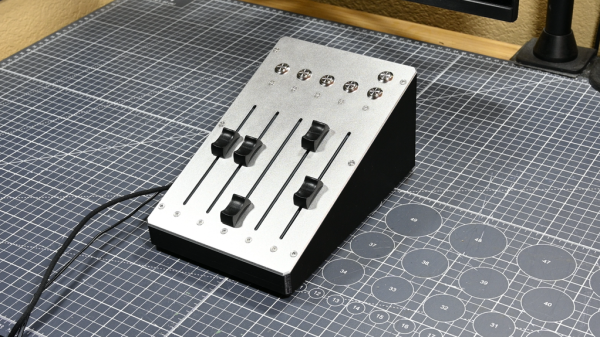
The build relies on a piece of software called MIDI Mixer. It’s designed to control the volume levels of any application or audio device on a Windows system, and responds to MIDI commands. To suit this setup, [CHWTT] built a physical device to send the requisite MIDI commands to vary volume levels as desired. The build runs on an Arduino Micro. It’s set up to work with five motorized faders which are sold as replacements for the Behringer X32 mixer, which makes them very cheap to source. The motorized faders are driven by L293D motor controllers. There are also six additional push-buttons hooked up as well. The Micro reads the faders and sends the requisite MIDI commands to the attached PC over USB, and also moves the faders to different presets when commanded by the buttons.

If you’re a streamer, or just someone that often has multiple audio sources open at once, you might find a build like this remarkably useful. The use of motorized faders is a nice touch, too, easily allowing various presets to be recalled for different use cases.

We love seeing a build that goes to the effort to include motorized faders, there’s just something elegant and responsive about them. Continue reading “Motorized Faders Make An Awesome Volume Mixer For Your PC”

Playing YouTube From The Command Line

Generally, one opens a web browser or an app to use YouTube. However, if you’re looking to just listen to the audio, you can actually do that right from the terminal. You just need Shellbeats from [lalo-space].

Shellbeats is primarily intended for playing music from YouTube, and is well equipped for this task. It allows searching YouTube directly from the terminal, as well as streaming tracks or entire playlists from the command line interface. You can also make and edit playlists from within the tool, and even download the whole lot as MP3s if so desired. It’s all keyboard-operated and nicely lightweight. The overall experience isn’t dissimilar from operating a simple LCD-based MP3 player from 20 years ago.

There’s plenty of other fun stuff you can do in the terminal, too, as we’ve explored previously. If you’re working on your own media player hacks, be sure to notify us on the tipsline!

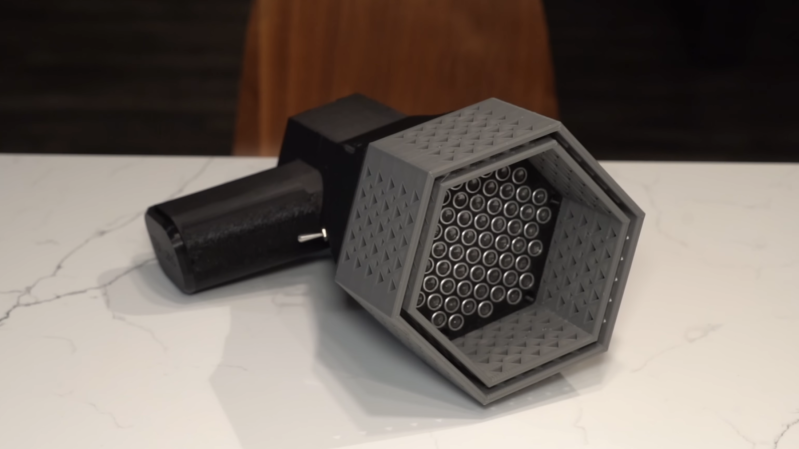
A device rather resembling a megaphone is lying on a table. The handle is made of black plastic. The horn is made of grey plastic, is hexagonal, and is not tapered. At the back of the horn is an array of silver ultrasonic transducers.

Accurately Aiming Audio With An Ultrasonic Array

When [Electron Impressions] used a powerful ultrasonic array to project a narrow beam of sound toward a target, he described it as potentially useful in getting someone’s attention from across a crowded room without disturbing other people. This is quite a courteous use compared to some of the ideas that occur to us, and particularly compared to the crowd-control applications that various militaries and police departments put directional speakers to.

Regardless of how one uses it, however, the physics behind such directional speakers is interesting. Normal speakers tend to disperse their sound widely because the size of the diaphragm is small compared to the wavelength of the sound they produce; just like light waves passing through a pinhole or thin slit, the sound waves diffract outwards in all directions from their source. Audible frequencies have wavelengths too long to make a handheld directional speaker, but ultrasonic waves are short enough to work well; [Electron Impressions] used 40 kHz, which has a wavelength of just eight millimeters. To make the output even more directional, he used an array of evenly-spaced parallel emitters, which interfere constructively to the front and destructively to the sides. Continue reading “Accurately Aiming Audio With An Ultrasonic Array”

Know Audio: Microphone Basics

A friend of mine is producing a series of HOWTO videos for an open source project, and discovered that he needed a better microphone than the one built into his laptop.  Upon searching, he was faced with a bewildering array of peripherals aimed at would-be podcasters, influencers, and content creators, many of which appeared to be well-packaged versions of very cheap genericised items such as you can find on AliExpress.

If an experienced electronic engineer finds himself baffled when buying a microphone, what chance does a less-informed member of the public have! It’s time to shed some light on the matter, and to move for the first time in this series from the playback into the recording half of the audio world. Let’s consider the microphone.

Background, History, and Principles

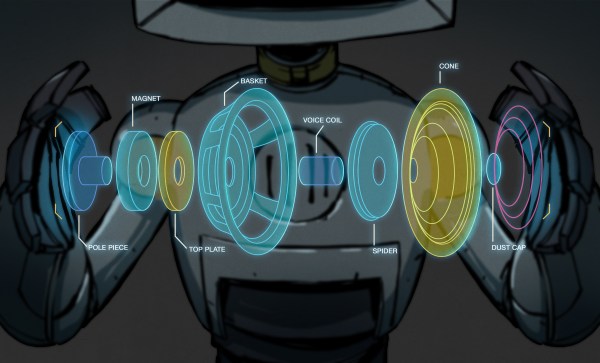
A microphone is simply a device for converting the pressure variations in the air created by sounds, into electrical impulses that can be recorded. They will always be accompanied by some kind of signal conditioning preamplifier, but in this instance we’re considering the physical microphone itself. There are a variety of different types of microphone in use, and after a short look at microphone history and a discussion of what makes a good microphone, we’ll consider a few of them in detail. Continue reading “Know Audio: Microphone Basics”

The Music Of The Sea

For how crucial whales have been for humanity, from their harvest for meat and oil to their future use of saving the world from a space probe, humans knew very little about them until surprisingly recently. Most people, even in Herman Melville’s time, considered whales to be fish, and it wasn’t until humans went looking for submarines in the mid-1900s that we started to understand the complexities of their songs. And you don’t have to be a submarine pilot to listen now, either; all you need is something like these homemade hydraphones.

Continue reading “The Music Of The Sea”

How To Build Good Contact Mics

We’re most familiar with sound as vibrations that travel through the atmosphere around us. However, sound can also travel through objects, too! If you want to pick it up, you’d do well to start with a contact mic. Thankfully, [The Sound of Machines] has a great primer on how to build one yourself. Check out the video below.

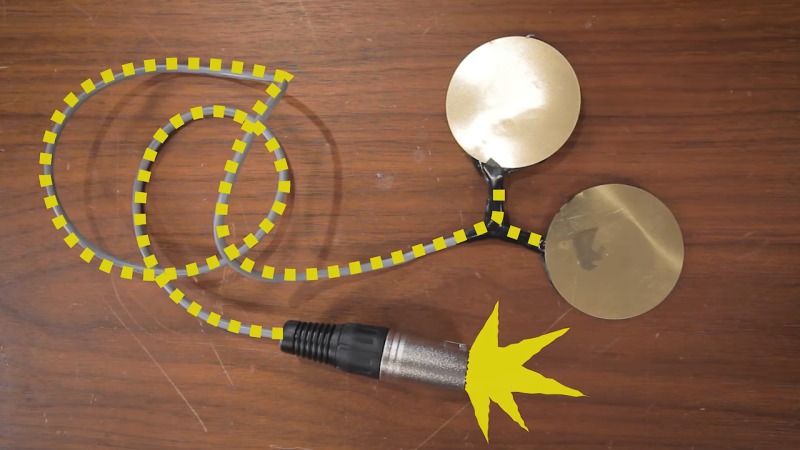
The key to the contact mic is the piezo disc. It’s an element that leverages the piezoelectric effect, converting physical vibration directly into an electrical signal. You can get them in various sizes; smaller ones fit into tight spaces, while larger ones perform better across a wider frequency range.

[The Sound of Machines] explains how to take these simple piezo discs and solder them up with connectors and shielded wire to make them into practical microphones you can use in the field. The video goes down to the bare basics, so even if you’re totally new to electronics, you should be able to follow along. It also covers how to switch up the design to use two piezo discs to deliver a balanced signal over an XLR connector, which can significantly reduce noise.

There’s even a quick exploration of creative techniques, such as building contact mics with things like bendable arms or suction cups to make them easier to mount wherever you need them. A follow-up explores the benefits of active amplification. The demos in the video are great, too. We hear the sound of contact mics immersed in boiling water, pressed up against cracking spaghetti, and even dunked in a pool. It’s all top stuff.

These contact mics are great for all kinds of stuff, from recording foley sounds to building reverb machines out of trash cans and lamps.

Continue reading “How To Build Good Contact Mics”