KiCad Utilities Generate Parts; Track Costs

The popularity of KiCad keeps increasing, and not only are more people converting to it and using it for their projects, but there’s also a growing number of folks actively contributing to the project in the form of libraries, scripts and utilities to improve the work flow.

KiPart

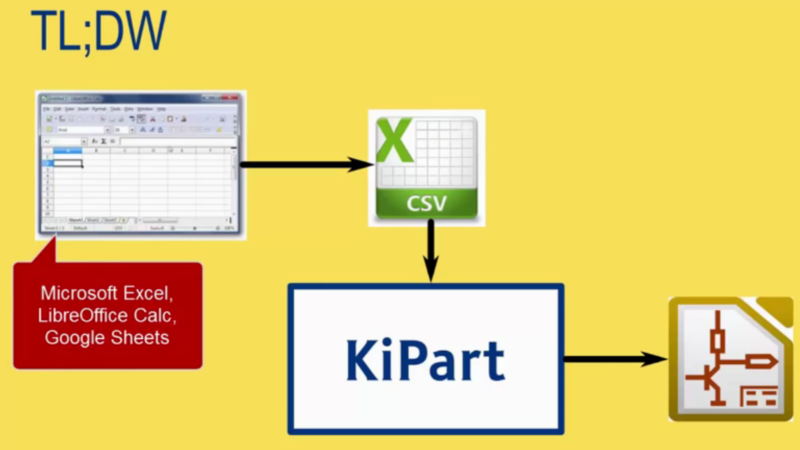
[Dave Vandenbout] a.k.a [xesscorp] has written a couple of utilities for KiCad. When working with large multi pin parts such as micro-controllers, creating a schematic symbol from scratch using the traditional KiCad schematic library editor can be quite tedious. KiPart is a python script that uses a CSV table as its input to generate the KiCad schematic symbol and is able to create multi-part symbols too. Usage is quite simple. The csv file needs a part name on its first row. The next row contains the headers. ‘Pin’ number and Pin ‘Name’ are the minimum required. Additionally, you can add in ‘Unit’, ‘Side’, ‘Type’, and ‘Style’. Unit is used when defining multi-unit parts. Side decides the location of the pin, Type its function, and Style is its graphic representation. Running the KiPart python script then results in a nice KiCad schematic symbol. Besides, KiPart can specifically generate schematic symbols for the Xilinx 7-Series FPGAs and the Cypress PSoC5LP. There are a whole host of options to customize the final output, for example ordering pin placement based on pin number, or pin name or pin function. Source files can be obtained from the [xesscorp] Github repository.

KiCost
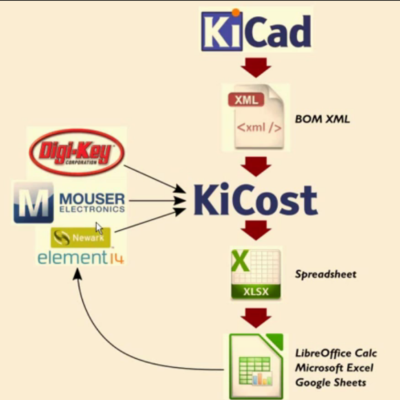
KiCostAnother useful utility from [xesscorp] is KiCost. It is intended to be run as a script for generating part-cost spreadsheets for circuit boards developed with KiCad. The one piece of information you need to add to your schematic parts is a manufacturers part number. The KiCost Python script then processes the BOM XML file, reading the manufacturer part number, scraping the web sites of several popular distributors for price and inventory data, and creating a costing spreadsheet. You can grab the source files from the KiCost Github repository.

Check the two videos below where [Dave] walks through the two utilities.

Thanks to [RoGeorge] for sending in this tip by commenting on the Open Source FPGA Pi Hat built by [Dave] that we featured recently.

Continue reading “KiCad Utilities Generate Parts; Track Costs” →

Airport Land Art Is (Acoustic) Baffling

According to an article in the Smithsonian magazine, these geometrically arranged hills aren’t landing signs for extra-terrestrials, but instead effectively sound baffles worked into the ground behind a runway at Amsterdam’s Schipol airport.

Photo by Alexis Glass, via Wikipedia

The 80 acres of hills and valleys are called the Buitenschot ‘land art park’ and supposedly reduce noise in the nearby neighborhood by around 50%. They work by sending the reflections in random directions that would otherwise skip off of the ground, just like anti-echo baffles in a sound studio. A nice touch for the local residents, they also contain jogging trails.

People have made land art before — we particularly like Spiral Jetty in the Great Salt Lake — but as far as we know this is the first land art “piece” that’s also functional.

Beauty is in the eye of the beholder, of course. Unfortunately, as the Smithsonian notes, nobody is beholding it. Because Buitenschot aims to diffuse the takeoff noise coming out of the rear of the planes, they are always flying away from it; passengers don’t get to see it from the air.

Volvo Trucks: Kid Tested, Mother Approved

If that looks like a four year old with a remote control driving a full-size dump truck — that’s because it is. As part of their Live Test Series, Volvo made a ridiculous obstacle course, and then let a four year old take the wheel of one of their heavy duty dump trucks. Viral advertising maybe — but too awesome not to share.

And don’t worry, there is a hack involved! The remote control setup in the truck isn’t that polished, and can’t possibly be a commercial “RC kit”. Which means some lucky hacker got to build a remote control system for a freaking dump truck. Consider us jealous.

Surprisingly (or maybe not), the truck seems to withstand everything the four year old throws at it. Including rolling it sideways down a hill, and of course smashing through an entire building. It’s well worth the watch and had us grinning from ear to ear.

Continue reading “Volvo Trucks: Kid Tested, Mother Approved” →

Windows 10 On A Tiny Board

Over the past few months, a number of companies and designers have started picking up the newest Intel SoCs. Intel has to kill ARM somehow, right? The latest of these single board x86 computers is the Lattepanda. It’s a tiny board that can run everything a 5-year-old desktop computer can run, including a full version of Windows 10.

This isn’t the first time we’ve seen a tiny x86 board in recent months. Last October, an x86 board that takes design cues from the Raspberry Pi 2 hit Kickstarter. These are proper PCs, with the ability to run Windows 10, Linux, and just about every other environment under the sun.

The specs for the Lattepanda include a quad-core Cherry Trail running at 1.8GHz. the RAM is either 2GB or 4GB depending on configuration, and 32GB of eMMC Flash. Peripherals include USB 3.0, Ethernet, WiFi, Bluetooth, and integrated graphics supporting either HDMI or a DSI connector.

But of course a computer is just a computer, and you can’t sell a machine that only runs Skype to the ‘maker’ market. The Lattepanda also includes an ATMega32u4 as a coprocessor, giving this board ‘Arduino functionality’. In my day we walked uphill both ways to get a parallel port, but I digress.

While these tiny x86 boards might not be available in a year’s time, and the companies behind them may fall off the face of the planet, the introduction of these devices portends a great war over the horizon. Intel wants the low-power SoC market, a space until now reserved entirely for ARM-based devices.

4 Port USB, Raspberry Pi Zero Piggy-Back Hack

[Frederick] decided his new Zero needed a USB hub. He noticed a small, on hand, USB hub was the same size as the Zero. As any good hacker would, he stripped it from its case to piggy-back it onto the Zero. What’s with the piggy-backing since we just saw that with another Zero hack that added a WiFi dongle? Is it something in the water? Nah, probably just a natural fit with the mini-sized Zero.

It certainly helps that the USB and power pads on the back of the Zero are available and of a good size to accept direct, soldered wire connections. The USB connections on the hub were a little more tricky. The wires were soldered to the surface mount pins of the mini-B connector. But [Frederick] managed to get that done, also.

A nice advantage of this hack is that a couple of soldered jumper wires let the Zero draw power from the hub’s wall-wart, eliminating one cable from those needed to work with the Pi. Using hot glue for strain relief on the wiring is a nice touch. To keep the boards from shorting he put a piece of foam between them and help them together with elastic bands. Simple and easy.

Retrocomputing On A Chip

New electrical components enable us to reconstruct old wiring more efficiently. Especially, the accessible and cheap FPGA kits which offer the possibility to put together wiring of many old computers as an “on-a-chip” solution.

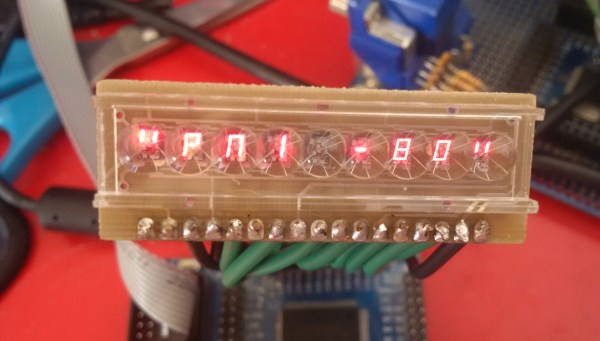
When I managed to get a hold of an old bubble LED display and a pretty mechanical matrix keyboard, I decided to build a replica of an old single board computer. Logical options seemed to be to build either KIM-1 or Heathkit ET-3400. Replicas of KIM-1 already exist, even for Arduino, so my task would be reduced to connect the keyboard and display. But then I told myself that I would use the fact that my bubble display has 9 positions as an excuse to build the legendary Czechoslovak Single Board Computer PMI-80 which used the same display. My replica is an FPGA, or rather an FPGA emulator of this very computer.

Continue reading “Retrocomputing On A Chip” →

Beyond Control: The Basics Of Control Systems

Control systems are exactly what you think they are: systems designed to control something. Perhaps a better way to put it is systems design control the behavior of something. The term “control systems” does an excellent job of being vague and most of us (originally) don’t think too much about it until its brought to our attention or we crash a robotic armature into itself and investigate how that horrifying event was allowed to happened. Usually during this investigation our internal dialog has a loop running that goes something like: “why the hell will the system allow me to manipulate it in a self-destructive way!?!”

What I found was my own ignorance, I hadn’t implemented a proper control system. One could make a case claiming that I hadn’t taken ANY control system into account whatsoever. I jumped in too deep, too fast (sound familiar?) and paid the price of crashing a rotating arm into another part of the system. Luckily, a friend stepped in and repaired the arm for me and metaphorically pointed to a large neon sign on the wall and said “you can’t ignore this”. He walked over to pull the chain dangling beneath the sign, the high voltage energized the gas in the tubes blinding me with the now unavoidably obvious words: Control Systems.

Continue reading “Beyond Control: The Basics Of Control Systems” →